YSi-SP_Ope_E.pdf - 第145页
3-10 3 Optional Functions 2.2 Procedures for visual inspection in extension conveyor unit ■ Visual inspection in extension conveyor unit for exit 1. T he board judged fail in auto inspection is transferred to exit convey…
3-9
3
Optional Functions
2. Extension Conveyor unit
The visual inspection for board that is judged fail in auto inspection is enabled when selecting optional
extension conveyor unit.
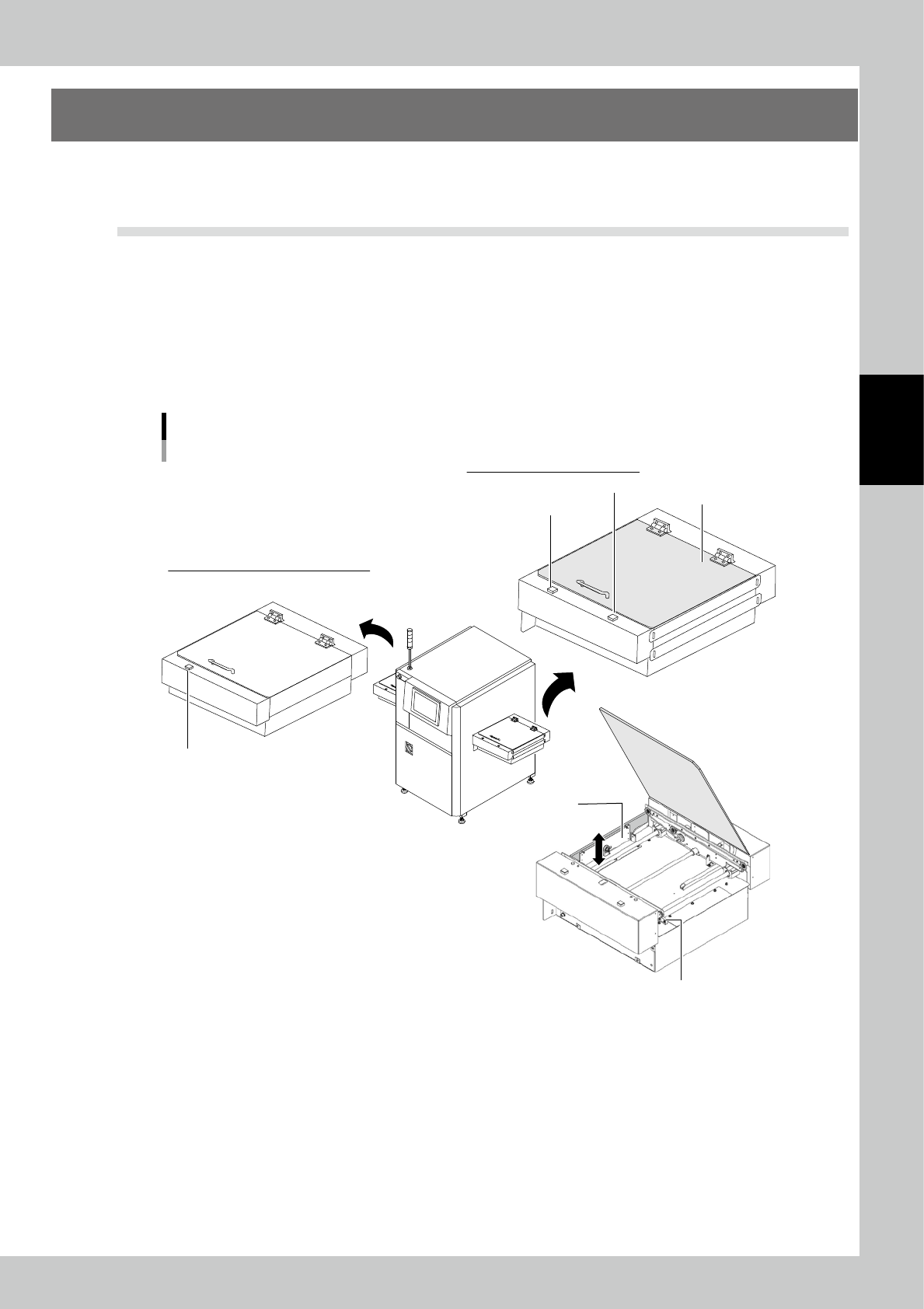
2.1 Overview of extension conveyor unit
There are 2 types of extension conveyor unit: for entrance and for exit.
• Extension conveyor unit for entrance
When another board is already set in the inspection machine, a board stops in the extension conveyor unit for entrance.
• Extension conveyor unit for exit
The board judged fail in auto inspection stops in the extension conveyor unit for exit.The board can be removed
manually for visual inspection.
Additionally, when a board is in the extension conveyor unit for exit, the next auto inspection can be performed.
Names of parts
YSi-SP Extension conveyor unit (Example: transfer from left to right)
[Shutter Open/Close] switch
[Restart] switch
Shutter
Extension conveyor unit for entrance
[Shutter Open/Close] switch
Extension conveyor unit for exit
Conveyor cover
Extension conveyor exit sensor
23303KMN-00
• [Shutter Open/Close] switch / Shutter
The shutter between extension conveyor and inspection machine moves up by pressing the [Shutter Open/Close] switch.
Note that the [Shutter Open/Close] switch lights up while the shutter is moving up.
• Conveyor cover
The conveyor cover is lock type and it is closed and locked during automatic operation.
The lock is released when the machine is powered off or the shutter is moving up ([Shutter Open/Close] switch lights up)
and cover can be opened.
• [Restart] switch
It is on the extension conveyor unit for exit. When the board is returned in the extension conveyor after the visual
inspection,pressing this switch transfers the board to the downstream machine. Then the extension conveyor can accept
the inspected board.
3-10
3
Optional Functions
2.2 Procedures for visual inspection in extension conveyor unit
■
Visual inspection in extension conveyor unit for exit
1. The board judged fail in auto inspection is transferred to exit conveyor and stops.
2. Visually check the board through the conveyor cover. If no problem is found, press the [Restart] switch.
The board is transferred to the downstream machine.
3. When taking out the board for visual inspection, press the [Shutter Open/Close] switch.
4. When the shutter moves up, the [Shutter Open/Close] switch lights up and the conveyor cover lock is released.
5. Open the conveyor cover manually and take out the board for visual inspection.
6. If no problem is found in visual inspection, return the board on the exit conveyor.
Place the board where the extension conveyor exit sensor reacts.
7. Close the conveyor cover.
8. Press the [Shutter Open/Close] switch.
9. The shutter moves down, the conveyor cover is locked, and the [Shutter Open/Close] switch lights off.
10.Pressing the [Restart] switch transfers the board to the downstream machine.
Tip
When the board is being transferred and the shutter cannot be operated, the conveyor cover cannot be opened
even pressing the [Shutter Open/Close] switch.
■
Visual inspection in extension conveyor unit for entrance (reference)
1. Pressing the [Shutter Open/Close] switch moves up the the shutter between extension conveyor and inspection
machine.
2. When the shutter moves up, the [Shutter Open/Close] switch lights up and the conveyor cover lock is released.
3. Open the conveyor cover to check the board.
4. Close the conveyor cover and press the [Shutter Open/Close] switch. The shutter moves down and the cover is locked.
If the board is in the extension conveyor, it is transferred to the inspection machine side.
3-11
3
Optional Functions
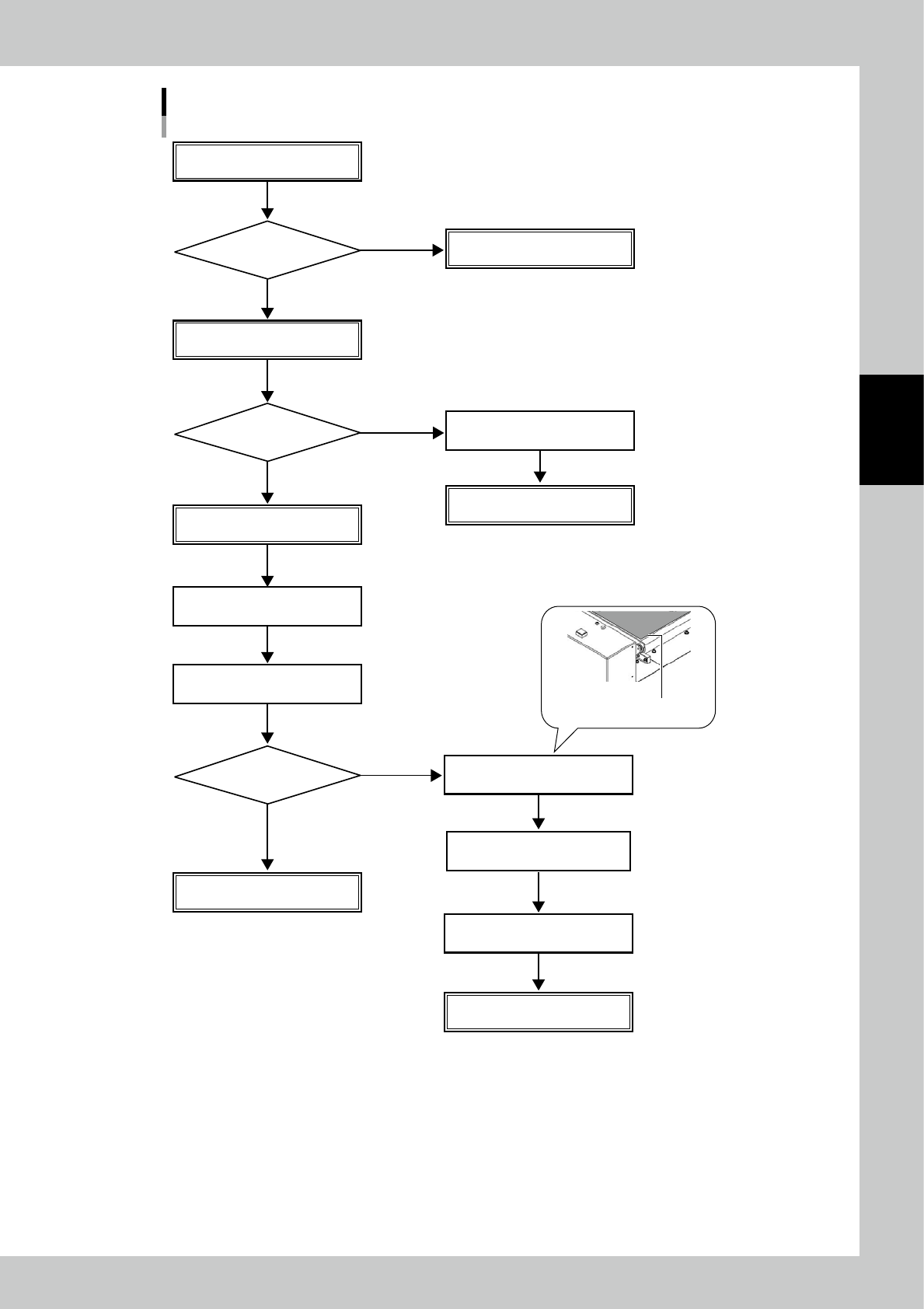
Flow of board visual inspection in extension conveyor unit for exit
Auto inspection for printed board
Auto inspection result
Transfer board to downstream machine
Board stops at conveyor for exit
Visual inspection
Visual inspection
through cover
Press [Restart] switch
Take out board for visual inspection
Press [Shutter Open/Close] switch
Open conveyor cover
Shutter moves down
[Shutter Open/Close] switch lights off
Conveyor cover is locked
Take out board for
visual inspection
Press [Shutter Open/Close] switch
Investigate cause of failure
Shutter moves up
[Shutter Open/Close] switch lights up
Conveyor cover lock is released
Return board on conveyor
Transfer board to downstream machine
Press [Restart] switch
Transfer board to downstream machine
Place board where extension
conveyor exit sensor reacts
OK
NG
OK
NG
NG
OK
23304-KMN-00