YSi-SP_Ope_E.pdf - 第146页
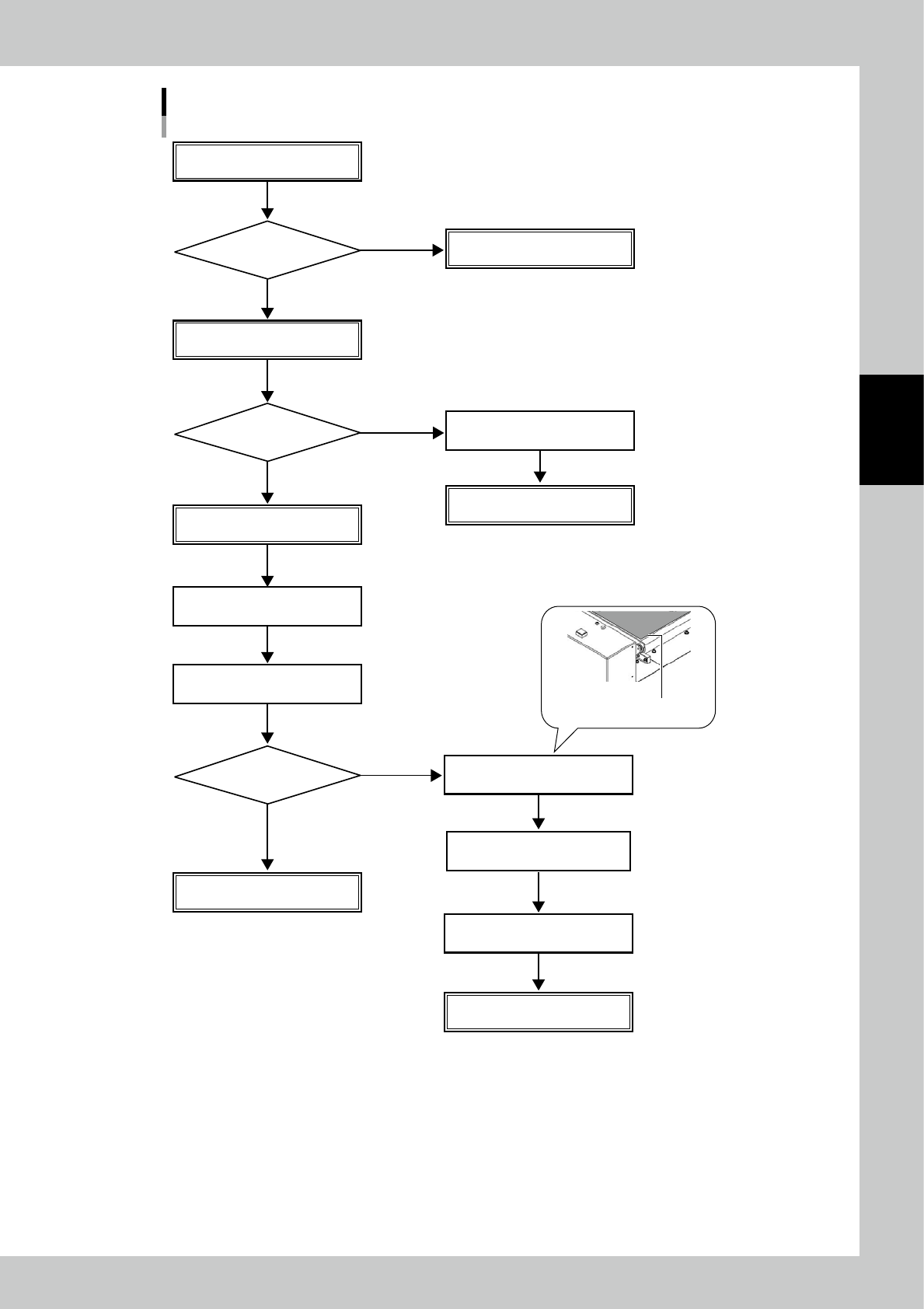
3-11 3 Optional Functions Flow of board visual inspection in extension conveyor unit for exit Auto inspection for printed board Auto inspection result T ransfer board to downstream machine Board stops at conveyor for exi…
3-10
3
Optional Functions
2.2 Procedures for visual inspection in extension conveyor unit
■
Visual inspection in extension conveyor unit for exit
1. The board judged fail in auto inspection is transferred to exit conveyor and stops.
2. Visually check the board through the conveyor cover. If no problem is found, press the [Restart] switch.
The board is transferred to the downstream machine.
3. When taking out the board for visual inspection, press the [Shutter Open/Close] switch.
4. When the shutter moves up, the [Shutter Open/Close] switch lights up and the conveyor cover lock is released.
5. Open the conveyor cover manually and take out the board for visual inspection.
6. If no problem is found in visual inspection, return the board on the exit conveyor.
Place the board where the extension conveyor exit sensor reacts.
7. Close the conveyor cover.
8. Press the [Shutter Open/Close] switch.
9. The shutter moves down, the conveyor cover is locked, and the [Shutter Open/Close] switch lights off.
10.Pressing the [Restart] switch transfers the board to the downstream machine.
Tip
When the board is being transferred and the shutter cannot be operated, the conveyor cover cannot be opened
even pressing the [Shutter Open/Close] switch.
■
Visual inspection in extension conveyor unit for entrance (reference)
1. Pressing the [Shutter Open/Close] switch moves up the the shutter between extension conveyor and inspection
machine.
2. When the shutter moves up, the [Shutter Open/Close] switch lights up and the conveyor cover lock is released.
3. Open the conveyor cover to check the board.
4. Close the conveyor cover and press the [Shutter Open/Close] switch. The shutter moves down and the cover is locked.
If the board is in the extension conveyor, it is transferred to the inspection machine side.
3-11
3
Optional Functions
Flow of board visual inspection in extension conveyor unit for exit
Auto inspection for printed board
Auto inspection result
Transfer board to downstream machine
Board stops at conveyor for exit
Visual inspection
Visual inspection
through cover
Press [Restart] switch
Take out board for visual inspection
Press [Shutter Open/Close] switch
Open conveyor cover
Shutter moves down
[Shutter Open/Close] switch lights off
Conveyor cover is locked
Take out board for
visual inspection
Press [Shutter Open/Close] switch
Investigate cause of failure
Shutter moves up
[Shutter Open/Close] switch lights up
Conveyor cover lock is released
Return board on conveyor
Transfer board to downstream machine
Press [Restart] switch
Transfer board to downstream machine
Place board where extension
conveyor exit sensor reacts
OK
NG
OK
NG
NG
OK
23304-KMN-00
3D Solder Paste
Inspection Machine
YS
i - SP
Version 2.00
Operator’s Manual
July 2019