Xg系列操作手册.pdf - 第177页
5-10 5 1 . 3 . 2 实 施 置 换 从 主 画 面 的 显 示 项 目 查 找 相 应 的 项 目 , 置 换 为 指 定 的 内 容 。 1 操 作 主 画 面 , 在 主 画 面 显 示 要 置 换 的 数 据 。 2 点 击 主 画 面 的 任 意 栏 。 3 实 施 置 换 。 1 . 请 从 「 E d i t 」 菜 单 选 择 「 R e p l a c e 」 。 「 R e p l a c e 」 设 置…
5-9
5
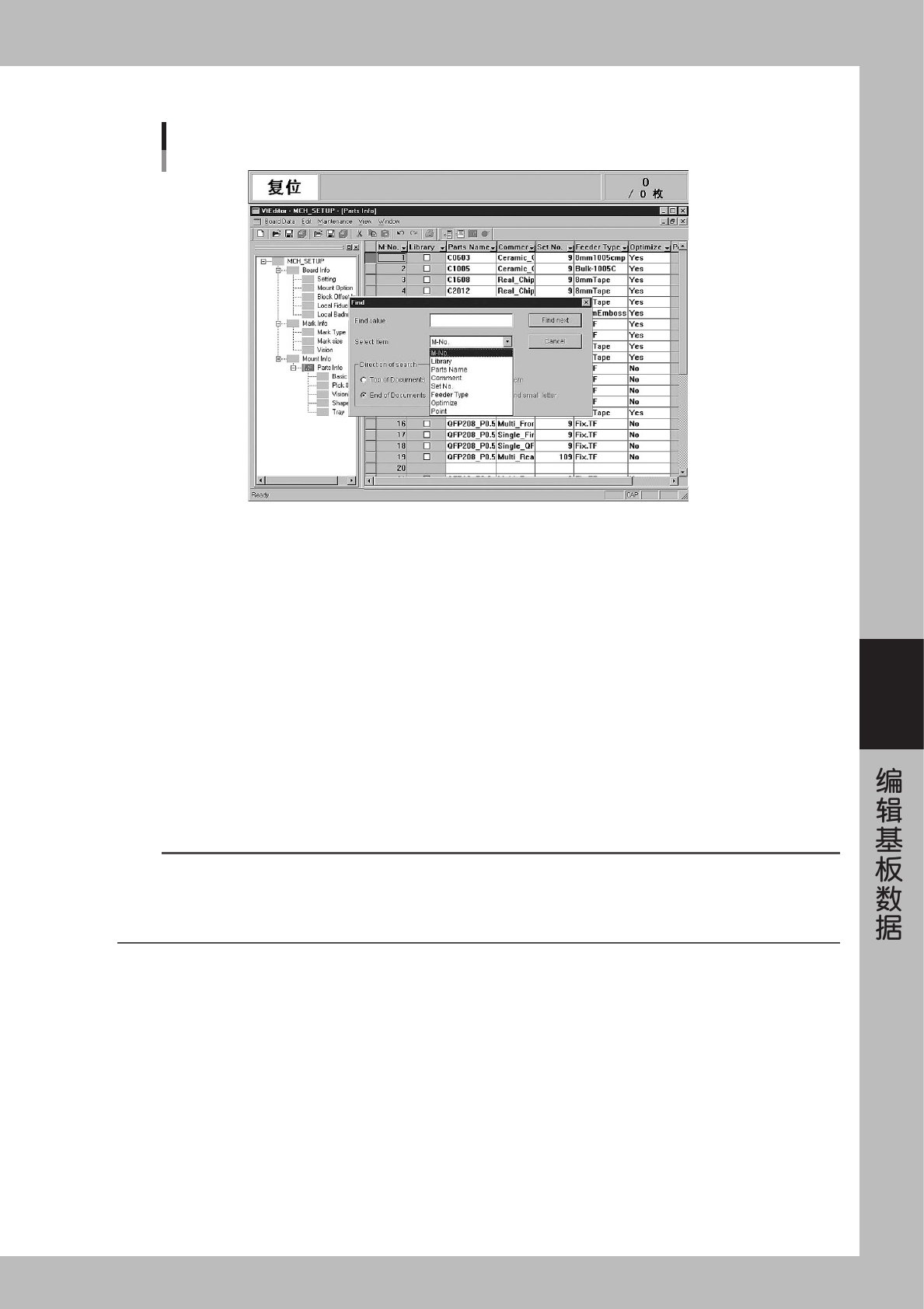
2. 从「Select Item」的下拉滚条栏中选择要查找的项目。
查找项目选择
26511-E0-00
3. 请在「Find value」栏中输入要查找的字符串、数值等。
4. 需区别要查找的字符串的全角或半角字符,请点击「Distinguish capital and small letter」的确认框。
附单选标志。
5. 设置查找方向。
要查找 Step2 中点击栏以上的栏时,请单击「Top of Documents」单选按钮,要查找「Step2」中点击
栏以下的栏时,请单击「End of Documents」单选按钮。
6. 单击 [Find next] 按钮,开始查找。
找到要查的项目后,该栏显示为选择状态。如果需查找同样条件的其他项目,请单击 [Find next] 按钮,
继续查找。
如果没有要查的项目,提示对话框被显示。单击 [OK] 键,提示对话框消失。请在「Find」设置画面,
变更查找条件。
4
关闭「Find」设置画面。
请按 [Cancel] 按钮。关闭「Find」设置画面。
参考
·「Find value」设置画面中,根据选择项目,画面的显示内容随之变化。
· 在「Select Item」栏,选择「Set No.」、「M-No.」等指定数值的内容,即成「Find value」。
· 在「Select Item」栏,一旦选择「Comment Parts」、「Name」等指定文字的内容,即呈「Find string」。
· 在「Select Item」栏,一旦选择如「Skip」那样需要设置确定有无的项目时,即呈「Find Data」,栏也成为下拉式滚条。
5-10
5
1.3.2 实施置换
从主画面的显示项目查找相应的项目,置换为指定的内容。
1
操作主画面,在主画面显示要置换的数据。
2
点击主画面的任意栏。
3
实施置换。
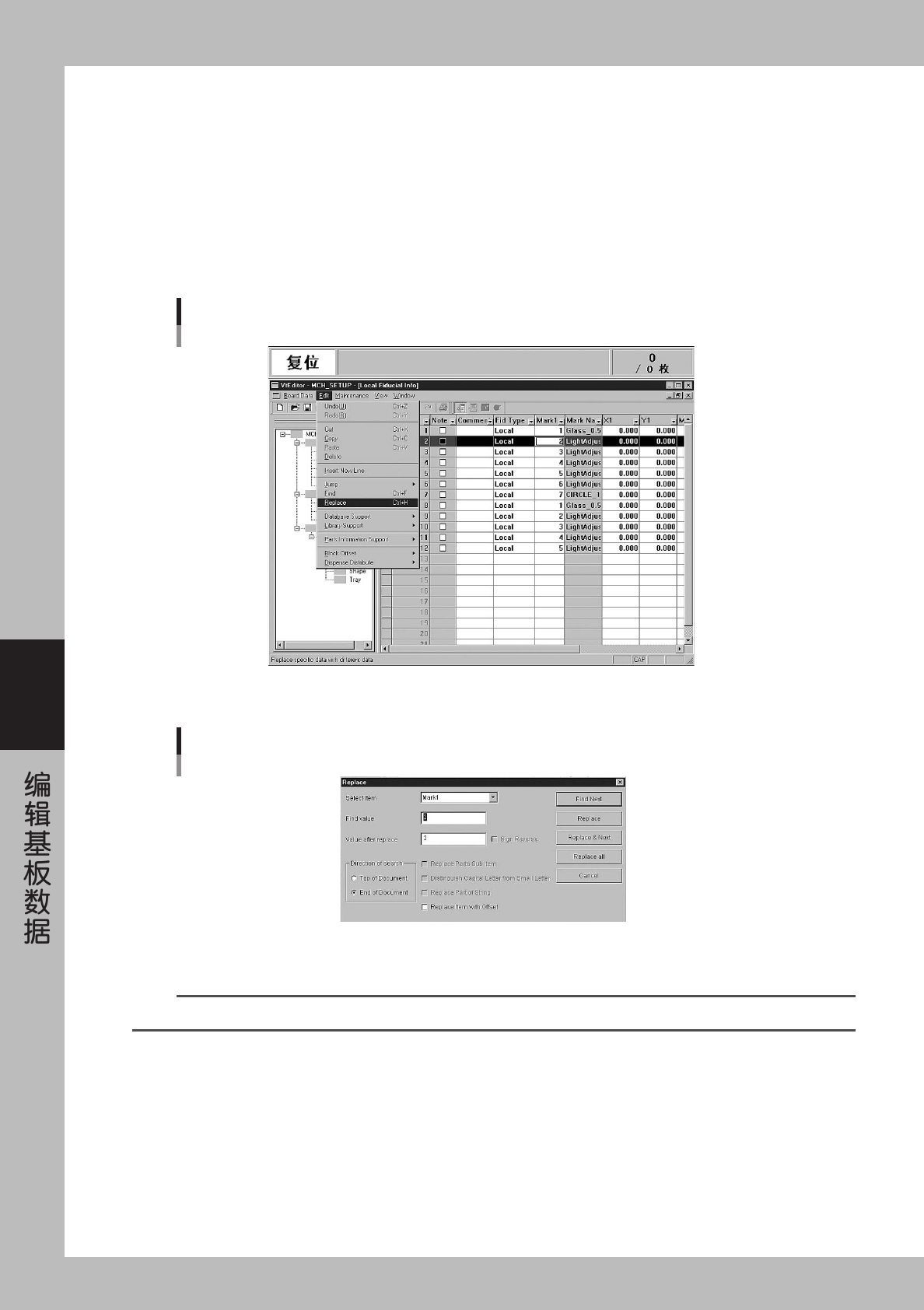
1. 请从「Edit」菜单选择「Replace」。「Replace」设置画面被显示。
选择置换指令
26512-E0-00
2. 请从「Select Item」下拉滚条栏中选择要查找的项目。
选择置换项目
26513-E0-00
3. 请在「Find value」栏中设置要查找的字符串、数值等。
n
要点
如要将所有数据都为对象,请选择“*”( 星号符 )。
4. 请在「Value after replace」栏中设置置换后的字符串、数值等。
5. 需区别要置换的字符串的全角或半角字符,请点击「Distinguish capital and small letter」的确认框,
确认框附单选标志。
6. 在要置换的字符串中,只需置换其一部分时,请点击「Replace Part of String」的确认框,确认框附
单选标志。
7. 置换「X」「Y」「R」等坐标数据时,可以加减既有的指定数值。即选中「Replace Item with Offset」
栏的单选框,使该项目的既有数值成为「Value after replace」。

5-11
5
8. 设置查找方向
要查找「Step2」中点击栏以上的项目时,请单击「Top of Document」单选按钮。
要查找「Step2」中点击栏以下的项目时,请单击「End of Document」单选按钮。
9. 如要一个一个确认置换项目,请单击 [Find Next] 按钮,开始查找。找到要查的项目后,该栏显示为选
择状态。如需置换请单击 [Replace & Next] 按钮。如果所有相应项目的置换都已完成或没有要置换的
项目,会显示提示画面。
n
要点
如要一次完成所有项目的置换,请点击 [Replace All] 键。s 完成置换后, 会显示提示画面。
4
关闭「Replace」设置画面。
请按 [Cancel] 键。关闭「Replace」设置画面。