80S-2080F480F4-680F5 User’s Manual.pdf - 第216页
SIPLACE 80S- 20/F4/F4-6 User’s Manual 4 Single Functions Edition 07/97 from Software Version SR.403.xx 4.5 Single Functi ons: Transport 2 (Option) 4 - 51 4.5 Single Functi ons: Transport 2 (Option) The singl e functio n …

4 Single Functions SIPLACE 80S-20/F4/F4-6 User’s Manual
4.4 Single Functions: Transport 1 Edition 07/97 from Software Version SR.403.xx
4 - 50
4.4.2.2 Adjusting the Width
Click on the High speed check box.
If the check box has been activated, clicking on the Larger button will cause the conveyor belts to be
moved apart at high speed.
If the check box has been deactivated, clicking on the Larger button will cause the conveyor belts to be
moved apart at low speed.
If the check box has been activated, clicking on the Smaller button will cause the conveyor belts to be
moved together at high speed.
If the check box has been deactivated, clicking on the Smaller button will cause the conveyor belts to be
moved together at low speed.
NOTE
Once width adjustment has been completed and upon quitting Single functions, the left-hand gantry will carry
out a search run in order to determine the width of the conveyor.
SIPLACE 80S-20/F4/F4-6 User’s Manual 4 Single Functions
Edition 07/97 from Software Version SR.403.xx 4.5 Single Functions: Transport 2 (Option)
4 - 51
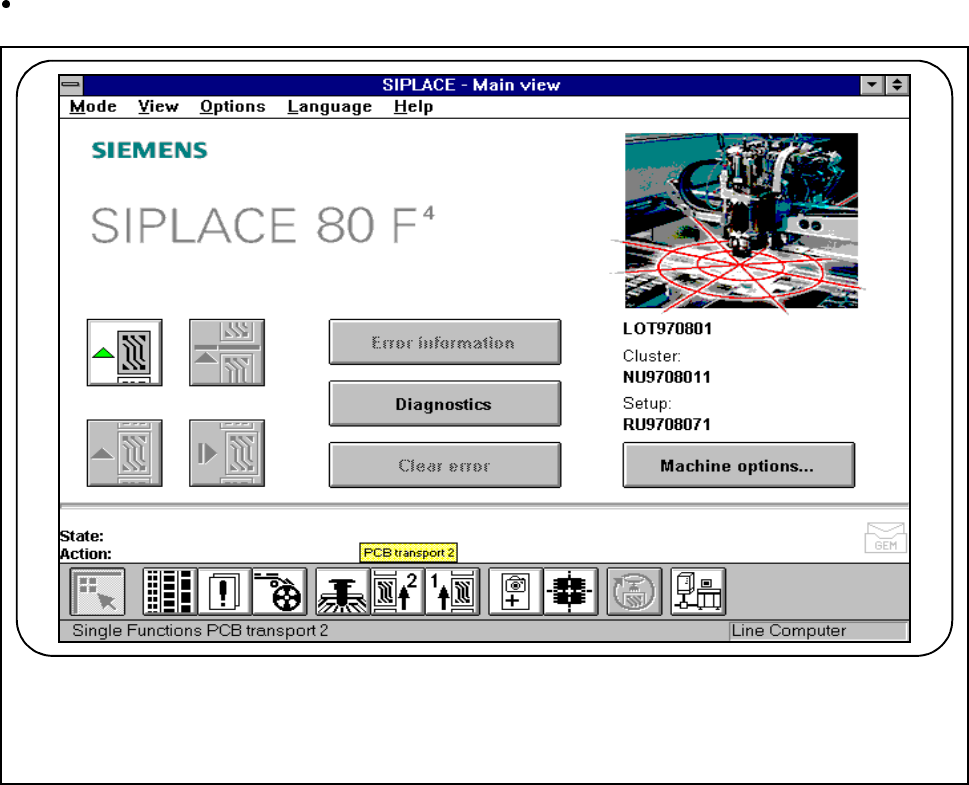
4.5 Single Functions: Transport 2 (Option)
The single function Transport 2 will not be active unless the option Twin conveyor has been physically
installed and activated. See Chapter 11.10 of this user’s manual too.
Click on the icon for Single functions - Transport 2 in the main view.
Fig. 4.5.1 Single functions - conveyor 2
All of the functions in this menu are identical to the functions described in 4.4 'Single Functions: Transport 1'.
F
4 Single Functions SIPLACE 80S-20/F4/F4-6 User’s Manual
4.5 Single Functions: Transport 2 (Option) Edition 07/97 from Software Version SR.403.xx
4 - 52
r