80S-2080F480F4-680F5 User’s Manual.pdf - 第511页
9 Maintenance SIPLACE 80S-20/F4/F4-6/F5 User’s Manual 9.6 IC Head (SIPLACE 80F4/80F4-6/F5) Edition 03/98 from Software Version SR.404.xx 9 - 62 Check to see whethe r the z axi s is in its top en d position a nd move th e…
SIPLACE 80S-20/F4/F4-6/F5 User’s Manual 9 Maintenance
Edition 03/98 from Software Version SR.404.xx 9.6 IC Head (SIPLACE 80F4/80F4-6/F5)
9 - 61
9.6 IC Head (SIPLACE 80F
4
/80F
4
-6/F
5
)
9.6.1 Preparatory Work
Select Gantry 1 functions → IC head functions → Return.
Switch the machine off at the main switch. Open the safety hoods / swivel door.
Observe the safety instructions for the coplanarity laser module in Section 9.1
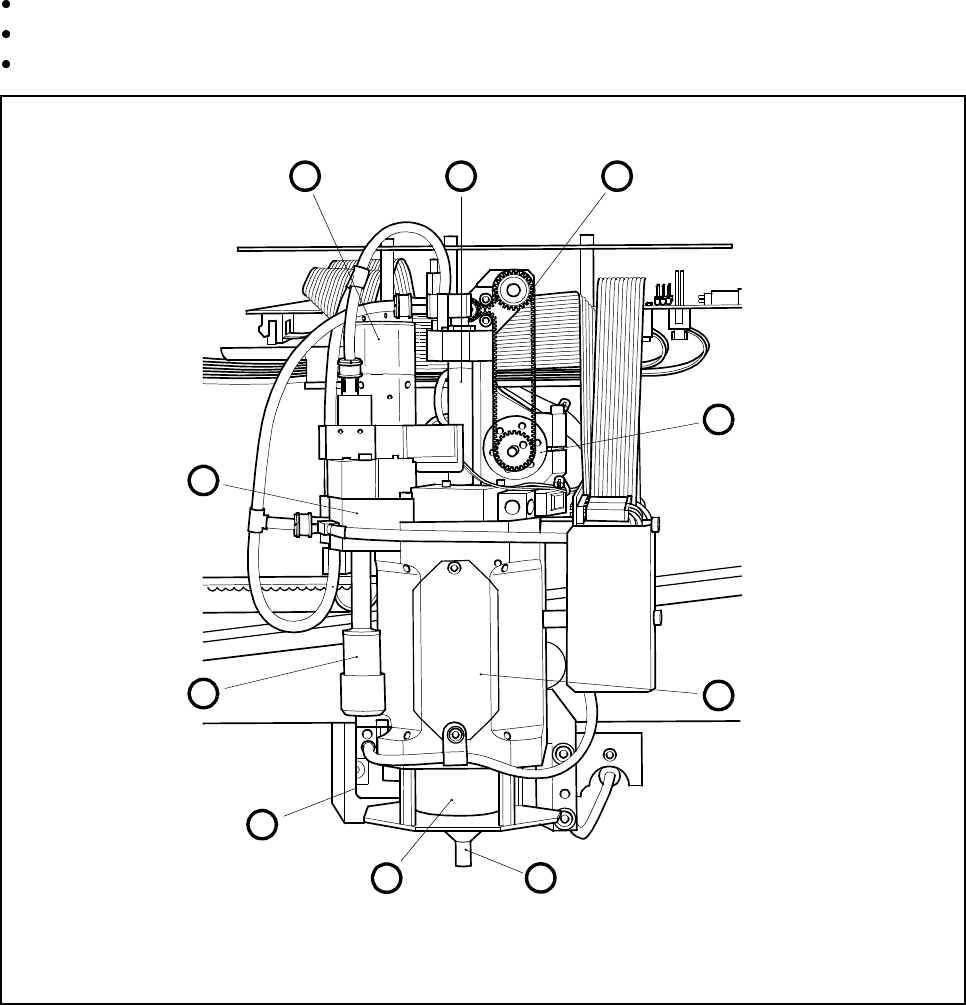
Fig. 9.6.1 Location of the modules requiring maintenance in the IC head
- Key to Fig. 9.6.1
1 Motor/tacho, dr axis 6 Nozzle
2 Venturi nozzle, installed 7 Cover
3 Silencer 8 Motor/tacho, z axis
4 Cover 9 Toothed belt, z axis
5 Encoder flange 10 IC-head sleeve, complete
1 10 9
8
7
65
4
3
2
9 Maintenance SIPLACE 80S-20/F4/F4-6/F5 User’s Manual
9.6 IC Head (SIPLACE 80F4/80F4-6/F5) Edition 03/98 from Software Version SR.404.xx
9 - 62
Check to see whether the z axis is in its top end position and move the IC head by hand to a favorable
working position by pressing on a suitable side of the gantry carriage, thus ensuring that the head does not
get damaged.
Currently when the Go to service position option in the Gantry functions menu is selected the service posi-
tion of the star head will be approached. The IC head service position button will be available at a later date.
9.6.2 Oiling the Sleeve and Cleaning the Encoder Disk
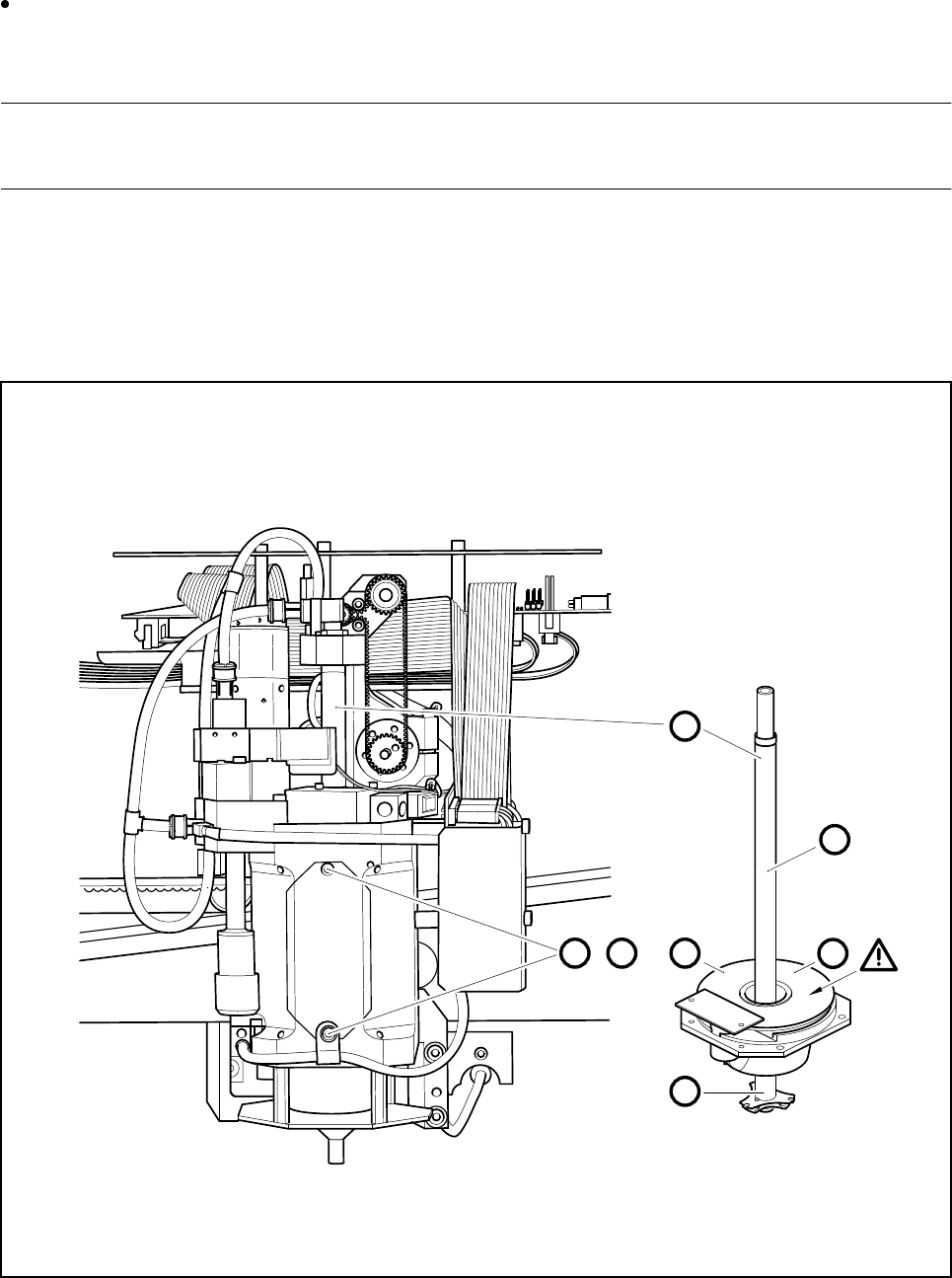
Carry out maintenance, as shown in Fig. 9.6.2.
Fig. 9.6.2 Oiling the sleeve and cleaning the encoder disk
A D
,
C
2
1
B
B

SIPLACE 80S-20/F4/F4-6/F5 User’s Manual 9 Maintenance
Edition 03/98 from Software Version SR.404.xx 9.6 IC Head (SIPLACE 80F4/80F4-6/F5)
9 - 63
- Key to Fig. 9.6.2
1 Sleeve
2 Encoder disk
- Sequence of work in Fig. 9.6.2
A Undo the M2.5 fillister head screws and remove the cover.
B Rub the top and bottom of the sleeve with a small amount of finest watchmakers’s oil.
C Clean the encoder disk with a lens cleaning cloth.
D Refit the cover.
ATTENTION: Do not get any oil on the encoder disk.
NOTE
You must not slide or rotate the z axis (sleeve) by hand as the clamping device has frictional contact with the
z axis. The oil will distribute itself during placement as a result of the movement of the sleeve.
Do not get any oil on the encoder disk. A dirty encoder disk will result in counting errors or cause errors in
positioning the d axis in the reference position.
Use a clean, lint-free cloth and apply a thin film of oil to the top and bottom of the sleeve.
Use proprietary lens cleaning cloths straight from the package (in other words, damp) and after oiling the
sleeve clean thoroughly the entire surface of the encoder disk until the cloth remains clean.
To reach all points of the encoder disk, proceed as follows:
Close the safety hoods → Switch the machine on and press the start button → Call the Gantry 1 func-
tions menu. Select IC head functions and click on Turn D axis. Each time you click on this option the
axis will make a quarter turn (90°).
9.6.3 Maintenance of the Pick-Up Star O-Ring
NOTE
Always select the Return (nozzle) function when you want to remove the nozzle from, or insert the nozzle in
the placement head pick-up star. In the first place you will thus avoid damaging the sleeve or nozzle, and in
the second place you will thus ensure that the last current nozzle is registered by the computer as having
been returned. This is necessary if placement is to continue smoothly.
Spare Parts
O-ring 6.5 x 1.6 Viton 80, from item no. 00308445-01
If you have complied with the sequence of work described above, the current nozzle will already have
been returned to the nozzle changer. The o-ring is thereby rendered accessible for maintenance work (see
Fig. 9.6.3).
Remove the o-ring from the annular groove of the pick-up star. Clean both the groove and the o-ring with
alcohol and dry them. If you detect damage, fit a new o-ring.
Grease the cleaned or new o-ring sparingly with Unisilkon L250L and replace it back in the annular groove
without overstretching the o-ring.
Clean the friction wheel of the d-drive unit (Section 9.6.4 on page 9 - 65).