80S-2080F480F4-680F5 User’s Manual.pdf - 第473页
9 Maintenance SIPLACE 80S-20/F4/F4-6/F5 User’s Manual 9.3 Machine Base Ed ition 03/98 from Software Version SR.404.xx 9 - 24 - Key to Fig. 9.3.2 9.3.4 Empty Tape Cu tters of the SIPLACE 80S-20/80F 4 /80F 4 -6 NOTE The em…
SIPLACE 80S-20/F4/F4-6/F5 User’s Manual 9 Maintenance
Edition 03/98 from Software Version SR.404.xx 9.3 Machine Base
9 - 23
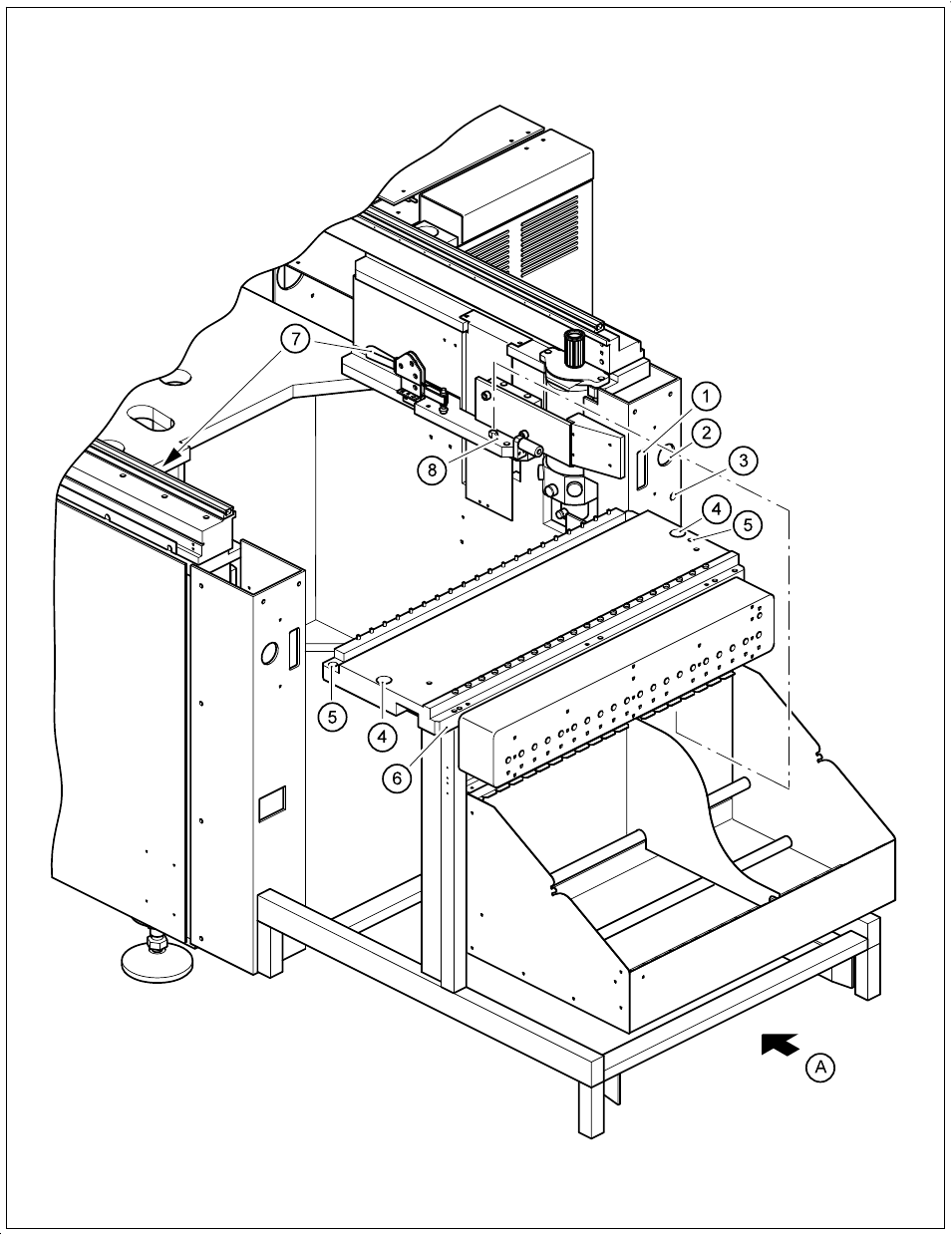
Fig. 9.3.2 Removing the components table
9 Maintenance SIPLACE 80S-20/F4/F4-6/F5 User’s Manual
9.3 Machine Base Edition 03/98 from Software Version SR.404.xx
9 - 24
- Key to Fig. 9.3.2
9.3.4 Empty Tape Cutters of the SIPLACE 80S-20/80F
4
/80F
4
-6
NOTE
The empty tape cutters are located on both sides of the PCB transport in the machine base in front of the
changeable components tables (Fig. 9.1.1, page 9 - 3).
9.3.4.1 Emptying the Waste Tape Container
Empty the waste tape container and remove all of the tape pieces in the bottom of the container with the vac-
uum cleaner.
9.3.4.2 Maintenance of the Guide Rail and Rotary Cutter Carriage, Checking the
Cutting Edge
DANGER
Do not carry out any cleaning work with alcohol in the presence of naked lights or fire!
Do not remove the empty tape cutter for this maintenance work as otherwise setting will be necessary when it
is reinstalled. In addition, we recommend you to carry out maintenance of the cutter immediately after mainte-
nance of the components table, since you will not need to remove the feeder modules again from the compo-
nents table.
1 Connection for the communication interface
2 Connection for the power supply to the component table
3 Compressed air connection
4 Holes for the centering pins
5 Hexagon socket head screws for fixing the component table
6 Supporting surface for the component table
7 Horizontal tensioner
8 Centering pins
A Push in the component table lifting truck
SIPLACE 80S-20/F4/F4-6/F5 User’s Manual 9 Maintenance
Edition 03/98 from Software Version SR.404.xx 9.3 Machine Base
9 - 25
NOTE
In order to avoid them being damaged, position placement heads 1 and 2 within the PCB transport area. To
do so, slide the corresponding gantry by hand by pressing against a side of the gantry. When carrying out
maintenance work make particularly sure before you switch on the 80S-20 machine that you have the at least
the minimum separation between the gantries. For this reason always position only one gantry by hand over
the board conveyor and then carry out maintenance work on the corresponding empty tape cutter.
Preparatory work
DANGER
• Switch the automatic placement system off at the main switch and disconnect from the power supply.
• Switch off the compressed air supply using the shut-off valve on the compressed air unit.
WARNING
• Wait until the compressed air lines have depressurized. This is indicated when the
cutter bar swings in towards the cutting wheel.
Open the protective covers and the side swivel doors.
Move the corresponding gantry out of the working range.
Remove
– the corresponding component changeover table from the 80 S placement system (see Section
9.3.3.7)
– the corresponding component changeover table from the 80 F placement system (see Section
9.3.3.7) and if a waffle-pack changer is installed, the waffle-pack changer (see Section 9.8).
NOTE
If the wafflepack changer has not yet been run to empty, the assignment of the trays to the track and the
rotational position of the magazines to the trays must not be changed.
Remove the guard plate of the cutter.