80S-2080F480F4-680F5 User’s Manual.pdf - 第640页
SIPLACE 80S-20/F4/F4-6/F5 User’s Manual 11 Station Extensions/Options Edition 03/98 from Software Version SR.404.xx 11.7 Dispenser Flux A pplication Unit for SIPLACE 80F4/F4-6/F5 11 - 43 11.7.6.2 Editing the Package Form…
11 Station Extensions/Options SIPLACE 80S-20/F4/F4-6/F5 User’s Manual
11.7 Dispenser Flux Application Unit for SIPLACE 80F4/F4-6/F5 Edition 03/98 from Software Version SR.404.xx
11 - 42
11.7.6 User Interface
NOTE
For the flip-chip component to be assembled and provided with flux, a placement program with flip-chip com-
ponents must be written in the line computer and sent to the station computer. See the UNIX user‘s manual.
The Fluxing option must be activated under Machine options in the station computer. See Section 2.4.4,
’The Options Menu’ of the SIPLACE 80S-20/F
4
/F
4
-6/F
5
user‘s manual.
11.7.6.1 Package Form List and Parameters
In order to apply flux to a board for the purpose of placing flip chips, at the station computer you must add the
process data to a list and also enter general parameters regarding fluxing.
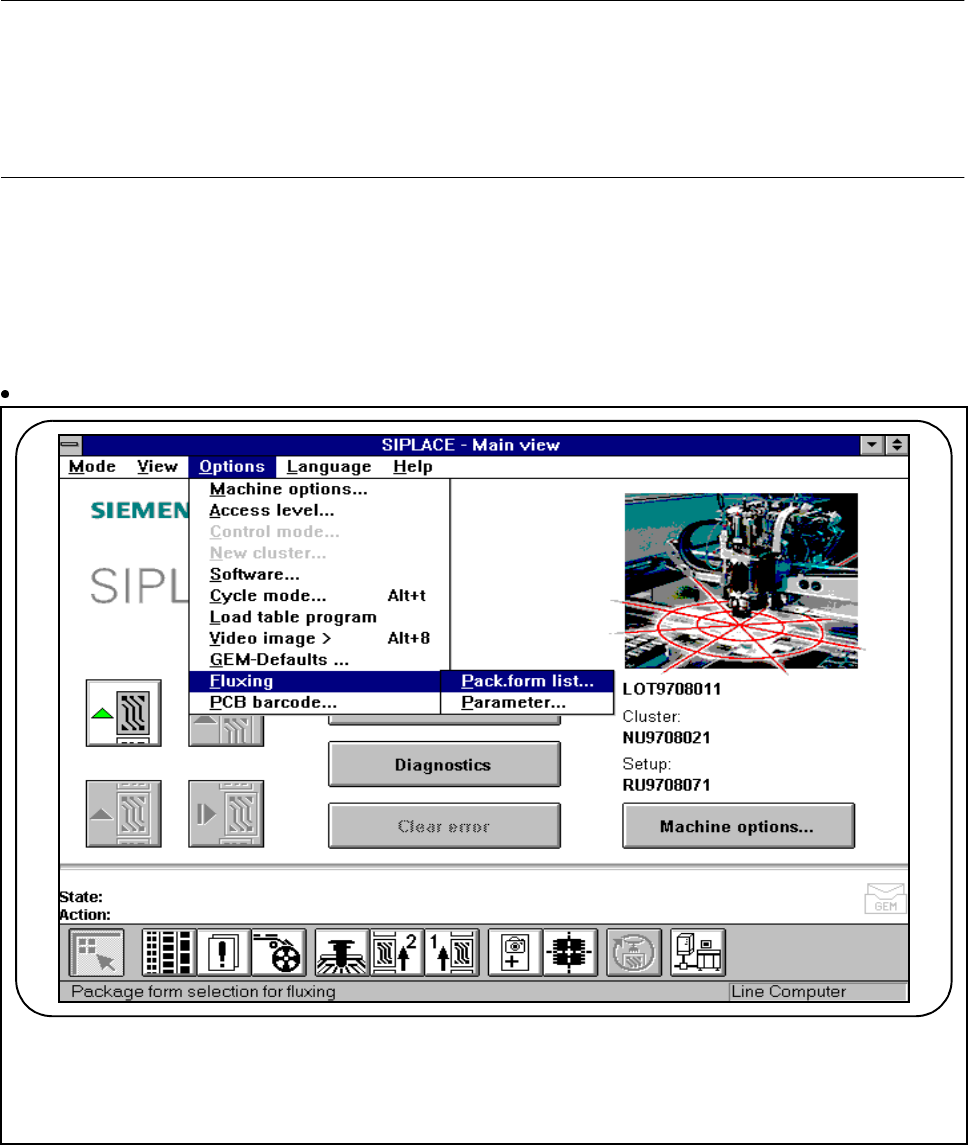
Select the submenu Fluxing in the Options menu.
Fig. 11.7.6 Fluxing option
F
SIPLACE 80S-20/F4/F4-6/F5 User’s Manual 11 Station Extensions/Options
Edition 03/98 from Software Version SR.404.xx 11.7 Dispenser Flux Application Unit for SIPLACE 80F4/F4-6/F5
11 - 43
11.7.6.2 Editing the Package Form List
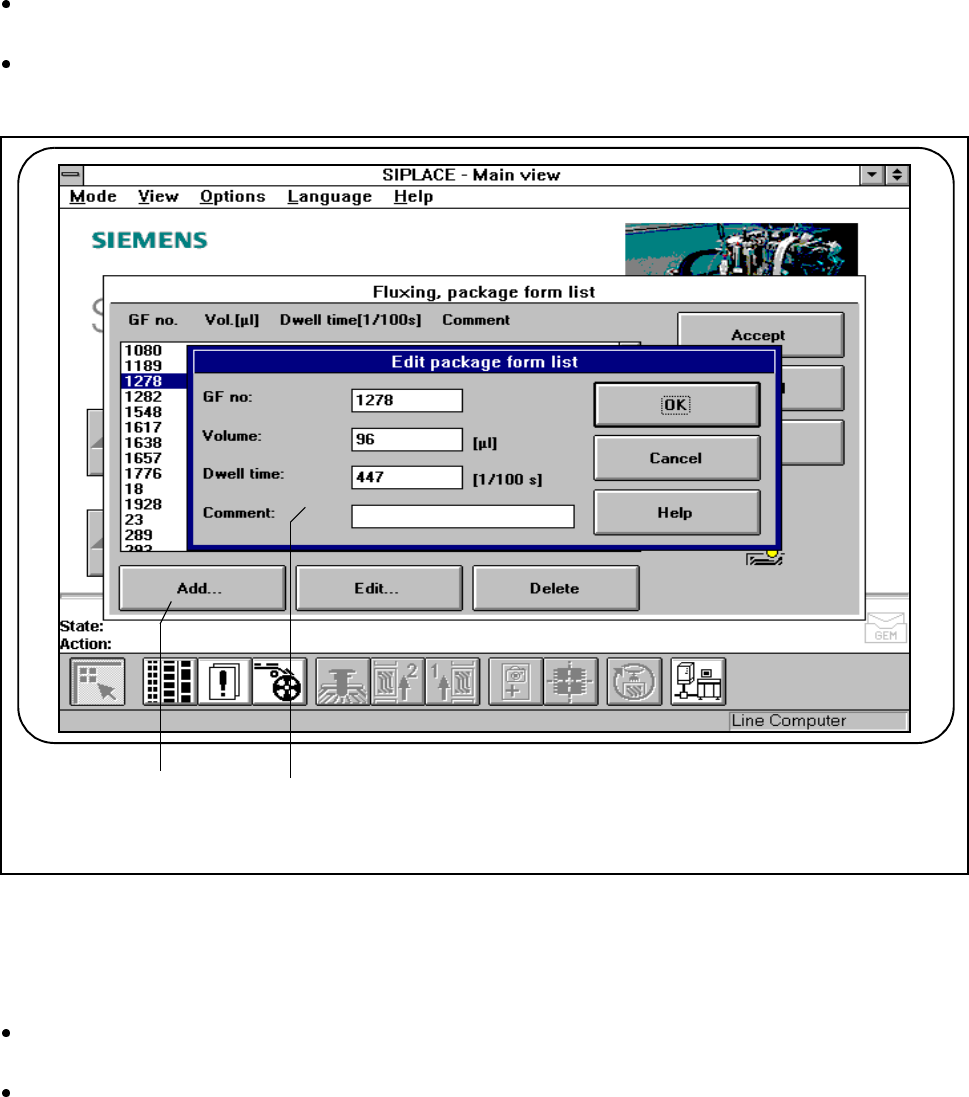
To be able to edit data for the flip-chip component which is to be placed, select the Package form list
menu.
In this menu you can add flip-chip components, each with its own GF No.[package form number] and also
edit them. See Fig. 11.7.7 and Fig. 11.7.8.
Fig. 11.7.7 Fluxing, package form list
- Key to Fig. 11.7.7
1 Add button 2 Input fields
Click on the Add button to describe a new component for fluxing and then enter the corresponding data
into the input fields.
You will need to enter the following data:
GF no.:
- The package form number of the component in question.
- You can input package form numbers between 1 and 32000.
F
2 1

11 Station Extensions/Options SIPLACE 80S-20/F4/F4-6/F5 User’s Manual
11.7 Dispenser Flux Application Unit for SIPLACE 80F4/F4-6/F5 Edition 03/98 from Software Version SR.404.xx
11 - 44
Volume:
- The quantity of flux in [µl] which is to be applied for the component in question.
- You may specify a flux volume between 1 µl and 100 µl.
- You can try out the following values as guidelines:
Component 6 mm x 6 mm => 8 µl flux
Component 10 mm x 10 mm =>10-15 µl flux
Dwell time:
- The period of time for which the component should be held in the flux during placement.
- You can specify a value between 0 and 500/100 seconds. This corresponds, of course, to 0 to 5 sec-
onds.
Comment:
- You can enter a comment for each component.
Confirm what you have entered by pressing OK.
Save the edited package form list by pressing Accept.
PLEASE NOTE
Up to 25 package forms can be entered on the station computer.