80S-2080F480F4-680F5 User’s Manual.pdf - 第424页
SIPLACE 80S- 20/F4/F4-6 User’s Manual 7 E rror Information & Diagn ostics Edition 03/98 from Software Version SR.403.xx 7.2 Diagnostics 7 - 9 7.2 Diagnost ics 7.2.1 General Comments If errors o ccur while the boa rd …
7 Error Information & Diagnostics SIPLACE 80S-20/F4/F4-6 User’s Manual
7.1 Error Information Edition 03/98 from Software Version SR.403.xx
7 - 8
SIPLACE 80S-20/F4/F4-6 User’s Manual 7 Error Information & Diagnostics
Edition 03/98 from Software Version SR.403.xx 7.2 Diagnostics
7 - 9
7.2 Diagnostics
7.2.1 General Comments
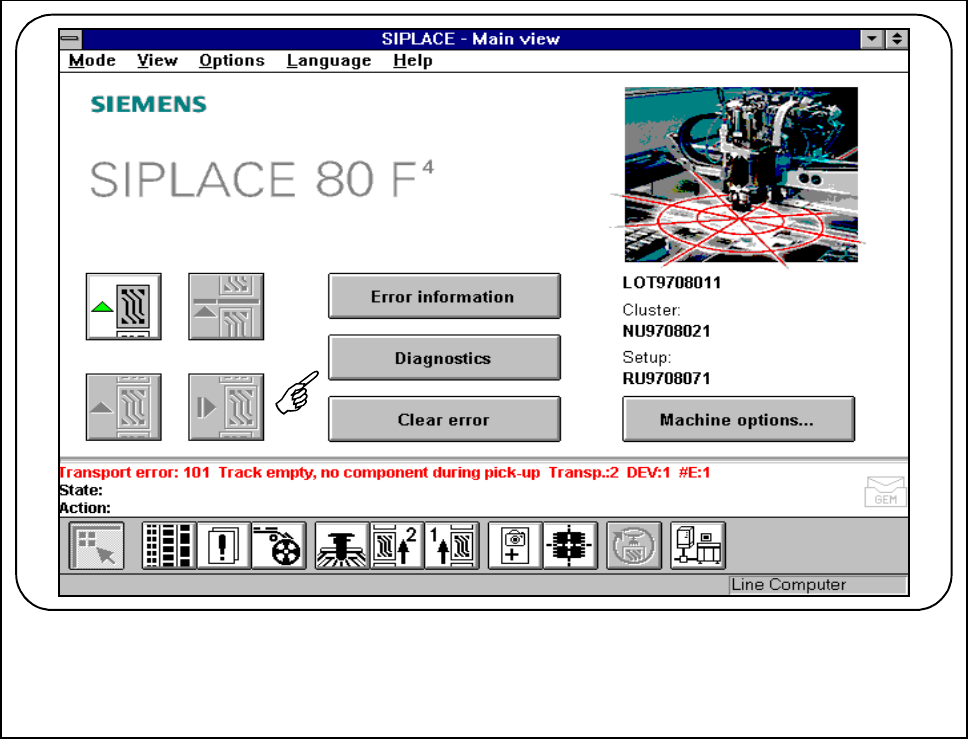
If errors occur while the board is being processed, a diagnostics program can be started for this error. You can
start this diagnostics facility either from the main view or from Display error.
This diagnostics facility will guide you as far as identifying a possible cause for the error and suggesting a
remedy. This is done by means of a series of questions. Information on the questions asked can be accessed
by pressing an information button.
7 Error Information & Diagnostics SIPLACE 80S-20/F4/F4-6 User’s Manual
7.2 Diagnostics Edition 03/98 from Software Version SR.403.xx
7 - 10
7.2.2 Basic Operation
If an error should occur during processing of the board, this error will be displayed in the status window.
● Click on the Diagnostics button.
Fig. 7.2.1 Diagnostics for error message no. 101
● The diagnostics main screen is displayed on the station software screen.