80S-2080F480F4-680F5 User’s Manual.pdf - 第579页
10 Component Handling SIPLACE 80 S20/F4/F4-6/F 5 User’s Manual 10.6 Wafflepack Changer Edition 03/ 98 from Software Version SR.404.xx 10 - 26 10.6.9 Fitting the Wafflepack Changer Before m oving the WPC into the machine,…

SIPLACE 80 S20/F4/F4-6/F5 User’s Manual 10 Component Handling
Edition 03/98 from Software Version SR.404.xx 10.6 Wafflepack Changer
10 - 25
10.6.7 Refilling the Wafflepack Changer
NOTE
The trays with the item numbers 00132110-04 (old) or 00116 431-xx (new) can both be used. However the
two types cannot be used together: in other words, only trays of exactly the same type can be used at one
time in the set-up.
- The wafflepack changer can be refilled without the machine having to stop.
- It is possible to approach and quit the filling position of the wafflepack changer even while placement is in
progress. In this connection see also Section 3.4.5 of this user’s manual.
- In the Feeders menu and in its submenu "Wafflepack changer" those functions are described which can
be performed using the wafflepack changer.
- If a wafflepack changer is physically installed and wired up to the corresponding location it will be possible
to approach and quit under Single functions even when there is no corresponding set-up. It is not possible
to input the fill level.
- If refilling is carried out with a different set-up during the course of placement, the fill levels will have to be
communicated to the station afterwards (after transmission of the corresponding set-up).
- Checking the magazine carrier assignments after quitting the refill position will be carried out against the
current set-up obtaining at the station. If refilling has already been carried out for a subsequent set-up, the
information in response to the request may not agree with the future set-up.
10.6.8 System Behavior in Fault Situations
- If the refill position is selected during pick-up or when a magazine carrier is being changed, the request will
be rejected with the message "Wafflepack changer currently being processed". Once the pick-up has been
completed it will still be necessary to reselect the menu item Go to refill position.
- If the placement head accesses the wafflepack changer while it is in the refill position, the placement
sequence will be suspended until after the status message 'Waiting for wafflepack changer refill position to
be quit' has been issued and refilling of the wafflepack changer has been finished by the operator.
- If the operator selects any other wafflepack changer function, apart from Quit refill position, while the
changer is still in the refill position, the request will be refused with the message Wafflepack changer in
refill position. The same will apply with Quit refill position if the changer is not actually in the refill position.
- If a wafflepack changer function is selected for a location where there is no wafflepack changer then this
will be refused after a 10 sec timeout with the message "No wafflepack changer at this location".
10 Component Handling SIPLACE 80 S20/F4/F4-6/F5 User’s Manual
10.6 Wafflepack Changer Edition 03/98 from Software Version SR.404.xx
10 - 26
10.6.9 Fitting the Wafflepack Changer
Before moving the WPC into the machine, remove the upper part of the camera of the component vision
module.
NOTE
The wafflepack changer can be moved into and out of the machine on its wheels, but it should be noted that
these wheels are not suitable for moving the wafflepack changer over longer distances. DANGER OF OVER-
TURNING! In such cases use the suitable lift truck (from item no. 00123141-01).
Move the wafflepack changer carefully into the desired location in the machine.The docking pins of the
wafflepack changer must be located above the docking slots of the SIPLACE machine.
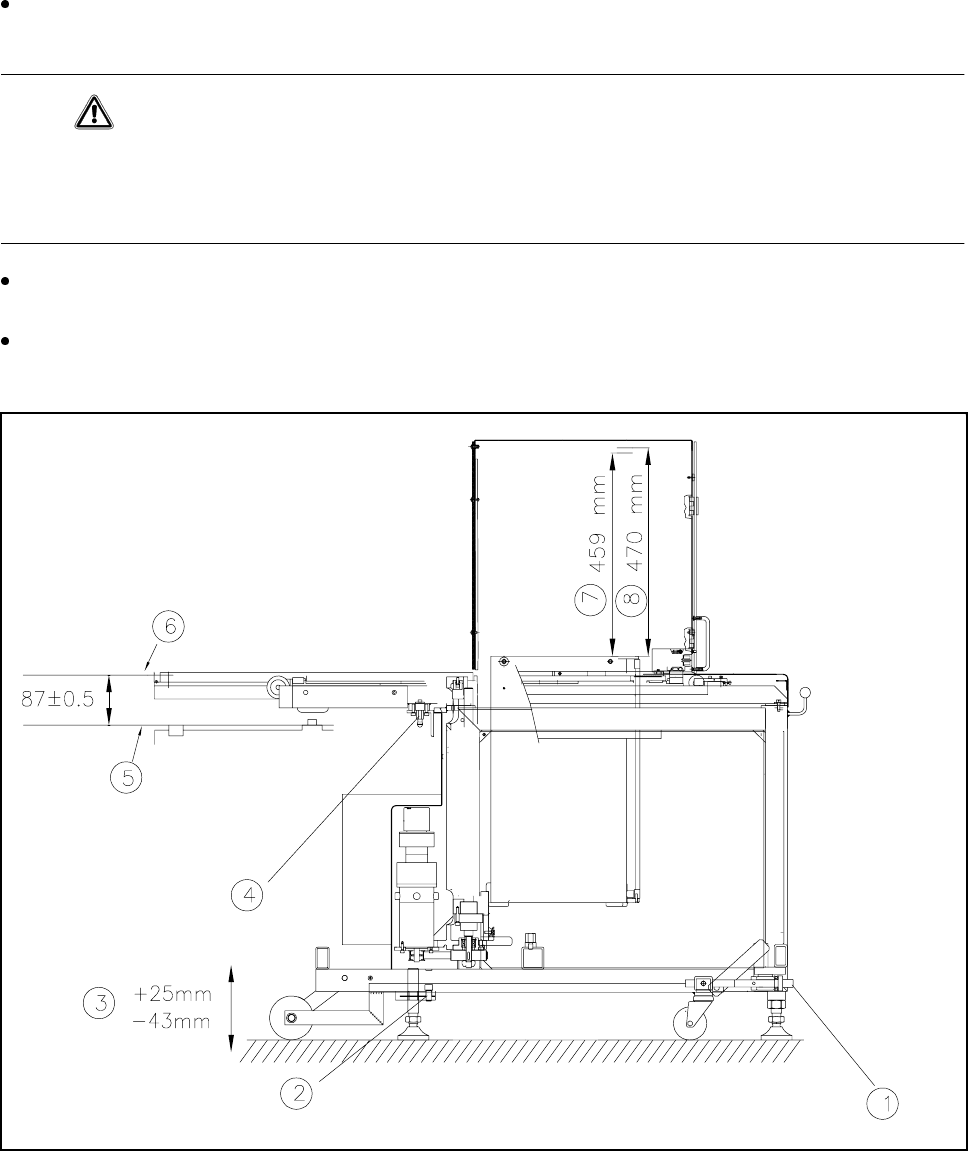
Check the dimension (87 ± 0.5 mm) between lower edge of tray and top of component table (see Fig.
10.6.5).
Fig. 10.6.5 Aligning the wafflepack changer
- Key to Fig. 10.6.5
1 With socket wrench UP/DOWN 2 Clamping screw
3 Stroke 4 Docking pin
5 Upper edge of the magnetic bar of the component table 6 Lower edge of tray
7 Nominal stroke (459 mm) 8 Refill position (470 mm)

SIPLACE 80 S20/F4/F4-6/F5 User’s Manual 10 Component Handling
Edition 03/98 from Software Version SR.404.xx 10.6 Wafflepack Changer
10 - 27
Undo the clamping screws at the feet (see Fig. 10.6.5) and using a 10 mm ball socket wrench rotate the
wafflepack changer downwards until the docking pin engages. The wafflepack changer must at this point
be aligned using the machine spirit level fitted to the wafflepack changer.
Tighten up the clamping screws and check the machine spirit level again.
Reinstall the upper part of the camera on the component vision module.
10.6.10 Technical Data
Wafflepack changer
Length approx. 1475 mm
Width approx. 620 mm
Height approx. 1355 mm
Weight approx. 240 kg
Magazine size 238 mm x 338 mm
Vertical stroke 470 mm
Horizontal stroke 730 mm
Pitch 17 mm
Storage unit capacity 28 trays for holding flatpack magazines
Tray 260 mm x 360 mm
Max. weight of storage unit 50 kg
Floor load < 25N/cm²
Changeover time (magazine/magazine) ≤ 3 sec.
Tab. 10.6.1