80S-2080F480F4-680F5 User’s Manual.pdf - 第588页
SIPLACE 80 S20/F4/F4-6/F5 User’s Manual 10 Component Handling Edition 03/98 from S oftware Version SR.404.xx 10.10 Surf tape feeder module (applies to 80F5 with DCA option only) 10 - 35 10.10 Surf tape feeder module (app…
10 Component Handling SIPLACE 80 S20/F4/F4-6/F5 User’s Manual
10.9 Insertion of Components With a Height Clearance of up to 21 mm on 80F Edition 03/98 from Software Version SR.404.xx
10 - 34
SIPLACE 80 S20/F4/F4-6/F5 User’s Manual 10 Component Handling
Edition 03/98 from Software Version SR.404.xx 10.10 Surf tape feeder module (applies to 80F5 with DCA option only)
10 - 35
10.10 Surf tape feeder module
(applies to 80F
5
with DCA option only)
10.10.1 Overview
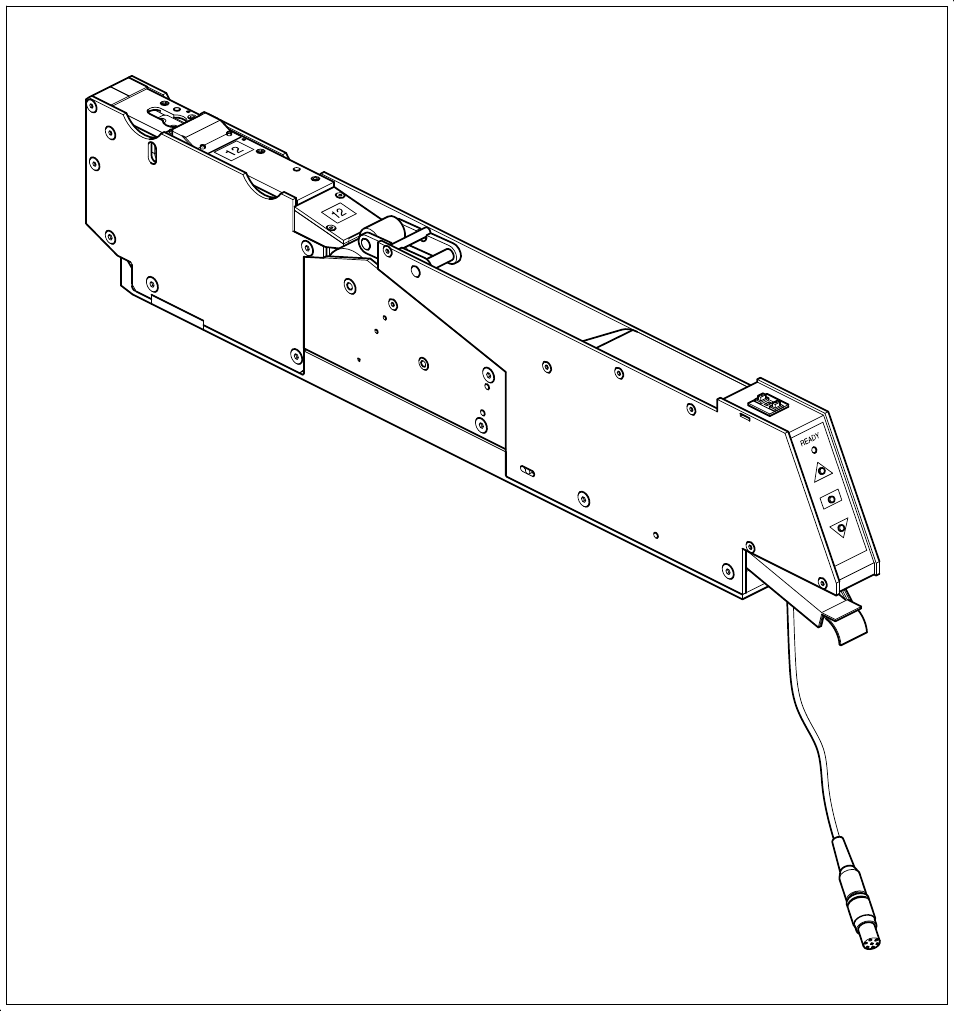
You will need the surf tape feeder module to supply the components in order to insert bare dies. Feeder mod-
ule versions are available for 8 mm tapes and 12 or 16 mm tapes.
Fig. 10.10.1 Surf tape feeder module
Use of the feeder module is described in chapter 16 of the feeder module operating instructions, 2/98 edition.

10 Component Handling SIPLACE 80 S20/F4/F4-6/F5 User’s Manual
10.10 Surf tape feeder module (applies to 80F5 with DCA option only) Edition 03/98 from Software Version SR.404.xx
10 - 36
10.10.2 Machine data file DCA.MA
You will need version 404 or higher of the machine controller software if you want to insert bare dies.
The file DCA.MA contains the machine data for the surf tape feeder modules. It is located in the directory
C:\SRDaten\Srcma\
The machine data can be modified using the WINDOWS NT text editor.
10.10.3 Editing the file DCA.MA
PLEASE NOTE:
All the actions for modifying the DCA.MA file described below can only be carried out at the ’Service engineer’
operator level.
You must exit the SIPLACE program before you can edit the machine data in the DCA.MA file. To do this, pro-
ceed as follows:
In the main view, open the ’Options’ pull-down menu.
Select the ’Service engineer’ operator level.
Open the ’Mode’ pull-down menu and click on the ’Close user interface ...’ option. You can also exit the
SIPLACE program by pressing the Alt and F4 keys at the same time.
You are now in the WINDOWS NT 4.0 desktop.
Click on the ’Start’ button at the bottom of the screen.
Under ’Programs’ and then ’Accessories’, open the ’Editor’.
PLEASE NOTE:
We recommend that you use the Windows NT editor. However, if you would prefer to use WORD or
NOTEPAD to edit the data, you must ensure that you save the DCA.MA file as an ASCII file, i.e. without
formatting. If you forget to do this, the machine controller will be unable to read DCA.MA.
In the directory C:\SRDaten\Srcma\, open the file DCA.MA using the ’File’ option and edit the file to suit
your requirements.
Up to 20 package form numbers for the IC head and up to 100 package form numbers for the revolver head
can be entered in the package form arrays in the DCA.MA file. The package forms can be fetched from four
different surf tape feeder module types.