80S-2080F480F4-680F5 User’s Manual.pdf - 第674页
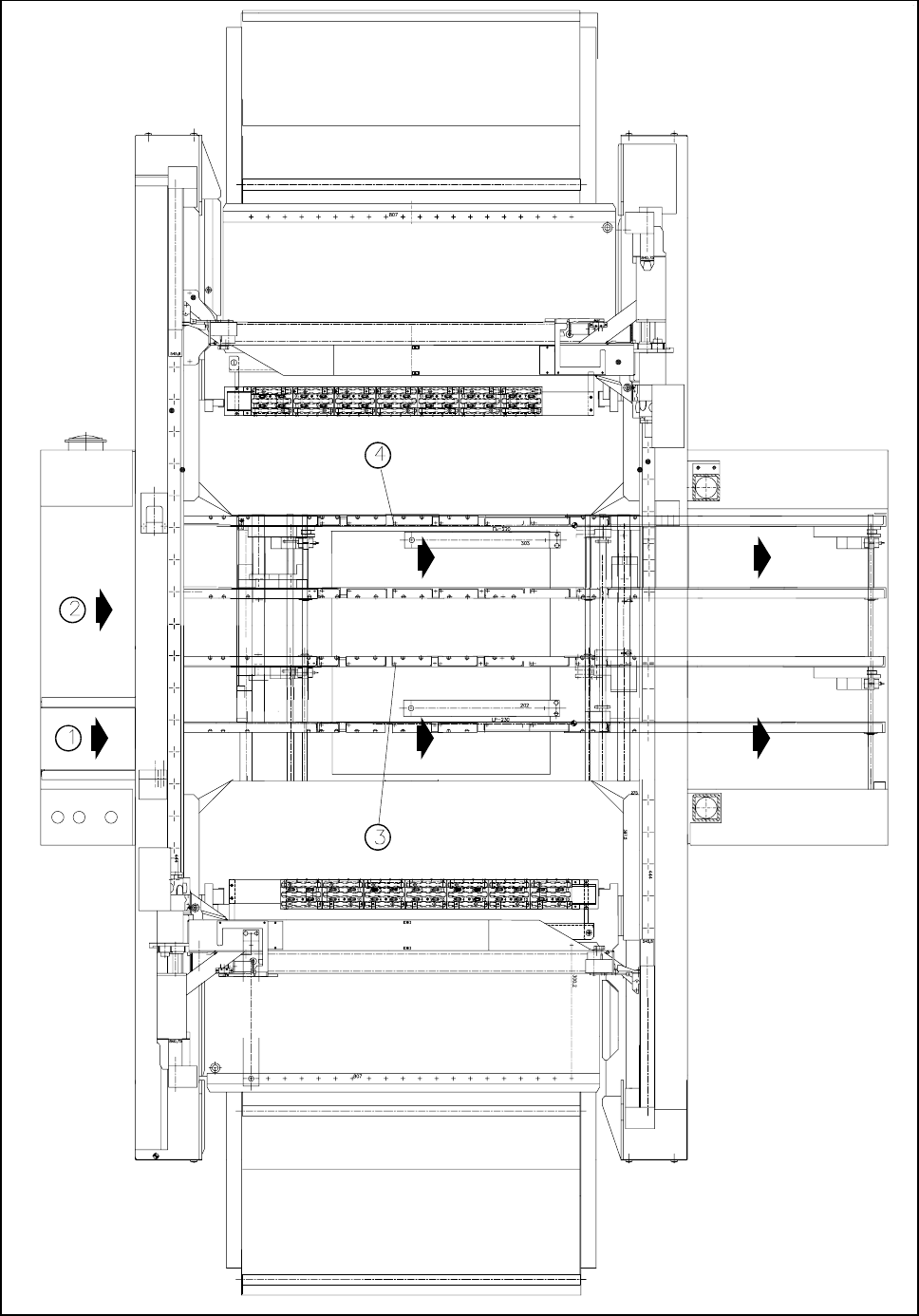
SIPLACE 80S-20/F4/F4-6/F5 User’s Manual 11 Station Extensions/Options Edition 03/98 from Software Version SR.404.xx 11.10 Twin Conveyor 11 - 77 - Key to Fig. 11 .10.2 1 Tran sport trac k 1 2 Tr anspor t track 2 3 Fixed t…
11 Station Extensions/Options SIPLACE 80S-20/F4/F4-6/F5 User’s Manual
11.10 Twin Conveyor Edition 03/98 from Software Version SR.404.xx
11 - 76
Fig. 11.10.2 General layout view of SIPLACE with twin conveyor (fixed left side)

SIPLACE 80S-20/F4/F4-6/F5 User’s Manual 11 Station Extensions/Options
Edition 03/98 from Software Version SR.404.xx 11.10 Twin Conveyor
11 - 77
- Key to Fig. 11.10.2
1 Transport track 1 2 Transport track 2
3 Fixed transport side for transport track 1 4 Fixed transport side for transport track 2
11.10.4 Transport Type Asynchronous
11.10.4.1 Description
In asynchronous mode, only one PCB is fitted with components in a transport track, while the other PCB on
the second transport track is moved into the placement position. This halves the transport time, leading to a
considerable increase in output, particularly for PCBs with a low cycle time.
11.10.4.2 Operation
Once the machine has been supplied with job data (cluster, set-up), at each moment during the placement
operation, the PCBs located on the input conveyors are transported into the center conveyor (when the center
conveyor is free). The placement sequence starts as soon as a PCB has been transported onto the free cen-
ter conveyor. The PCBs are fitted with components one after another.
NOTE
The components to be placed and the width of the PCBs on transport tracks 1 and 2 must be identical.
If the placement sequence is interrupted, the transport interface is disabled and placement is completed for
the PCBs still on the center conveyors at this moment.
The transport interface is disabled and enabled simultaneously for both transport tracks.
11.10.5 Transport type synchronous
11.10.5.1 Description
In synchronous mode, two PCBs of the same size are moved simultaneously into the placement position and
must be processed as a common cluster.
This enables the top and bottom of a PCB to be processed on a single line. The time required to transport the
PCBs is reduced since there are always two PCBs being transported at any given time.

11 Station Extensions/Options SIPLACE 80S-20/F4/F4-6/F5 User’s Manual
11.10 Twin Conveyor Edition 03/98 from Software Version SR.404.xx
11 - 78
11.10.5.2 Operation
PCBs on transport tracks 1 and 2 are moved synchronously on the transport tracks (i.e. the transport convey-
ors are independent of one another, although they are activated synchronously). The components to be
placed for transport tracks 1 and 2 must be organized in a cluster via two single circuits (see operating instruc-
tions for the line computer).
If only one transport track (or center conveyor) is assigned at the start of the placement sequence, the individ-
ual circuit of this transport conveyor is identified as „not for placement“.
NOTE
A dead time must be specified for synchronous transport into the center conveyor since, because the controls
are independent, the PCBs will otherwise not reach the input conveyor light barrier at the same time after
being transferred from the previous station.
This dead time is incorporated into the placement capacity when components are to be fitted to one transport
side only (if one side is always empty).
11.10.6 Single functions
Control of the twin conveyor using the single functions on the user interface is described in sections 4.4.1 and
4.4.2 of these operating instructions.
11.10.6.1 Automatic Width Adjustment for Twin Conveyor
NOTE
The preset desired setpoint width relates to both transport conveyors. When the command is received, the
transport conveyors are set to the desired width one after another.
The automatic width adjustment is deactivated for synchronous transport.