80S-2080F480F4-680F5 User’s Manual.pdf - 第409页
6 What should you do ... ? SIPLACE 80S-20/F4/F4-6/F5 User’s Manual 6.8 How to avoid trac k errors Edition 03/98 from Software Vers ion SR.404.xx 6 - 18 6.8.6 Checking the pick-up angle of the compo nents Fig. 6.8.2 Check…
SIPLACE 80S-20/F4/F4-6/F5 User’s Manual 6 What should you do ... ?
Edition 03/98 from Software Version SR.404.xx 6.8 How to avoid track errors
6 - 17
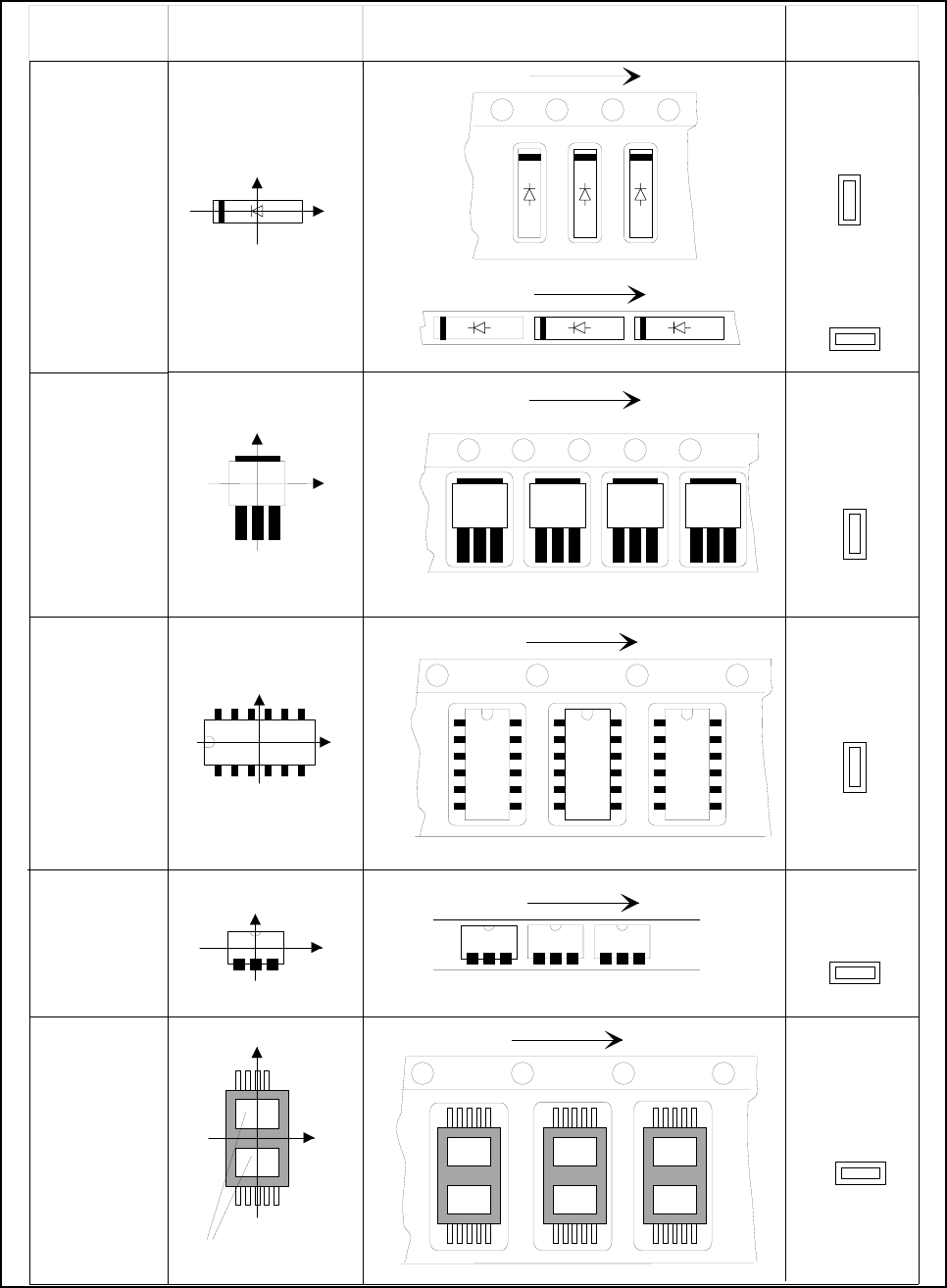
6.8.5 Component coordinate system and pick-up angle
Fig. 6.8.1 Position of the component and its pick-up angle
0°
90°
90°
SO-IC
DIL-IC
0°
SOT 194
90°
90°
SOT 23
Y
X
Vibratory feeder:
Special
Component
Chip
component
with
polarity
0402
2220
Component
type
Coordinate system Position in the feeder
Pick-up angle
nozzle angle
Tape
Tape
Vibratory feeder:
Tape
Tape
Y
X
Y
X
Holes
Y
X
Y
X
The anode must be
aligned with the
+x-coordinate
6 What should you do ... ? SIPLACE 80S-20/F4/F4-6/F5 User’s Manual
6.8 How to avoid track errors Edition 03/98 from Software Version SR.404.xx
6 - 18
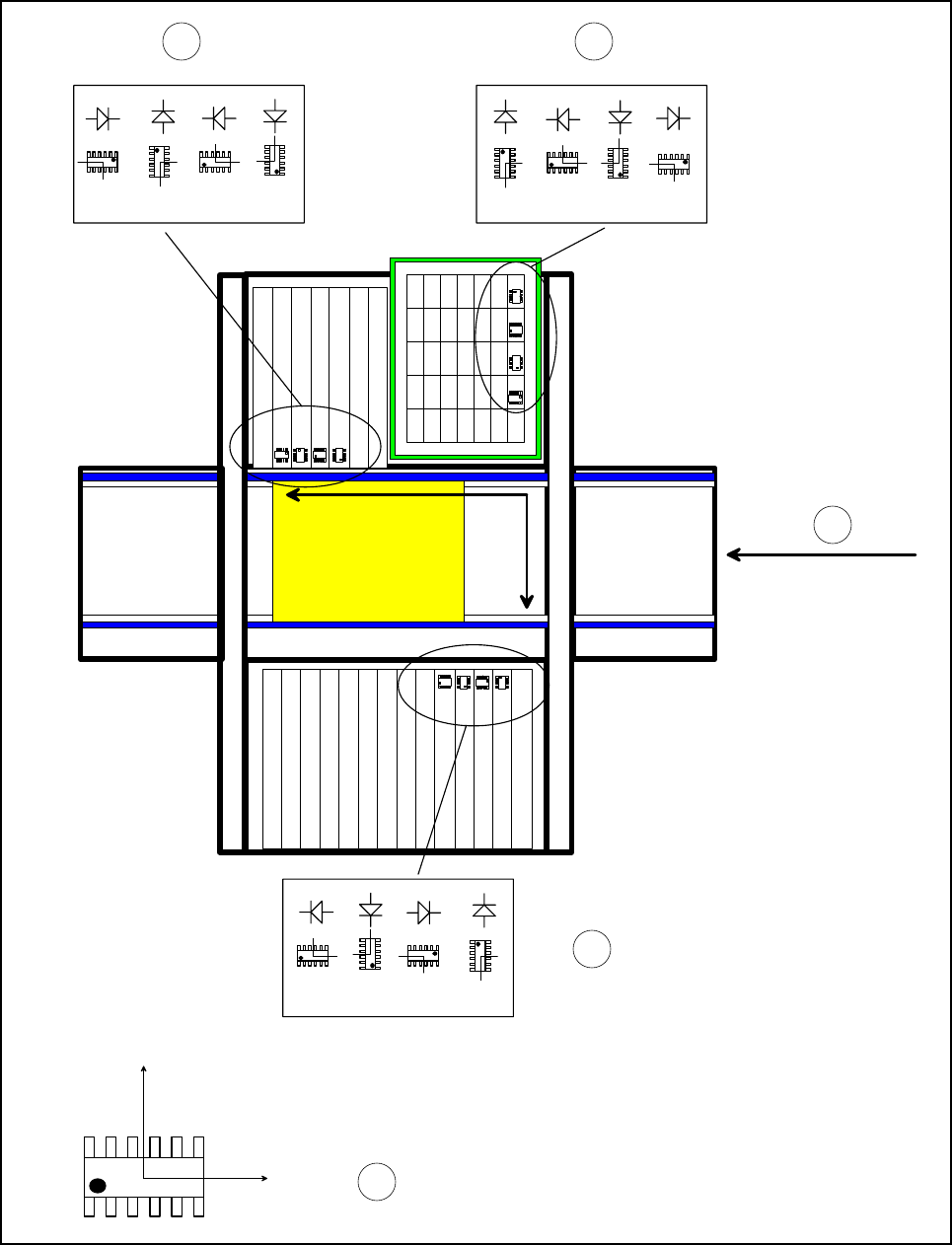
6.8.6 Checking the pick-up angle of the components
Fig. 6.8.2 Checking the pick-up angle of the components
0° 90°
180° 270°
X
component-removal belt
0°
90°
180°
270°
0°
90° 180° 270°
Y
0°
90°
180°
270°
0°
90°
180°
270°
0°
90°
180°
270°
Y
X
MKS
12
4
3
5

SIPLACE 80S-20/F4/F4-6/F5 User’s Manual 6 What should you do ... ?
Edition 03/98 from Software Version SR.404.xx 6.9 When you refill the components
6 - 19
Key to Fig. 6.8.2
1 Table 1 (WPC)
2 Table 2
3 Table 3
4 Transport direction
5 Description of the component in the package form editor, 0° description position
6.9 When you refill the components
Refilling with components with and without a barcode is described in Section 3.4 ’Feeders’, page 3 - 23.
PLEASE NOTE:
When you fill the long stick steel magazines with components, make sure that the connecting leads are not
bent.
WIth tape feeder modules, ensure that you always splice on a new tape in good time so that the feeder
modules do not run out.
But do not splice the tapes too early because if you wind onto the new reel after splicing the end of the old
tape, the reel with the new tape may be over-filled. The tape could then slip off the reel and become caught
up. Under certain circumstances, this could cause pick-up errors and prolonged down-times.
With large tape reels, always insert shafts and make sure that the dividing plates are inserted correctly
(see Fig. 6.5.2, page 6 - 11)
6.10 When you use wafflepack magazines
Use the following procedure to refill WPC magazines:
Call the "Feeder“ menu from the "Main view“ menu.
Then select the "Wafflepack changer“ menu.
Click on the "Go to refill position“ button.
Call the "Display magazine” and “Update inventory levels“ menu.
Click on the "Update inventory levels“ button. The current fill level of the magazine will be displayed.
Fill a magazine with components.
Click on the corresponding magazine in the table.
Click on the "New inventory level ...“ button to open the "Enter inventory level“ window.
Enter the number of refilled components in the "New level“ input box.
Click on OK. The magazine will be filled.
Return to the "Wafflepack changer“ menu.
Click on the "Quit refill position“ button.
Continue the placement operation if it was interrupted.