2OM-1733-005w_F8.pdf - 第113页
2OM-1733 1-4-37 4.3 "T est Mode" T ab Sheet When the [Test Mode] tab is pressed in the "OPERATION" window, the following tab sheet appears. [1] [2] Fig. 2A4-24 " Test Mode " Tab Sheet The nu…

2OM-1733
1-4-36
[3] Execution Timing
Specify the timing to execute the air blowing.
Operation time
Select this button to specify the timing of the execution based on the running
time.
PCB Count
Select this button to specify the timing of the execution based on the number
of PCBs.
[4] Count
The set value is designated based on the item selected in executive timing.
When the [Run Time] is selected, the interval from the automatic operation
start to the air blow execution is set based on time.
When the [PCB Counter] is selected, the interval from the automatic
operation start to the air blow execution is set based on the completed
number of PCBs.
[5] Blow Count
Specify the number of blowing times.
1212-002
4.2 "Opr.Mode" Tab Sheet
2OM-1733
1-4-37
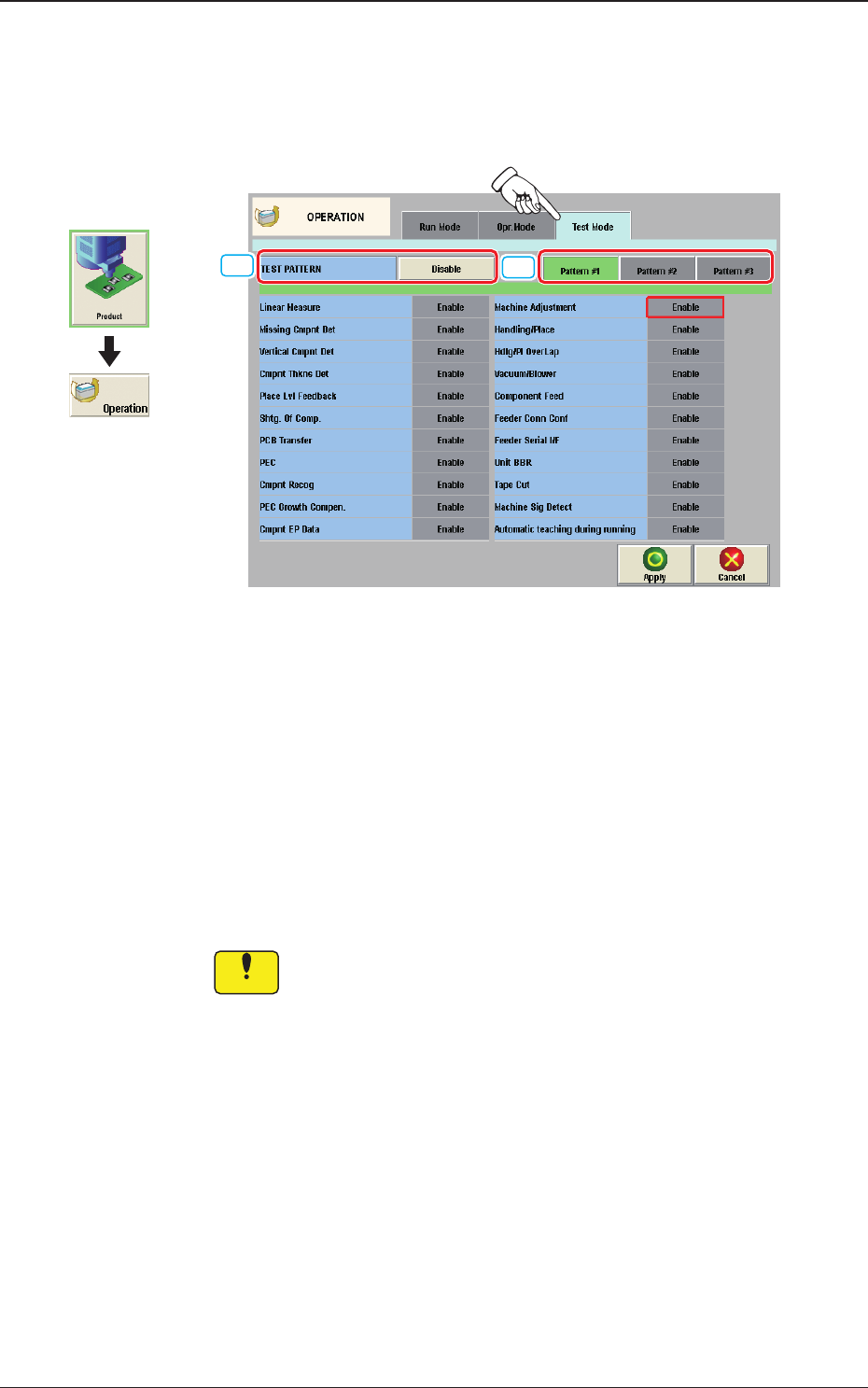
4.3 "Test Mode" Tab Sheet
When the [Test Mode] tab is pressed in the "OPERATION" window, the
following tab sheet appears.
[1]
[2]
Fig. 2A4-24
"
Test Mode
"
Tab Sheet
The number of test run patterns to be saved is up to three.
[1] TEST PATTERN
The pattern where the test operation mode has been designated, is selected in
this data box.
[2] [Pattern #1], [Pattern #2], and [Pattern #3] Buttons
Select one of the buttons to specify the desired pattern for designation of the
test mode.
Notice
Wrong selections (test run in wrong modes) will cause various
decienciessuchascomponentpicksbyvacuumnozzles,
scattering of components, or collision with the chute, etc.
Graphic
Development
1212-002
4.3 "Test Mode" Tab Sheet

2OM-1733
1-4-381204-001