2OM-1733-005w_F8.pdf - 第70页
2OM-1733 1-2-10 [6] Line Ctrl [Start] Button When this button is pressed and the [Start] button on the operation panel is pressed, the machines (including the printer) in the line, are started up together. Note (a) The s…
2OM-1733
1-2-9
2.2 Line Window
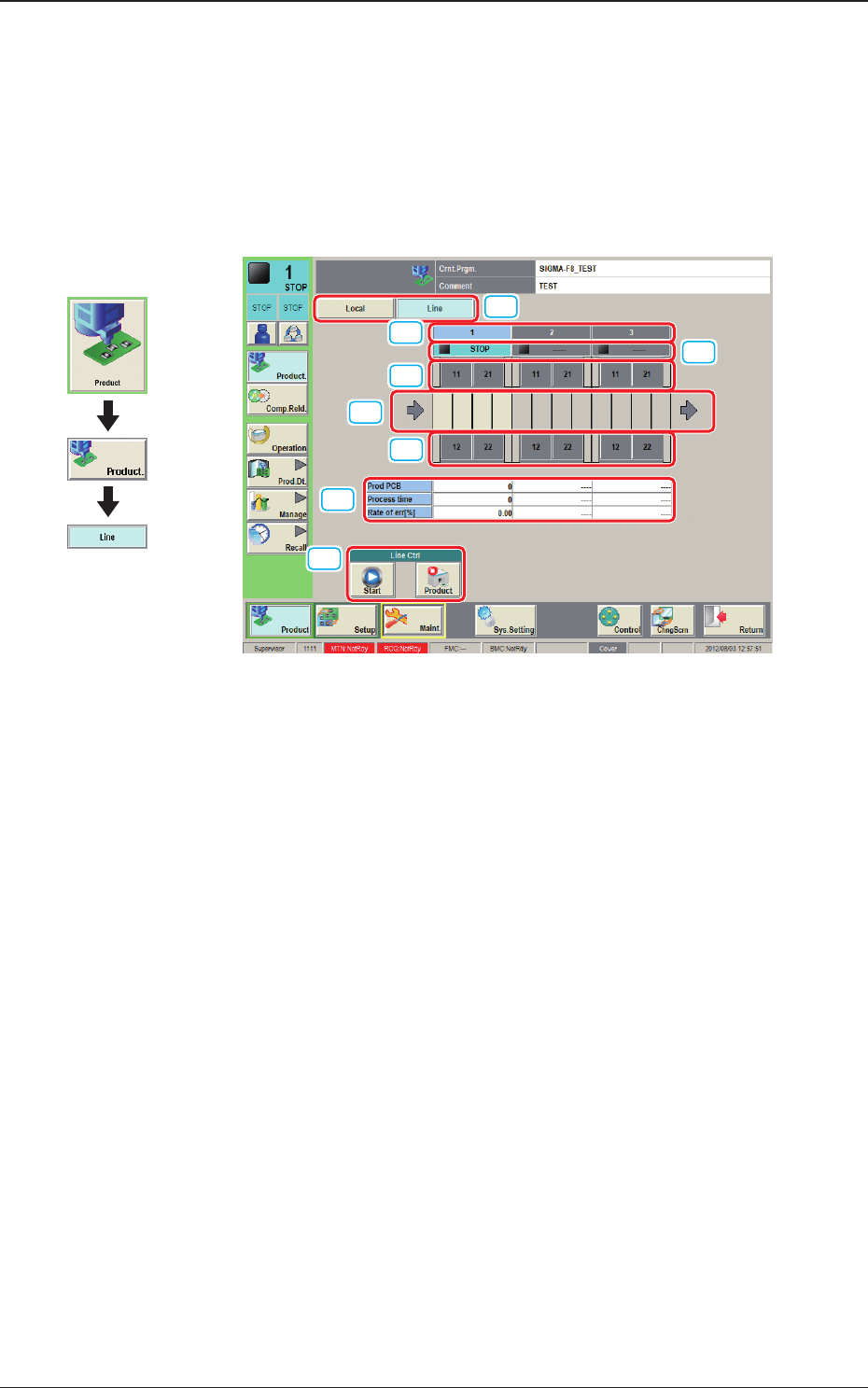
This window enables the operator to check the production line operation status
and operate the line.
In this window, the operation status of the SIGMA series machines (including
the printer) set in the line conguration, PCB transfer unit graphic image and
production data are displayed.
[1]
[6]
[5]
[7]
[3]
[4]
[5]
[2]
F2A2-9
[1] [Local] / [Line] Change Buttons
Using these buttons, the Local window is changed to or from the Line
window.
[2] No.
In this area, the machine Nos. in the line are displayed.
[3] Operation Status
In this area, the operation status of each machine in the line, is displayed.
RUN
: This machine is under operation.
STOP
: This machine is shut down.
PAUSE
: This machine is stopped temporarily.
[4] PCB transfer section
In this area, the operation status of each machine in the line, is displayed.
Green
: PCB present
Gray
: PCB absent
[5] Feeder Base Unit
In this area, the presence or absence of the feeder base is displayed.
Graphic
Development
1212-002
2.2 Line Window
2OM-1733
1-2-10
[6] Line Ctrl
[Start] Button
When this button is pressed and the [Start] button on the operation panel
is pressed, the machines (including the printer) in the line, are started up
together.
Note
(a) The start-up operation is available from any machine in the line.
(b) Press the start button after all the machines to be operated have been
set to production READY condition.
When any of the machines has not been set to production READY
condition, the start-up together is not available.
(c) When the machines are started up together, the tower light ashes for
three seconds and the buzzer sounds.
[Product] Button
When this button is pressed and the [Start] button on the operation panel is
pressed, the PCB is discharged from any machine (including the printer) in
the line.
Note
The start-up operation is available from any machine in the line.
[7] Production Data
The production data for the SIGMA Series line is displayed in this area.
Prod PCB
The currently produced PCB count is displayed in this data box.
Process time
The production nish time is displayed in this data box.
Rate of err [%]
The pick-up error rate based on the quantity of produced PCBs, is
displayed in this data box.
1212-003
2.2 Line Window
2OM-1733
1-3-11212-002
3. "Comp.Reload" Window
3. "Comp.Reload" Window
[1]
[3]
[4]
[2]
[7]
[6]
[5]
[8]
[9]
[11]
[10]
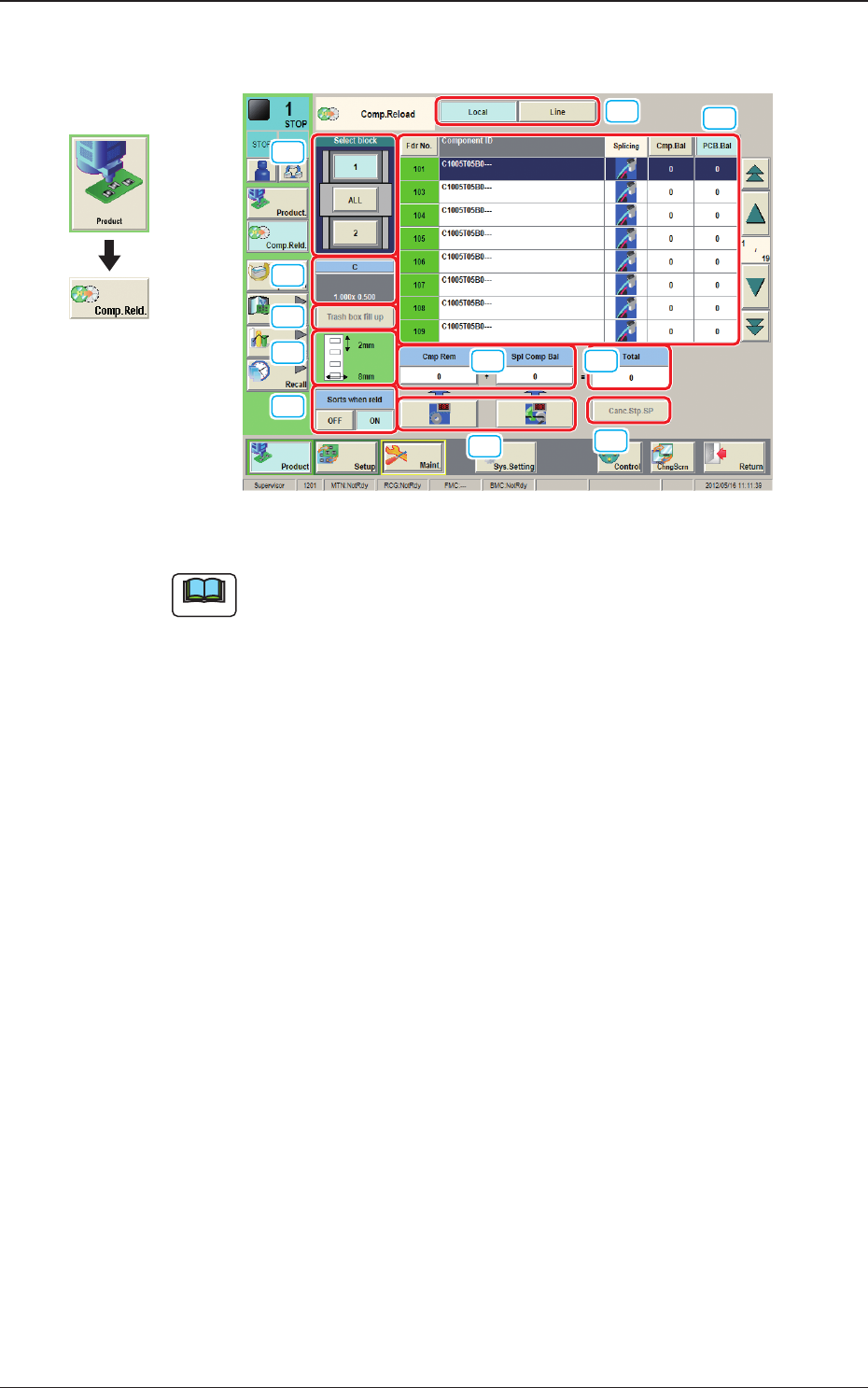
Fig. 2A3-1 "Comp.Reload" Window
Note
The displayed contents will differ depending on selection of the options.
Graphic
Development