2OM-1733-005w_F8.pdf - 第294页
2OM-1733 6-4-4 4.1 Collection of PCB Support Pins and Setup Operation of Conveyor Width • For Support Pin Manual Change) The PCB support pins are used to keep the upper surface of the PCB in proper height for stabilizati…

2OM-1733
6-4-3
[5] "PCB Locate" Group Box
[Locate] Button
: When pressed, this button moves up the Z clamp and
the backup base and locates the PCB.
[Release] Button
: When pressed, this button moves down the Z clamp and
the backup base and releases the PCB locating.
[6] "Conveyor Width" Group Box
PCB Size Y, Y Standard Pos.
The "PCB size Y" and "Y Standard Pos." set on the pattern program data for
the product model, are shown in these data boxes.
[Clearance] Button
When this button is pressed, the "Clearance" window opens. Enter the value
as a leeway between the conveyor width and the PCB. The entered value
appears in the text box beside this button.
The actual conveyor width becomes "PCB Size Y + Clearance (Recommended
Value: 0.5 mm)".
1212-002
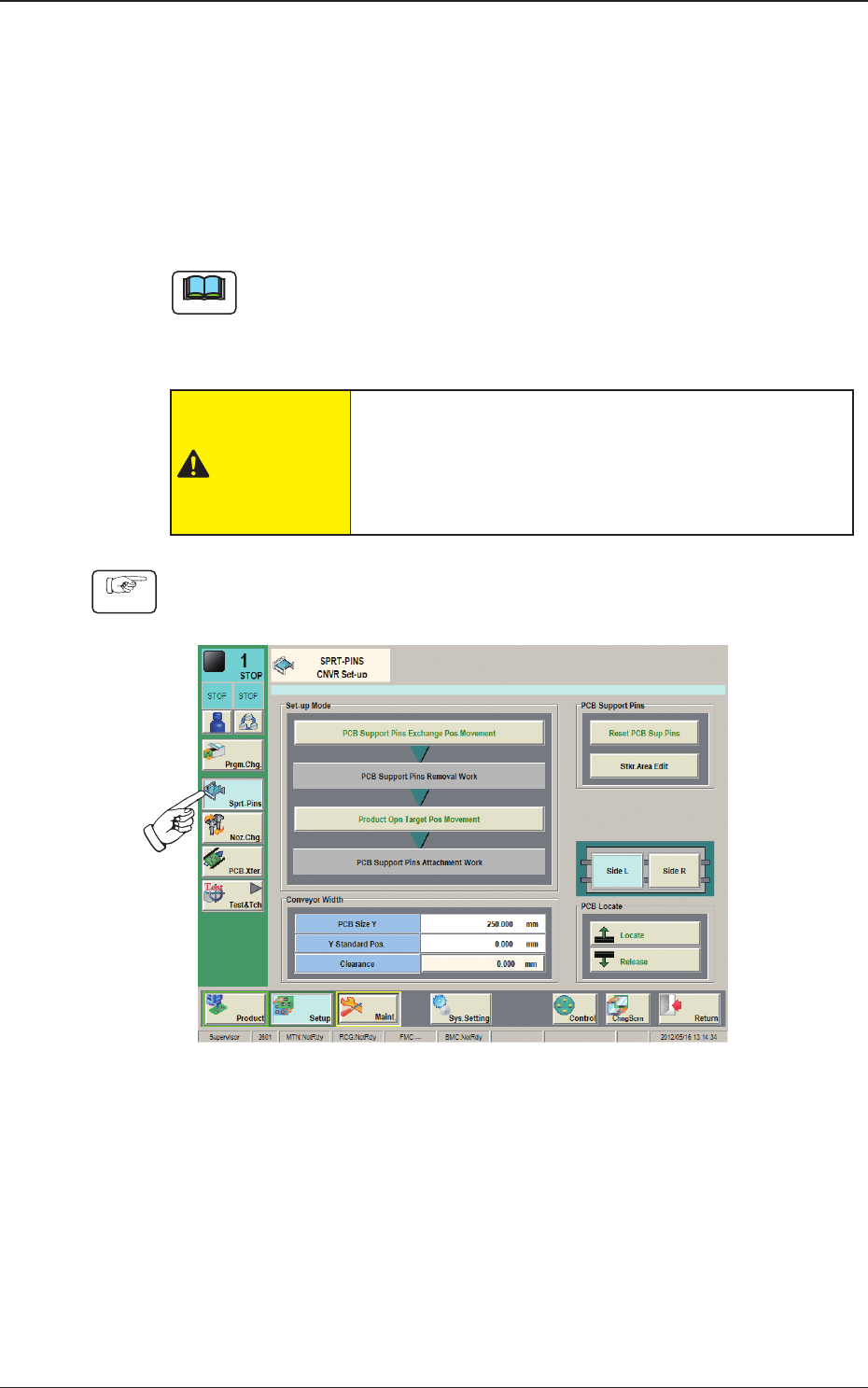
4. "CNVR Set-up" Window
2OM-1733
6-4-4
4.1 Collection of PCB Support Pins and Setup Operation of
Conveyor Width
•
For Support Pin Manual Change)
The PCB support pins are used to keep the upper surface of the PCB in proper
height for stabilization of the component placement. If the conveyor width is
not correctly set, the PCB support pins cannot be attached correctly.
Note
When 0402 and 0603 components must be placed, it is important to secure the
atness of the PCB. Use the support pins or a backup plate.
Consult the marketing department or sales agency of Yamaha Motor Co., Ltd.
for how to make a backup plate.
CAUTION
The load power to the motors, etc., is turned OFF
but the setup operation must be performed carefully
when you put your hand inside the machine. Avoid
handandngerinjuries.
Procedure
(1) Press the [CNVR Set-up] button on the submenu bar to display the "CNVR
Set-up SPRT-PINS" window.
Fig. 2F4-4
(2) Press the [PCB Support Pins Exchange Pos. Movement] button.
After that, press the [START] button on the operation panel in 10 sec.
(The machine retracts the head and maximizes the conveyor width.)
(3) Press the cover lock switch.
(The transparent cover will be unlocked).
1212-002
4.1 Collection of PCB Support Pins and Setup Operation of Conveyor Width
2OM-1733
6-4-5
(4) Open the transparent cover and remove the support pins.
(5) Close the transparent cover and press the cover lock switch.
(6) Press the [Product Opn Target Pos Movement] button.
In 10 seconds, press the [START] button on the operation panel.
(The conveyor width is changed appropriate for the selected pattern
program.)
(7) Press the pertinent cover lock switch. The lamp of the switch extinguishes.
(The transparent cover (door type) is unlocked. )
(8) Open the transparent cover (door type).
(9) Insert the PCB support pins vertically to the holes on the backup table.
(Be sure to set up the PCB support pins such that they are dispersed to
support the object PCB equally.)
Notice
Do not put your hand or any heavy object on the backup table while
working with the backup table. Otherwise, the backup table may become
deformed due to an excessive load.
(10) Conrm that a PCB support pin, etc., is not left behind on the backup table.
(Conrm that no component or dust, etc., has fallen into the holes on the
backup table.)
(11) Close the transparent cover (door type).
(12) Press the cover lock switch. The lamp of the switch illuminates.
(The transparent cover (door type) is locked.)
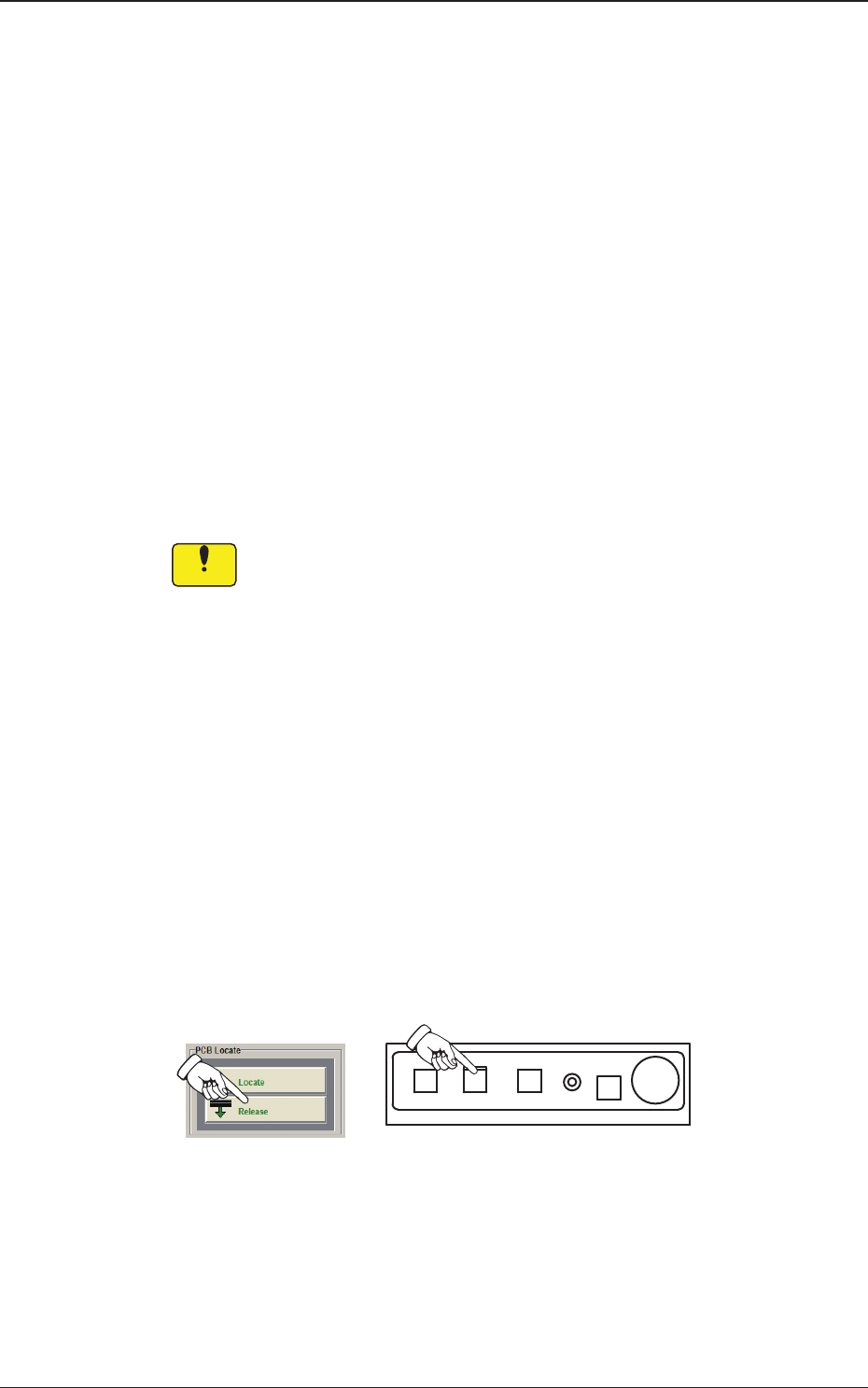
(13) Press the [Release] button in the "PCB Locate" group box.
In 10 seconds, press the [START] button on the operation panel.
(The backup table moves down.)
Fig. 2F4-5
1212-002
4.1 Collection of PCB Support Pins and Setup Operation of Conveyor Width