2OM-1733-005w_F8.pdf - 第170页
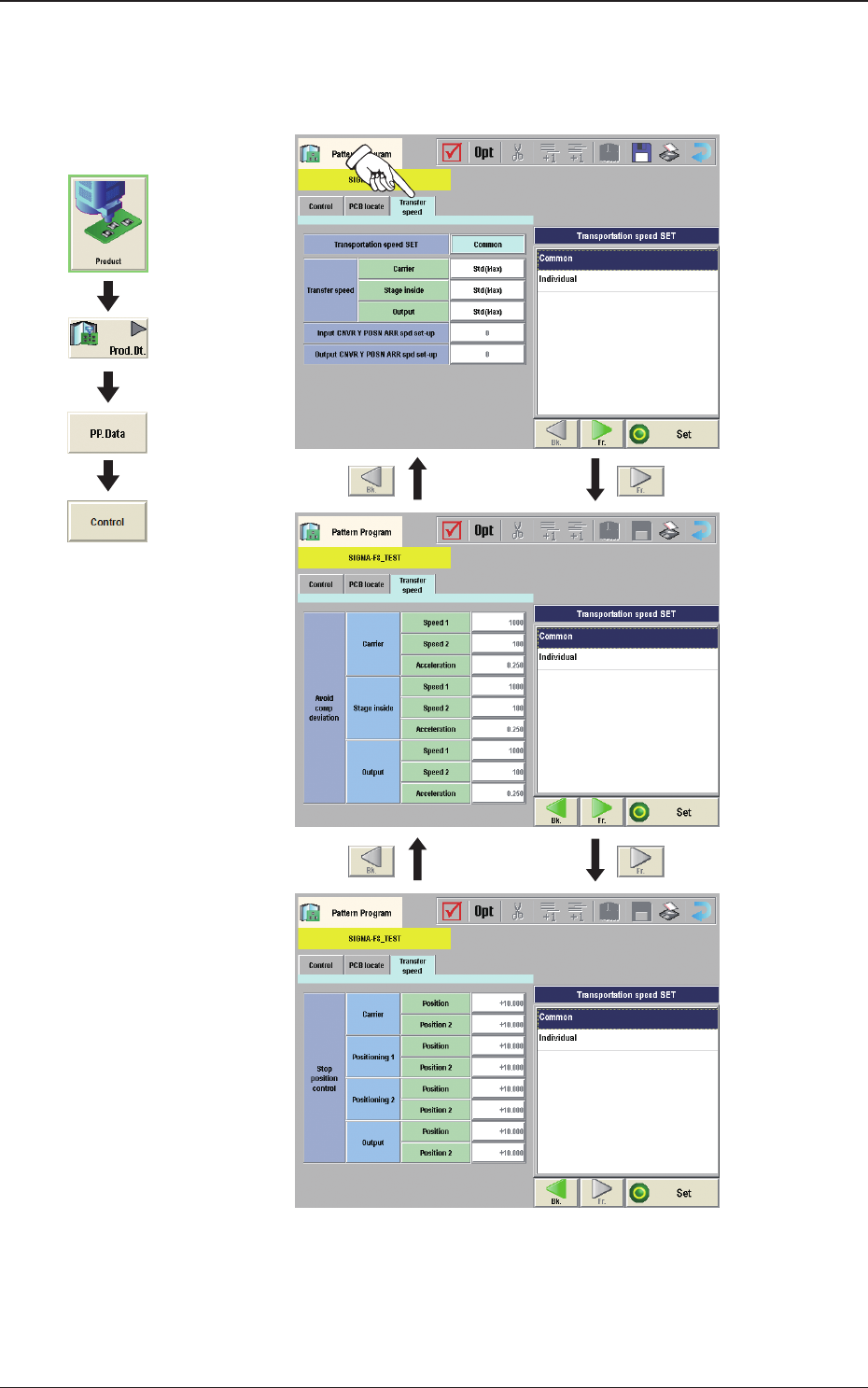
2OM-1733 2-3-36 (D03) T ransfer speed When the [Transfer Speed] tab is pressed in the "Control"window, the following tab sheet appears. Fig. 2B3-32 Graphic Development 1212-002 3.4 Control

2OM-1733
2-3-35
(D02_10)
DN
MOVE
The PCB moving down operation for positioning is selected from "Standard"
or "Value Set".
Normally, "Standard" is selected.
Standard :
When selected, the PCB is moved up for positioning
based on the standard value set in the machine.
Value Set :
When selected, the speed value can be set freely.
1st speed DCLR SET
The deceleration rate in the backup base rst stage operation in the PCB
position clearing operation, is set in this text box. This value is reected in
the speed and acceleration.
2nd speed DCLR SET
The deceleration rate in the backup base second stage operation in the PCB
position clearing operation, is set in this text box. This value is reected in
the speed and acceleration.
Vac. Ctrl. delayed starts
The time period from the PCB position clearing operation start to the vacuum
pick-up turned OFF, is set in this text box.
Vac. Wtg. Timer
The time period from the rst stage operation completion in the PCB position
clearing operation completion to the second stage operation startup, is set in
this text box.
Damaged Vac. Wtg. time
The operation time period for the vacuum breakage turned ON in the PCB
position cleaning operation, is set in this text box.
Backup axis DN start DLY
The time period until the backup base rst stage operation startup in the PCB
position cleaning operation, is set in this text box.
1212-001
3.4 Control
2OM-1733
2-3-36
(D03) Transfer speed
When the [Transfer Speed] tab is pressed in the "Control"window, the
following tab sheet appears.
Fig. 2B3-32
Graphic
Development
1212-002
3.4 Control

2OM-1733
2-3-37
(D03_01)
Transportation speed SET
Common :
When selected, the transfer speed is set commonly to the
machines in the line.
Individual :
When selected, the transfer speed is set individually for each
machine in the line.
(D03_02)
Transfer speed
Carrier, Stage inside, Output
Select the PCB transfer speed from the following items.
Std(Max)
: When selected, the PCB is transferred at the standard speed.
-20%
: When selected, the PCB is transferred at the speed 20%
lower than the standard.
-40%
: When selected, the PCB is transferred at the speed 40%
lower than the standard.
-60%
: When selected, the PCB is transferred at the speed 60%
lower than the standard.
-80%
: When selected, the PCB is transferred at the speed 80%
lower than the standard.
Value Set
: When selected, any speed level is set freely for the PCB
transfer.
(D03_03)
Avoid comp deviation
Carrier, Stage inside, Output
The following items are set for "Reload", "Stage Inside" and "Discharge".
Speed 1 [mm/sec]
The PCB is transferred at the specied speed.
Speed 2 [mm/sec]
The PCB transferred at the Speed 1, is detected using the speed reduction
sensor and the speed is reduced to the "Speed 2"specied here in this text
box.
Acceleration [G]
The acceleration to reach the speed specied in "Speed 1"is set in this text
box.
1403-004
3.4 Control