2OM-1733-005w_F8.pdf - 第197页
2OM-1733 3-1-1 1212-002 1. Selection of Component IDs 1. Selection of Component IDs When the component library data is to be edited, select the component ID to be edited and edit it in the "Component Library" w…

2OM-1733
1204-001 3-B
2OM-1733
3-1-11212-002
1. Selection of Component IDs
1. Selection of Component IDs
When the component library data is to be edited, select the component ID to be
edited and edit it in the "Component Library" window.
Reference
Refer to "Vol.6 : Component Library" for the description of component library
data and data creation procedure.
1.1 List of Component IDs
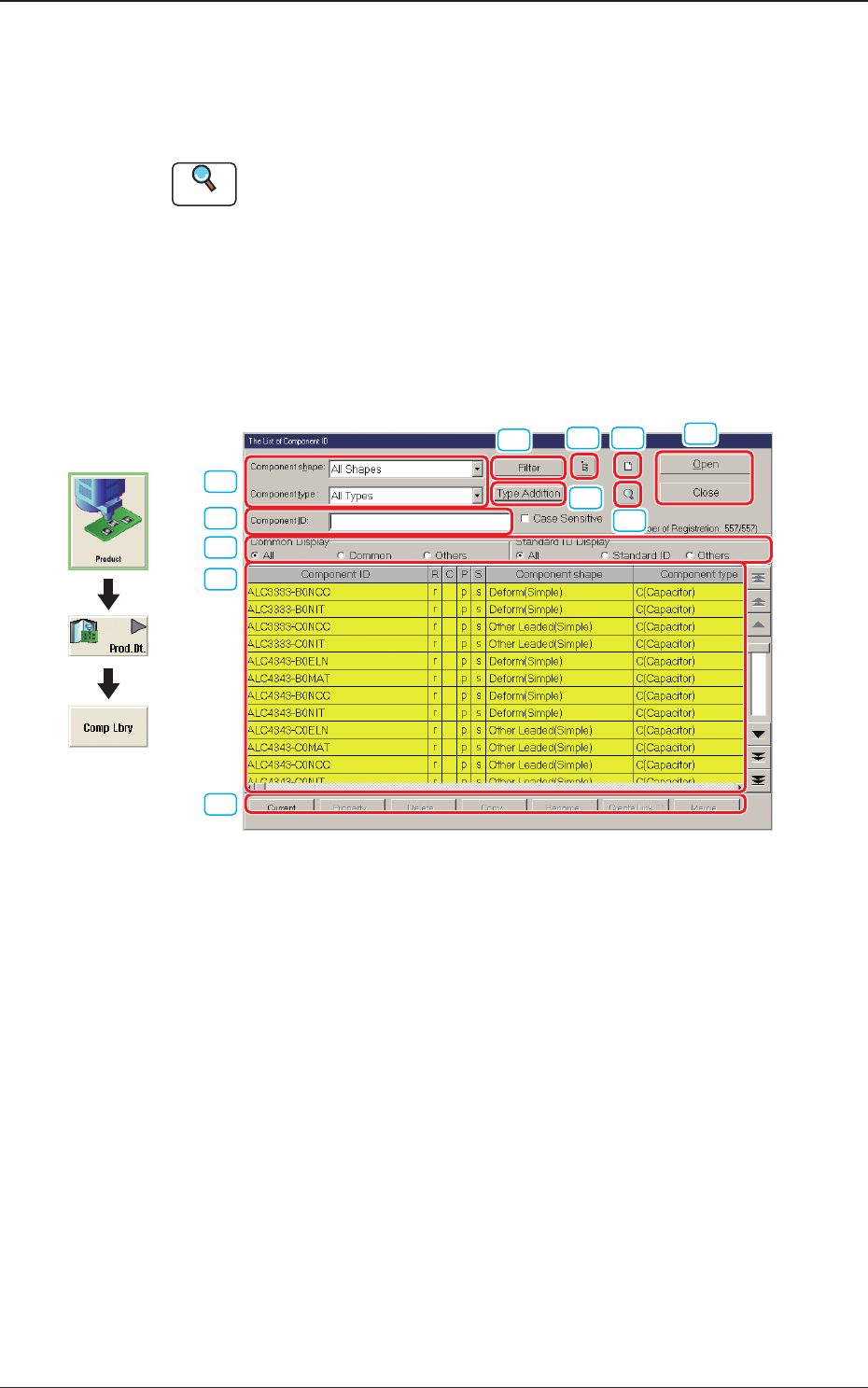
In this window, the component library data list is displayed.
When the component library data is to be edited, select the component ID to be
edited and edit it in the "Component Library" window.
[10]
[3]
[4]
[1]
[5]
[6] [7]
[8]
[9]
[2]
[11]
Fig. 2C1-1
Graphic
Development

2OM-1733
3-1-2
[1] Component ID
Displayed is the component ID selected in "[3] "List of Component IDs"
Pane".
[2] Component Shape and Type
Select the desired component shape and type. The component IDs based on
the selected shape and type are displayed in "[3] "List of Component IDs"
Pane".
[3] "List of Component IDs" Pane
A list of component IDs is displayed.
Select the component ID whose data should be displayed in the "Component
Library" edit window or the component ID to be deleted, copied, or renamed.
Component ID
: Component IDs are displayed.
R
: When "r" is set, it indicates that the component ID is a
root one.
A root ID is an original component ID for linking,
copying, etc.
C
: When "c" is set, it indicates that the component ID is
registered as a common one.
P
: When "p" is set, it indicates that the component ID is
protected.
S
: When "s" is set, it indicates that the component ID is a
standard one.
Component shape
: Component shapes are displayed.
Component type
: Component types are displayed.
Update time
: Update time (date and time) is displayed
Nozzle Type
: Nozzle types are displayed.
Placeable Data
: Placement OK or NG (Not Good) conrmation history
in the SIGMA-F8 machine is displayed.
Note
By pressing one of the titles (the labels arranged on top of the list), the
step lines (parameters) are sorted by ID, update time, etc., and reorganized,
depending on which title is selected.
[4] "Common Display" and "Standard ID Display" Group Boxes
Select the desired option buttons. Depending on which option buttons are
selected, a list of component IDs having specic attributes appears in "[3]".
[5] [Filter] Button
When pressed, this button opens the "Filter" window, enabling you to select
a component shape, a component type, a common display, and a standard ID
display for ltering.
1212-002
1.1 List of Component IDs