2OM-1733-005w_F8.pdf - 第94页
2OM-1733 1-4-18 Head 1, Head 2 Disable When this button is selected, the pre-pick nozzle conrmation function is not activated. Enable When this button is selected, the pre-pick nozzle conrmation function is activated. …
2OM-1733
1-4-17
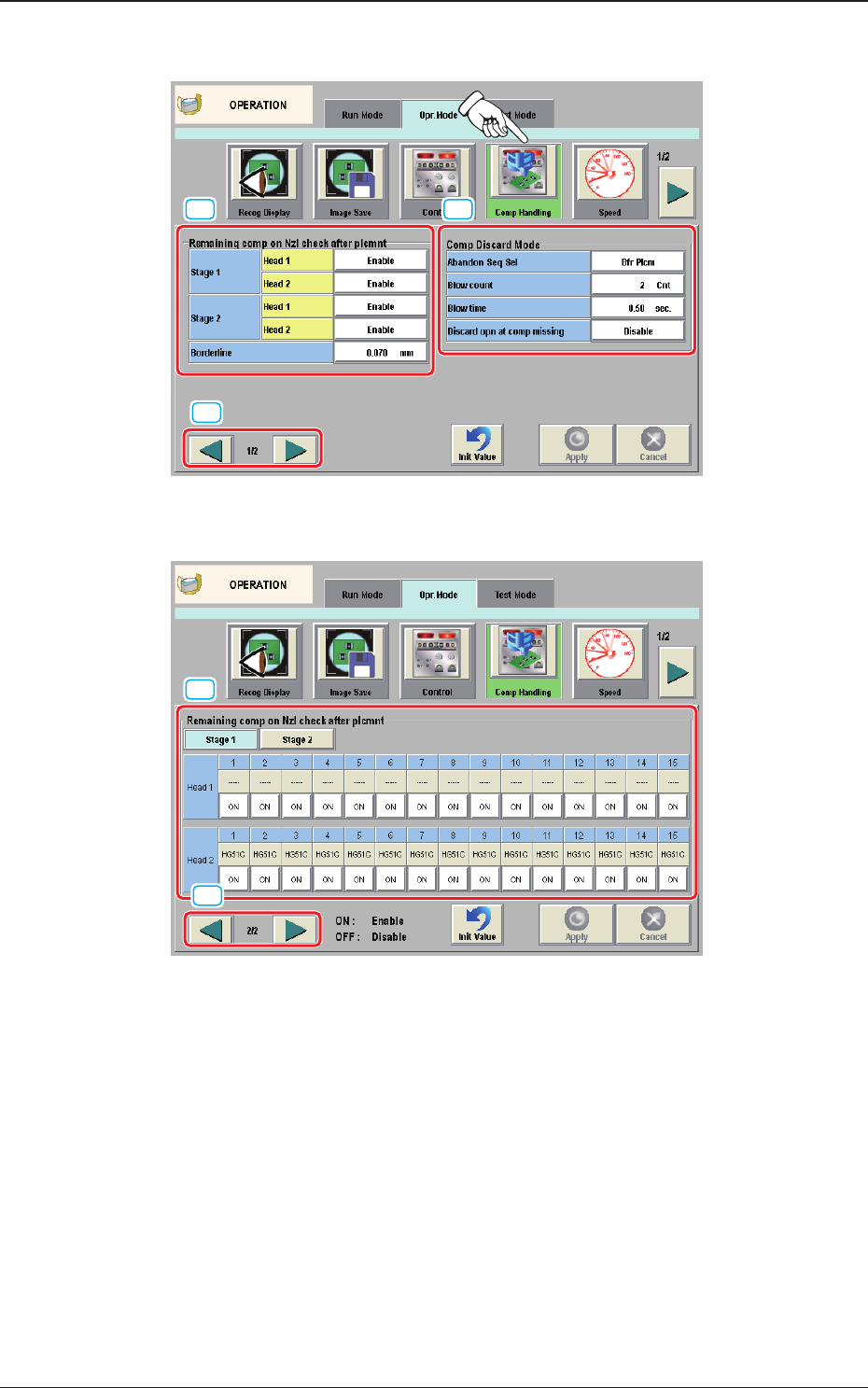
4.2.4 Comp Handling
[1] [2]
[4]
F2A4-12 "Comp Handling" Tab Sheet (1/2)
[3]
[4]
F2A4-13 "Comp Handling" Tab Sheet (2/2)
[1] "Remaining comp on Nzl check after plcmnt" Group Box
This function is used to check if no foreign substance or component adheres
to the nozzle end before the nozzle picks up a component.
When a foreign substance or a component is detected, an "ERROR" window
opens and the machine stops running after it has taken an abandoning action.
1212-002
4.2 "Opr.Mode" Tab Sheet
2OM-1733
1-4-18
Head 1, Head 2
Disable
When this button is selected, the pre-pick nozzle conrmation function is
not activated.
Enable
When this button is selected, the pre-pick nozzle conrmation function is
activated.
Borderline
This button makes it possible to determine the judgement level for the pre-
pick nozzle conrmation function.
[2] "Comp Discard Mode" Group Box
Specify the timing to abandon the components.
Abandon Seq Sel
Aft Plcm
When this button is selected, the machine abandons the components that
were left behind (not placed) after it has placed the picked component on
the PCB.
Bfr Plcm
When this button is selected, the machine abandons the components that
cannot be placed before it places the picked component on the PCB.
Notice
In normal cases, it is recommended that the [Bfr Plcm] button be
selected.
For the stage on which the coplanarity unit (option) is installed, be
sure to select the [Aft Plcm] button.
Blow Count
Specify the number of blowing times.
Blow time
Specify the period of time during which air should be blown.
Discard opn at comp missing
"Enable" or "Disable" for the component discarding movement when the
component is missing, is selected.
1205-002
4.2 "Opr.Mode" Tab Sheet
2OM-1733
1-4-191204-001
4.2 "Opr.Mode" Tab Sheet
[3] Remaining comp on Nzl check after plcmnt
[Stage 1], [Stage 2]
Using these buttons, the stage where the nozzle is checked before the
component pick-up, is selected.
Setting the button which is displayed under each nozzle in the Head 1 or 2,
to "OFF", cancels the nozzle check before the component pick-up operation
for each nozzle.
ON
: The nozzle check before pick-up operation is to be performed.
OFF
: The nozzle check before pick-up operation is not to be performed.
Note
Setting it to "OFF" for the nozzles with larger diameter, prevents a
malfunction such as a machine stop in such case that solder debris, etc.,
attached to the nozzle, is judged as a component taken back by the nozzle.
[4] Page Change Button
Using this button, the page for the "Control (Picked-up Component)"
Window is changed.