OM-1068-001.pdf - 第120页
1 1. Others 1 1.1 Operation of Multi-Layer T ray Feeder from Main Machine Side • The multi-layer tray feeder must be selected for use in advance for the cur- rent program before operating the feeder from the main machine…

10. Shut-Down Operation (End of Production)
Press the [POWER OFF] button on the operation panel.
Turn off the power breaker (
{) located on the front side of the machine to
shut off the power completely.
10. Shut-Down Operation (End of Production)
0010-002 Chapter 1 2-36 Tg0252-PM-SO
11. Others
11.1 Operation of Multi-Layer Tray Feeder from Main Machine
Side
• The multi-layer tray feeder must be selected for use in advance for the cur-
rent program before operating the feeder from the main machine side.
11.1.1 Changing from “NEUTRAL” to “LINE” Mode
Operation Procedure
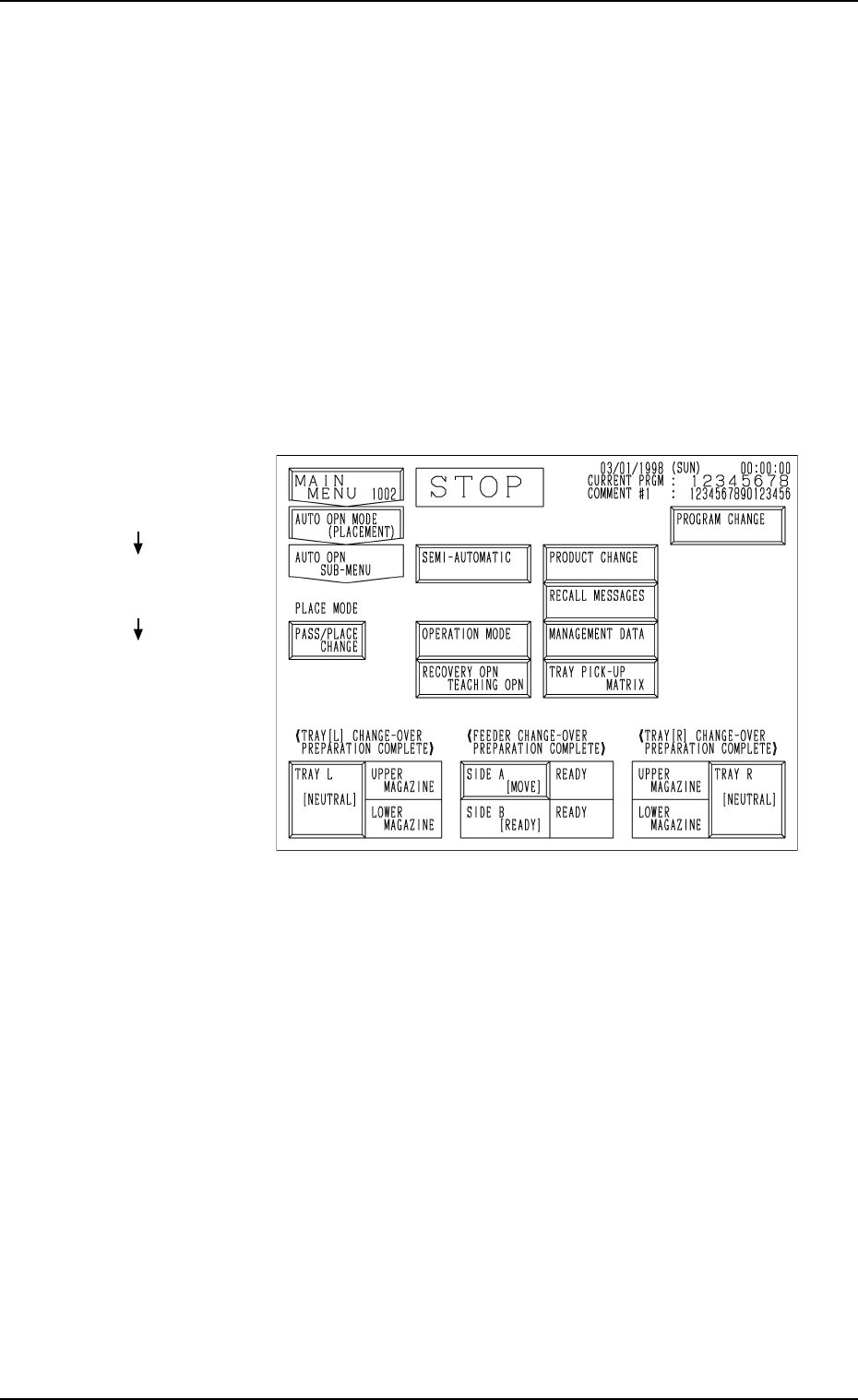
(1) Press the [AUTO OPN SUB-MENU] key at the “AUTO OPN MODE
<PLACEMENT>” display on the main machine side.
The display (Fig. 1.44) appears on the screen.
Fig. 1.44
(2) Press the [TRAY L [NEUTRAL]] or the [TRAY R [NEUTRAL]] key.
The multi-layer tray feeder is set in the “LINE” mode.
11. Others
Hierarchical Sequence
(Display)
“MAIN MENU”
“AUTO OPN. MODE
<PLACEMENT>”
“AUTO OPN. SUB-MENU”
0010-002 Chapter 1 2-37 Tg0252-PM-SO
11.1.2 Zeroing Operation Maneuvered on Main Machine Side
To zero the multi-layer tray feeder from the main machine side, the multi-
layer tray feeder must be selected for use in advance for the current program.
11.1.2.1 Zeroing Operation Procedure at “AUTO OPN
SUB-MENU” Display
(1) Press the [AUTO OPN. SUB-MENU] key at the “AUTO OPN MODE
<PLACEMENT>” display.
The “AUTO OPN SUB-MENU” display (Fig. 1.44) appears on the screen.
(2) Press the [TRAY L [NEUTRAL]] and [TRAY R [NEUTRAL]] keys.
The multi-layer tray feeders are set in the “LINE” mode.
(3) Press the [ZERO] button.
The main machine and the multi-layer tray feeders are zeroed.
Ref.: When one of the multi-layer tray feeders is not set in the “LINE”
mode, the “CHECK” display appears, indicating that the zeroing
operation cannot be performed.
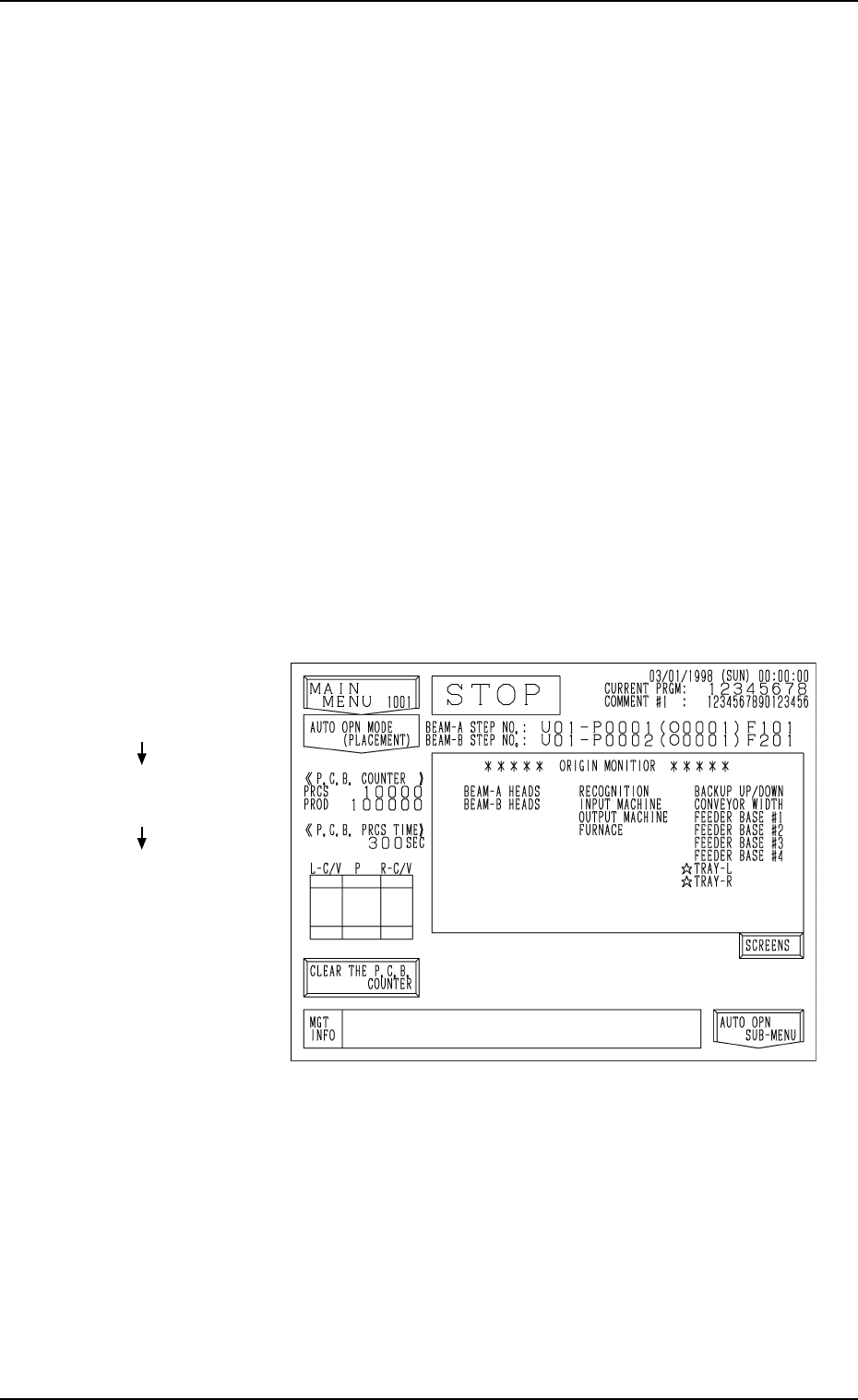
(4) Press the [AUTO OPN MODE] key.
The display (Fig. 1.45) appears on the screen.
Fig. 1.45
(5) Confirm that each device is marked with “” in the “***** ORIGIN
MONITOR *****” field.
Hierarchical Sequence
(Display)
“MAIN MENU”
“AUTO OPN MODE
<PLACEMENT>”
“AUTO OPN. SUB-MENU”
11. Others
0112-003 Chapter 1 2-38 Tg0252-PM-SO