OM-1068-001.pdf - 第123页
(1) Press the [TRA Y FEEDER (L)] or the [TRA Y FEEDER (R)] key . Ref.: Both keys cannot be selected at a time. (2) Press the [MOVE] button of the main machine. The selected devices are zeroed. (The LED of the [MOVE] butt…
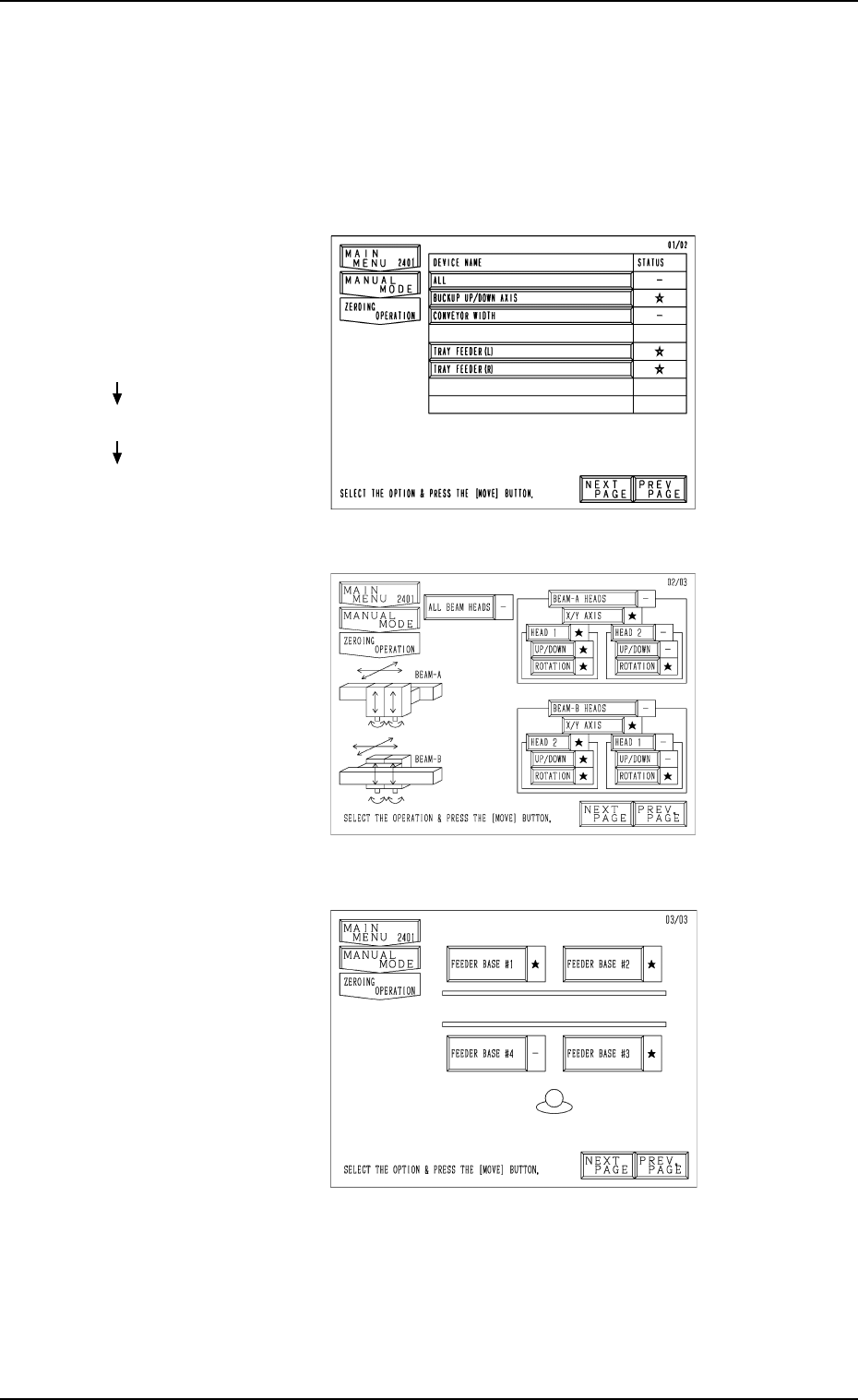
11.1.2.2 Operation Procedure at “ZEROING OPERATION” Display
• Press the [ZEROING OPERATION] key at the “MANUAL MODE” dis-
play. The display (Fig. 1.46-1) appears on the screen.
Every time the [NEXT PAGE] or the [PREV. PAGE] key is pressed, another
or previous page appears on the screen.
Fig. 1.46-1
Fig. 1.46-2
Fig. 1.46-3
Second Page
Third Page
First Page
Hierarchical Sequence
(Display)
“MAIN MENU”
“MANUAL MODE”
“ZEROING OPERATION”
11. Others
0112-003 Chapter 1 2-39 Tg0252-PM-SO

(1) Press the [TRAY FEEDER (L)] or the [TRAY FEEDER (R)] key.
Ref.: Both keys cannot be selected at a time.
(2) Press the [MOVE] button of the main machine.
The selected devices are zeroed.
(The LED of the [MOVE] button illuminates while the devices are being
zeroed.)
(3) When the zeroing operation is completed, “” appears in the “STA-
TUS” text box.
(While the current position is being managed or indefinite, “-” appears in
the text box.)
• To zero all devices, select the [ALL] key and press the [MOVE] but-
ton.
All devices possible to be returned to their origins are zeroed.
Note: When the [OPERATION/SET UP] switch is set to the “SET UP”
side, the zeroing operation cannot be performed.
Refer to “5. Zeroing Operation of Section 4 in Volume 1” in the main machine
instruction manual for details.
11. Others
0010-002 Chapter 1 2-40 Tg0252-PM-SO
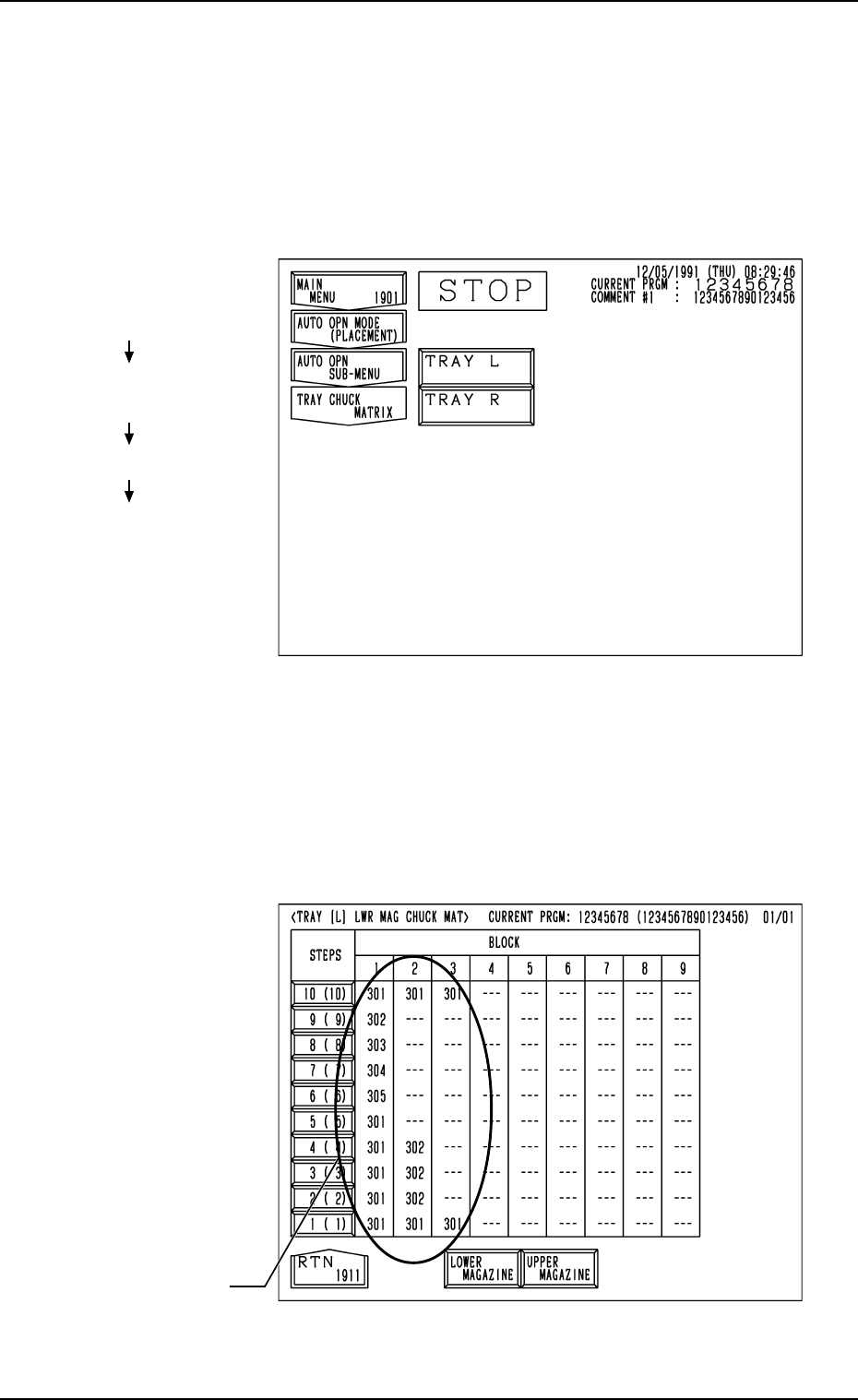
11.1.3 Tray Chuck Matrix Change Operations
Refer to “7. Tray Pick-Up Matrix (Option) of Section 3 in Volume 1” in the
main machine instruction manual for details.
Operation Procedure
(1) When the [TRAY CHUCK MATRIX] key is pressed at the “AUTO OPN
SUB-MENU” display, the following display appears on the screen.
Fig. 1.48
Fig. 1.47
(2) Press the [TRAY L] or the [TRAY R] key to select the multi-layer tray
feeder L or R.
When the [TRAY L] or the [TRAY R] key is pressed, the following dis-
play appears on the screen.
(In this example, the “TRAY [L] LWR MAG CHUCK MAT” display is
shown. The display for “Tray R” looks like this.)
Hierarchical Sequence
(Display)
“MAIN MENU”
“AUTO OPN MODE
<PLACEMENT>”
“AUTO OPN SUB-MENU”
“TRAY CHUCK MATRIX”
11. Others
FDR. No.
0010-003 Chapter 1 2-41 Tg0252-PM-SO