OM-1068-001.pdf - 第160页
Chapter 3 1-3 Tg0252-PM-SO 2. Case: Power is not supplied to the multi-layer tray feeder 2. Case: Power is not supplied to the multi-layer tray feeder . 01 12-003 The multi-layer tray feeder cannot be powered up. Is the …

9911-001 Chapter 3 1-2 Tg0252-PM-SO
1. Confirmation of Low Component Pick-Up Rate
(Handling Errors)
Check Procedure
(1) Check the following management information and grasp
the contents, the frequency, and the trend of pick-up er-
rors.
The management information can be checked on the main
machine side.
• Machine Performance Data and Component Handling
Errors in Management Data
• Nozzle Management Data in Management Data
• Head Management Data in Management Data
• Handling Error per Feeder Location in Pattern Program
Management Data
• Recall Handling Error
• Recall Component Recognition Error
(2) Check whether the vacuum pressure for component
picks is correctly adjusted.
Check the vacuum pump and pipes.
Refer to “Volume 3 Troubleshooting ” in the main
machine instruction manual for details.
(3) Check whether the proper vacuum nozzles are selected.
If not, components cannot be picked up.
When a nozzle having a small diameter is selected for
large components, components may not be picked up due
to lack of pick-up force.
(4) Check whether the component pick-up position is
normal.
If not, components cannot be picked up correctly.
Confirm whether the offset of the traverse axis, the tray
offset in the pallet, the tray matrix size, and the height
data of the tray and the component is normal.
(5) Check whether a problem exists in the transfer of
pallets.
Check whether a pallet bounds while it is pulled out from
the elevator or stored in it.
If the pallet bounds, the components in the tray may pop
out from the tray, making it impossible for them to be
picked up.
In this case, check the offset of the elevator.
(6) Check whether the tray is fixed securely.
If not, the tray will move while the pallet is pulled out or
stored, the tray position will be changed, and the pick-up
position will be shifted from the correct one.
1. Confirmation of Low Component Pick-Up Rate (Handling Errors)
Hierarchical Sequence
(Display)
“MAIN MENU”
“SPECIAL SEL.”
“MANAGEMENT DATA”
Chapter 3 1-3 Tg0252-PM-SO
2. Case: Power is not supplied to the multi-layer
tray feeder
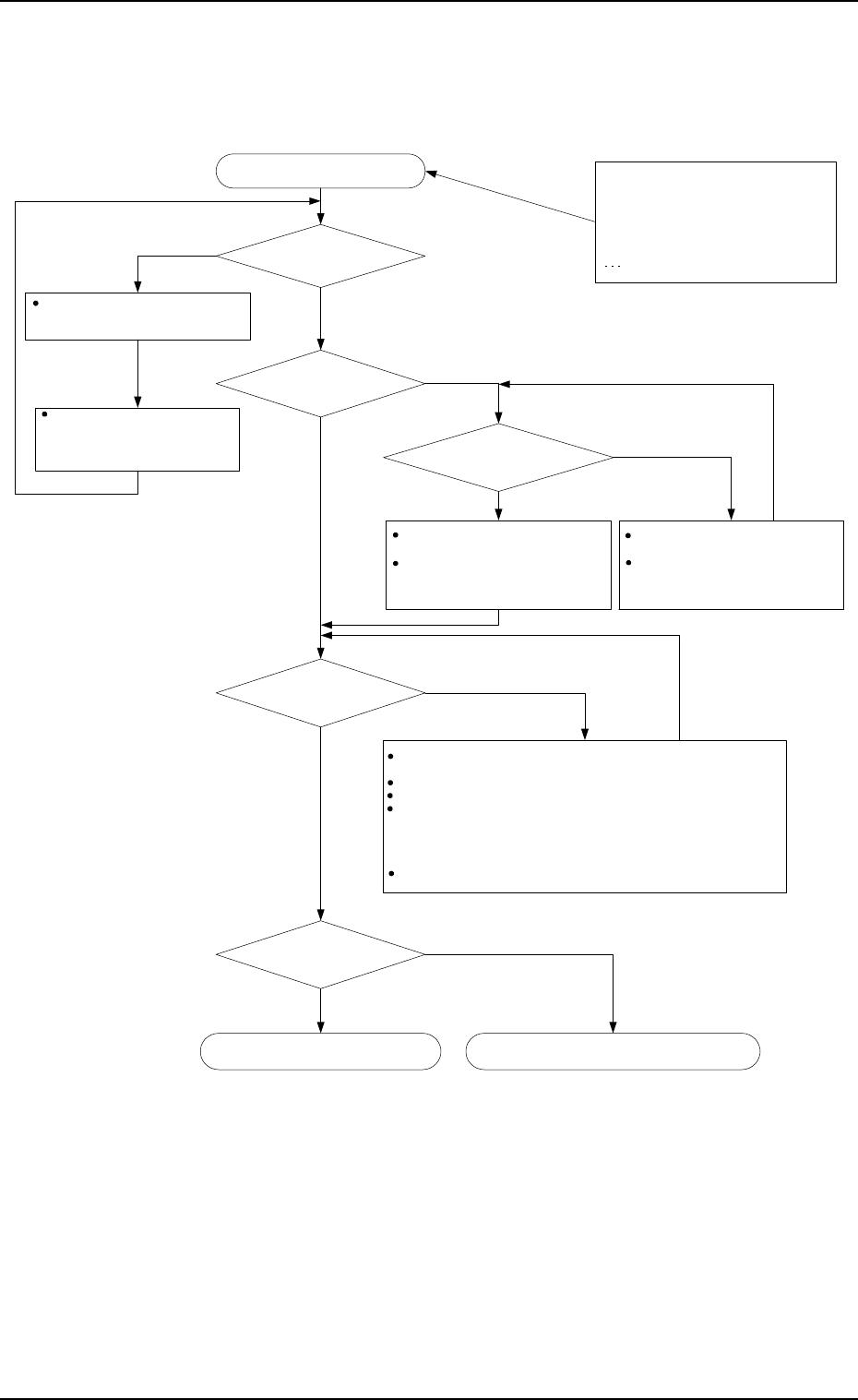
2. Case: Power is not supplied to the multi-layer tray feeder.
0112-003
The multi-layer tray feeder
cannot be powered up.
Is the main machine
powered?
Is the operation monitor
of the multi-layer tray working
correctly?
Supply power to the main machine.
Check the power supply to the main
machine.
Turn on the power breaker crank
of the main machine and hold
down the [POWER ON] button for
a few seconds to supply power to
the machine.
When an [EMERGENCY STOP] button of the main machine is
pressed, release it.
When the safety door of the main machine is open, close it.
When the load power of the main machine is shut off, turn it on.
When Q401 and Q402 of the main machine are tripped, remove the
cause and reset them to the normal condition.
(Refer to "Layout of Conveyor 2 of Section 7 in Volume 5" in the
main machine instruction manual for the location of Q401 and
Q402.)
Check how KM31 and KM32 of the main machine work.
Is power supplied to the
traverse shaft?
Is power supplied to the
elevator shaft?
Is the power LED of the
operation monitor "ON"?
Check whether or not the
connector (X504) is connected.
To locate the connector, remove
the lower cover.
(See Fig. 1-2-1.)
Check whether or not the
connector (X504) is connected.
To locate the connector, remove
the lower cover.
(See Fig. 1-2-1.)
To Item 3. case : Power is not supplied to
the elevator shat.
Consult our service personnel or
marketing department for details.
[Symptom]
Nothing is displayed on the operation
monitor.
No power is supplied to the elevator
shaft.
No power is supplied to the traverse
shaft.
etc.
NO
NO
YES
NO
YES
YES
NO
YES
NO
YES
Chapter 3 1-4 Tg0252-PM-SO
3. Case: Power is not supplied to the elevator shaft
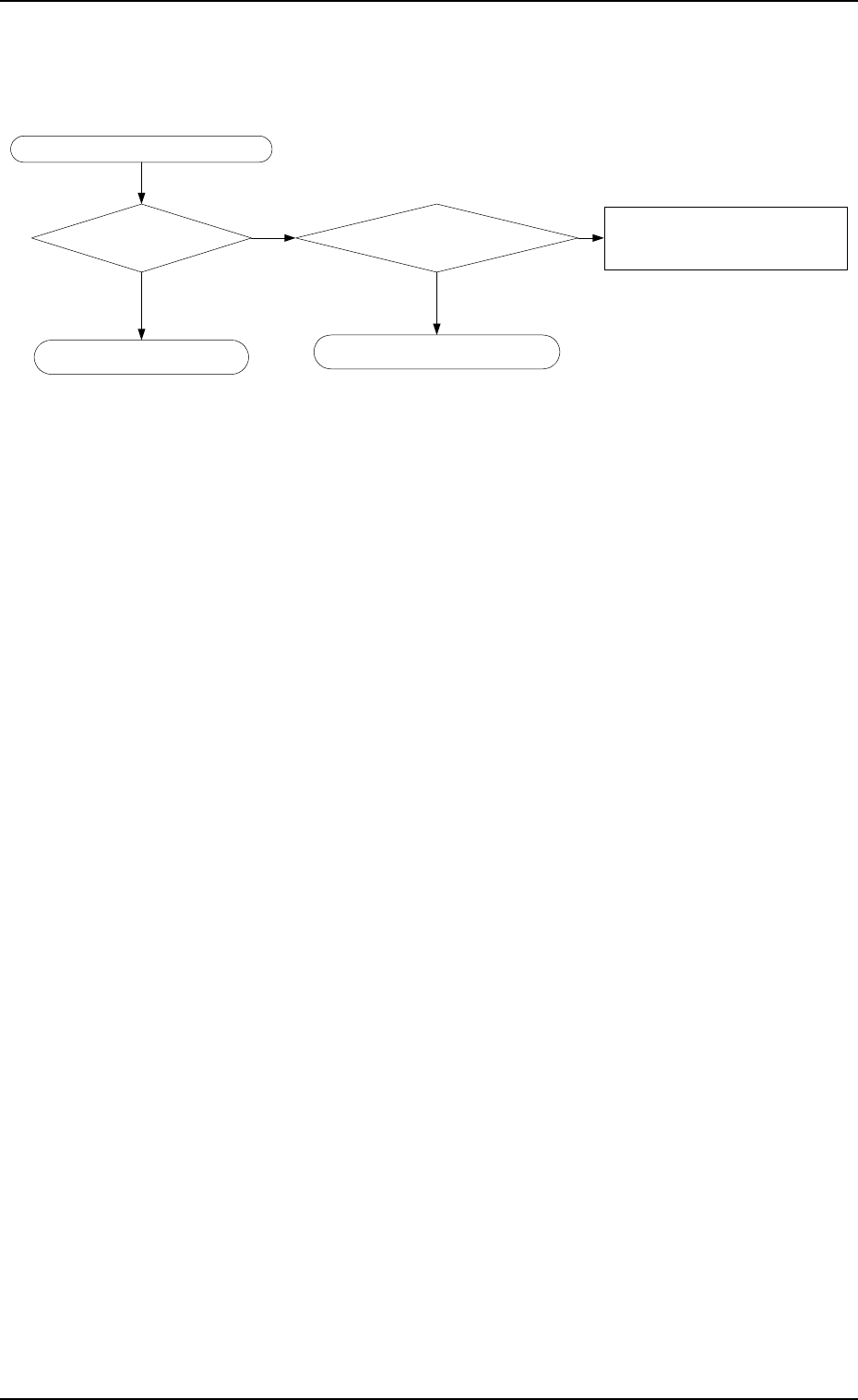
3. Case: Power is not supplied to the elevator shaft.
0112-003
Power is not supplied to the elevator shaft.
Are the upper and
lower doors closed?
Are they locked?
Are the upper and lower
magazines disconnected?
Close the upper and lower doors and
press [U READY] and [L READY]
buttons.
The doors are locked.
NO
Consult our service or marketing
department for details.
Consult our service or marketing
department for details.
YES YES
NO