OM-1068-001.pdf - 第217页
0005-002 Chapter 3 3-2 Tg0252-PM-SO 1. Starting Guidance When a pushbutton on the operation panel is pressed under the condition that requirements for a device to be activated are not fulfilled with the machine in the “S…

0010-002 Chapter 3 3-1
Tg0252-PM-SO
Management Information Messages
Section 3
0005-002 Chapter 3 3-2 Tg0252-PM-SO
1. Starting Guidance
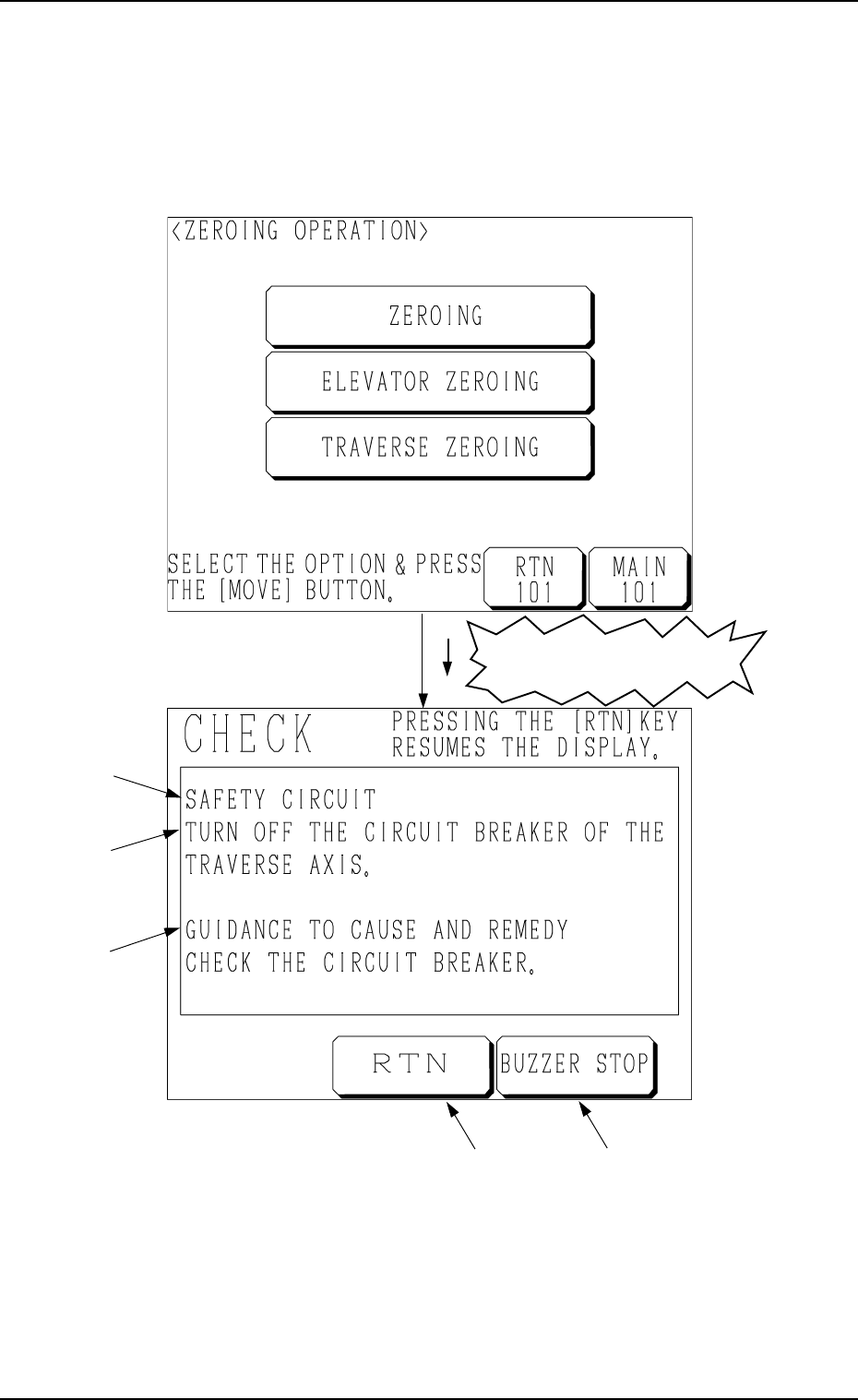
When a pushbutton on the operation panel is pressed under the condition that
requirements for a device to be activated are not fulfilled with the machine in
the “STOP” or the “PAUSE” mode, a “CHECK” display (Fig. 3.4) appears on
the screen.
1. Starting Guidance
A : Check Message
B : Description of Check Message
C : Guidance to Cause and Remedy of Nonfulfillment of Starting Require-
ments
D : This key is used to stop buzzer sound.
E : This key is used to stop buzzer sound and resume the display opened
before the “CHECK” display.
Refer to “3. List of Check Messages of Section 3 in Chapter 3” for details.
Fig. 3.4
A
B
C
ED
Fig. 3.3
Nonfulfillment of Starting
Requirements

9911-001 Chapter 3 3-3 Tg0252-PM-SO
2. Reset Procedure after Check Message
Operation Procedure
(1) Press the [BUZZER STOP] key. (See Fig. 3.4.)
The buzzer stops sounding.
(2) Check the contents of the check message and the remedial procedure
(GUIDANCE TO CAUSE AND REMEDY) displayed on the operation
monitor.
(3) Remove the cause of the nonfulfillment of starting requirements.
(4) Press the [RTN] key. The original display resumes.
2. Reset Procedure after Check Message