YV180X_Mainte_E.pdf - 第145页
6 -7 SED8013110 Service Manual Chapter 6 6 Conveyor unit and air supply unit adjustment 1 Adjust the conveyor width according to the size of the PCB. T o adjust the conveyor width, the <3/4A0 CONVEYOR UNITS> - ” CO…
6
-6
Service Manual
Chapter 6
SED8013110
6
Conveyor unit and air supply unit adjustment
1.2 Conveyor speed
The conveyor speed varies according to the frequency of the power supply
and the weight of the PCBs on the conveyor. You can adjust the carry-in
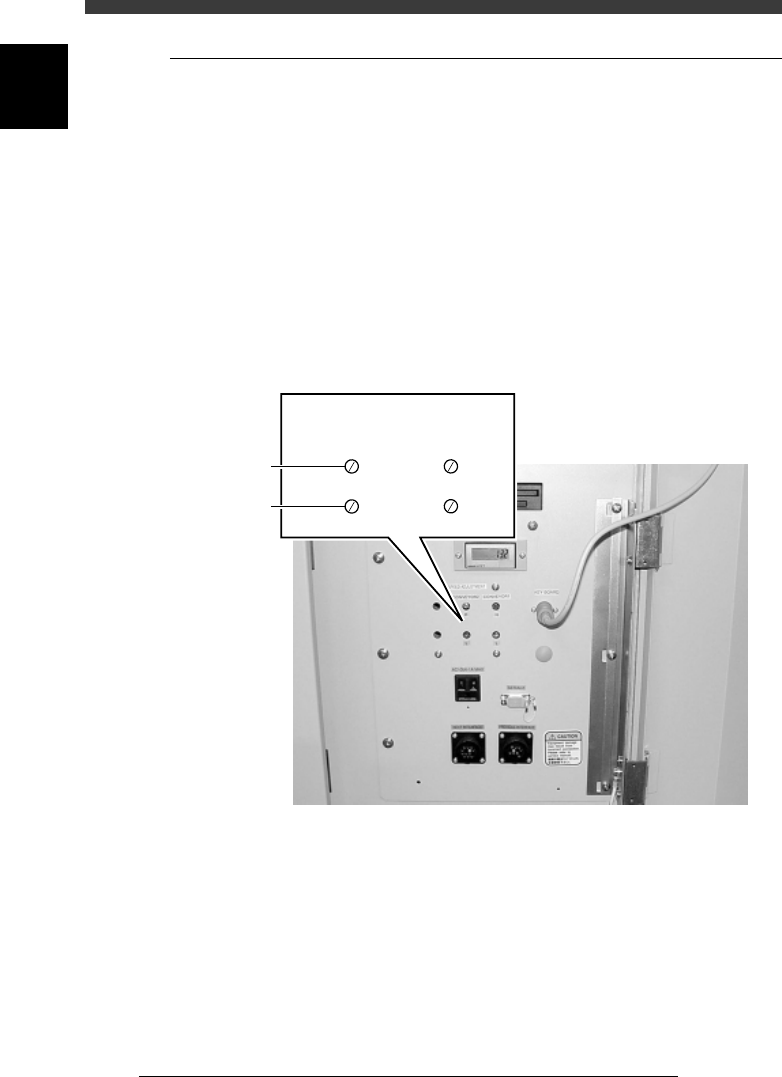
and carry-out conveyor speeds by using the adjustment screws located
inside the lower right panel on the front side.
The YV180X conveyor section is divided into 4 conveyors: carry-in
conveyor, B-table conveyor, A-table conveyor and carry-out conveyor. The
carry-in and carry-out conveyors each move at two different speeds: a high
speed (H) for reducing the transfer time of PCBs and a low speed (L) for
minimizing impact when the PCB hits the entrance stopper and exit
stopper. To adjust these speeds, prepare typical PCBs and use the proce-
dure below.
Conveyor speed adjustment screws
43611-D8-00
SPEED ADJUSTMENT
High speed
Low speed
CONVEYOR 2 CONVEYOR 1
HH
LL
6
-7
SED8013110
Service Manual
Chapter 6
6
Conveyor unit and air supply unit adjustment
1 Adjust the conveyor width according to the size of the
PCB.
To adjust the conveyor width, the <3/4A0 CONVEYOR UNITS> - ”CONV.
WIDTH” command will prove convenient.
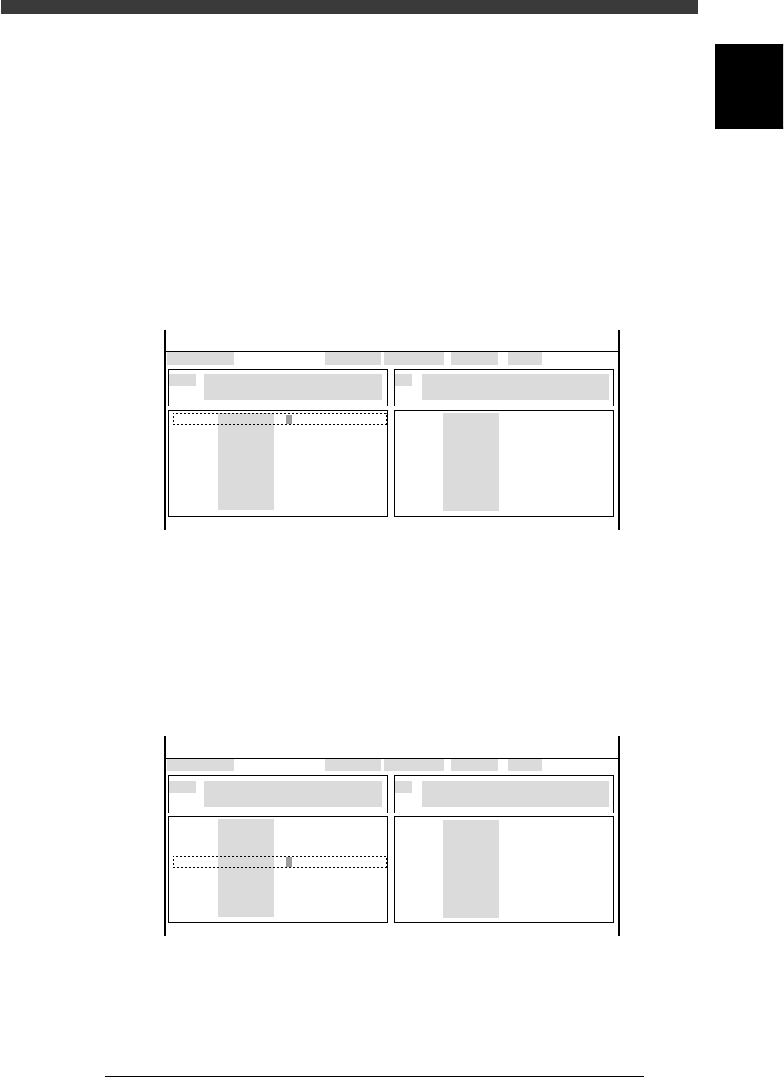
2 Open the output monitor screen and turn on the conveyor.
1. Select <3/4/A1 INPUT/OUTPUT MONITOR> - “SELECTION” -
“CONVEYOR” and press the [ENTER] key.
2. Use the arrow keys to line up the cursor with “T1834” (ENT. CON-
VEYOR ON).
3. Press the [ENTER] key to turn on the conveyor.
The output monitor digit for “T1834" reads “1” when the conveyor is
on and reads “0” when it is off.
47602-D8-00
CONV
CONV
CONV
CONV
CONV
CONV
CONV
CONV
OUT
0
0
0
0
0
0
0
0
0
0
0
0
0
0
0
0
IN
T1834
T1860
T1863
T1835
T1861
T1864
T1925
T1926
N1113
N1117
N1115
N1120
N1116
N1030
N1121
N1123
I/O MONITOR DISP. TYPE SELECTION
ENT.CONVEYOR1 ON
OFF 0 / ON 1
BUSY IN (GATE IN)
NOT DETECT 0 / DETECT 1
CONV
CONV
CONV
CONV
CONV
CONV
CONV
CONV
OBJECT CONV
<<<APPLICATION>>> 3/MAINTE/M
<<MODE>> 4/MANUAL
↑
↓↓
3 While running the conveyor, switch the speed.
1. Use the arrow keys to line up the cursor with “T1835” (ENT. CON-
VEYOR SPEED CHANGE) .
2. Press the [ENTER] key and check the conveyor speed.
The output monitor digit for “T1835" reads “1” when the conveyor is at
low speed, and reads “0” when at high speed.
Switching the conveyor speed
47603-D8-00
CONV
CONV
CONV
CONV
CONV
CONV
CONV
CONV
OUT
0
0
0
0
0
0
0
0
0
0
0
0
0
0
0
0
IN
T1834
T1860
T1863
T1835
T1861
T1864
T1925
T1926
N1113
N1117
N1115
N1120
N1116
N1030
N1121
N1123
I/O MONITOR DISP. TYPE SELECTION
CONVEYOR1 SPEED LOW
HIGH 0 / LOW 1
BUSY IN (GATE IN)
NOT DETECT 0 / DETECT 1
CONV
CONV
CONV
CONV
CONV
CONV
CONV
CONV
OBJECT CONV
<<<APPLICATION>>> 3/MAINTE/M
<<MODE>> 4/MANUAL
↑
↓↓
4 Adjust the high speed.
While running the carry-in conveyor at high speed, adjust the speed by
turning the “H” screw.
Do not set the speed too high, as this may hamper switching response.
Position the “H” screw at a point slightly slower than the maximum speed.

6
-8
Service Manual
Chapter 6
SED8013110
6
Conveyor unit and air supply unit adjustment
5 Raise the entrance stopper.
1. On the OUTPUT MONITOR screen, move the cursor to “T1925” (ENT.
CONVEYOR STOPPER).
2. Press the [ENTER] key to raise the entrance stopper.
The output monitor digit for “T1925” reads “1” when the entrance
stopper is raised, and reads “0” when it is lowered.
6 Adjust the low speed.
While running the carry-in conveyor at low speed and carrying in a PCB,
adjust the speed by turning the “L” screw. Adjust the “L” screw so that the
PCBs are not subjected to a strong impact when they hit the entrance
stopper.
7 Adjust the carry-out conveyor speeds in the same way.
The output monitor codes used to adjust the carry-out conveyor speeds are
as follows.
“T1826” (EXIT CONVEYOR ON)
“T1827” (EXIT CONVEYOR SPEED CHANGE)
“T1926” (EXIT CONVEYOR STOPPER)
8 Quit the adjustment.
After pressing the emergency stop button, remove the PCB from the
conveyor. (There is no machine data to be saved in this adjustment.)