YV180X_Mainte_E.pdf - 第96页
4 -38 Service Manual Chapter 4 SED8013110 4 Machine adjust mode 3.4.1 Adjusting the FOV & focus The following explains how to adjust the FOV (field of view) and focus of the moving camera. Prepare a PCB ha ving obvio…
4
-37
SED8013110
Service Manual
Chapter 4
4
Machine adjust mode
3.4 Moving camera
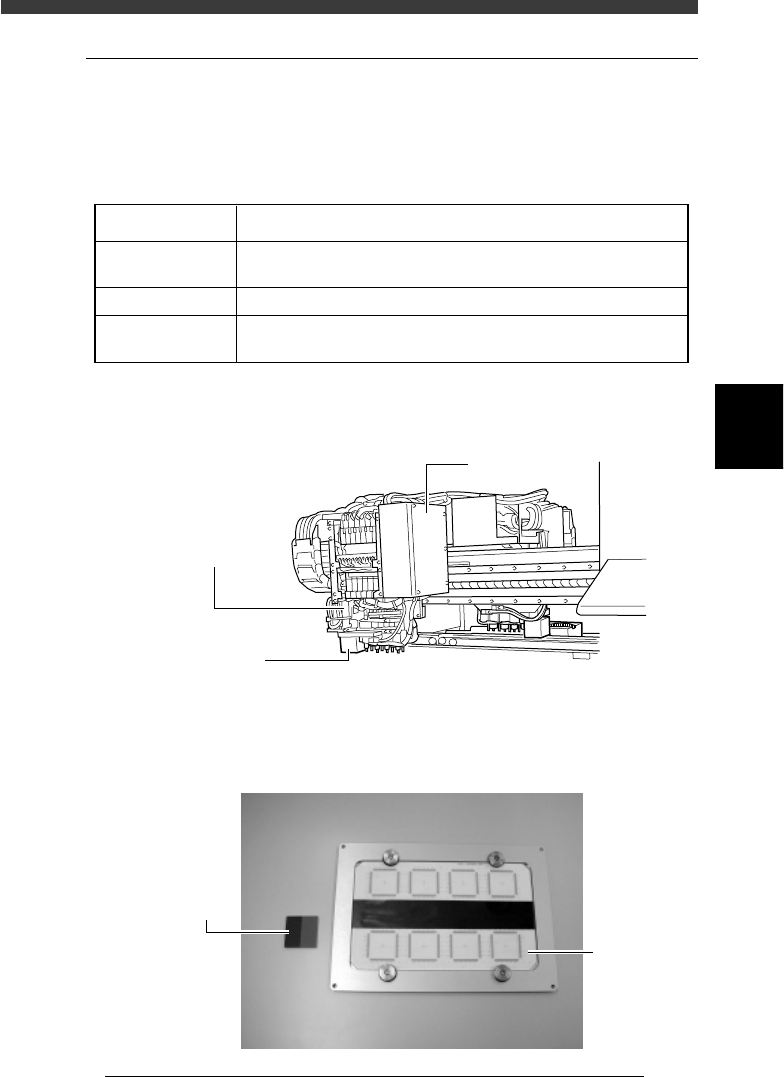
The moving camera is installed in the head assembly and used to recognize
PCB fiducial marks or perform coordinate teaching. The focus, lighting
level and the scale of the moving camera must be adjusted correctly.
Adjustment items for moving camera
45404-D8-00
FOV & Focus
Brightness
Camera Scale
A PCB having clear characters or marks to be focused is used.
For more accurate adjustment, use of a glass PCB is recommended.
A light adjuster plate (KV1-M8806-0XX) is used.
A PCB having marks of accurate dimensions is used
For more accurate adjustment, use of a glass PCB is recommended.
Adjustment items Description
Moving camera and lighting unit
43415-D8-00
Moving camera
Recognizes the marks
on a PCB or performs
teaching or tracing.
I/O board cover
LED for moving
camera
Used to illuminate
marks on the PCB.
Adjustment tools (option) for moving camera
43420-D8-00
Light adjuster
(KV1-M8806-0XX)
Glass PC
B
4
-38
Service Manual
Chapter 4
SED8013110
4
Machine adjust mode
3.4.1 Adjusting the FOV & focus
The following explains how to adjust the FOV (field of view) and focus of
the moving camera. Prepare a PCB having obvious characters or marks that
can be used for focusing.
Reference
YAMAHA uses a glass PCB with minimal warp and distortion, specially designed for
adjustment work. To make more accurate adjustments, we recommend using this glass
PCB (sold separately).
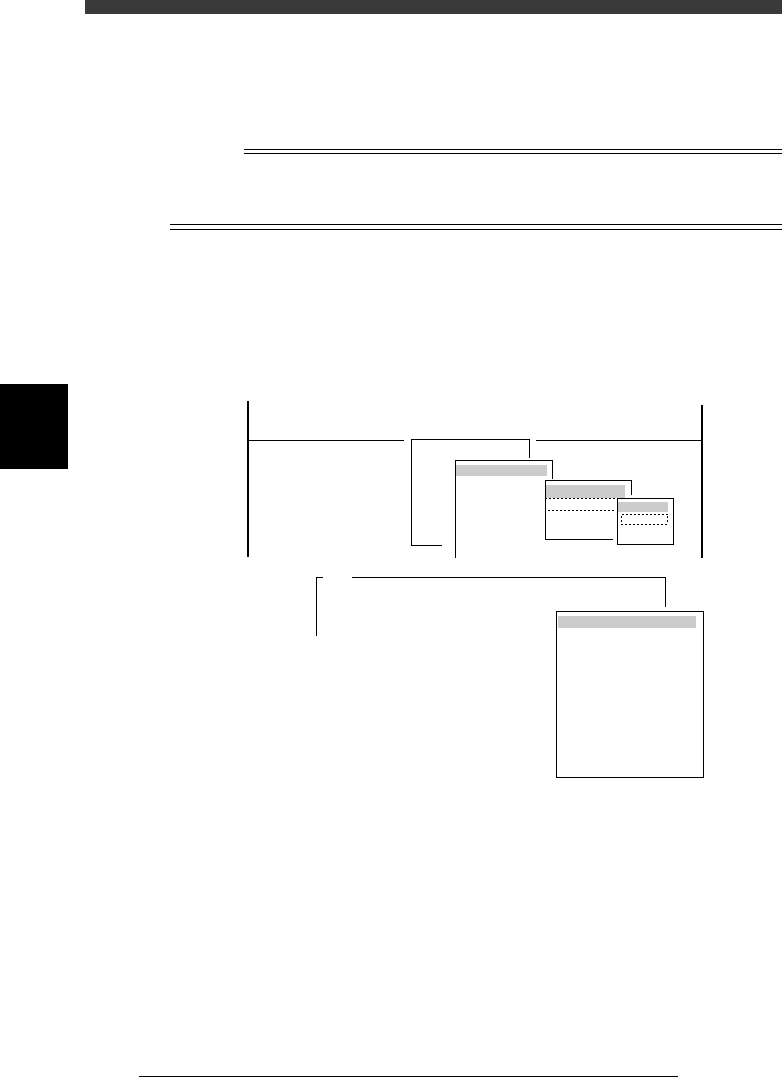
1 Run the “Moving Camera” - “FOV & Focus” command.
1. Select <3/3/B1 ADJUST TARGET> - “Moving Camera” - “FOV & Focus”
and press the [ENTER] key.
2. Select the conveyor table and press the [ENTER] key.
The CONVEYOR UNIT menu box appears.
47428-D8-00
A426
Please put the specified PCB at the mount position
with the conveyor unit utility.
After.....
(STS.)
OFF
OFF
OFF
OFF
OFF
OFF
OFF
OFF
OFF
OFF
LOCATE PIN
PUSH UP
PCB CLAMPE
EDGE CLAMP
PUSH IN
MAIN STOPPER
ENT. STOPPER
EXIT. STOPPER
CONV. MOTOR
CONV. WIDTH
PROGRAM PIN
RETURN
CONVEYOR UNIT
Target
FOV & Focus
Broghtness
Camera Scale
B1 ADJUST TARGET
Object
Moving Camera
<<<APPLICATION>>> 3/MAINTE/M
<<MODE>> 3/MCH_ADJUST
<COMMAND_LIST> B/SAVE & QUIT
Target
Atable
Btable
2 Set the PCB on the conveyor table.
See the mounter operation manual for how to clamp the PCB on the
conveyor.
Always press the emergency stop button before putting your hands in the
axis movement area.
3 Cancel emergency stop after clamping the PCB on the
conveyor.
Release the emergency stop button and press the [READY] button.
4 Select “RETURN” from the CONVEYOR UNIT menu.
You can also use the [ESC] key to exit the CONVEYOR UNIT menu.
4
-39
SED8013110
Service Manual
Chapter 4
4
Machine adjust mode
5 Check safety and press the [ENTER] key.
The teaching screen appears.
47429-C0-00
CAUTION! The axes will move.
Check that everything is safe, then press the [ENTER] ...
A303
<<<Teaching>>>
Please position the cross hair cursor over the
Light Adjuster...
A303
6 Position the target to be focused, in the center of the
screen.
Manipulate the YPU joystick to move the moving camera and conveyor
table so that the target to be focused is positioned in the center of the
screen.
7 Press the [ENTER] key and proceed to the next step.
e
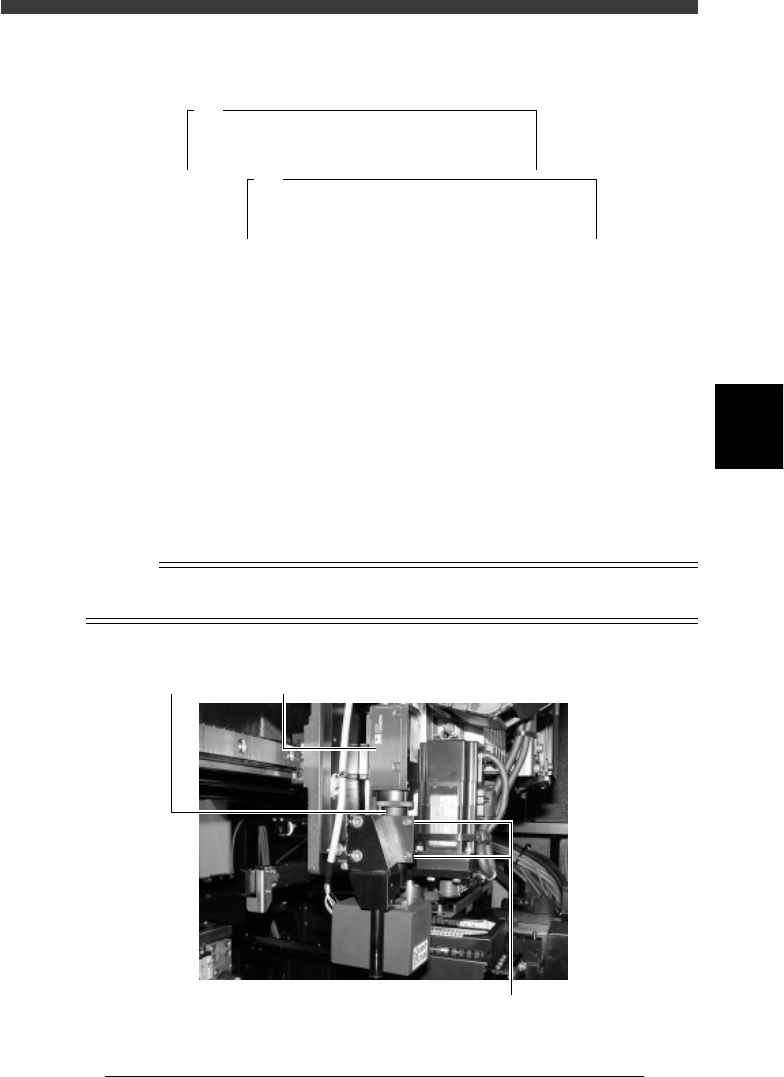
8 Press the emergency stop button and then adjust the FOV
and focus.
Loosen the two bolts clamping the moving camera lens tube (do not
remove them) and gradually move the camera body up or down so that
the best focus is obtained. (The FOV is set to an optimum range at this
point.) After adjusting the focus, tighten the two bolts to temporarily clamp
the lens tube.
Reference
If necessary, the lighting level can be adjusted during focus adjustment by using the UP
and Down arrow keys or [DEL] and [INS] keys.
Moving camera focus adjustment
43421-D8-00
Lens tube Moving camera
Loosen the two bolts and move the camera up or down