YV180X_Mainte_E.pdf - 第59页
3 -22 Service Manual Chapter 3 3 Machine data edit mode MultiCam Marker screen 47320-D8-00 Coord. 1 0.000 182.000 0.000 0.000 0.000 0.000 0.000 0.000 0.000 0.000 0 000 Object Maker 1 Offset Maker 2 Offset Maker Window Ca…
3
-21
Service Manual
Chapter 3
SED8013110
3
Machine data edit mode
6. Precision
When “Precision” is selected from the <3/2/MCH_DATA> main menu, the
submenu appears as shown below. Data entered here are offset parameters
for correcting mounting accuracy and multi camera marker settings for
maintaining .high recognition accuracy.
Submenu box when “Precision” is selected
47319-D8-00
SUB MENU
Zigzag Param.
Parallel Param.
Rotation Param.
MultiCam Marker
MCHDATA SORT
Head
Camera
Machine
Tray Changer
Station
Other
Precision
Spare Data
<<<APPLICATION>>> 3/MAINTE/M
<<MODE>> 2/MCH_DATA
Camera
Camera1
Camera2
Camera3
Camera4
Camera5
Camera6
Camera7
Camera8
6.1 MultiCam Marker
Selecting “MultiCam Marker” from the “Precision” submenu opens the
MultiCam Marker screen showing the offset position of the reference
marker relative to Head 1 and related parameters.
When this function is enabled, the machine recognizes components by
using the reference marker provided on the head assembly. Adverse effects
from mechanical changes over time on recognition accuracy can be
minimized. To use this function with the YV180X, set the MultiCam.
Marker parameter to “Marker 2” on the detail menu in OPTION CONFIG.
mode and to “Use” in component information.
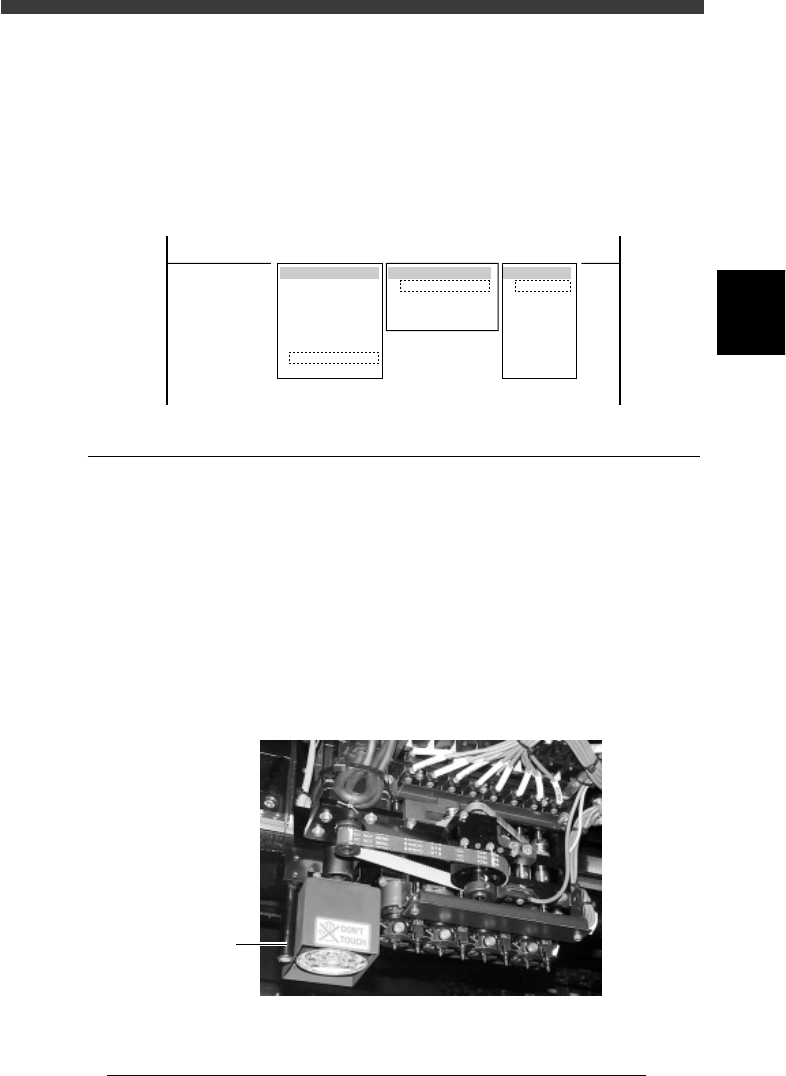
Multi camera marker of YV180X
43302-D8-00
Marker

3
-22
Service Manual
Chapter 3
3
Machine data edit mode
MultiCam Marker screen
47320-D8-00
Coord. 1
0.000
182.000
0.000
0.000
0.000
0.000
0.000
0.000
0.000
0.000
0 000
Object
Maker 1 Offset
Maker 2 Offset
Maker Window
Cam3 Datym +
Cam3 Datym -
Cam4 Datym +
Cam4 Datym -
Cam5 Datym +
Cam5 Datym -
Cam6 Datym +
C6Dt
OBJECT
MultiCam Marker
TCH. UNIT SPEED
- - - - - - - -
A
A
A
A
A
A
A
A
A
A
A
Coord. 2
10.000
0.000
8.000
0.000
0.000
0.000
0.000
0.000
0.000
0.000
0 000
Coord. 3
0.000
0.000
0.000
0.000
-0.135
-0.138
0.000
0 000
Coord. 4
980
0.000
0.000
0.000
0.000
0.000
0.000
0.000
0 000
Option
255
<<<APPLICATION>>> 3/MAINTE/M
<<MODE>> 2/MCH_DATA
Marker Offset - Coord.1, Coord 2
XY offset of the reference marker on the head assembly, relative to Head
1.
Marker Window Window size used to recognize the reference
marker.
Cam Datum + Offset position measured by moving the reference
marker in the left-to-right direction above the
camera.
Cam Datum - Offset position measured by moving the reference
marker in the right-to-left direction above the
camera.
n
NOTE
“Cam Datum +” and “Cam Datum -” parameters can be automatically adjusted by
running the Marker command in MCH_ADUST mode.

1. Machine adjust mode main menus 4-3
2. Utility <3/3/A> 4-4
2.1 Vacuum ON/OFF <3/3/A1> <3/3/A2> .......................................................4-4
2.2 Pickup component <3/3/A3> .....................................................................4-5
2.3 Dump component <3/3/A4> ......................................................................4-7
2.4 Change nozzle <3/3/A5> ...........................................................................4-7
2.5 Head down valve <3/3/A6> .......................................................................4-8
2.6 Change speed <3/3/A7>.............................................................................4-8
2.7 Search origin <3/3/A8> ..............................................................................4-9
3. Adjust target <3/3/B1> 4-10
3.1 Software limits ......................................................................................... 4-11
3.2 Position (machine coordinates) ................................................................4-14
3.3 Pickup/mount vacuum levels ...................................................................4-33
3.3.1 Pickup vacuum level 4-33
3.3.2 Mount vacuum level 4-35
3.4 Moving camera ........................................................................................4-37
3.4.1 Adjusting the FOV & focus 4-38
3.4.2 Adjusting the moving camera lighting level 4-41
3.4.3 Calibrating the moving camera scale 4-45
3.5 Multi-vision camera .................................................................................4-50
3.5.1 Adjusting the FOV & focus 4-51
3.5.2 Adjusting the lighting level 4-55
3.5.3 Calibrating the multi-vision camera scale 4-58
3.5.4 Adjusting the dual-direction recognition offset 4-62
3.5.5 Marker4-65
3.6 R-axis accuracy offset...............................................................................4-67
4. Other commands 4-71
Chapter 4
Machine adjust mode
The machine was completely adjusted at the factory prior to ship-
ment or installation. However, if for some reason adjustments and
parameter settings are needed, refer to this chapter for correct
adjustment and data setting procedures.