YV180X_Mainte_E.pdf - 第91页
4 -33 SED8013110 Service Manual Chapter 4 4 Machine adjust mode 3.3 Pickup/mount vacuum levels 3.3.1 Pickup vacuum level When a nozzle descends and picks up a component, no air is allowed to enter the nozzle so the v acu…
4
-32
Service Manual
Chapter 4
SED8013110
4
Machine adjust mode
Conv. Correct 1 to 4
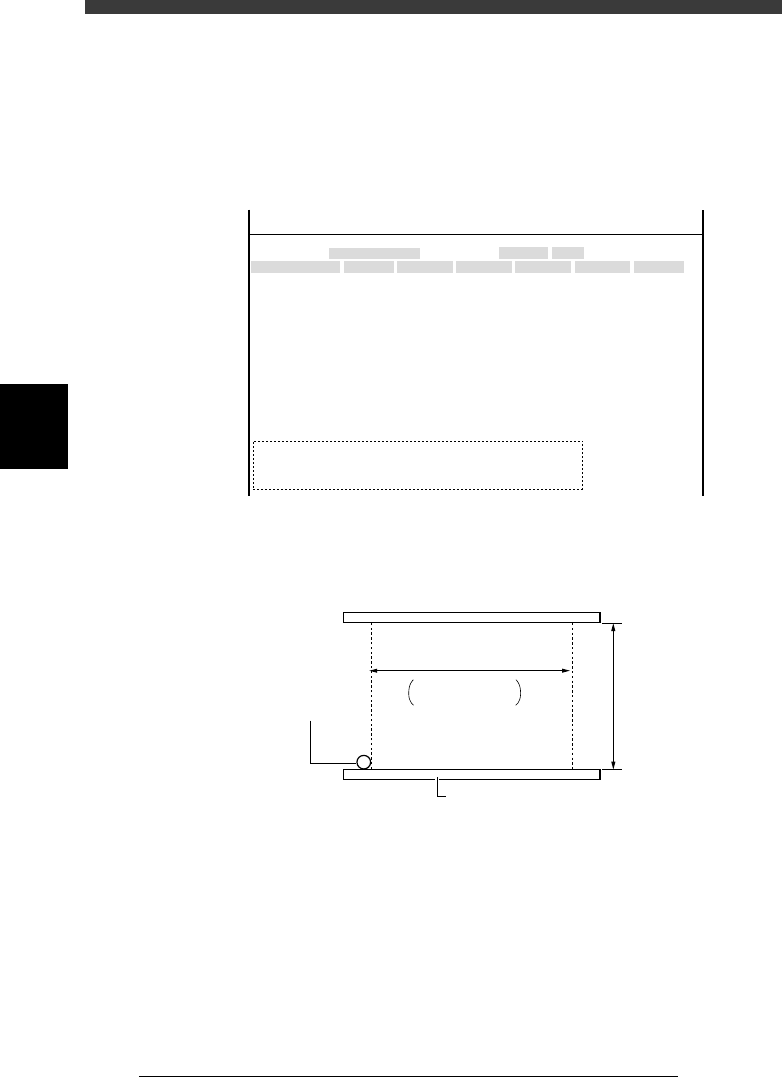
These parameters are used to correct the conveyor surface for non-flatness
(uneven height with position). The positions (XY) at 4 points on the
conveyor table (see below) and their heights (Z) are entered here, with the
conveyor rails widened to its maximum. To re-enter these coordinates, refer
to the teaching procedure for PCB height.
47422-D8-00
X
-28.280
-28.280
562.000
255.916
0.500
100.000
130.000
0.000
10.000
100
-9.709
312.105
312.105
-44.554
Object
FINE mode
Locate pin
Edge Clamp
Wait point
Discard point
PCB Height
Simul. pickarea
QFP clearance
Retry Limit.
Dump station1
Dump station2
Fiducial cor.
T-axis Distance
T-axis Speed
Conv Correct1
Conv Correct2
Conv Correct3
Conv Correct4
Type
NORMAL
100
DUMP
4.00
NO RETRY
2.00
2.00
Nouse
OBJECT
Position
TCH. UNIT SPEED
- - - - - - - -
A
A
A
A
A
A
A
A
A
A
A
A
A
A
A
Y
0.005
118.810
118.810
0.000
71.321
0.5000
150.000
210.000
0.000
30
110.195
110.194
290.522
290.441
Z
0.000
0.000
17.480
0.500
16.000
16.000
0.000
10.000
20
17.438
17.460
17.493
17.512
R
0.000
0.000
0.000
0.000
17.480
0.200
0.000
10.000
Feeder
100
0
0
<<<APPLICATION>>> 3/MAINTE/M
<<MODE>> 2/MCH_DATA
Conveyor height correction points
43407-D8-00
++
++
M type: 330mm
L type: 380mm
Main stopper
Maximum PCB length
Maximum
PCB widt
h
Conveyor rail
43
1
2
1 - 4:Teaching points
4
-33
SED8013110
Service Manual
Chapter 4
4
Machine adjust mode
3.3 Pickup/mount vacuum levels
3.3.1 Pickup vacuum level
When a nozzle descends and picks up a component, no air is allowed to
enter the nozzle so the vacuum pressure sensor detects a higher negative
pressure. When this detected level becomes higher than the preset pickup
vacuum level, the machine determines that the nozzle has picked up a
component. (There are other parameters the machine uses to check compo-
nent pickup.)
The pickup vacuum level should be preset for each head or nozzle, for a
level slightly higher (offset value: 5) than the minimum vacuum level
maintained when the nozzle is open (no component at the nozzle).
When measuring the vacuum level by selecting “All Nozzle Common” (see
step 1), attach Type 72 nozzles to all heads in advance.
1 Run the Vacuum Level command.
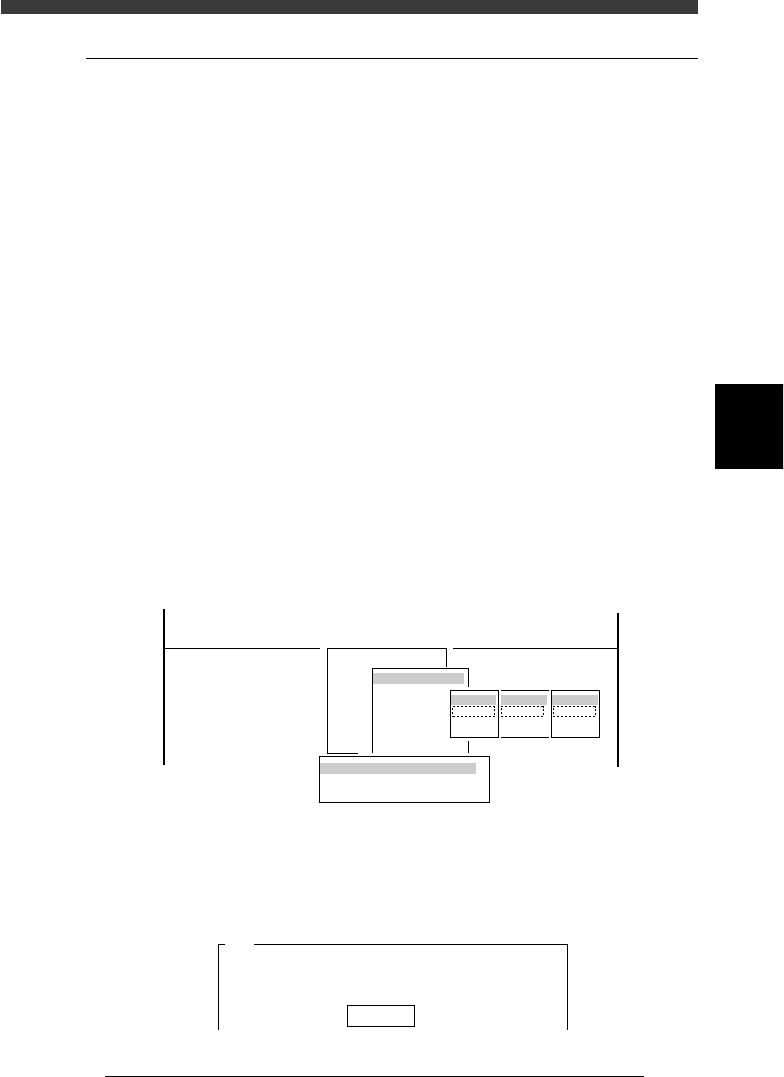
1. Select <3/3/B1 ADJUST TARGET> − ”Vacuum Level” and press the
[ENTER] key.
2. Select “Each Nozzle” or “All Nozzle Common” and press the [ENTER]
key.
3. Select A table” (or “B table”) − “ALL” − ”Pick” and press the [ENTER]
key.
47423-D8-00
B1 ADJUST TARGET
Object
Vacuum Level
<<<APPLICATION>>> 3/MAINTE/M
<<MODE>> 3/MCH_ADJUST
<COMMAND_LIST> B/SAVE & QUIT
tabale
Atable
Btable
Head
ALL
Key in
Target
Pick
Mount
Vaccum Level Measuring Way
Each Nozzle
All Nozzle Common
2 Confirm that [offset 5] is displayed, and press the [ENTER]
key.
An offset of “5” is recommended.
47424-C0-00
A441
Please enter the vaccum level offset value.
The picking vaccum level equals the vaccum level when
the nozzle is......
Offset 5
4
-34
Service Manual
Chapter 4
SED8013110
4
Machine adjust mode
3 Select the nozzle type to perform test.
When the Measuring Nozzle Selection box appears, select the nozzle to
perform vacuum level test and press the [ENTER] key. (The Measuring
Nozzle Selection box does not appear when “All Nozzle Common” was
selected in step 1.)
4 Change the nozzles by following the instructions that
appear on the operation monitor.
When changing the nozzles manually, always press the emergency stop
button.
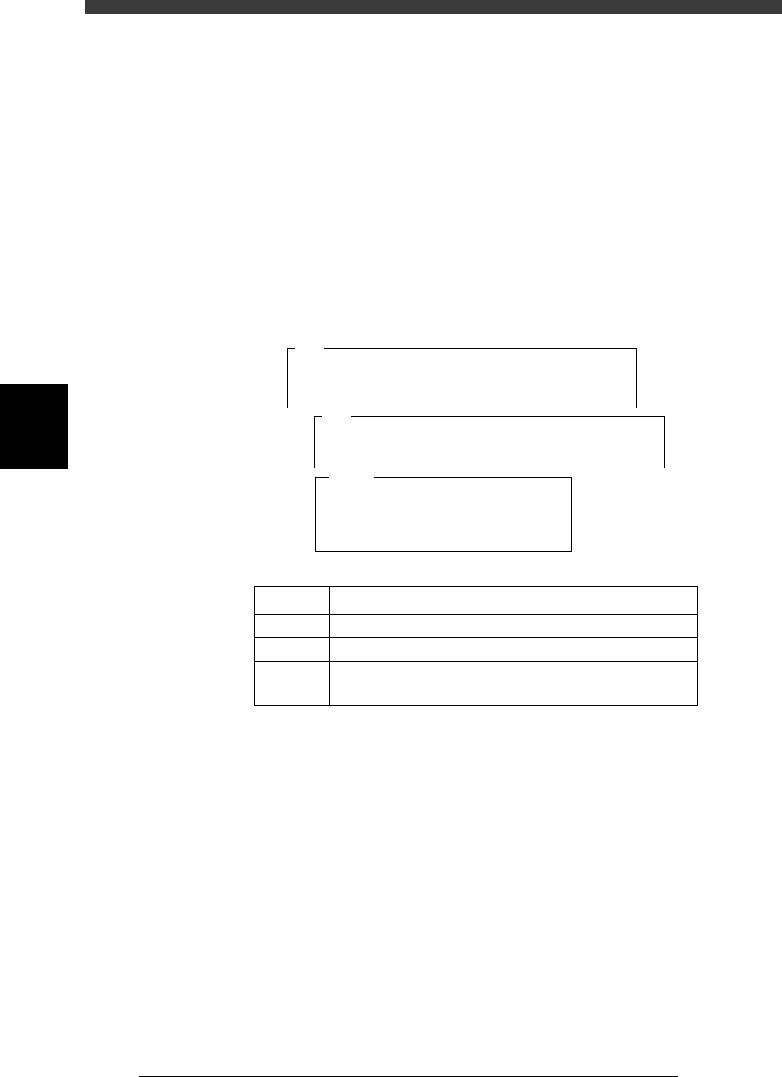
5 Cancel emergency stop and press the [ENTER] key to start
test.
Pickup vacuum level is measured for about 8 to 20 seconds, and the
results are then displayed.
47426-D8-00
Level
Max.
Current
Result
1
XX
XX
XX
XX
2
XX
XX
XX
XX
3
XX
XX
XX
XX
4
XX
XX
XX
XX
5
XX
XX
XX
XX
6
XX
XX
XX
XX
7
XX
XX
XX
XX
8
XX
XX
XX
XX
Atable
A494
<<<Measuring>>>
The vaccum level of TYPE - 71 nozzle is
now being measured.
Measurement.....
A495
<<<Reasult>>>
The results of the picking and mounting vaccum level
adjustment of TYPE - 71 nozzle......
5C04329-00
LEVEL
Max.
Current
Result
Real-time vacuum level being measured.
Maximum vacuum level during measurement
Pickup vacuum level specified as machine data
Measurement results (Equal to the maximum vacuum
level with an offset of 5 added)
5 Quit test according to the instructions on the operation
monitor.
6 Save the results.
Select <B2 SAVE DATA> or <B0 SAVE & QUIT> and press the [ENTER]
key. (To quit without saving, select <B3 RECOVER ADJUST> or <B7
QUIT> and press the [ENTER] key.)