YCP10 Users_E.pdf - 第141页
5-10 5 Cr eating and setting the data z: X-Axis Move For Board T ransfer T his function moves the print table (X-axis) so as to minimize the time loss associated with the movement w hen delivering the board between the u…
5-9
5
Creating and setting the data
Y: Air conditioner interlock (option)
When an optional temperature control unit is used, set whether or not to enable the interlock mechanism that functions
if an abnormal temperature is detected.
m: Trans Height (mm)
After components are mounted, the machine permits the conveyor to carry out the board when the push-up unit is
lowered. If components have already been mounted on the reverse side of the board, the push-up unit must be lowered
sufficiently to avoid interference from push-up pins with those components. This parameter specifies the height of the
push-up unit at which the conveyor is allowed to carry out each type of board. Enter a numeric value ranging from 0 to
50 mm showing how many millimeters the transfer height is lowered from the height of the bottom surface mounted
component or board warpage.
When this parameter is set at "0 mm", the transfer height lowers to the maximum down height.
o: Conveyor Motor Speed (%)
Change this parameter setting if you want to change the conveyor motor speed (board transport speed). The conveyor
motor speed can be increased up to "Standard+50%" (150% of "Standard" speed) or decreased down to "Standard-90%"
(10% of "Standard" speed) in 10% steps.
p: Carried Pos. Check
Enables/disables the conveyance position check. The standard setting is "Enable". When enabled, the board's position is
verified by the board vision camera which checks the board's 1st fiducial mark before the conveyed board is secured.
q: Carried Pos. Check Value (mm)
Enter a value that is used to judge whether or not the board position is corrected when checking the transfer position.
A value ranging from 0.0 to 5.0 mm can be entered.
If the mark position is beyond the set range, the board is moved by the mark shift amount.
(This parameter is enabled
only if the "o: Carried Pos. Check" item is set as "Enabled".)
r: Carried Pos. Detail Setting
Make this setting when a mark different from the fiducial mark or first point is used to check the transfer position. The
standard setting is "Disabled". (This parameter is enabled only if the "o: Carried Pos. Check" item is set as "Enabled".)
s: Carried Pos. Check Mark
Inputs the mark No. used for the conveyance position check detailed setting. The input value setting range is 0 to 128.
The recognition status of the mark used for the conveyance position check must be verified by performing a mark position
check, and the mark must then be registered in the mark information. (This parameter is enabled only if the "r: Carried
Pos. Detail Setting" item is set as "Enabled".)
t: Carried Pos. Check Mark X (mm)
Inputs the X-coordinate of the conveyance position check mark. (This parameter is enabled only if the "r: Carried Pos.
Detail Setting" item is set as "Enabled".)
u: Carried Pos. Check Mark Y (mm)
Inputs the Y-coordinate of the conveyance position check mark. (This parameter is enabled only if the "r: Carried Pos.
Detail Setting" item is set as "Enabled".)
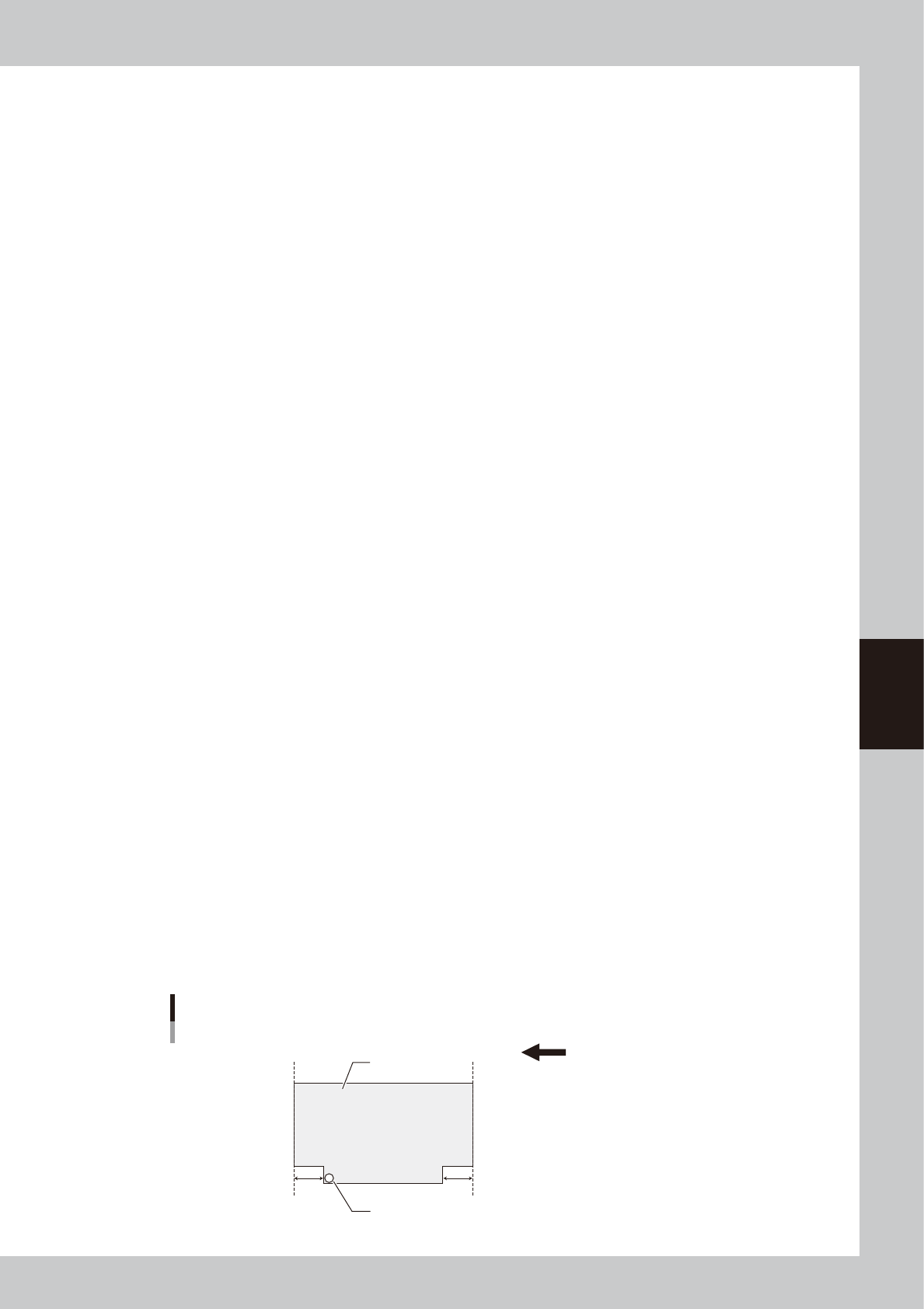
v: Board Edge Offset Lower Left, w: Board Edge Offset Lower Right
If the board edge cannot be detected by the board detection sensor due to board shape, press the [Offset Teach] button to
enter a distance from the board edge to the sensor detection position through teaching. The initial value is "0.0". When
the board edge offset function is not used, remain the initial value. (For details about teaching, see "3.2.2 Board edge
offset" in Chapter 3.)
Board edge offset
Board edge transfer direction (right → left)
Board edge
Board
Sensor detection position
Board edge
v w
63532-N1-00

5-10
5
Creating and setting the data
z: X-Axis Move For Board Transfer
This function moves the print table (X-axis) so as to minimize the time loss associated with the movement when
delivering the board between the upstream and downstream machines. Select either "Use" or "Not Use".
Use: The print table (X-axis) moves to the soft limit when delivering the board between the upstream and
downstream machines.
Not Use: The print table (X-axis) does not move to the soft limit when delivering the board between the upstream and
downstream machines.
To reduce the tact time, select this setting.
c
CAUTION
This function is enabled only when the board size X is 100.0 mm or more.
When the board size X is less than 100.0 mm, this function performs the operation with "Not Use" setting regardless of
the setting.
5-11
5
Creating and setting the data
3.2 Board data detail setting
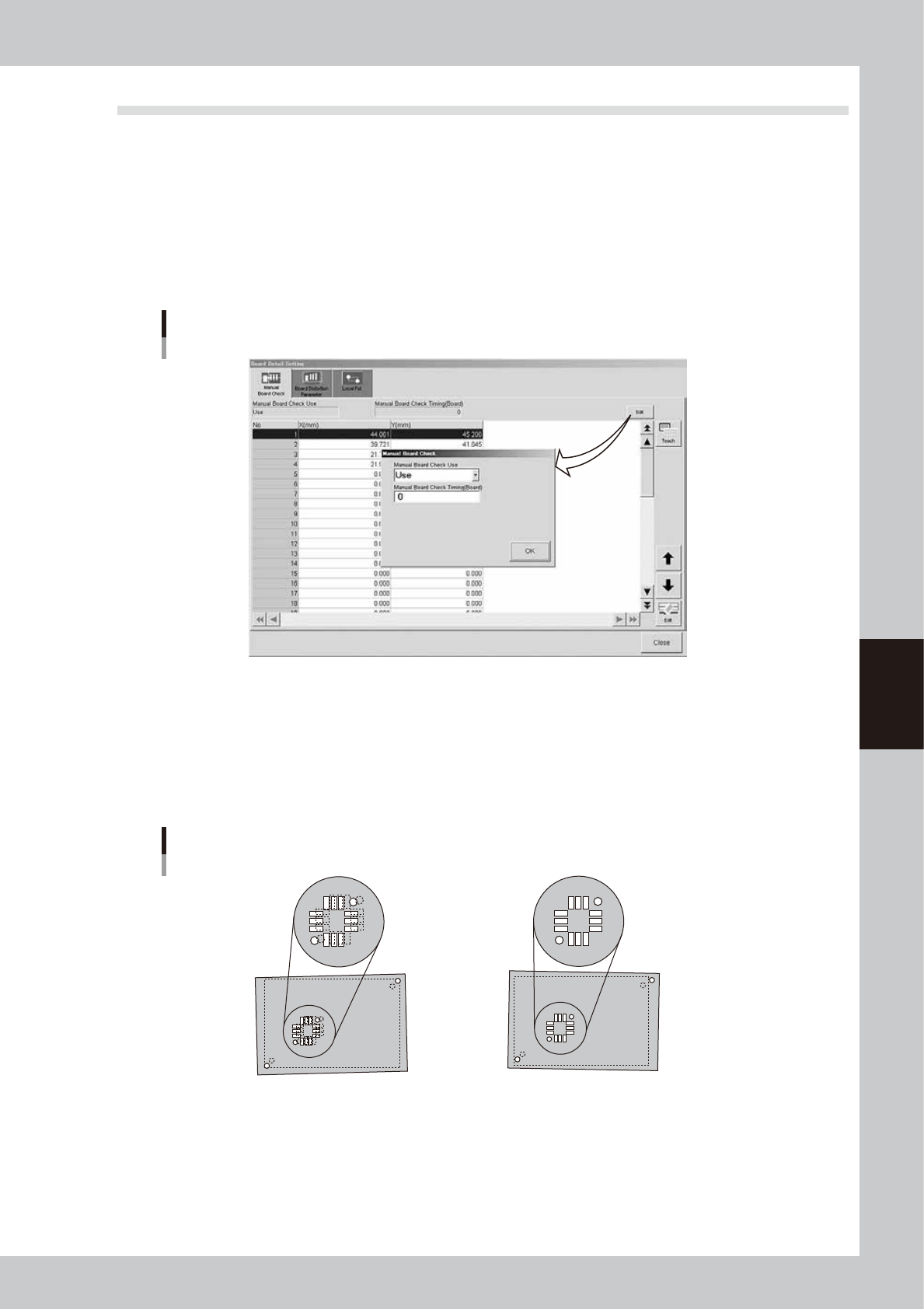
When you press the [Detail] button on the [Print]-[Board] tab, a screen with the [Manual Board Check], [Board
Distortion Parameter] and [Local Fid.] tabs appears. You can set the board check positions, board distortion
offset parameters and local fiducial function here. Setting methods are explained below.
l
Board check positions
On the [Manual Board Check] tab, you can specify the positions on the board where you want to make a visual check of
printed solder. (Refer to "9. Making a test print" in this chapter for solder-print testing.) Pressing the [Edit] button at the
upper right opens the "Manual Board Check" screen. Set whether to use this function or not, as well as the board interval
to make a visual check.
[Manual Board Check] tab
64513-N1-00
l
Board distortion offset *Print inspection function (option)
When boards in the same lot tend to be elongated or distorted in the same direction, or the same problem appears only
in the board fiducial positions, then overall position deviations might occur in the solder-print inspection. These
deviations can occur regardless of whether print accuracy was maintained by visual alignment. If this happens, use the
board distortion offset function to add correction offsets to the overall inspection coordinates to get the correct position
using solder-print inspection results (solder position) of the printed board used as the reference.
Board distortion offset
1. When the board fiducial positions have
elongation or distortion, the board clamping
deviation cannot be corrected, and overall
position deviations will occur in the
solder-print inspection results.
2.
Solder accurately printed on the land patterns
is recognized by the vision camera and the
position offset data is used as feedback.
(overall shift)
63506-N1-00