YCP10 Users_E.pdf - 第157页
5-26 5 Cr eating and setting the data 5.1 Squeegee detail setting When you press the [Detail] button on the [Print]-[Squeegee] tab, the follo wing screen appears for adjusting the solder fill amount and setting the timin…

5-25
5
Creating and setting the data
Y, Z: Escape Position SY, SZ
If you want to specify the escape position where the squeegee head moves back from the solder printing area, enter the
desired SY and SZ (height) coordinates. Settings here will be valid only when the "Escape Position" parameter is set to
"Defined Position".
f: Detaching Position
Specify a detaching position of the squeegee head. Normally, set “Standard Position”. If you want to change the
detaching position of the squeegee head by the production board, set “Defined Position” and specify data in the
Detaching Position SY and SZ parameters.
g, h: Detaching Position SY, SZ
When the Detaching Position is set to “Defined Position”, specify a position (SY) and a height (SZ).
TIP
To check the Mask Offset amount (positional shift), see "9. Making a test print" in this Chapter.
5-26
5
Creating and setting the data
5.1 Squeegee detail setting
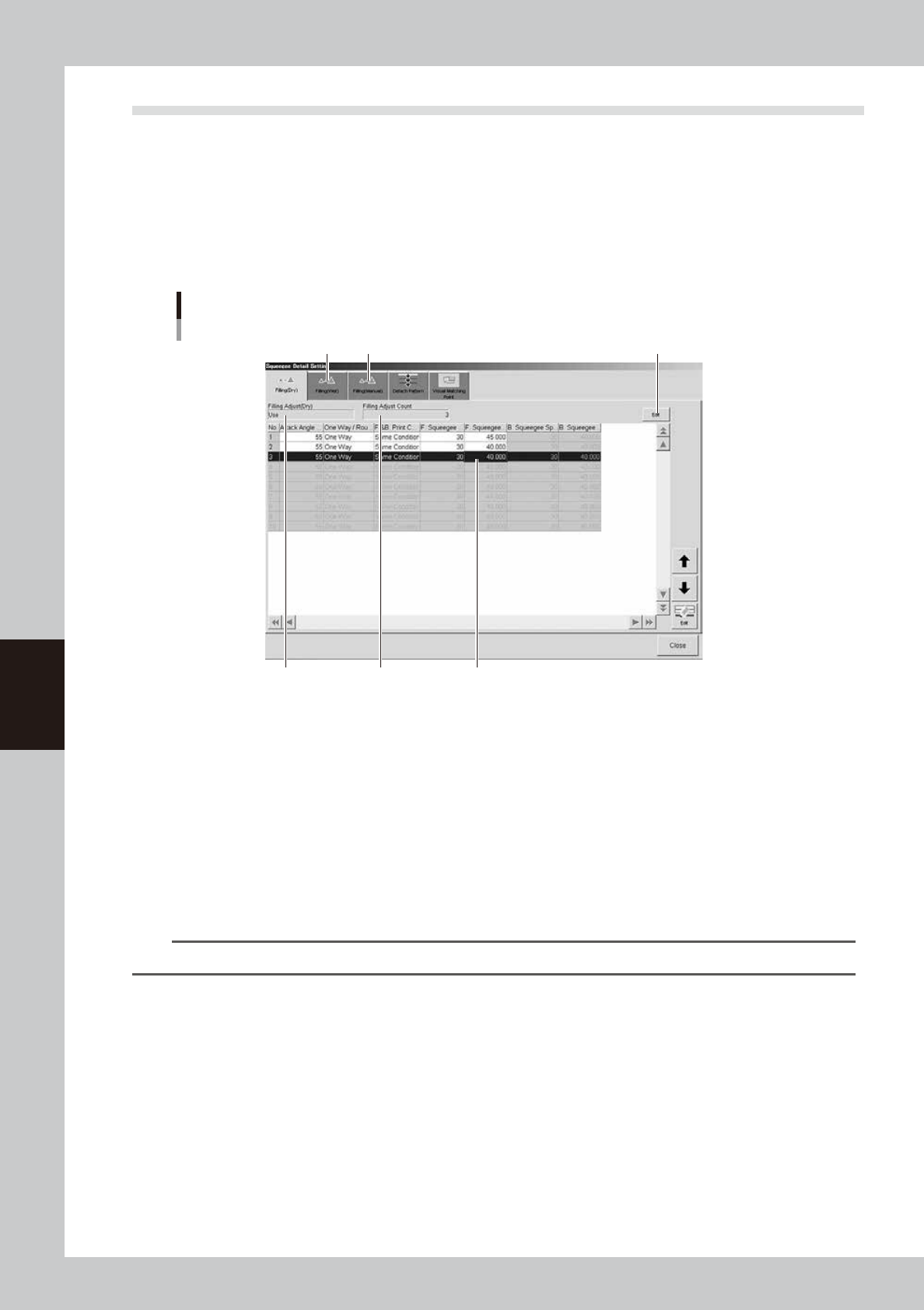
When you press the [Detail] button on the [Print]-[Squeegee] tab, the following screen appears for adjusting
the solder fill amount and setting the timing that the board separates from the mask after printing. Here you
can also set the positions for graphic alignment. Detail settings can be edited by selecting the [Filling (Dry)],
[Filling (Wet)], [Filling (Manual)], [Detach Pattern] and [Visual Matching Point] tabs.
l
Filling Adjust
If you want to adjust the squeegee speed and pressure to compensate for the board solder fill amount just after mask
cleaning, make the necessary settings here while referring to the following description.
[Filling (Dry) ] tab
1
4 5
2 3
[Edit] button
64523-N1-00
1. Filling (Dry)
Set to "Use" when using this function. Set to "NotUse" if not using it. To change the setting, press the [Edit] button on the
right end.
2. Filling Adjust Count
Specify the number of boards on which you want to apply this function after mask cleaning. The data lines up to the
number of boards you specified become valid to allow data entry. Up to 10 boards can be specified. To change the
setting, press the [Edit] button on the right end.
3. Data grid display
Shows the squeegee speed and pressure parameters that were set on the [Print]-[Squeegee] tab. Change these parameter
values as needed. Merely increasing the printing pressure cannot increase the solder fill amount.
TIP
For details about parameter set values, see "Chapter 3 Printing guide".
4. [Filling (Wet)] tab
If you want to adjust the squeegee speed and pressure to compensate for the board solder fill amount just after auto wet
cleaning, select this tab and make the necessary settings.
5. [Filling (Manual)] tab
If you want to adjust the squeegee speed and pressure to compensate for the board solder fill amount just after manual
cleaning, select this tab and make the necessary settings.
5-27
5
Creating and setting the data
l
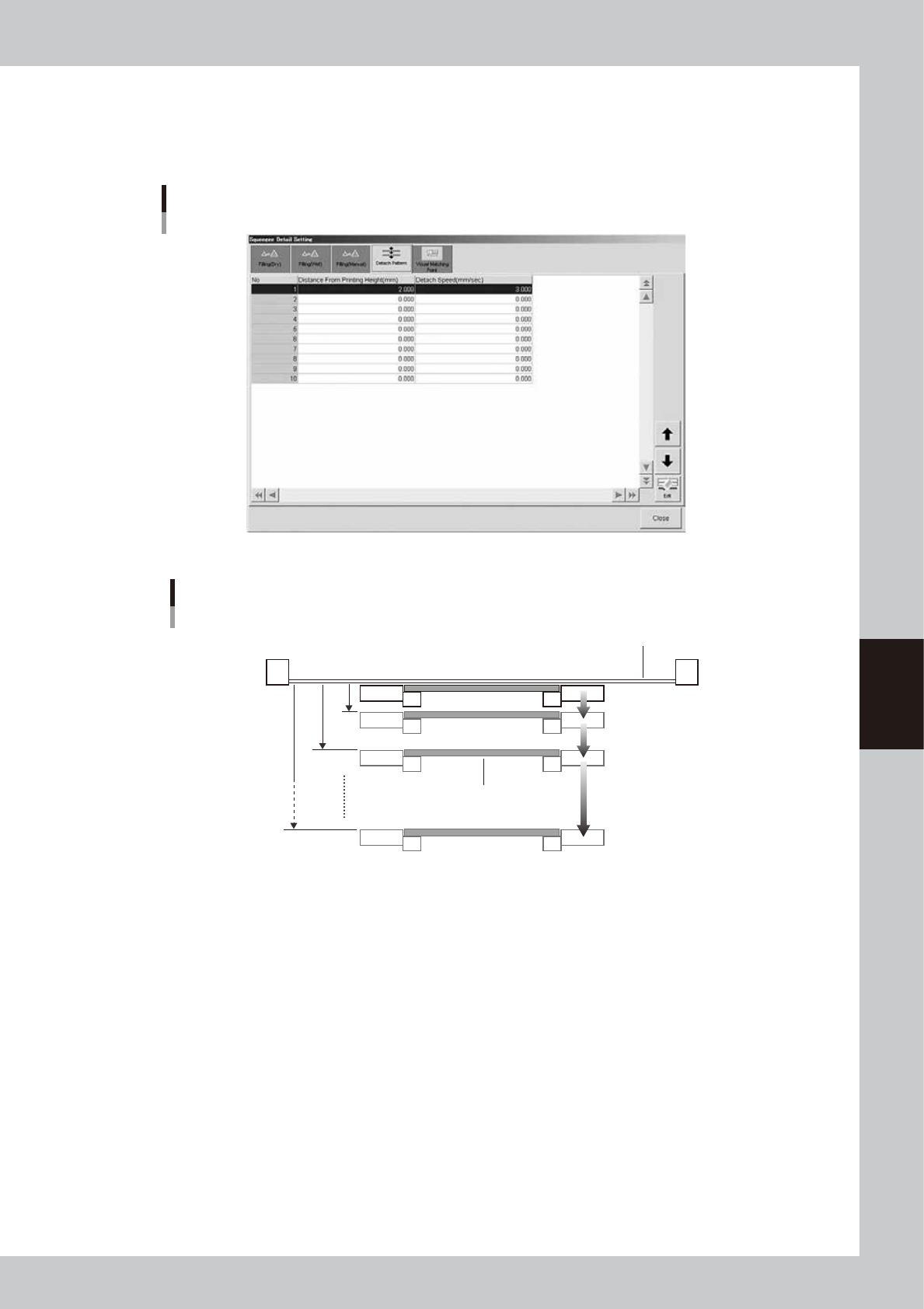
Detach Pattern
When you want to adjust the timing that the board separates from the backside of the mask after solder printing, up to 10
timing steps can be set as needed. Taking the solder, mask and board materials into account, determine the optimum
separation timing by specifying the distances (mm) and speeds (mm/sec).
[Detach Pattern] tab
64524-N1-00
Board separation setting
Board
Mask
No.1
No.2
Distance from
printing height
(0.001mm steps)
[0.001 to 7.000mm]
Board separation speed
(0.001mm/s steps)
[0.001 to 20.000mm/s]
No.10
63519-N1-00
l
If using sticky boards or jigs
If the surface (such as preflux board surface) that contacts the mask is sticking to it, then that board might stick to the
mask. If that happens the machine cannot see the board and triggers an error.
To deal with this problem, increase the board separation distance (from mask after printing) so that the board completely
separates from the mask. Change the default setting (2.00 mm) for "Distance from printing height" in the above drawing,
to 3.00 to 4.00 mm or more.