YCP10 Users_E.pdf - 第182页
Chapter 6 Managing the data T his chapter explains how to back up board data and make a user database, as well as how to view and sa ve the production and machine operation logs. Contents 1. Data backup 6-1 1.1 Making a …
5-50
5
Creating and setting the data
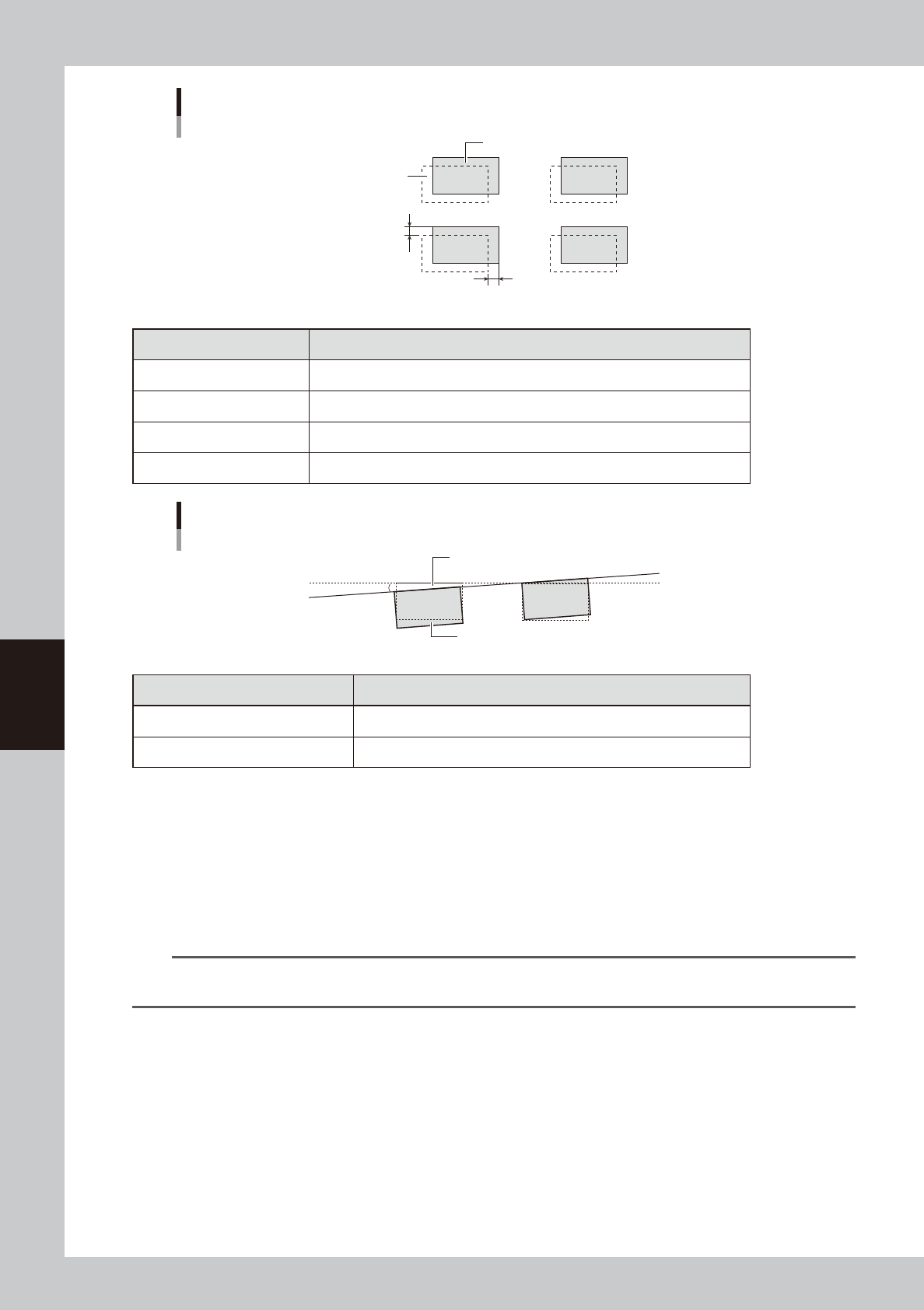
Mask Offset XY
Printed solder
Land pattern
Offset X
Offset Y
63530-N1-00
Printed state Offset entry
When shifted to right In Offset X, enter the position error (mm).
When shifted to left In Offset X, enter the position error (mm) with a minus sign.
When shifted to upper side In Offset Y, enter the position error (mm).
When shifted to lower side In Offset Y, enter the position error (mm) with a minus sign.
Mask Offset R
Printed solder
Land pattern
θ
63531-N1-00
Printed state Offset entry
When shifted counterclockwise Enter a plus error (
q
) in Offset R.
When shifted clockwise Enter a minus error (-
q
) in Offset R.
7
Repeat the above procedure until an optimum printed result is obtained.
8
Clean the mask.
When the test print is complete, clean the mask.
1. Open the [Unit]-[Cleaner] tab and press the [Auto Cleaning] button.
A screen appears to select the cleaning method.
2. Select the cleaning method ("Dry" or "Wet") and press the OK button.
The cleaning unit begins moving to clean the backside of the mask automatically.
TIP
When you want to perform manual cleaning, press the [Manual Cleaning] button and follow the message that
appears.

Chapter 6 Managing the data
This chapter explains how to back up board data and make a user database, as well as how to view and save the production
and machine operation logs.
Contents
1. Data backup 6-1
1.1 Making a backup of board data 6-1
1.1.1 Backing up onto a USB flash drive 6-2
1.2 Making a backup of system data 6-6
1.2.1 System backup settings 6-7
1.2.2 Making a backup 6-8
1.3 Restoring the system data 6-11
1.3.1 Restoring a system backup 6-11
1.3.2 Restoring a system full backup 6-13
2. Creating the user database 6-16
2.1 Copying the data into the database 6-16
3. Production log management 6-18
3.1 Production log types 6-18
3.1.1 Production log (MIS) 6-18
3.1.2 Operation log (Unit Log) 6-20
3.1.3 Other operations 6-22
3.2 Production and operation log settings 6-24
3.2.1 Specifying the auto-save destination 6-24
3.2.2 History Utility 6-27

6-1
6
Managing the data
1. Data backup
Production board data and system data can be backed up. This section explains how to make a backup of
these data.
1.1 Making a backup of board data
A backup copy of board data can be stored on a USB flash drive or on a network drive (including on-line
software). When board data is saved in YGZ format, it can be stored in any location. However, when using a
USB flash drive, the data should be stored in a predetermined location.
c
CAUTION
Use a USB flash drive (supplied with the machine or purchased from YAMAHA sales reps) specified by YAMAHA Motors
Co., Ltd. U sing a USB flash drive other than specified might cause problems. Do not use any other type of USB flash
drive with YAMAHA surface mounters and related machines.
c
CAUTION
Before operating the USB flash drive to copy data, always close the media access door to prevent dust from adhering
to the USB port and to protect the USB flash drive from electrostatic noise.
c
CAUTION
After copying board data or system data into a USB flash drive, do not leave that data in the USB flash drive for a long
time. Use the USB flash drive just as a copy medium for backup data. Prepare other backup media (CD , DVD , MO ,
etc.) to store the backup data.