YCP10 Users_E.pdf - 第283页
A-3 Appendix 1.2 Power connection terminals When opening the panel at the lower portion on the front of the main unit, y ou can see the power connection terminals. Use the power cable shown in the figure belo w to connec…
A-2
Appendix
1.1.2 Edge clamp air pressure
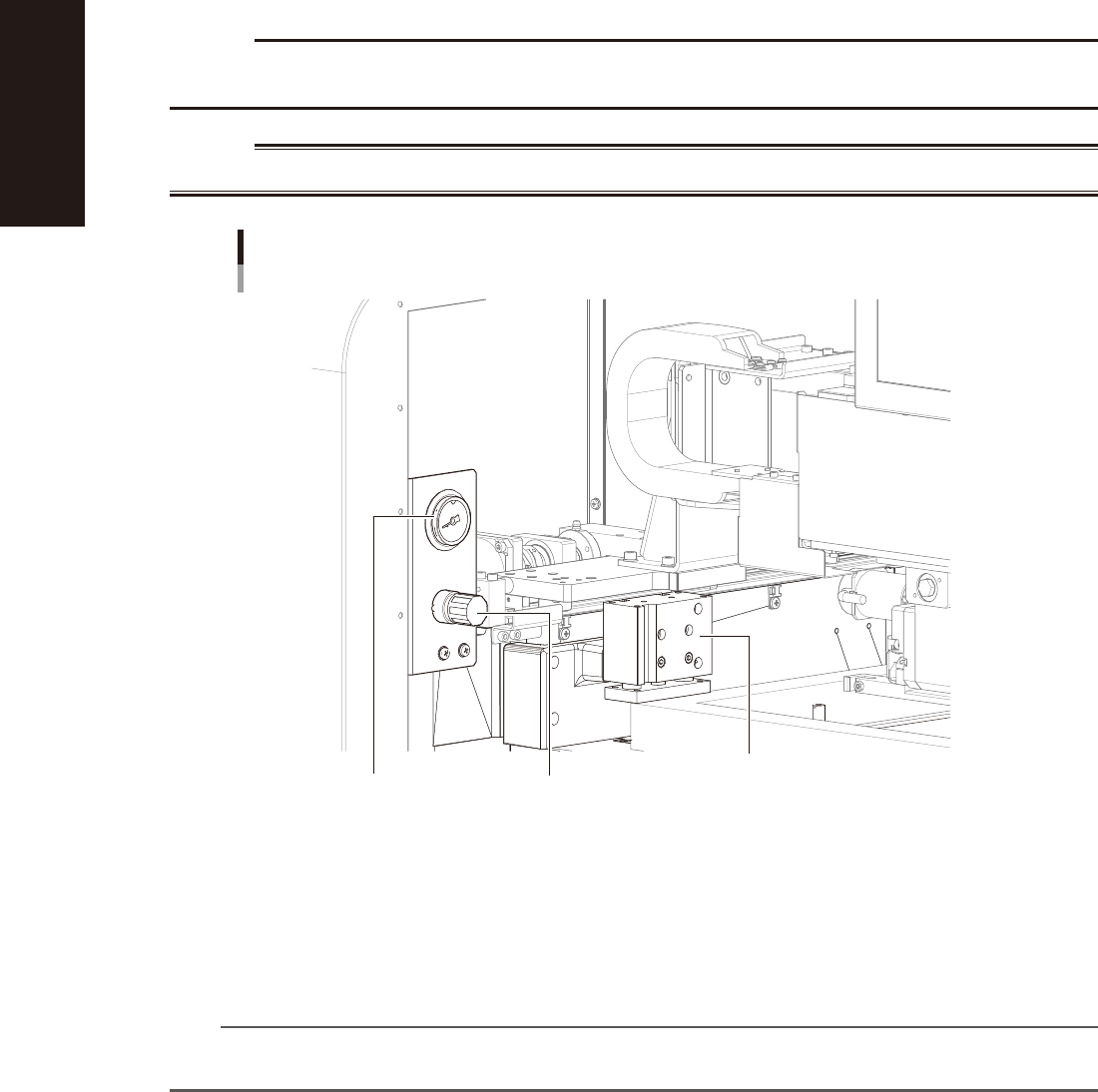
The edge clamp that pushes against the board edge to clamp it is actuated by compressed air. This air pressure should be
set to an optimum level (usually 0.225MPa). When necessary, turn the knob on the pressure regulator on the left side
inside the main unit to adjust the air pressure.
c
CAUTION
Before adjusting the edge clamp air pressure, make sure that the air pressure in the machine is set to the optimum
level (0.40 to 0.41MPa).
w
WARNING
BEFORE ADJUSTING THE EDGE CLAMP AIR PRESSURE, BE SURE THAT THE MACHINE IS IN EMERGENCY STOP.
Adjusting the edge clamp air pressure
Left side inside the main unit
Pressure regulator
Pressure gauge
(Set to 0.225MPa in most cases.)
Mask clamp
53A02-N1-00
Pressure gauge (for edge clamp)
Shows the edge clamp air pressure.
Pressure regulator
Adjusts the air pressure to be supplied to the edge clamp.
n
NOTE
If multi-board panels or thin boards warp up when force is applied by the edge clamp, reduce the edge clamp air
pressure. Conversely, if you want to clamp heavy boards more securely, increase the air pressure.
A-3
Appendix
1.2 Power connection terminals
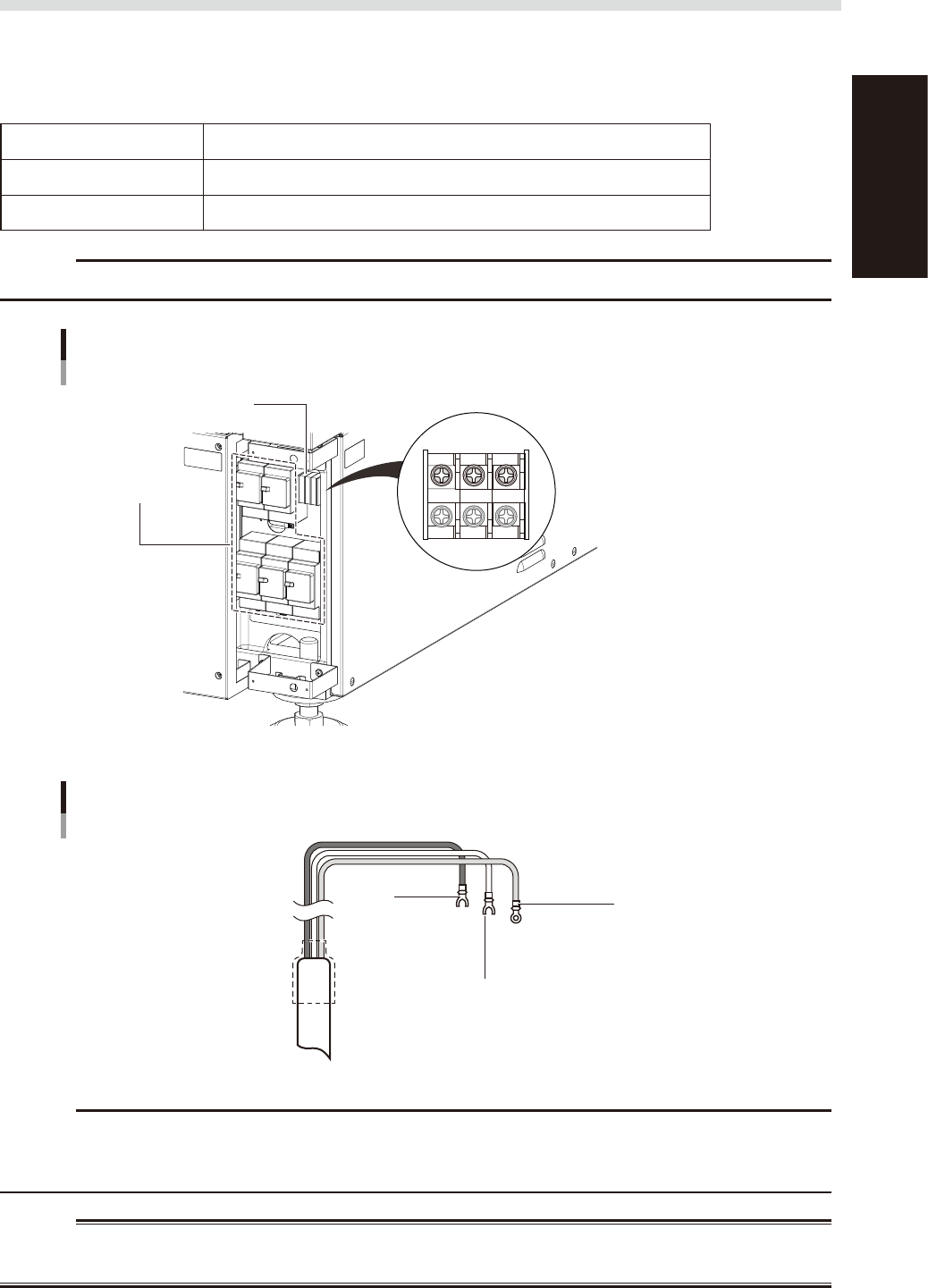
When opening the panel at the lower portion on the front of the main unit, you can see the power connection
terminals. Use the power cable shown in the figure below to connect the power cable leads to the primary
terminals L1 and L2 on the main breaker and the ground terminal on the main unit chassis.
n
Power supply specifications
Power Single-phase AC 200 / 208/ 220 / 230V ±20V
Frequency 50/60Hz
Power capacity 6.9KVA (excluding optional air conditioner)
c
CAUTION
When installing an earth leakage breaker on the host unit, its sensitivity current must be 30mA or more.
Power input terminal
Power input terminal M5
Terminal blocks
Main breaker
L1 L2 PE
53A03-N1-10
Connecting power cables (example)
L1
L M5
L2
N M5
Ground (green)
L = 350 mm
Crimp ring terminal M5
53A04-N1-10
c
CAUTION
Use a power cable with a grade of cross-sectional area of the conductor is 6.0 mm2 or more.
Make sure that the power cable connections are correct. If misconnected, the vacuum operation of the suction unit
will be reversed (air blows outward).
w
WARNING
TO AVOID THE RISK OF ELECTRICAL SHOCK, MAKE SURE THAT THE POWER SOURCE IS OFF BEFORE CONNECTING THE
POWER CABLE. ALSO MAKE SURE THAT THE GROUND CABLE IS SECURELY CONNECTED TO THE MACHINE.
A-4
Appendix
1.3 Connection between machines
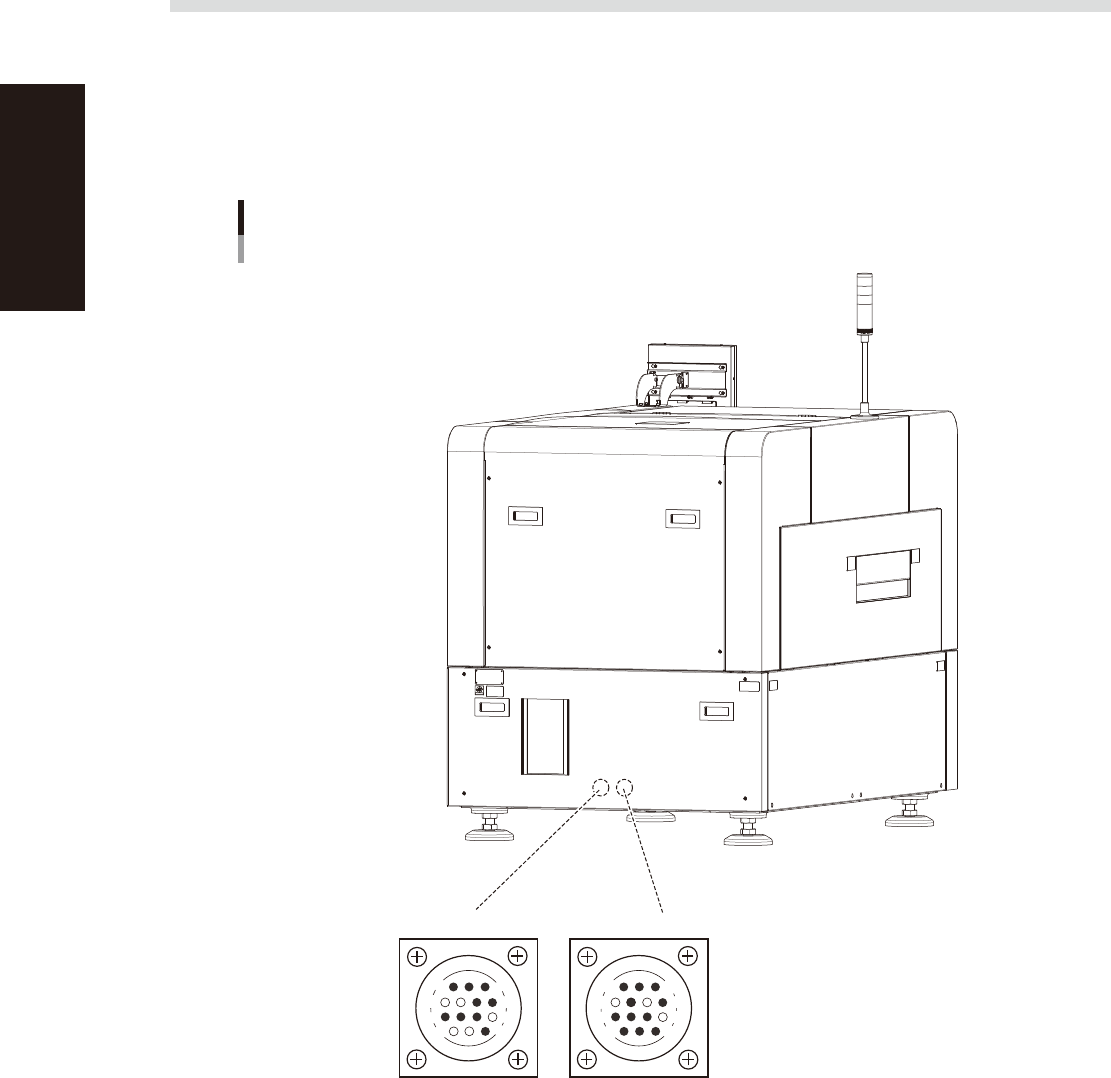
To exchange signals such as board request and operation status with the downstream or upstream machine, the
"NEXT INTERFACE" and "PREVIOUS INTERFACE" connectors located on both sides of the machine are used.
The "NEXT INTERFACE" connector connects to the downstream machine, and the "PREVIOUS INTERFACE"
connector connects to the upstream machine such as the loader. In the case of standard right-to-left flow, the
PREVIOUS INTERFACE connector is located on the left side of the rear panel, and the NEXT INTERFACE
connector is located on the right side. Both connectors use a 14-pin receptacle (AMP 206043-1).
Machine-to-machine interface connectors
Inside the panel at the lower portion of the rear
Connector : AMP 206043-1 (14-pin receptacle)
NEXT INTERFACE
14
11
12
7
4
8
3
1
PREVIOUS INTERFACE
14
11
12
7
4
8
1
3
53A05-N1-00