YCP10 Users_E.pdf - 第251页
2-4 2 Inspection and maintenance 2. Periodic maintenance items 2.1 Periodic inspection (W eekly/Monthly) In addition to daily inspection, periodic inspections (weekly and monthly) are essential to ensure safe and efficie…
2-3
2
Inspection and maintenance
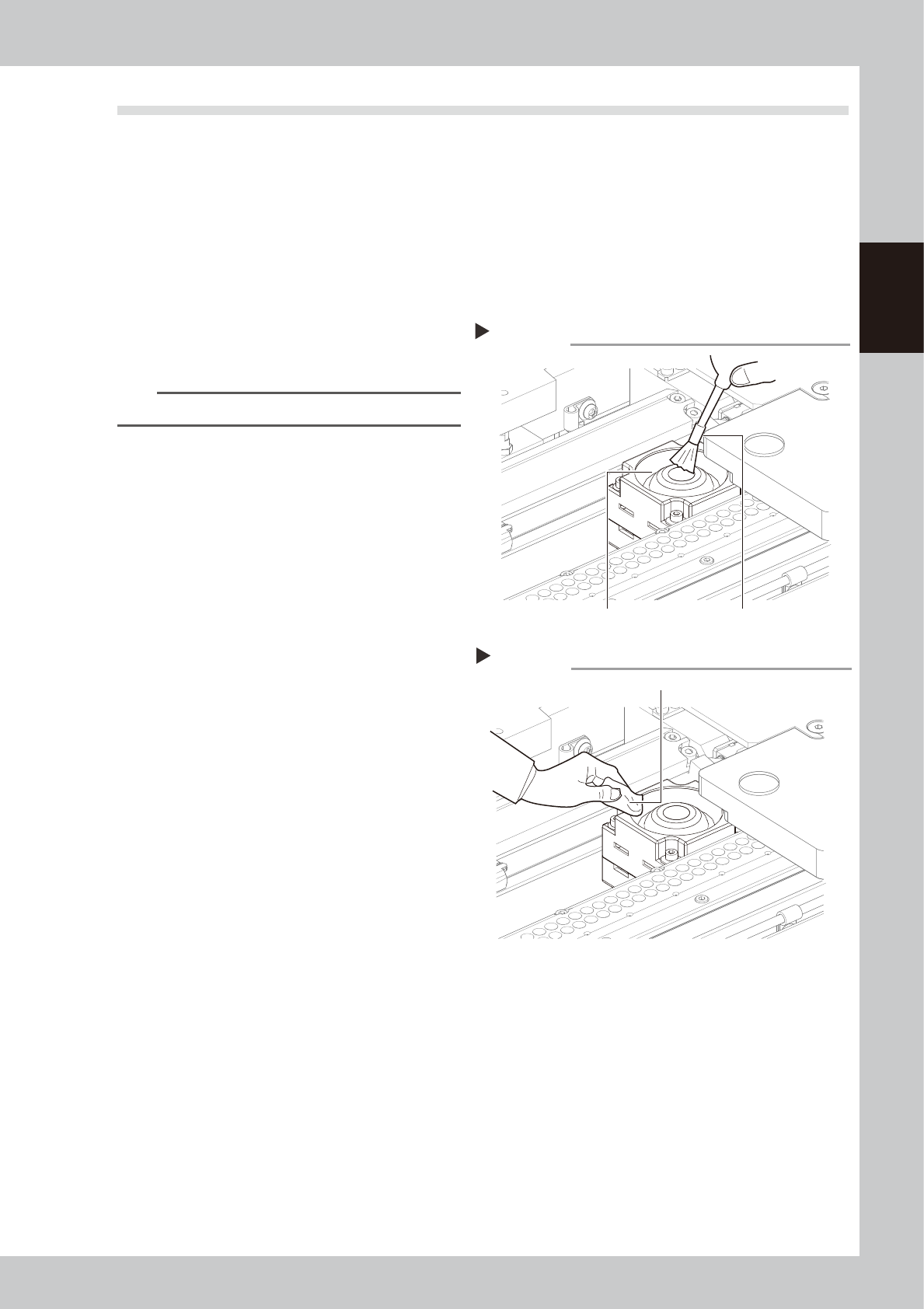
1.2 Cleaning the camera protective glass
Dirt or dust particles sticking to the protective glass of the mask (stencil) camera unit may cause recognition
errors.
e
To ensure the safety, make sure that the emergency stop button is pressed or the machine power switch is
turned off before starting this work.
n
Items to be prepared
• Lens blower brush (option)
• Lint-free cleaning cloth or paper towel
• Lens cleaner (option)
1
Remove dust on the protective glass
with the lens blower brush.
53201-N1-00
TIP
The lens blower brush is an optional part.
2
Wipe the protective glass with a
lint-free cleaning cloth.
Apply a few drops of lens cleaner to a
lint-free cleaning cloth and wipe the
protective glass.
53202-N1-00
Blowing off dust with the blower brush
Step 1
Lens blower brushProtective glass
Wiping the protective glass with a lint-free cleaning cloth
Step 2
Lint-free cleaning cloth
2-4
2
Inspection and maintenance
2. Periodic maintenance items
2.1 Periodic inspection (Weekly/Monthly)
In addition to daily inspection, periodic inspections (weekly and monthly) are essential to ensure safe and
efficient use of the machine.
We recommend setting an earlier inspection interval if parts are subject to frequent usage.
2.1.1 Parts to be replaced during periodic replacement
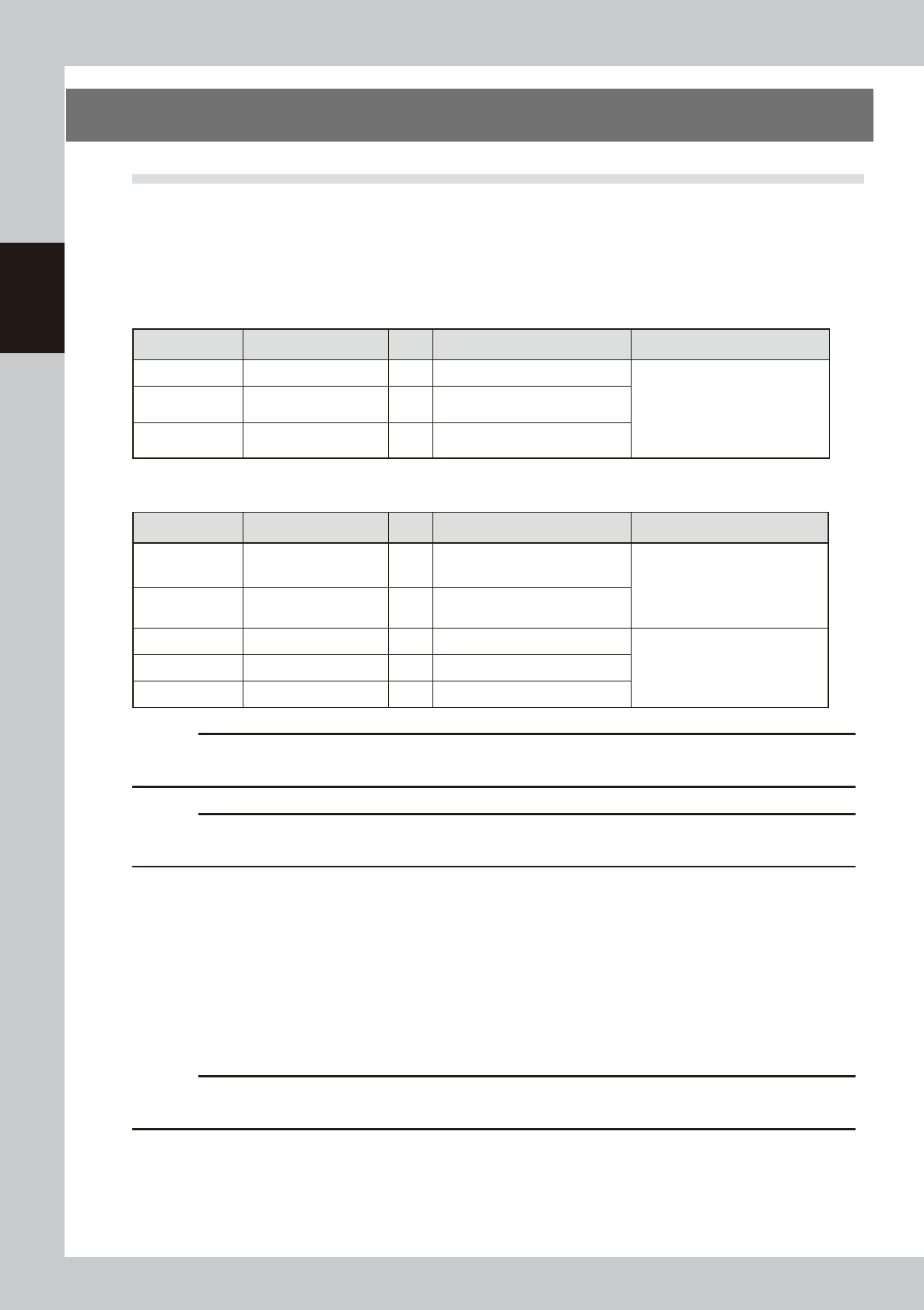
If parts need to be replaced as a result of the periodic inspection, use the spare parts listed below.
n
Replacement parts (conveyor related)
Part No. Part name Q'ty Location used Replacement interval
KLV-M9123-00X PLATE, CONV. EDGE 1 Board clamp
Replace the part according to the
worn away status observed during
inspection.
KLV-M9127-00X BELT, CONV. 1
Conveyor transfer belt
(hereafter "Type A")
KLV-M9127-01X BELT, CONV. 1
Conveyor transfer belt
(hereafter "Type B")
n
Replacement parts (filter related)
Part No. Part name Q'ty Location used Replacement interval
KGR-M9934-F0X
FILTER, SPARE 3 Filter of ejector for mask vacuum
Replace the filter 1 or 2 years
after delivery. As a general guide,
replace the filter if it becomes
dirty when checked from the
outside.
KGY-M3710-40X
INL, FILTER ELEMENT 1 In front of blower on machine front
KLC-M8506-00X
FILTER ELEMENT 1 Air filter for primary air supply
As a general guide, replace the
filter if it becomes dirty when
checked from the outside
LG0-M86A2-10X
MIST FILTER ELEMENT 1 Mist filter for primary air supply
KLV-M1319-00X FILTER, FAN 2 Filter for machine cooling fan
c
CAUTION
Parts (Part No.) listed above is current as of the issue date of this manual. When ordering a replacement part, please
check for the latest information.
c
CAUTION
Part Nos. are subject to change without prior notice. When ordering a replacement part, contact your local sales
dealer to check its part No.
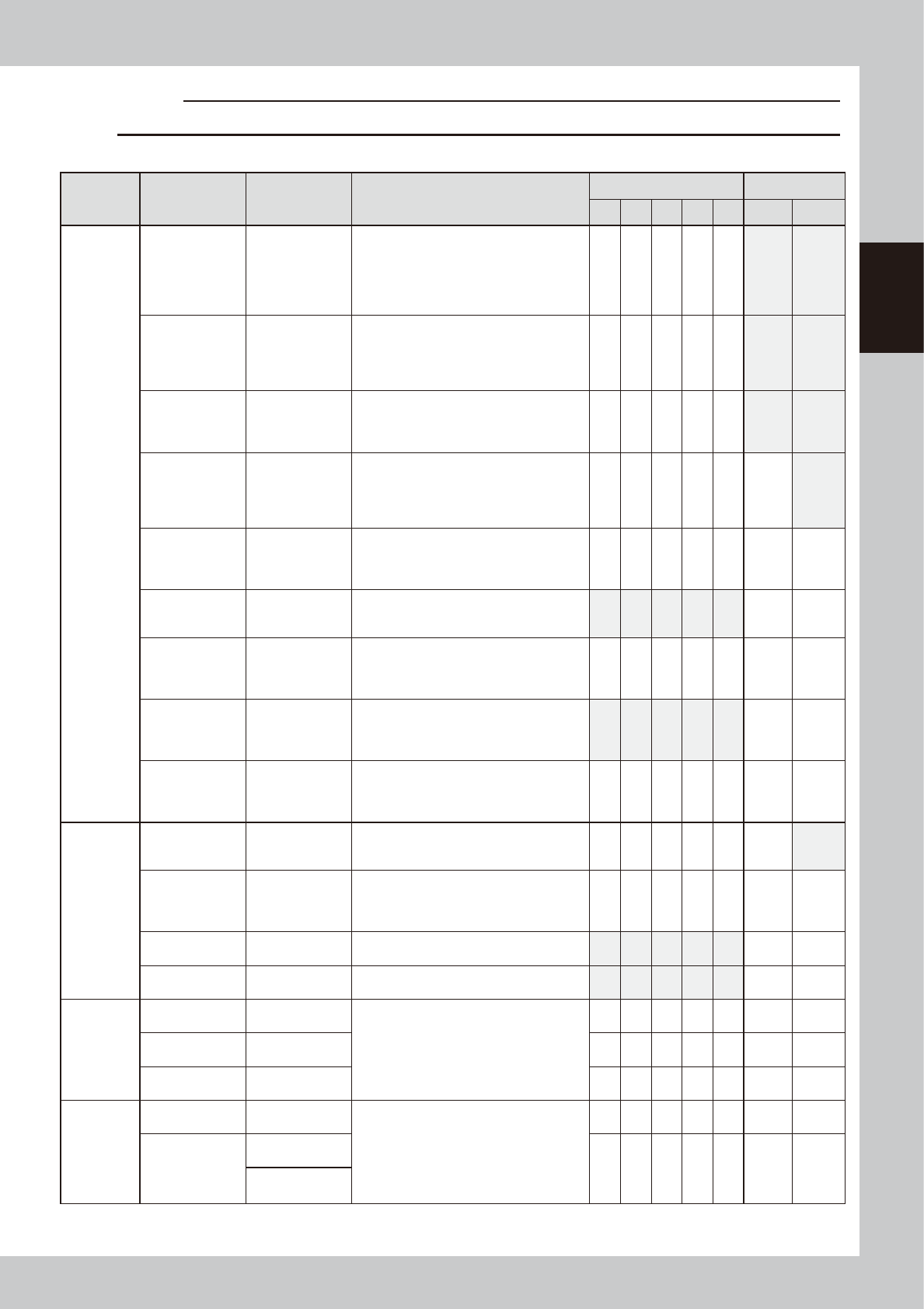
2.1.2 List of periodic inspection checkpoints
Use the inspection check sheet to periodically inspect the machine.
The inspection check sheet describes the contents of the inspections to be performed weekly or monthly in
addition to the daily inspection described in the previous section.
Make a copy of the inspection check sheet (sample) stated on the next page and use it for the periodic
inspection. Or, it is recommended that the customer prepares an appropriate inspection sheet in such format
and properly perform the periodic inspection with it.
c
CAUTION
Periodic inspections must be performed by or under the direction of person who has received training from YAMAHA
or a YAMAHA sales representative.
2-5
2
Inspection and maintenance
c
CAUTION
Warm up the machine and wipe away excess grease before greasing up the lubrication points.
n
Inspection check sheet (Sample)
Section Check item Checkpoint Contents of inspection/work
Weekly (Date) Monthly
/ / / / /
Cleaning Lubrication
Conveyor
unit
Edge clamp
Entrance/exit
stopper
Operation,
sensor
• Check that the edge clamp functions at
an air pressure level of 0.1 MPa or less.
• Check that the edge plate (metallic part
of the edge clamp) for wear.
• Check that the sensor of the entrance/
exit stopper responds correctly.
Board flap
Contamination
on backside of
flap
Operation,
sensor
• Check that the sensor responds
correctly.
* Clean the solder contamination on the
backside.
Conveyor
transfer belt
Contamination,
napped surface,
operation
• Check the board transfer belt for
contamination, wear, or napping.
* Clean the sensor surface if any dust or
lint is on it.
Push-up plate
Operation,
contamination
on top surface
• Check that the push-up plate is leveled
without noise when operating it with the
board set.
* Remove the matrix plate and clean the
top surface of the plate.
PU-axis
Ball screw
Guide
• Check for foreign matter or solder
sticking.
* As needed, wipe away excess grease
after the grease has been applied.
W-axis timing
belt
Crack,
deterioration
• Check the belt for wear and the belt
tension.
* If the belt deteriorates, replace it.
W-axis conveyor
auto width
adjustment
Ball screw
Guide
• Check for foreign matter or solder
sticking.
* As needed, wipe away excess grease
after the grease has been applied.
Mask vacuum
Operation
Vacuum filter
• Check that the mask vacuum functions
correctly.
* Check the filter. Clean or replace the
filter if necessary.
MX-axis
Ball screw
Guide
• Check the MX-axis unit for foreign
matter or solder sticking.
* As needed, wipe away excess grease
after the grease has been applied.
Vision
camera unit
related
Mask camera
Contamination
on light lens
Lighting status
• Check the light lens for contamination.
• Turn on each light individually to check
that it is lit correctly.
CX-axis
Ball screw
Guide
• Check for foreign matter or solder
sticking.
* As needed, wipe away excess grease
after the grease has been applied.
Board camera Lighting status
• Turn on each light individually to check
that it is lit correctly.
Inspection
camera (OP)
Lighting status
• Turn on each light individually to check
that it is lit correctly.
X-, Y-, and
Z-axis
X1-axis, X2-axis
Ball screw
Guide
• Check for foreign matter or solder
sticking.
* As needed, wipe away excess grease
after the grease has been applied.
Caution : Remove the Y-axis cover for
maintenance.
Y-axis
Ball screw
Guide
Z-axis
Ball screw
Guide
Printing
head
SY-axis
Ball screw
Guide
• Check for foreign matter or solder
sticking.
* As needed, wipe away excess grease
after the grease has been applied.
SZ-axis
Ball screw
Guide
Guide shaft
Spring