YCP10 Users_E.pdf - 第255页
2-8 2 Inspection and maintenance 2.3.1 Belt T ype A 1 Change the conv ey or width to a conv enient width for maintenance work. 1. Press the [Width] button to display the "Conveyor Width" screen. 2. In the "…
2-7
2
Inspection and maintenance
2.3 Adjusting the conveyor transfer belt tension
The conveyor moves by belt drive to load boards ready for printing and to unload the finished boards. If the
conveyor transfer belt (hereafter "belt")is too loose, it may slip on the pulleys causing unstable board transfer. If
the belt is too tight, it may break or wear excessively.
If requiring the tension adjustment after replacing belt or inspected, adjust with the following procedures.
The tension of each belt on the fixed and movable rails should be adjusted evenly.
n
NOTE
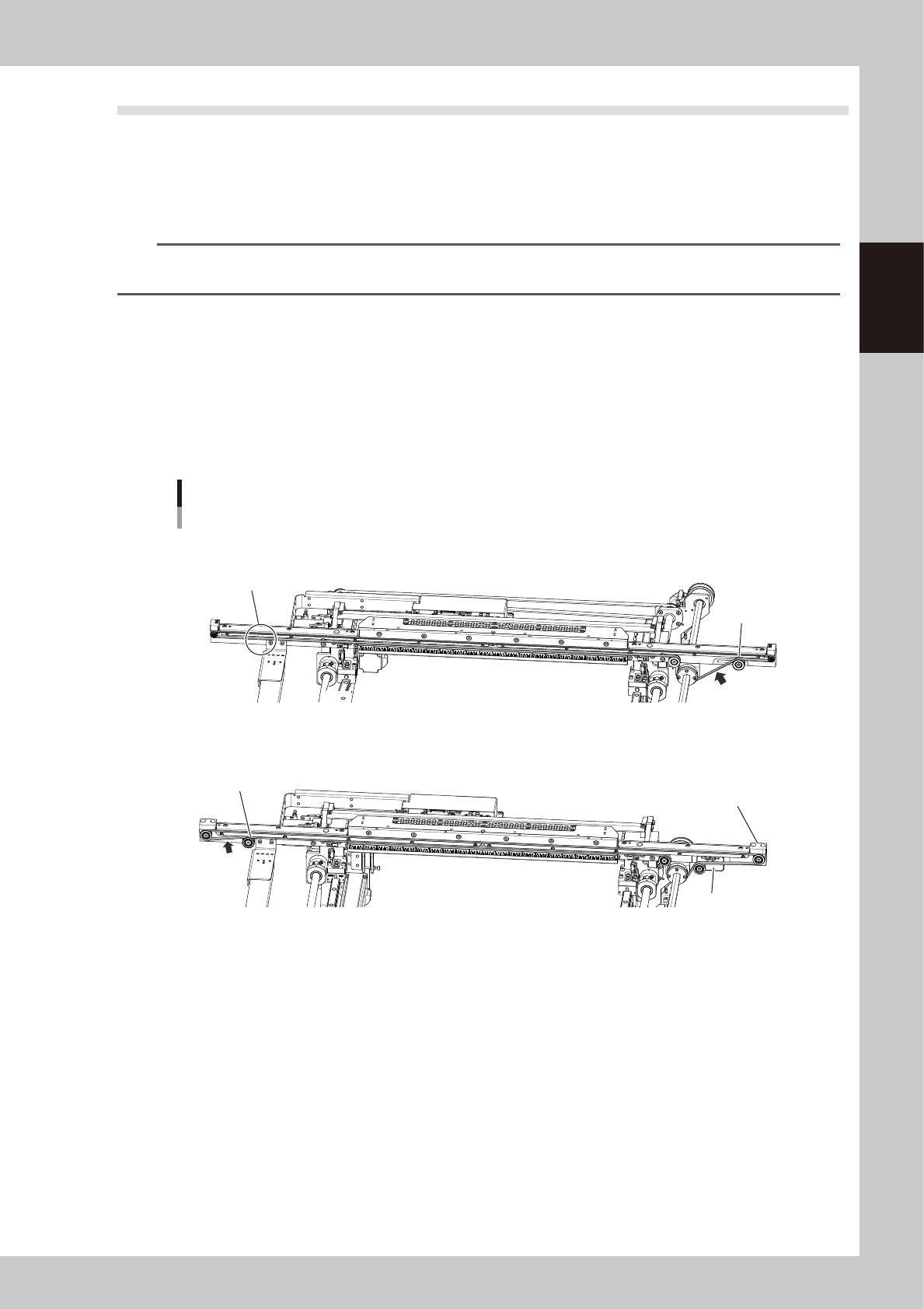
The 2 types of belt below are set on the machine depending on the shipping time. The belt path and procedures of
applying tension also vary. Check the belt type to adjust it correctly.
n
Distinguishing between belts
Type A (KLV-M9127-00X)
•
The idler is not set to the downstream side (in front of exit).
•
The tension is adjusted by moving tensioner (pulley).
Type B (KLV-M9127-01X)
•
The idler is set to the downstream side (in front of exit).
•
The tension is adjusted by moving the tension adjustment plate. (Tensioner is not moved directly.)
Distinguishing between belts
Tension
Measurement
position
Tension
measurement
Position
No idler
Type A
Type B
Idler
Tension
adjustment plate
Tensioner
The shape of end block is
different from type A.
53230-N1-00
n
Required tools
•
Hex wrenches (3 mm, 4 mm, 5 mm)
•
Tension meter
•
Permanent marker (marking tension position)
•
Scale (Measuring SPAN)
2-8
2
Inspection and maintenance
2.3.1 Belt Type A
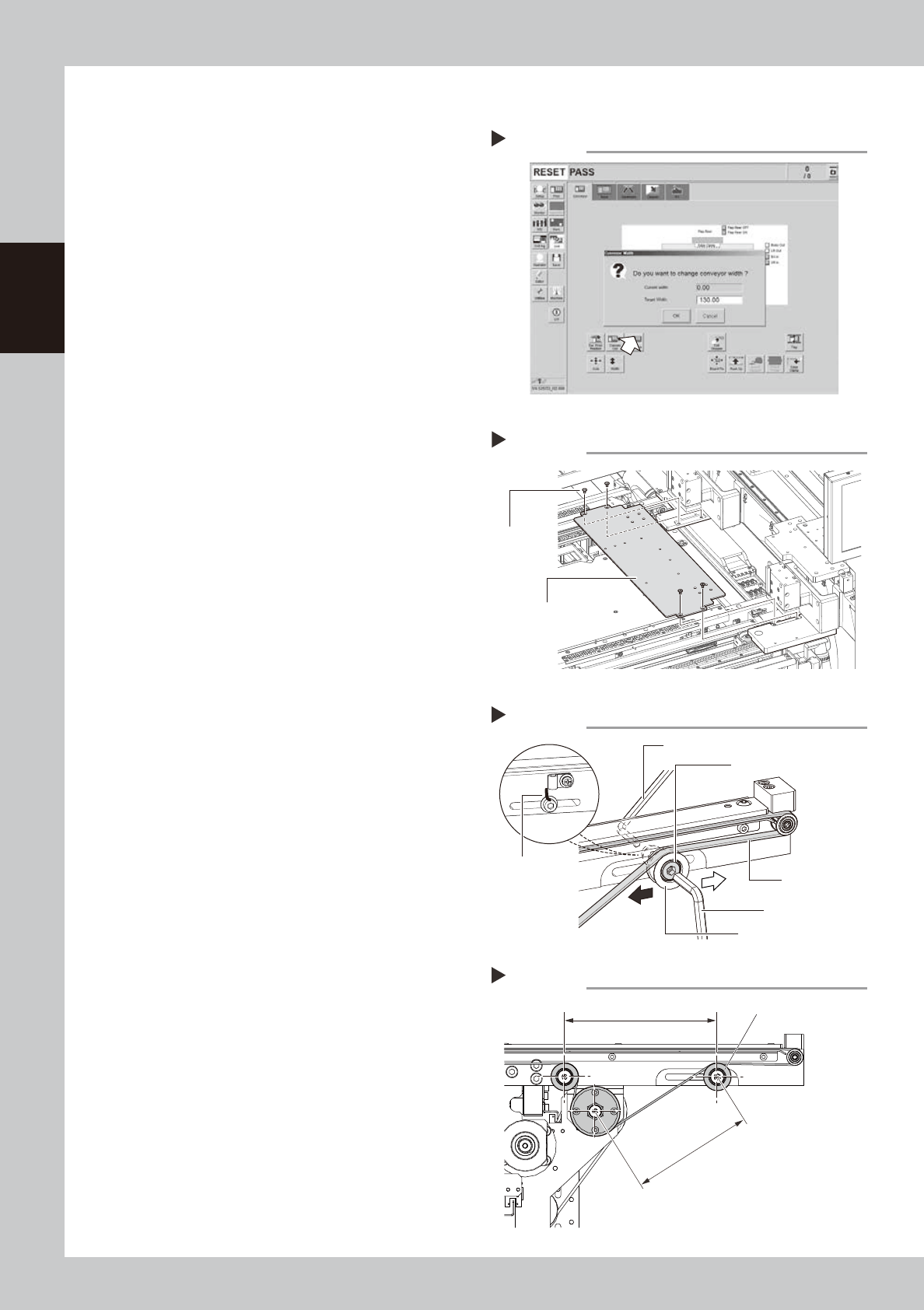
1
Change the conveyor width to a
convenient width for maintenance
work.
1. Press the [Width] button to display the
"Conveyor Width" screen.
2. In the "Target Width" box, enter a width
wide enough to insert hex wrench and
press [OK] button.
The conveyor is changed to the specified
width.
54203-N1-00
e
2
Press the emergency stop button
and open the upper door.
The machine must be in emergency stop to
ensure safety during work.
3
Remove the mask guide plates.
Remove 4 bolts with hex wrench (3 mm) and
detach mask guide plate. The mask guide
plate is on left and right.
53220-N1-10
4
Loosen the belt tension.
1. Mark the current tensioner position with
permanent marker before loosening belt.
2. Loosen tensioner mounting bolt with hex
wrenches (4 mm and 5 mm).
53221-N1-10
5
Tighten the tensioner temporarily.
If applying tension strongly, slide the bolt
mount position to black arrow's direction
shown at right. Sliding it to white arrow's
direction loosens the tension. After sliding
the bolt, mount the tensioner temporarily.
6
Measure the SPAN.
Measure the SPAN (distance between
pulleys) with scale shown at right.
53226-N1-00
Changing the conveyor width
Step 1
Adjusting belt tension
Step 4, 5
Tensioner mounting bolt
Tensioner (pulley)
Hex wrench (5 mm)
Hex wrench (4 mm)
Conveyor belt
Marking
Detaching mask guide plate
Step 3
Mounting
bolt
Mask plate guide
Measuring SPAN (between pulleys)
Step 6
Tensioner
SPAN (between pulleys)
Set SPAN
2-9
2
Inspection and maintenance
7
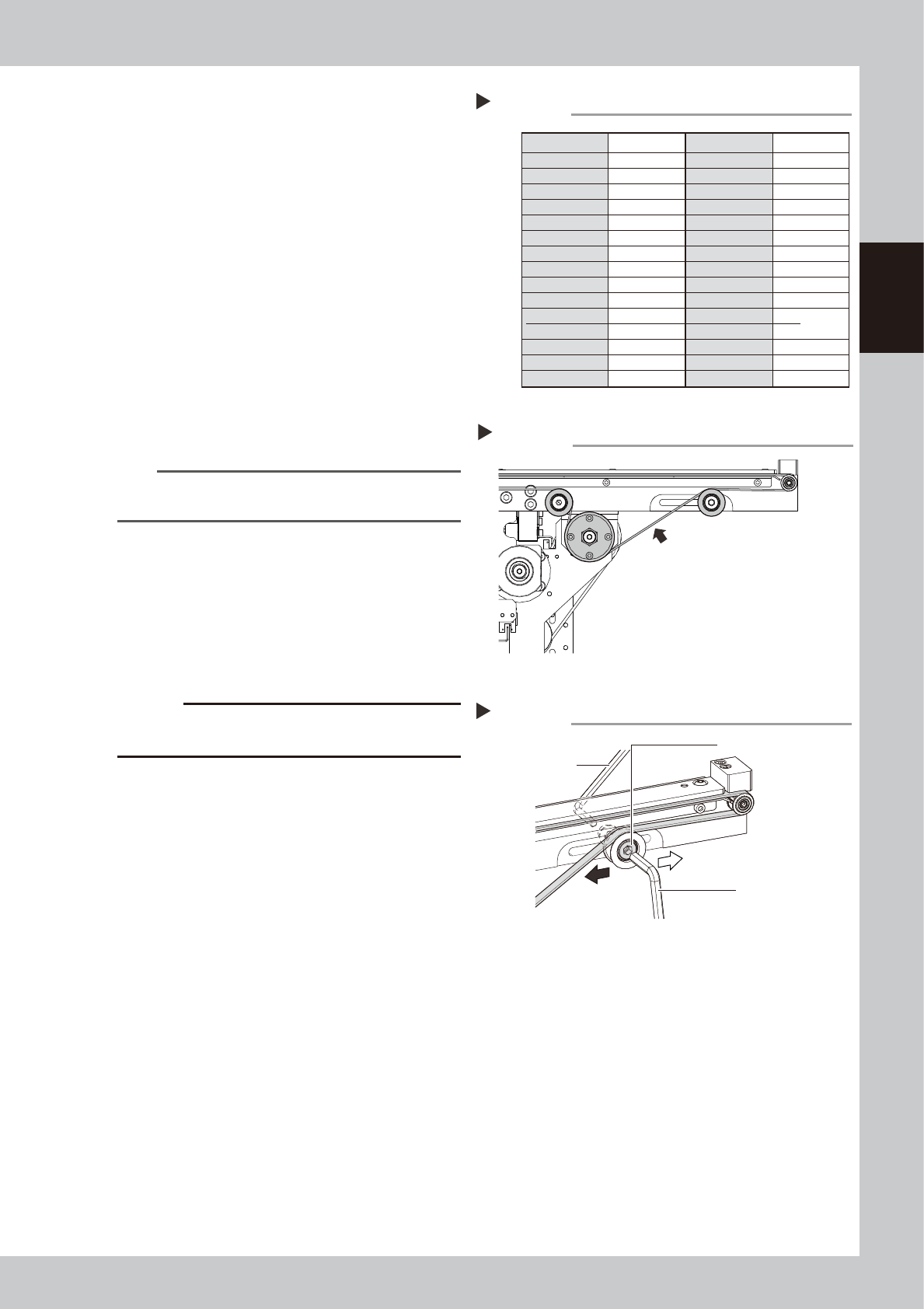
Check the set SPAN value.
Check the set SPAN value according to the
measured SPAN value referring to the table
at right.
53227-N1-00
8
Enter SPAN value.
Enter the value according to tension meter
SPAN.
Tension meter set value
WEIGHT: 1.3 g/m
WIDTH: 6 mm
SPAN: (Checked value)
9
Measure the belt tension.
Measure the belt tension an the position
shown at right with tension meter.
Tension value: 12.5 to 19 N
53228-N1-00
n
NOTE
Make sure to use tension meter when measuring and
adjusting the tension.
0
Adjust the tensioner position.
1. Repeat Step 5 to Step 9 according to the
belt tension measurement result until the
value falls within the specified value.
2. Tighten the tensioner bolt after the belt
tension enters the appropriate range.
53229-N1-00
c
CAUTION
The tightening torque of tensioner mounting bolt is 5.5
N•m. Make sure not to tighten the bolt excessively.
q
Check the belt rotating condition.
Run the conveyor belt and check that the
motor pulley does not slip.
1. Cancel the emergency stop.
2. On the [Unit]-[Conveyor] tab, press the
[Convey In] and [Convey Out] buttons to
turn on the conveyor motor and check
the belt rotation.
3. If the slip of the motor pulley, the belt
rotation fluctuation and the deflection
are excessive, adjust the tensioner
(pulley) position and transfer a board
again and check the condition.
w
Return the mask guide plate to its
original position.
Attach the mask guide plate to conveyor by
tightening 4 bolts with hex wrench (3 mm).
Measured SPAN Set SPAN Measured SPAN Set SPAN
Checking set SPAN
Step 7
129
128
127
126
125
124
123
122
121
120
119
118
117
116
115
104
103
102
101
100
99
98
97
96
95
94
93
92
91
90
114
113
112
111
110
109
108
107
106
105
104
103
102
101
100
89
88
87
86
85
84
83
82
81
80
79
78
77
76
75
Tension measurement position
Step 9
Tension measurement position
Tension value:12.5 to 19 N
Adjusting tensioner position
Step 10
Tensioner mounting bolt
Hex wrench (5 mm)
Loosen belt.
Tighten belt.
Hex wrench (4 mm)