YCP10 Users_E.pdf - 第235页
Maintenance Manual
7-24
7
Other functions
4.6 [Unit]-[I/O] tab screen
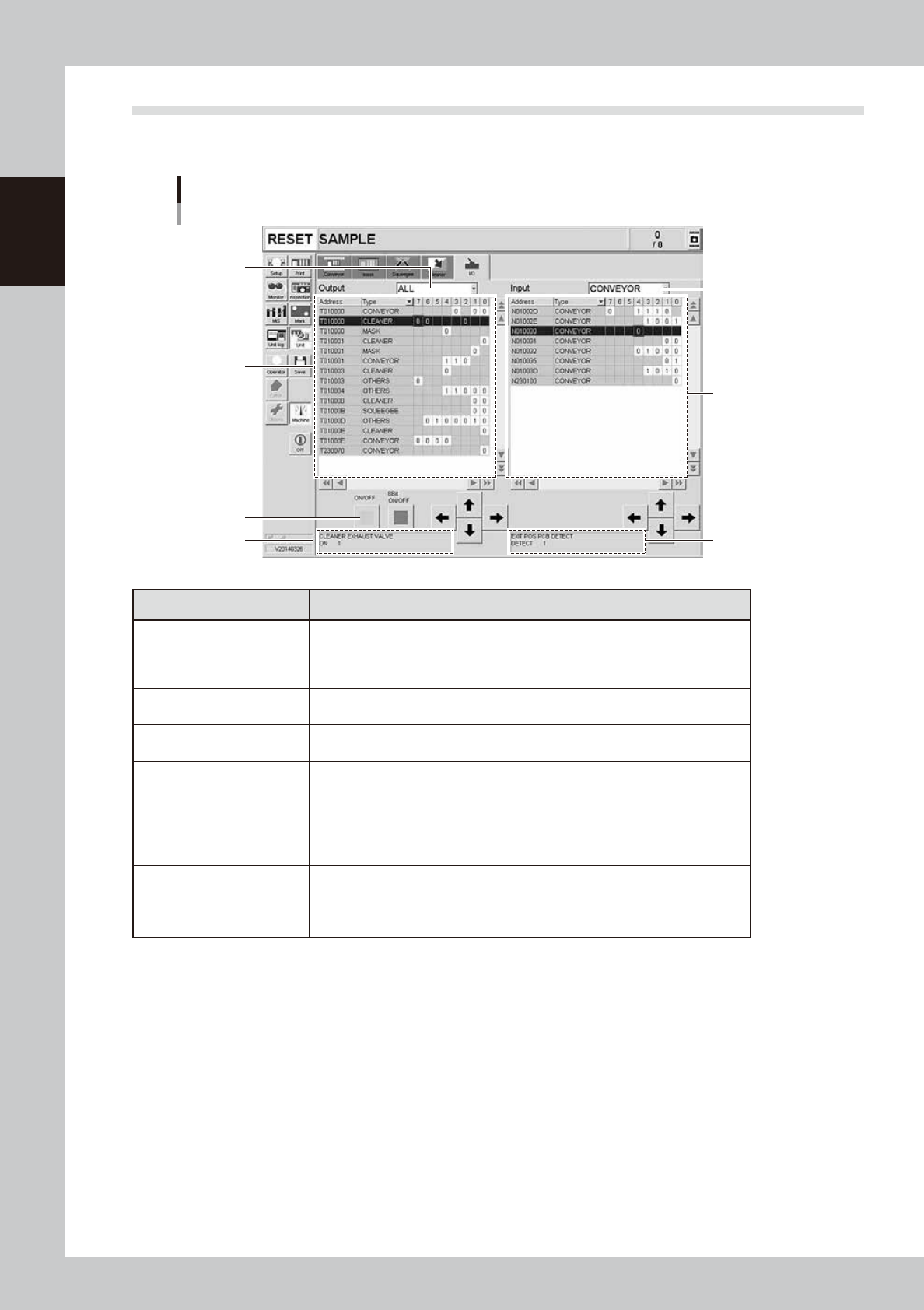
The [Unit]-[I/O] tab screen allows you to check the I/O signal status and switch each output signal on or off.
How to read this [I/O] tab screen is described below.
[Unit] - [I/O] tab screen
3
1
7
5
2
6
4
64723-N1-10
Item/button name Function
1 Output signal status
The status of each digital output signal is expressed in binary digits (1 and 0).
Each signal is identified by a code name consisting of an alphabet letter and
numbers such as "T00275". To select each signal, click on it in the grid or click
the up/down and right/left arrow buttons to move the cursor there.
2
Output signal
description box
Shows the name of the currently selected output signal and a description of what
"0" and "1" mean.
3
Unit selection
drop-down list
Select a unit from this drop-down list whose output signal status you want to
display.
4 ON/OFF
Clicking this button turns the currently selected signal on or off. (The [8bit ON/
OFF] button is not currently used.)
5 Input signal status
The status of each digital input signal is expressed in binary digits (1 and 0).
Each signal is identified by a code name consisting of an alphabet letter and
numbers such as "N005E0". To select each signal, click on it in the grid or click
the up/down and right/left arrow buttons to move the cursor there.
6
Input signal
description box
Shows the name of the currently selected input signal and a description of what
"0" and "1" mean.
7
Unit selection
drop-down list
Select a unit from this drop-down list whose input signal status you want to
display.

Maintenance Manual

General Contents
Introduction
1. About this manual i
2. Maintenance list ii
Chapter 1 Maintenance
1. Maintaining machine performance 1-1
1.1 Essential conditions and working environment 1-1
1.2 Importance of periodic inspections and cleaning 1-2
2. Preparing for maintenance tasks 1-3
2.1 Maintenance tools 1-3
2.1.1 Cleaning tools 1-3
2.1.2 Lubricating tools and grease 1-3
2.2 Required tools 1-4
Chapter 2 Inspection and maintenance
Before beginning work 2-1
1. Inspection and maintenance 2-2
1.1 Daily inspection 2-2
1.2 Cleaning the camera protective glass 2-3
2. Periodic maintenance items 2-4
2.1 Periodic inspection (Weekly/Monthly) 2-4
2.1.1 Parts to be replaced during periodic replacement 2-4
2.1.2 List of periodic inspection checkpoints 2-4
2.2 Parts recommended for periodic replacement 2-6
2.3 Adjusting the conveyor transfer belt tension 2-7
2.3.1 Belt Type A 2-8
2.3.2 Belt Type B 2-10
2.5 Inspecting and cleaning the air/mist filters 2-11
3. Replacing the consumable parts 2-13
3.1 Replacing the unit 2-13
3.2.1 Metal squeegee scraper 2-14
3.2.2 Urethane squeegee scraper 2-15
3.3 Suction-blower unit 2-17
3.3.1 Replacing the filter 2-17
3.3.2 Replacing the blower hose 2-18
3.4 Cleaning/replacing filter for mask vacuum chuck 2-20
3.5 Replacing the conveyor transfer belt 2-21
EMN11922
10