YCP10 Users_E.pdf - 第253页
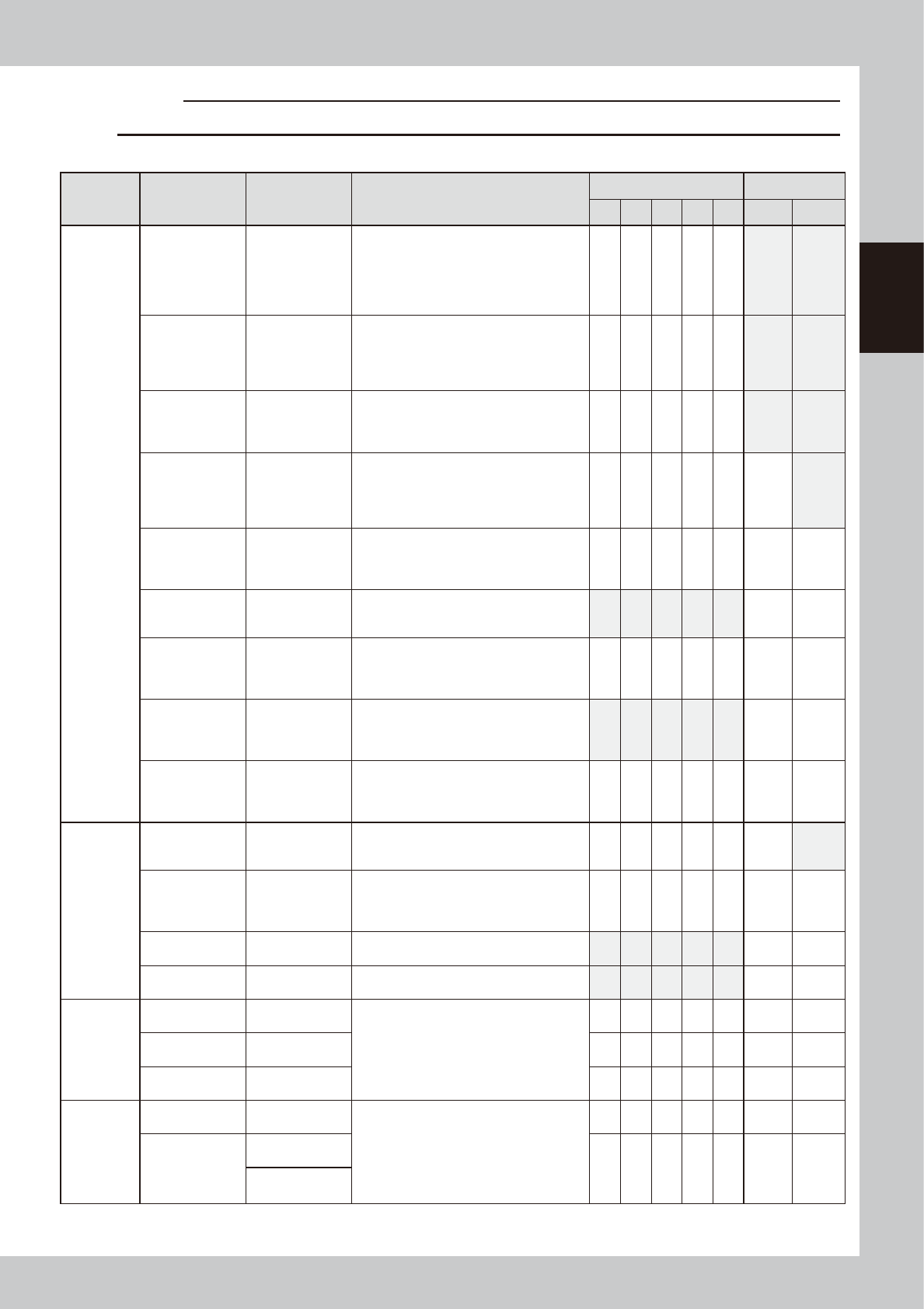
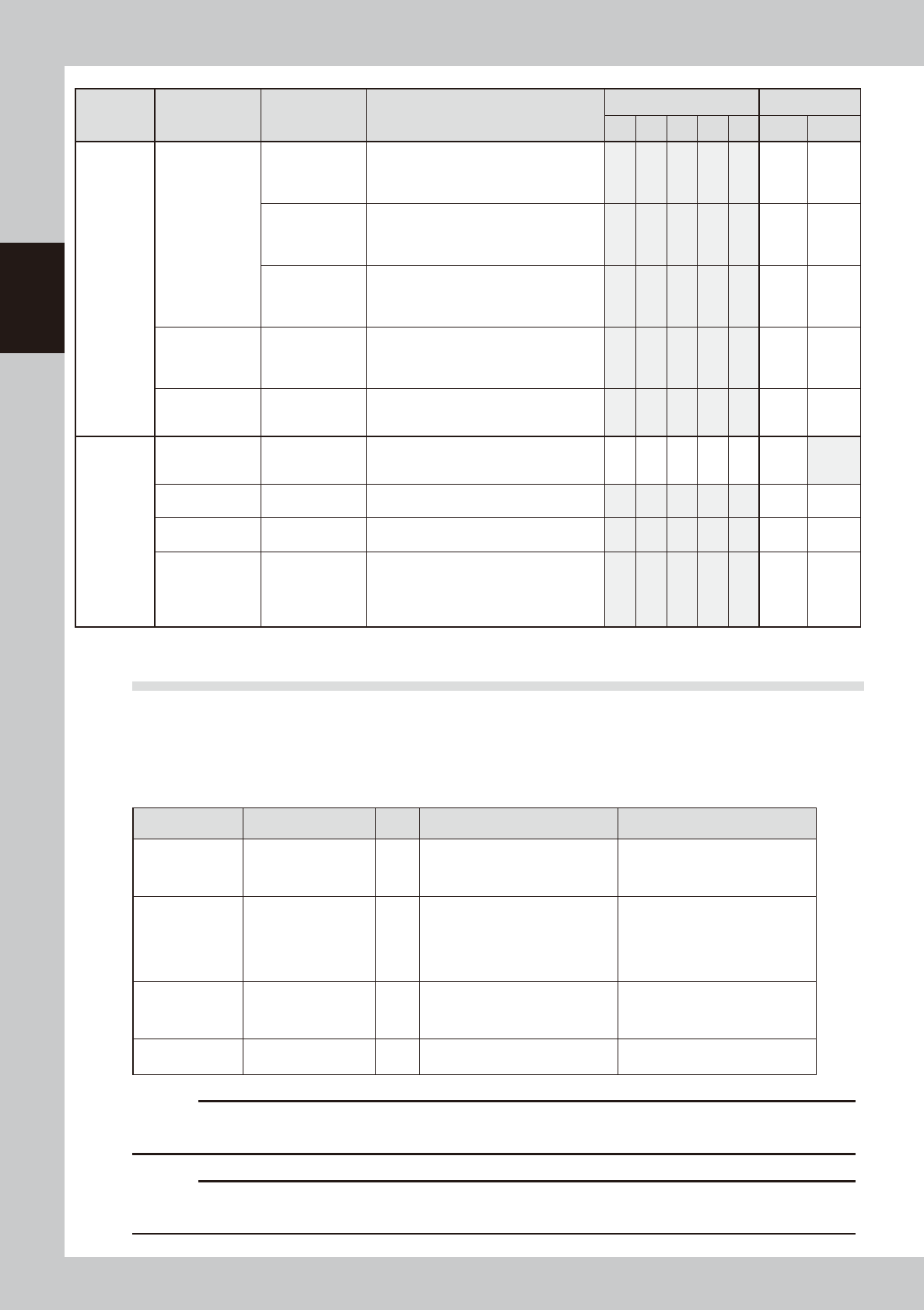
2-6 2 Inspection and maintenance Section Check item Checkpoint Contents of inspection/work Weekly (Date) Monthly / / / / / Cleaning Lubrication Cleaner Cleaner unit Up/down operation Roll sheet wind- up • Check that the …
2-5
2
Inspection and maintenance
c
CAUTION
Warm up the machine and wipe away excess grease before greasing up the lubrication points.
n
Inspection check sheet (Sample)
Section Check item Checkpoint Contents of inspection/work
Weekly (Date) Monthly
/ / / / /
Cleaning Lubrication
Conveyor
unit
Edge clamp
Entrance/exit
stopper
Operation,
sensor
• Check that the edge clamp functions at
an air pressure level of 0.1 MPa or less.
• Check that the edge plate (metallic part
of the edge clamp) for wear.
• Check that the sensor of the entrance/
exit stopper responds correctly.
Board flap
Contamination
on backside of
flap
Operation,
sensor
• Check that the sensor responds
correctly.
* Clean the solder contamination on the
backside.
Conveyor
transfer belt
Contamination,
napped surface,
operation
• Check the board transfer belt for
contamination, wear, or napping.
* Clean the sensor surface if any dust or
lint is on it.
Push-up plate
Operation,
contamination
on top surface
• Check that the push-up plate is leveled
without noise when operating it with the
board set.
* Remove the matrix plate and clean the
top surface of the plate.
PU-axis
Ball screw
Guide
• Check for foreign matter or solder
sticking.
* As needed, wipe away excess grease
after the grease has been applied.
W-axis timing
belt
Crack,
deterioration
• Check the belt for wear and the belt
tension.
* If the belt deteriorates, replace it.
W-axis conveyor
auto width
adjustment
Ball screw
Guide
• Check for foreign matter or solder
sticking.
* As needed, wipe away excess grease
after the grease has been applied.
Mask vacuum
Operation
Vacuum filter
• Check that the mask vacuum functions
correctly.
* Check the filter. Clean or replace the
filter if necessary.
MX-axis
Ball screw
Guide
• Check the MX-axis unit for foreign
matter or solder sticking.
* As needed, wipe away excess grease
after the grease has been applied.
Vision
camera unit
related
Mask camera
Contamination
on light lens
Lighting status
• Check the light lens for contamination.
• Turn on each light individually to check
that it is lit correctly.
CX-axis
Ball screw
Guide
• Check for foreign matter or solder
sticking.
* As needed, wipe away excess grease
after the grease has been applied.
Board camera Lighting status
• Turn on each light individually to check
that it is lit correctly.
Inspection
camera (OP)
Lighting status
• Turn on each light individually to check
that it is lit correctly.
X-, Y-, and
Z-axis
X1-axis, X2-axis
Ball screw
Guide
• Check for foreign matter or solder
sticking.
* As needed, wipe away excess grease
after the grease has been applied.
Caution : Remove the Y-axis cover for
maintenance.
Y-axis
Ball screw
Guide
Z-axis
Ball screw
Guide
Printing
head
SY-axis
Ball screw
Guide
• Check for foreign matter or solder
sticking.
* As needed, wipe away excess grease
after the grease has been applied.
SZ-axis
Ball screw
Guide
Guide shaft
Spring
2-6
2
Inspection and maintenance
Section Check item Checkpoint Contents of inspection/work
Weekly (Date) Monthly
/ / / / /
Cleaning Lubrication
Cleaner
Cleaner unit
Up/down
operation
Roll sheet wind-
up
• Check that the up/down operation timing
is correct.
• Check that the roll sheet is wound up
correctly.
Contamination
inside head
Solvent dispense
status
Check the cleaning solvent dispense
status or the head for contamination.
Y-direction guide
• Check for foreign matter or solder
sticking.
* As needed, wipe away excess grease
after the grease has been applied.
Suction unit
hose
Crack,
deterioration
* Check the hose for crack. If the hose
deteriorates, replace it.
• Check that the swing unit beside the
cleaner head functions smoothly.
Suction unit
Filter inside
suction unit
Operation
* Clean the contamination of the filter.
Replace the filter if necessary.
Others
Each sensor
Contamination
on sensor
Operation
* Check the senor or dog for foreign
matter or solder sticking.
Clean the sensor or dog if necessary.
Air supply part
Air filter
Mist filter
* Clean the contamination of the filter.
Replace the filter if necessary.
Controller Filter
* Clean the contamination of the filter.
Replace the filter if necessary.
Cooling fan
(Lower portion
of front/lower
portion of rear/
inside of panel)
Filter
* Clean the contamination of the filter.
Replace the filter if necessary.
2.2 Parts recommended for periodic replacement
For parts listed in the table below, it may be predicted that the service life of the part is expired or the part
deteriorates even though no trouble is found through the visual check during the periodic inspection.
To maintain the performance of the machine at its optimal operating level, it is recommended to periodically
replace these parts.
n
Periodic replacement parts
Part No. Part name Q'ty Location used Replacement interval
KLV-M37D9-00X
TUBE 25
1
ø25-suction hose connected from
the left side of the cleaner unit to
the rear of the machine.
Replace periodically every time
the total production quantity
reaches 3 million boards.
KHU-M3756-01X PUMP 1 Solvent pump
Replace every time the number
of suction unit operation cycles
reaches 1,440 thousand cycles.
Check the operation records on
the [Unit log]-[Cleaner] tab screen.
KLW-M91V1-00X VALVE 1 Valve
Replace every time the operation
count reaches 20 millions.
KHT-M362E-20X FILTER, SUB ASSY 1 Filter for solvent pump
Replace these parts at the same
time the solvent pump is replaced.
c
CAUTION
Parts (Part No.) listed above is current as of the issue date of this manual. When ordering a replacement part, please
check for the latest information.
c
CAUTION
Part Nos. are subject to change without prior notice. When ordering a replacement part, contact your local sales
dealer to check its part No.
2-7
2
Inspection and maintenance
2.3 Adjusting the conveyor transfer belt tension
The conveyor moves by belt drive to load boards ready for printing and to unload the finished boards. If the
conveyor transfer belt (hereafter "belt")is too loose, it may slip on the pulleys causing unstable board transfer. If
the belt is too tight, it may break or wear excessively.
If requiring the tension adjustment after replacing belt or inspected, adjust with the following procedures.
The tension of each belt on the fixed and movable rails should be adjusted evenly.
n
NOTE
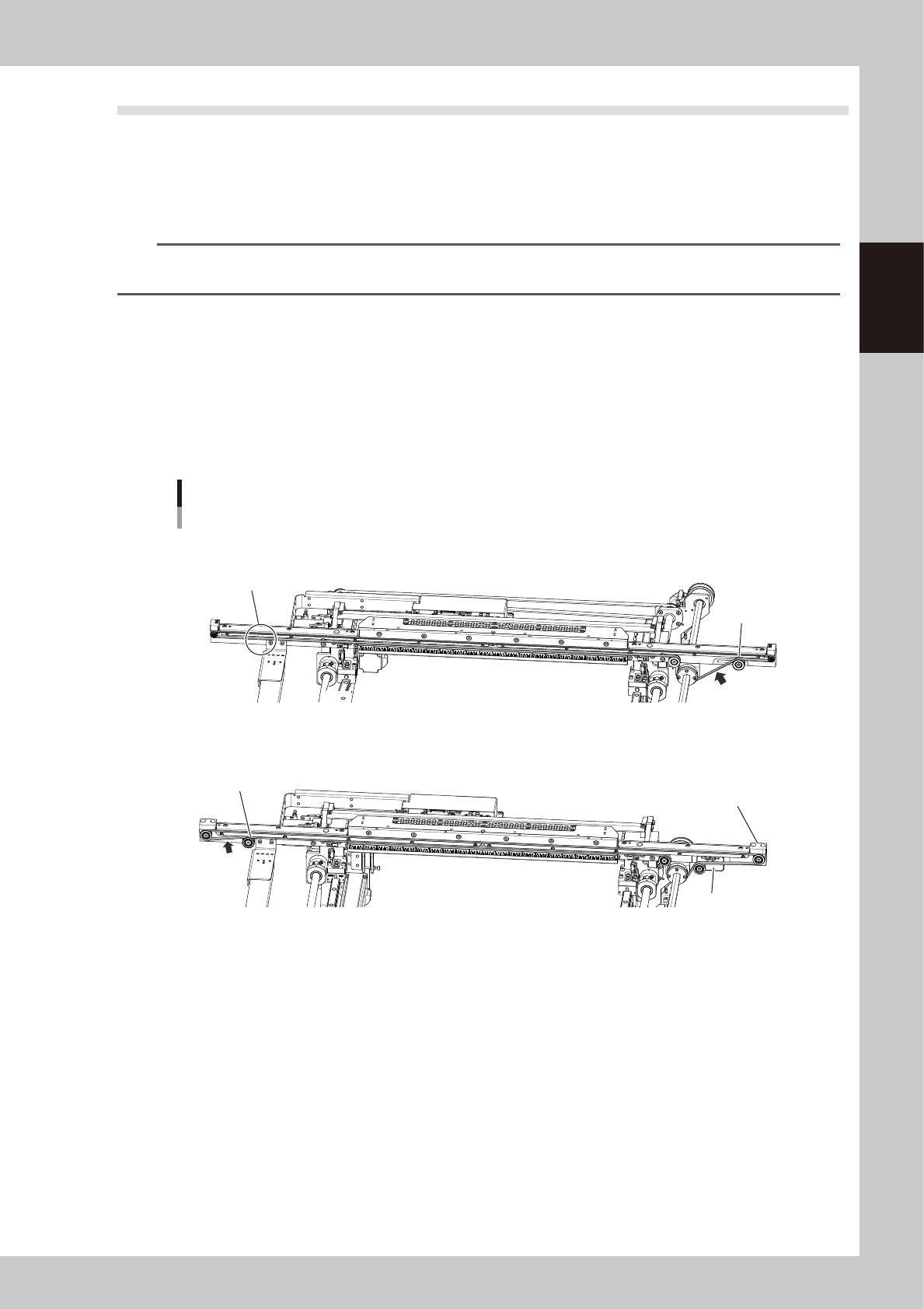
The 2 types of belt below are set on the machine depending on the shipping time. The belt path and procedures of
applying tension also vary. Check the belt type to adjust it correctly.
n
Distinguishing between belts
Type A (KLV-M9127-00X)
•
The idler is not set to the downstream side (in front of exit).
•
The tension is adjusted by moving tensioner (pulley).
Type B (KLV-M9127-01X)
•
The idler is set to the downstream side (in front of exit).
•
The tension is adjusted by moving the tension adjustment plate. (Tensioner is not moved directly.)
Distinguishing between belts
Tension
Measurement
position
Tension
measurement
Position
No idler
Type A
Type B
Idler
Tension
adjustment plate
Tensioner
The shape of end block is
different from type A.
53230-N1-00
n
Required tools
•
Hex wrenches (3 mm, 4 mm, 5 mm)
•
Tension meter
•
Permanent marker (marking tension position)
•
Scale (Measuring SPAN)