YCP10 Users_E.pdf - 第145页
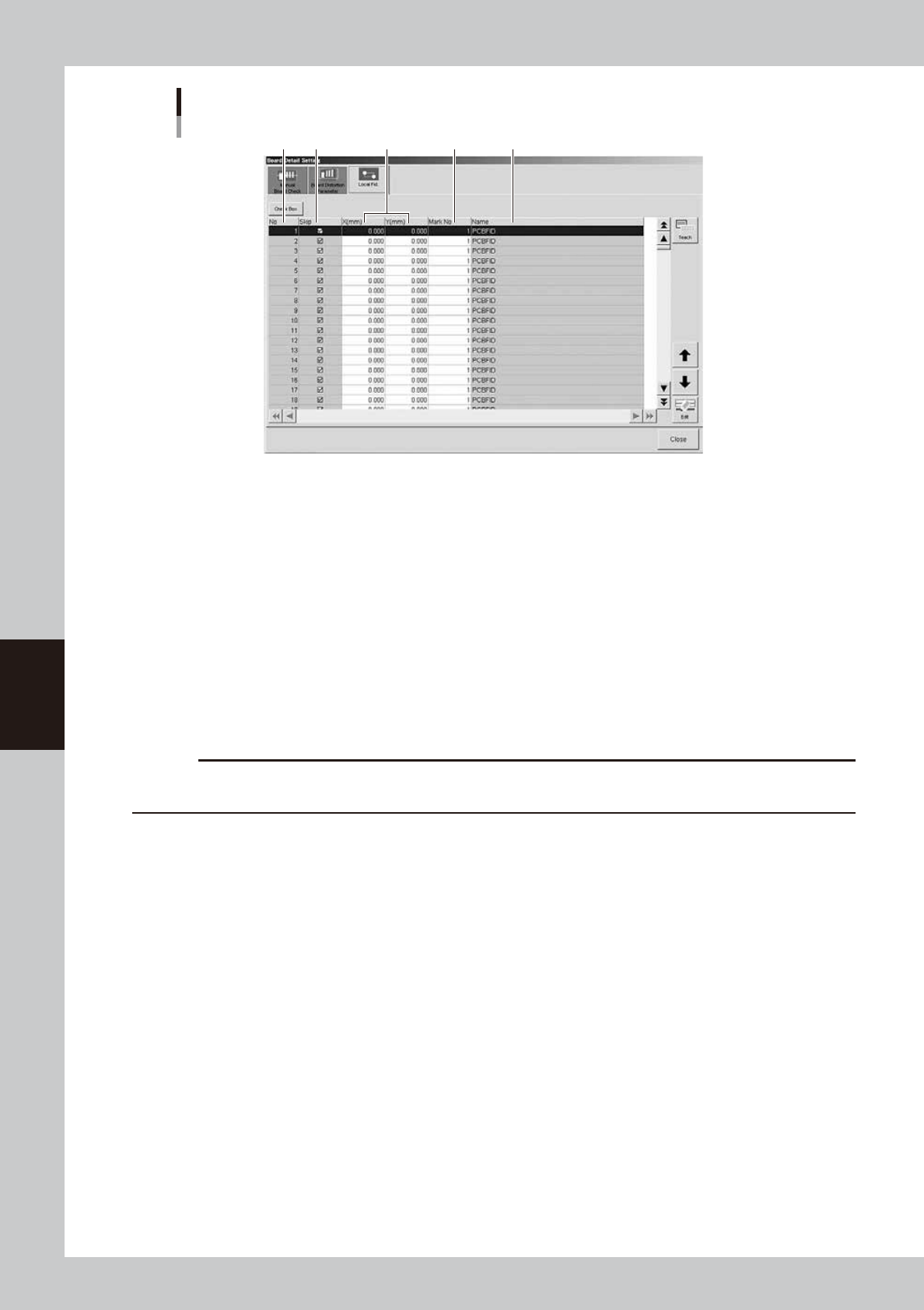
5-14 5 Cr eating and setting the data Local fiducial mark setting 1 2 3 4 5 64515-N1-00 1. No. Shows the local fiducial No. 2. Skip Sets whether to run or to skip the local fiducial function for the specified No. Clear t…
5-13
5
Creating and setting the data
l
Local fiducial function
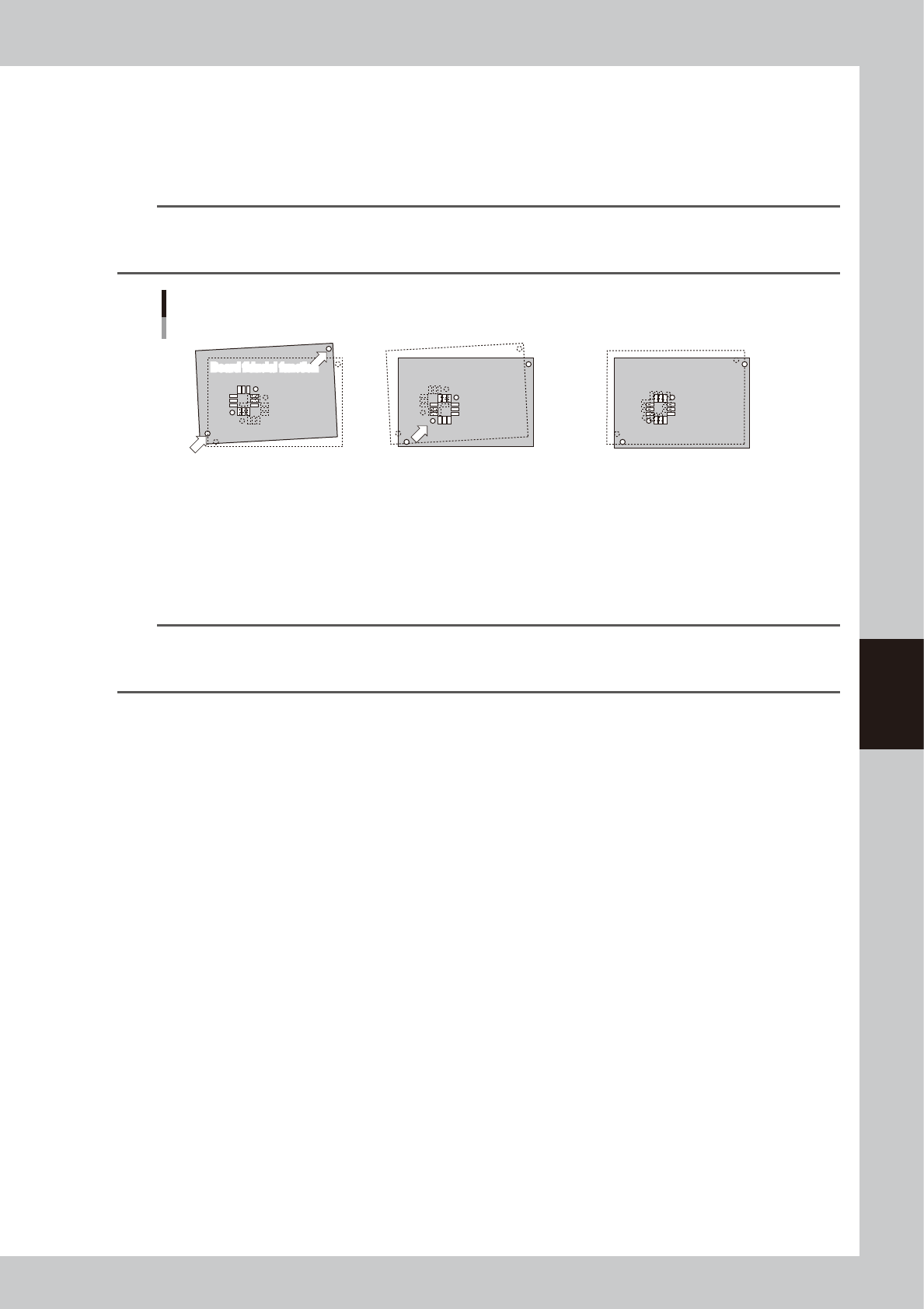
Uniform printing accuracy at important points can be ensured by recognizing marks near positions where it is essential
to maintain good printing accuracy. This is especially true when printing on board within the same lot having elongation
or distortion irregularities. The [Local Fid.] tab allows you to set the type of mark and position coordinates of the local
fiducial marks being used.
TIP
Position correction with local fiducial marks is also used to calculate the print position, as well as calculate the printing
position for running the solder-print inspection on machines equipped with the solder-print inspection function
(option).
Board fiducial and local fiducial functions
1. This function runs board
fiducial recognition and
calculates the amount of offset
for correcting the board
deviation that may occur when
clamped on the print table.
2. This function uses board fiducial
recognition results to correct the
board deviation that may occur
when clamped on the print table.
It then recognizes the marks at
the local fiducial positions that
were preregistered.
3. If there is no elongation or
distortion on the board then no
local fiducial recognition offset is
issued. But if elongation or
distortion is present, the local
fiducial recognition offset (only in
XY direction) is added unchanged,
to the board fiducial offset.
Board fiducial function
Board fiducial function
Board fiducial function
Local fiducial function
63507-N1-00
TIP
When there are multiple positions on the board where you want to essentially maintain satisfactory printing accuracy
and the local fiducial function is used on each of these positions, the average of the recognition offset amount for
each local fiducial mark is used as the correction offset.
5-14
5
Creating and setting the data
Local fiducial mark setting
1 2 3 4 5
64515-N1-00
1. No.
Shows the local fiducial No.
2. Skip
Sets whether to run or to skip the local fiducial function for the specified No. Clear the check box if running the local
fiducial function.
3. X(mm), Y(mm)
Sets the position for the local fiducial mark position for the specified No. The coordinate reference position is the same
as the board fiducial mark.
4. Mark No.
Specifies the mark No. to use for recognizing the local fiducial mark of the specified No.
5. Name
Shows the name of the mark data specified in the mark No.
c
CAUTION
Always set the board fiducial function to "Use" when using the local fiducial function. The board fiducial function is
disabled if set to "NotUse".
5-15
5
Creating and setting the data
4. Mask data setting
The following parameter items can be checked and edited on the [Print]-[Mask] tab.
4.1 Mask marks and parameter setting
[Print]-[Mask] tab
[Edit] button
1 4 5 6
7
2 3
64516-N1-10
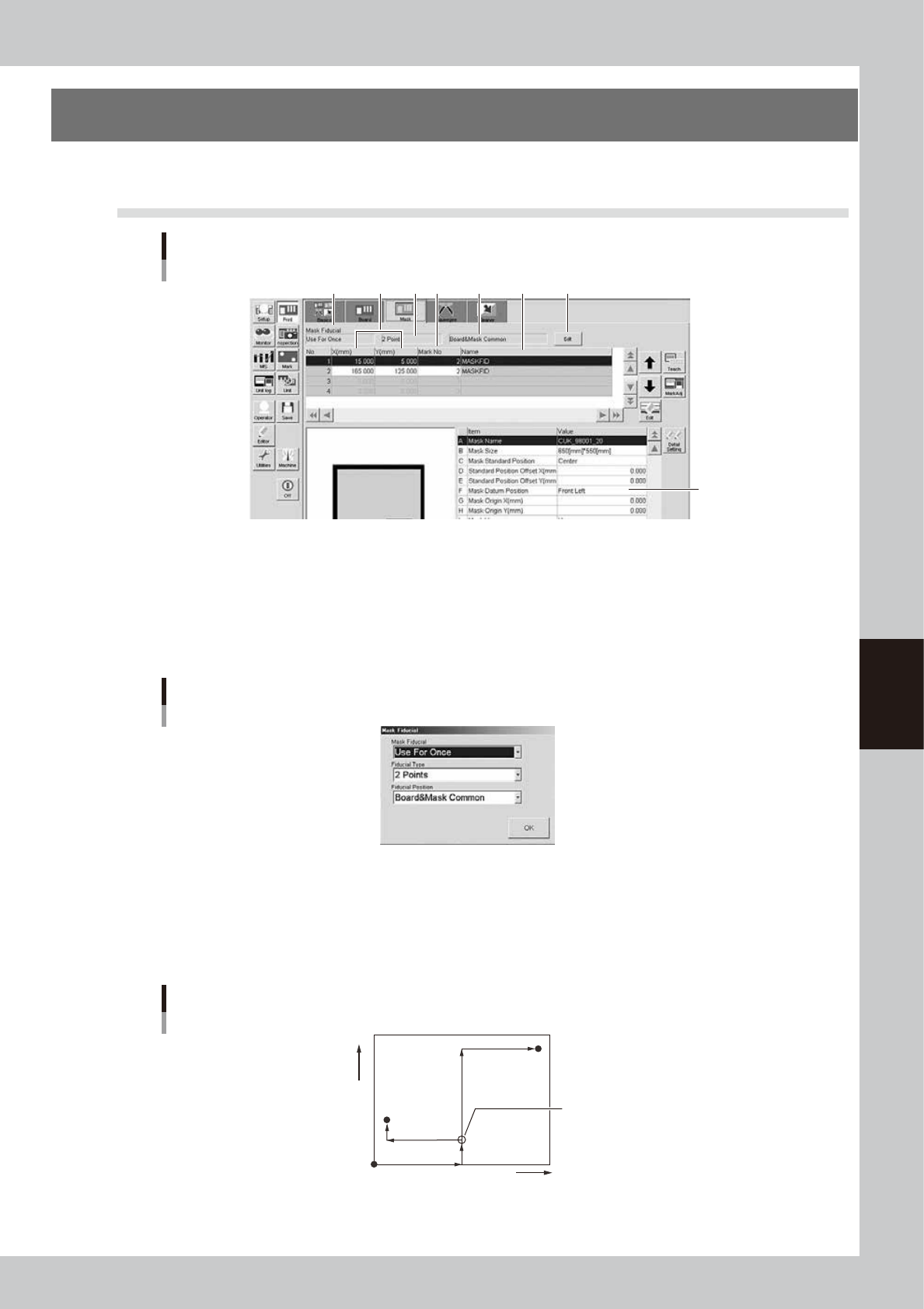
1: Mask Fiducial
Set this parameter to "Use For Every Board" or "Use For Once" when using mask fiducial marks for position alignment by
vision recognition. If not using mark recognition then set this to "NotUse". When set to "Use For Every Board", position
alignment by mark recognition is performed each time a board is loaded on the conveyor. When "Use for one" is selected,
position alignment by mark recognition is performed only when the first board is loaded. Pressing the [Edit] button at the
upper right displays the screen shown below. Select the desired item from the Mark Fiducial drop-down list.
“Mask fiducial” screen
64517-N1-00
2: Fiducial Type
When "Mask Fiducial" is set to "Use For Every Board" or "Use For Once", select the fiducial type (number of fiducial
marks to be recognized) from among "1 Point" to "4 Points". These marks can be different in shape and size from each
other. Pressing the [Edit] button at the upper right displays the screen shown above. Select the desired item from the
Fiducial Type drop-down list.
Fiducial Type example (2 points)
Mask reference position
Mark 1
(-X, Y)
+X
+Y
Mark 2
(X, Y)
Mask origin
63508-N1-00