3OM-1003-005.pdf - 第100页
P .E.C. recognition mode local When "Enable" is set in the "P .E.C. recognition function" text box, select one of the following options in the "P .E.C. recognition mode local" text box. Disa…
P.E.C. recognition mode image
When "Enable" is selected in the "P.E.C. recognition function" text box,
select one of the following options as an image recognition mode.
Disable : The image recognition function is not used.
Enable : The image recognition function(2-point recognition) is
used.
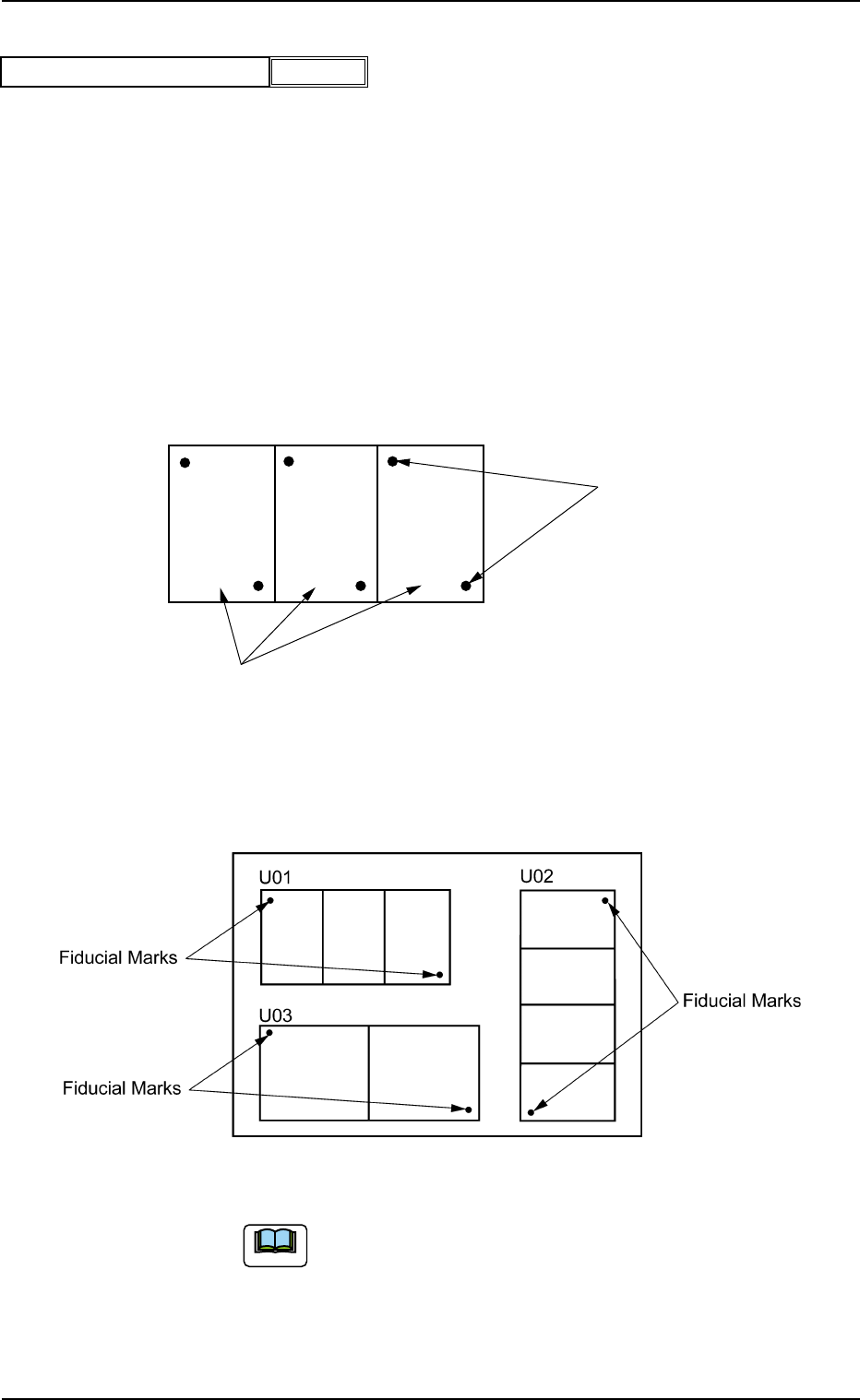
U-N : The P.E.C. recognition is performed, regarding a unit
P.C.B. as one unit on the multi-unit P.C.B.
Example: "Enable" in "P.E.C. recognition mode image" Text Box
Fig. 3B49
Example: "U-N" in "P.E.C. recognition mode image" Text Box
Fig. 3B50
When the global recognition function is used together with the
image recognition function, both recognizing actions take
place but the placement coordinates are corrected according
to the result of the image recognition.
Fiducial Marks
Unit P.C.B.'s (Multi-Unit P.C.B.)
0305-001 2-30 AIL01EDTP
2.3 Operation Data
Enable
P.E.C. recognition mode image
Fig. 3B48
Note
P.E.C. recognition mode local
When "Enable" is set in the "P.E.C. recognition function" text box,
select one of the following options in the "P.E.C. recognition mode
local" text box.
Disable : The local recognition function is not used.
Enable : The local recognition function is used.
(A02_02) P.E.C. recognition mode global
When "1 Point", "2 Point", "3 Point" or "4 Point" is selected for the
global P.E.C. recognition function, the coordinates and code of each
fiducial mark must be entered in the corresponding text boxes.
Fiducial mark #1 X location [mm] and Y location [mm]
Set the coordinates of the first fiducial mark in the text boxes.
Unit: mm
Fiducial mark #1 Mark code
Set the mark code of the first fiducial mark in the text box.
Fiducial mark #2 X location [mm] and Y location [mm]
Set the coordinates of the second fiducial mark in the text boxes.
Unit: mm
Fiducial mark #2 Mark code
Set the mark code of the second fiducial mark in the text box.
Fiducial mark #3 X location [mm] and Y location [mm]
Set the coordinates of the third fiducial mark in the text boxes.
Unit: mm
Fiducial mark #3 Mark code
Set the mark code of the third fiducial mark in the text box.
Refer to "(A03) P.E.C. Recognition Mark Data" for the mark codes.
2.3 Operation Data
1
Fiducial mark #1 Mark code
Fig. 3B53
1
Fiducial mark #2 Mark code
Fig. 3B55
1
Fiducial mark #3 Mark code
Fig. 3B57
Fig. 3B52
Fiducial mark #1 X location [mm]
Fiducial mark #1 Y location [mm]
10.000 [mm]
10.000 [mm]
0305-001 2-31 AIL01EDTP
Fig. 3B56
Fiducial mark #3 X location [mm]
Fiducial mark #3 Y location [mm]
0.000 [mm]
0.000 [mm]
Fig. 3B54
Fiducial mark #2 X location [mm]
Fiducial mark #2 Y location [mm]
100.000 [mm]
100.000 [mm]
Disable
P.E.C. recognition mode local
Fig. 3B51
Note
(A03) P.E.C. Recognition Mark Data
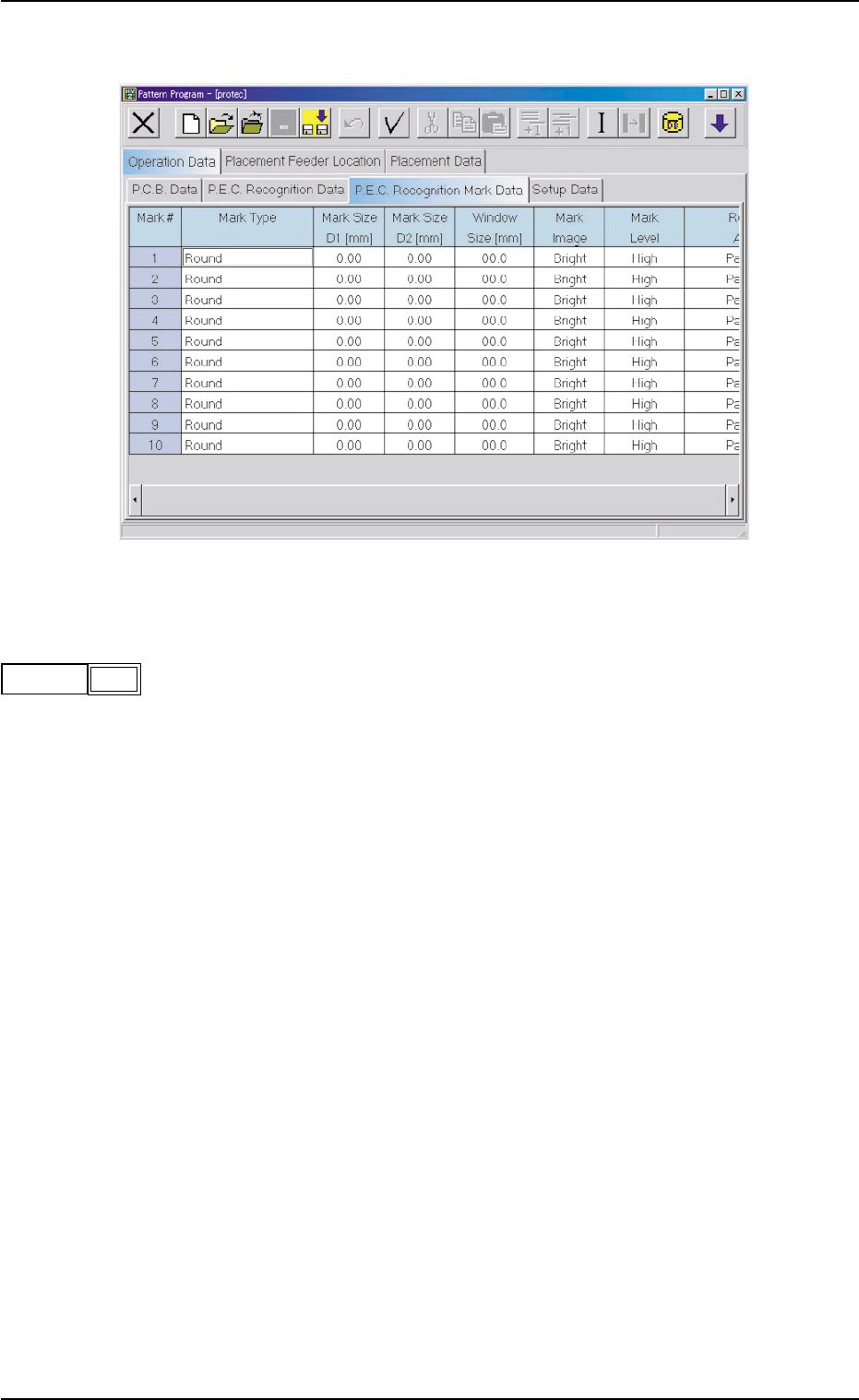
Fig. 3B58 Edit Window (Example)
(A03_01) Mark #
The mark Nos. correspond to the mark codes and the specified pa-
rameters of each fiducial mark used in the P.E.C. recognition function.
10 types of mark codes can be registered for each pattern program.
0305-001 2-32
AIL01EDTP
2.3 Operation Data
1
mark #
Fig. 3B59