3OM-1003-005.pdf - 第327页
• Sheet Composition *1 Auto nozzle bypass (Auto Nozzle bypass counts) [times] The specified number of pickup errors is used to automatically by- pass the nozzle (to avoid using the nozzle for component picks) where picku…
3.3 "Auto Operation" Tab
3.3.1 "Auto Operation Setup" Tab
• Sheet Layout
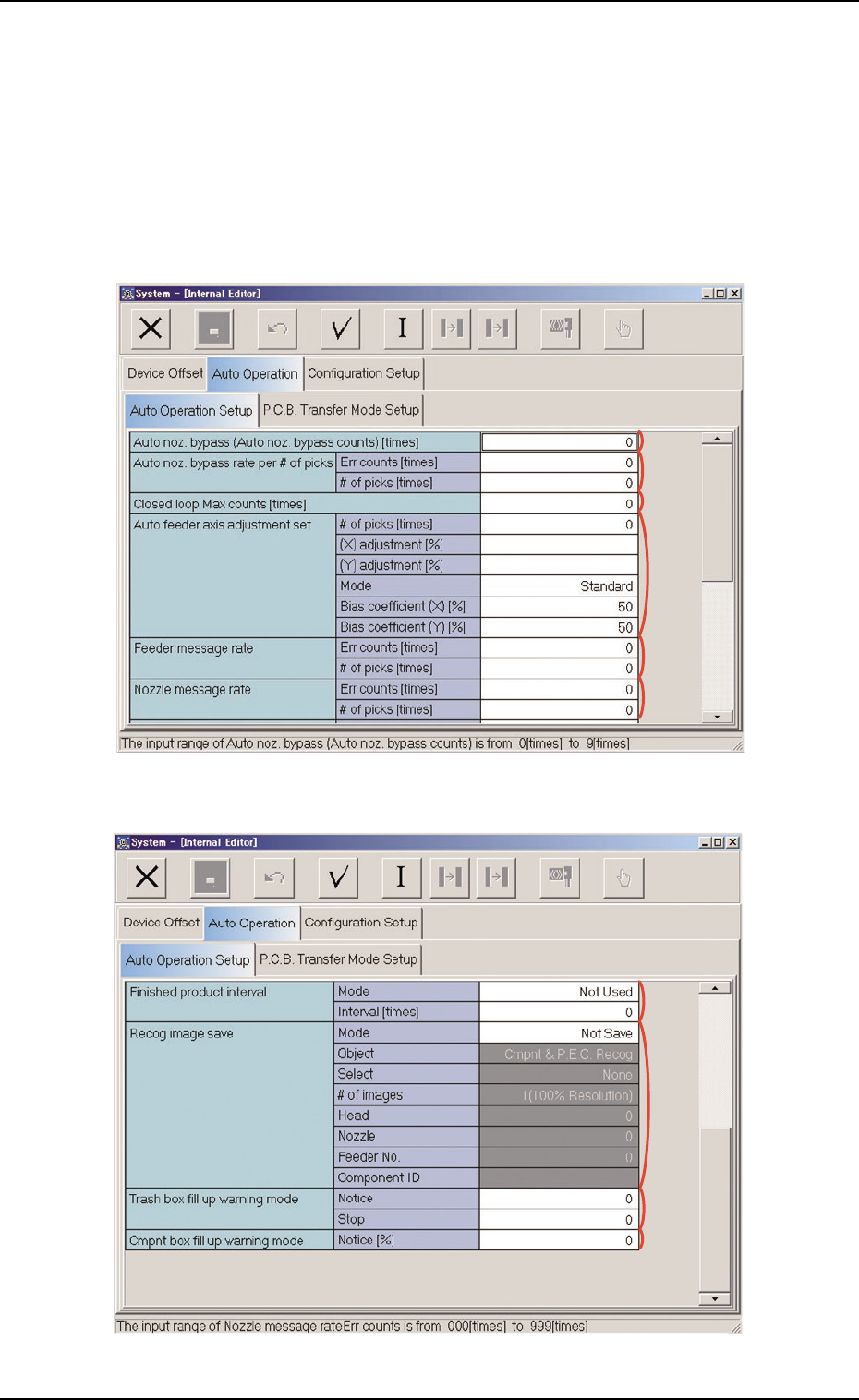
When the "Auto Operation Setup" tab is pressed in the "Auto Operation"
tab sheet, the following tab sheet appears.
Fig. 3E41 "Auto Operation" Tab Sheet (1)
Fig. 3E42 "Auto Operation" Tab Sheet (2)
051 1-002 5-45
AIL01EDTP
3.3 "Auto Operation" Tab
*1
*2
*3
*4
*5
*6
*9
*8
*10
*7
• Sheet Composition
*1 Auto nozzle bypass (Auto Nozzle bypass counts) [times]
The specified number of pickup errors is used to automatically by-
pass the nozzle (to avoid using the nozzle for component picks)
where pickup error have occurred continuously during automatic
operation.
When pickup errors have occurred continuously the specified num-
ber of times, the nozzle is automatically bypassed and the informa-
tion is displayed as machine information.
(a) The data input range is "0 to 9" (times).
(b) When "0" (zero) is set, the automatic nozzle bypass
function becomes unusable.
*2 Auto nozzle bypass rate per # of picks
Error counts [times], # of picks [times]
The specified parameters are used to automatically bypass the
nozzle whose pickup rate has deteriorated during automatic opera-
tion.
When the number of picks has reached the specified value, the
parameter in the "Error counts [times]" text box is cleared.
When the number of pickup errors has reached the specified error
counts before the number of picks reaches the specified number of
picks, the nozzle is automatically bypassed and the information is
displayed as machine information.
(a) The data input range is "0 to 9999" for both "Error
Counts" and "# of Picks".
(b) When "0" (zero) is set for "# of Picks" and "Error
Counts" or the parameter in the "Error counts [times]"
text box is larger than the parameter in the "# of picks
[times]" text box, the automatic nozzle bypass func-
tion does not work.
*3 Closed loop Max counts [times]
(Not Available)
0305-001 5-46
AIL01EDTP
3.3 "Auto Operation" Tab
Note
Note
051 1-002 5-47 AIL01EDTP
*4 Auto feeder axis adjustment set
# of picks [times], (X) adjustment [%], (Y) adjustment [%]
Set the sensitivity parameters which follow up the data learned by
using the statistical method in the feeder (B) offset data.
New "FDR. (B) OFFSET" = Old "FDR. (B) OFFSET" +
(mean of deviation obtained n times) * Coefficient
# of picks [times]
Set the total number of collected samples when data is updated
or changed.
(a) The data input range is "1 to 10".
(b) The standard value is "3".
(X) adjustment [%]
Set the feedback coefficient of the mean of the feeder axis’ X-
direction deviation.
(a) The data input range is "10 to 100%".
(b) The standard value is "50%".
(Y) adjustment [%]
Set the feedback coefficient of the mean of the feeder axis’ Y-
direction deviation.
(a) The data input range is "10 to 100%"
(b) The standard value is "50%"
3.3 "Auto Operation" Tab
Note
Note
Note