3OM-1003-005.pdf - 第268页
5. "Bypass & Rate Data" Window This window enables the operator to check the pick-up rate and nozzle bypass condition (managed for each individual feeders or nozzles) based on each pick-up rate and nozzle b…
(14) Component output error (Pickup error)
Shown is the total number of the output-error-caused compo-
nents (pickup errors) for each individual feeders.
(15) Component output error (Others)
Shown is the total number of the output-error-caused compo-
nents (errors other than pickup ones) for each individual feeders.
(16) Component ID.
Shown are the component IDs for each individual feeders.
(17) Type
Shown are the packaging types of the related component IDs.
(18) Width (mm)
Shown are the component widths.
When one of the above buttons is pressed, the feeder No. with
the biggest parameter under the selected button is displayed in
the first line and feeder Nos. having the subsequent (second,
third, fourth, ...) biggest parameters follow. That is, parameters
are re-arranged in order of error counts (from the biggest to the
smallest ones), making it easy to analyze and improve produc-
tion rate.
When the [Feeder No.] button is pressed, feeder Nos. are ar-
ranged in their initial order (order of slot Nos.).
*3 Vertical Scroll Bar
Up and down arrows are located at both ends of a scroll bar. The up
or the down arrow can be pressed to scroll up or down a tab sheet
to expose hidden parameters (data for the hidden feeder Nos.).
*4 Horizontal Scroll Bar
Right and left arrows are located at both ends of a scroll bar. The
right or the left arrow can be pressed to scroll right or left a tab sheet
to expose hidden parameters.
4.3 "Handling Errors Per Feeder" Tab
0403-002 4-42 AIL01EDTP
Note
5. "Bypass & Rate Data" Window
This window enables the operator to check the pick-up rate and nozzle
bypass condition (managed for each individual feeders or nozzles) based
on each pick-up rate and nozzle bypassing specified in the auto opera-
tion setup data.
Refer to "3.3.1 "Auto Operation Setup" Tab" in "Section 5" for
the auto operation setup data.
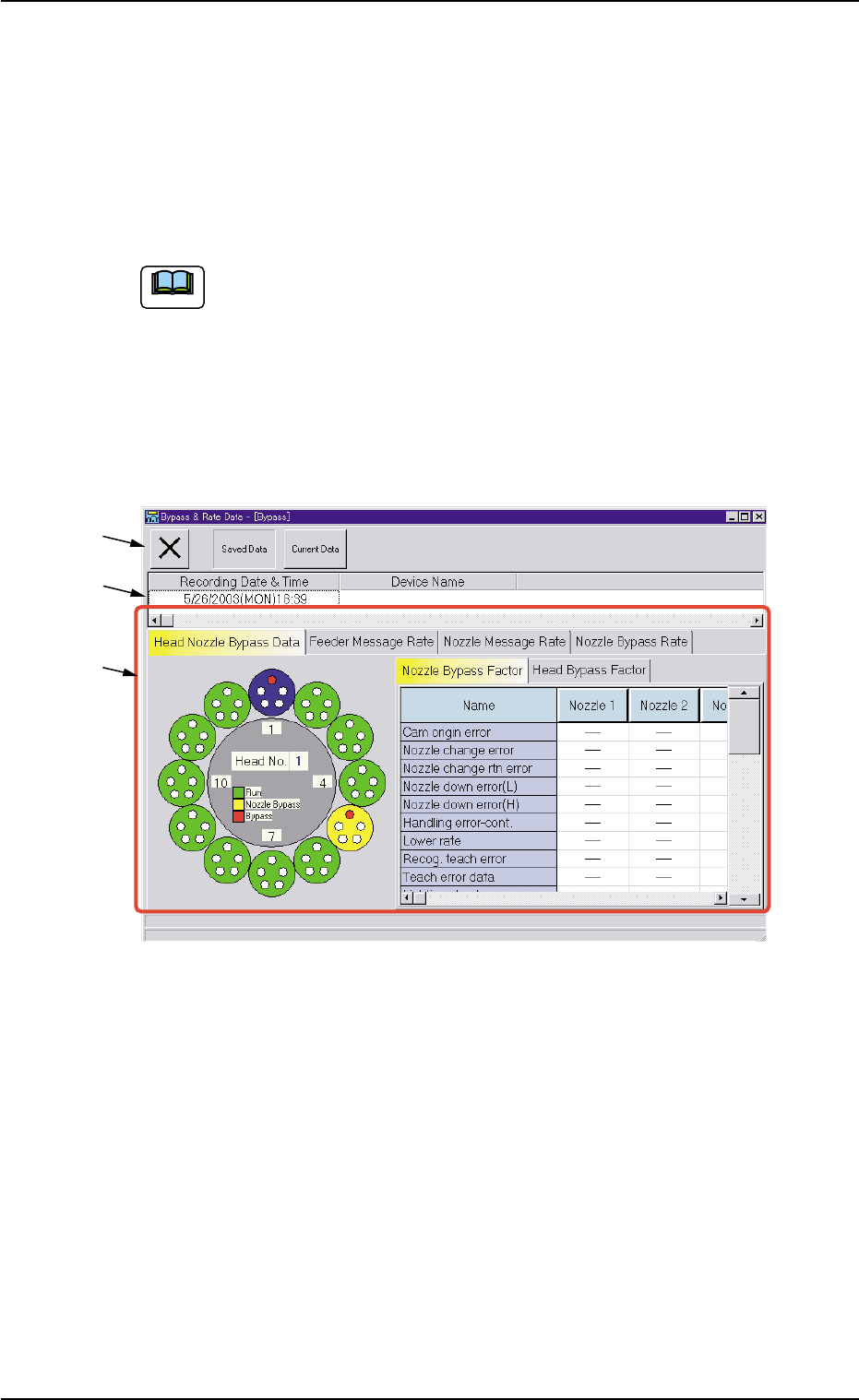
• Window Layout
When the [Comp. Handling Err. Rate Dt.] button in the "Comp. Han-
dling Err. Rate Dt." tab sheet ("Management Data" window) is pressed,
the "Bypass & Rate Data" window opens.
Fig. 3D19 "Bypass & Rate Data" Window
• Window Composition
*1 Toolbar
The following buttons are provided on this bar.
[Close] Button
When this button is pressed, the "Bypass & Rate Data" window
closes.
[Saved Data] Button
When pressed, this button displays the data saved as bypass &
rate data.
[Current Data] Button
When pressed, this button displays the current bypass & rate data.
*1
*2
*3
5. "Bypass & Rate Data" Window
0305-001 4-43 AIL01EDTP
Note
*2 Recording Date & Time
Displayed are the recording date & time and the machine name
related to the bypass & rate data.
*3 Tabs and Tab Sheets
The "Bypass & Rate Data" window is provided with the following
four tab sheets. When a tab is pressed, the corresponding tab sheet
appears inside the window.
Table 3D6
Tabs Description
Head Nozzle Bypass The rotary turret (heads and nozzles) is displayed graphically on the
Data left side of the tab sheet.
When a head (nozzles) is selected on the graphical rotary turret, the
bypass factors are displayed on the right side of the tab sheet.
Feeder Message Rate This tab sheet is provided with two tab sheets - "Feeder Carriage #1"
and "Feeder Carriage #2" tab sheets. Each tab sheet displays the
pick-up rate, the feeder message rate, and the component ID that
are classified by each warning factor on individual feeders (actual
feeders).
Nozzle Message Rate The corresponding tab sheet displays the pick-up rate and the nozzle
message rate classified by each warning factor on the individual heads
and nozzles.
See Fig. 3D23.
Nozzle Bypass Rate The corresponding tab sheet displays the pick-up rate and the nozzle
bypass rate classified by each nozzle bypass rate on the individual
heads and nozzles.
5. "Bypass & Rate Data" Window
0305-001 4-44 AIL01EDTP