3OM-1003-005.pdf - 第84页
(A01_03) P .C.B. origin offset X (horizontal) [mm] and Y (vertical) [mm] Set the offset values to correct the difference between the placement coordinate reference point (N 0 ) and the P .C.B. origin (P 0 ). Unit: mm &qu…
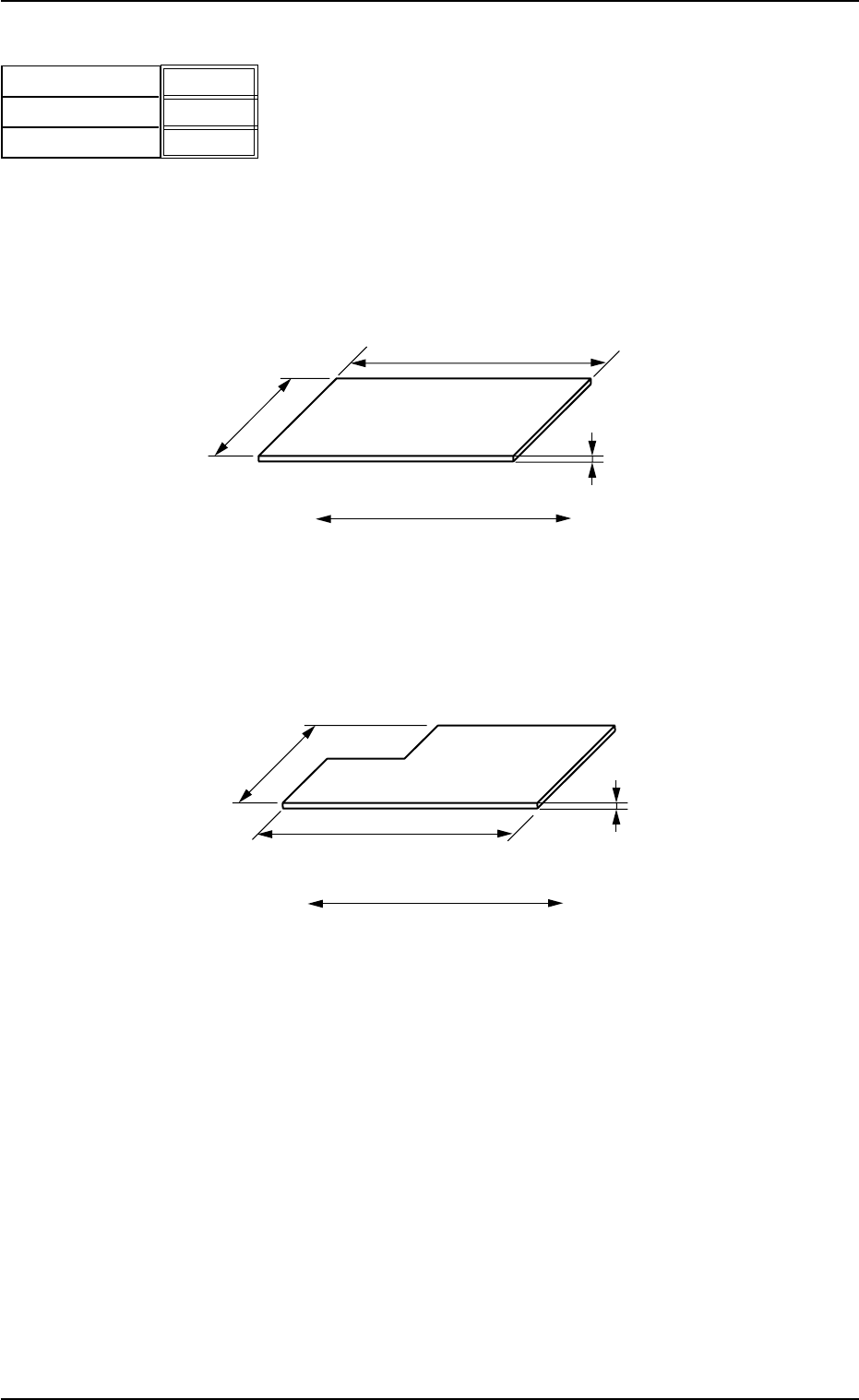
(A01_02) P.C.B. size
X (horizontal) [mm], Y (vertical) [mm], and T (thickness)
[mm]
Set the dimensions of the P.C.B. to be produced.
Unit: mm
Fig. 3B11
When the P.C.B. has a cutout, the following dimensions must
be entered.
Fig. 3B12
Data Input Range
TCM-X110J
X: 50 to 330 Y: 50 to 250 T: 0.5 to 5.0
TCM-X300S
• P.C.B. Origin Position : [to R460 mm]
X: 50 to 460 Y: 50 to 460 T: 0.5 to 5.0
• P.C.B. Origin Position : [to R510 mm]
X: 50 to 510 Y: 50 to 460 T: 0.5 to 5.0
• P.C.B. Origin Position : [to R560 mm]
X: 50 to 560 Y: 50 to 460 T: 0.5 to 5.0
• P.C.B. Origin Position : [to R610 mm]
X: 50 to 610 Y: 50 to 460 T: 0.5 to 5.0
330.000
250.000
1.600
X (Horizontal)[mm]
Y (Vertical)[mm]
T (Thickness)[mm]
Fig. 3B10
2.3 Operation Data
0305-001 2-14 AIL01EDTP
P.C.B.
P.C.B. Flow Direction
Y (Vertical)
X (Horizontal)
T (Thickness)
Y (Vertical)
X (Horizontal)
T (Thickness)
P.C.B.
P.C.B. Flow Direction
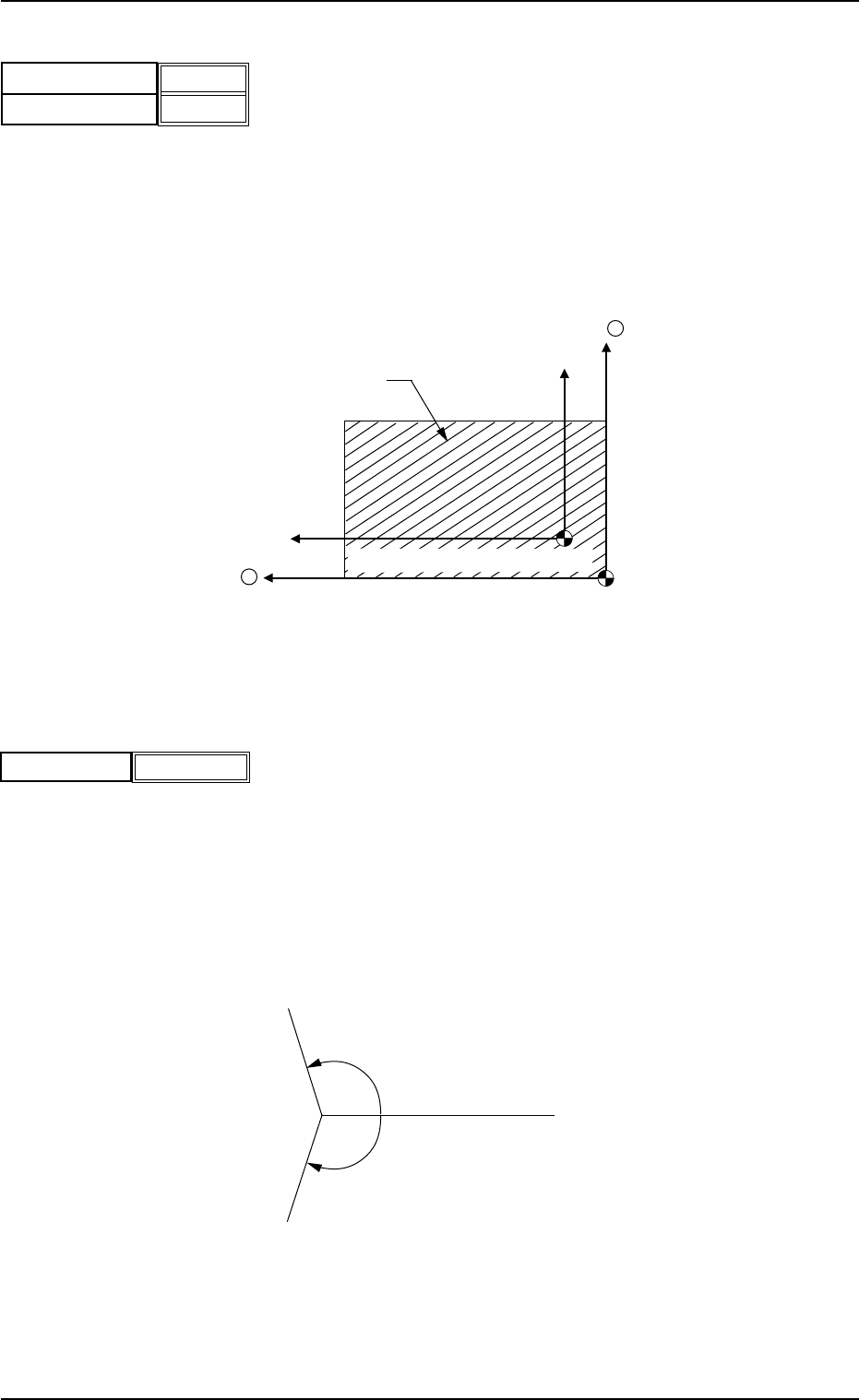
(A01_03) P.C.B. origin offset
X (horizontal) [mm] and Y (vertical) [mm]
Set the offset values to correct the difference between the placement
coordinate reference point (N
0
) and the P.C.B. origin (P
0
).
Unit: mm
"Plus" or "Minus" can be set in both X and Y coordinates in the direc-
tion of the correction.
Fig. 3B14 Example of "+" (Plus) Direction for Correction
Z=(Theta)[deg]
Set the offset value for component placement angle.
The set value is added to the "Z=theta" of all components in the place-
ment data (P data).
To correct the angle of component placement counterclockwise, a
parameter must be entered with a "+" (plus) sign. Put a "-" (minus)
sign to correct it clockwise.
Unit: degree
Fig. 3B16
P.C.B. Origin(P0)
X +
Y +
P.C.B.
Placement Coordinate Reference(N
0
)
Fig. 3B13
2.3 Operation Data
0305-001 2-15 AIL01EDTP
0°
+.°
-.°
X (horizontal)[mm]
Y (vertical)[mm]
+00.000
+00.000
Z=Theta [deg]
Fig. 3B15
+0.00
(A01_04) Placement Angle
"Relative" or "Absolute" can be selected as an angle value
in the text box.
Relative
The normal placement direction is selected.
Absolute
When the component feeding direction differs from one as-
sumed in the component library, it is required to change only
the feeding direction in the component library data. It is not
necessary to change the placement direction in the pattern
program data.
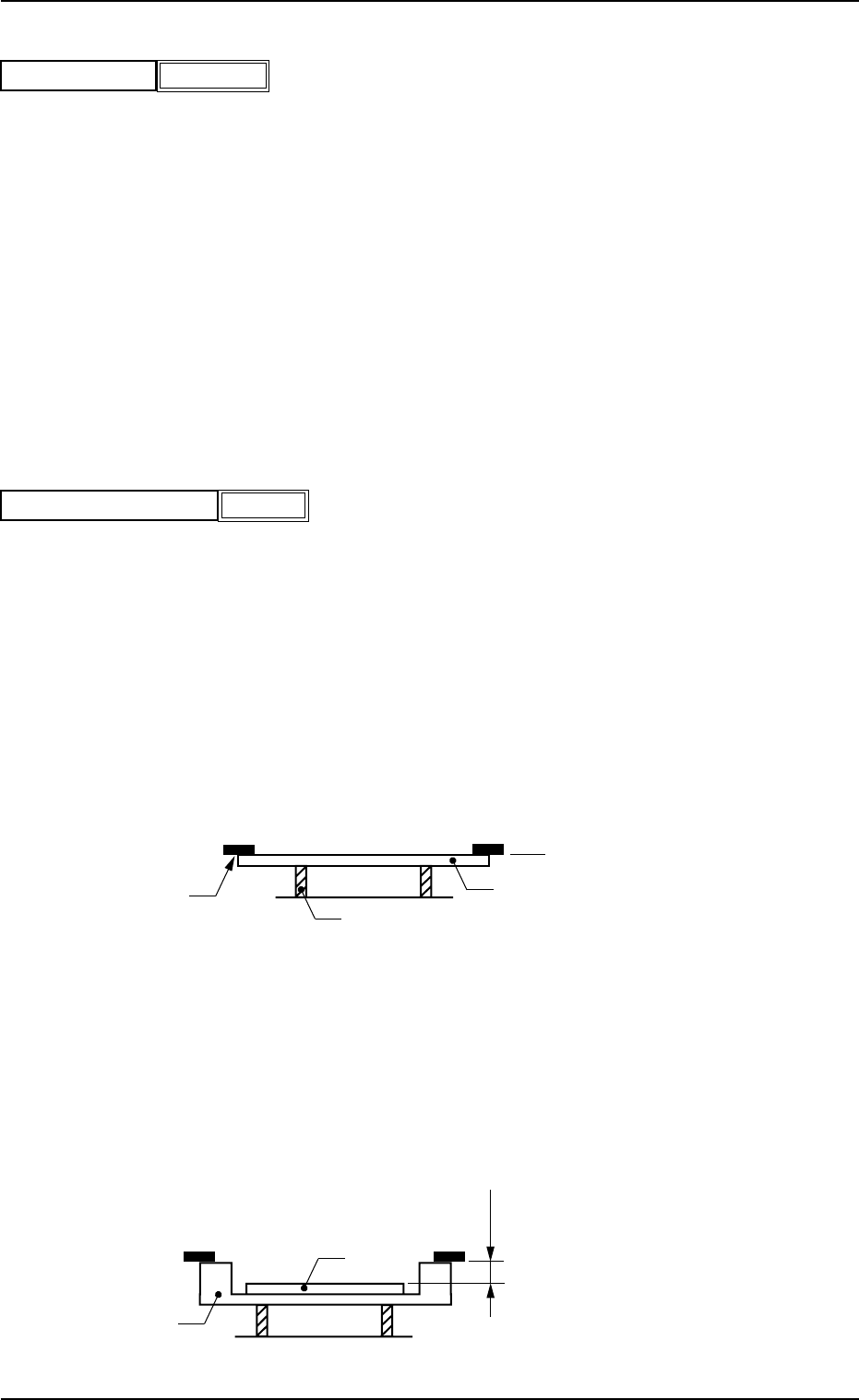
(A01_05) P.C.B. height offset
Set an offset value as a nozzle descending distance based on the
upper surface of the P.C.B. in the component placement section.
This offset value applies to all components in the pattern program.
Unit: mm
Normal Cases
Set "0.000 mm" (zero) in the text box.
The figure below shows that the upper surface of a P.C.B. is main-
tained at the P.C.B. upper surface reference point by the P.C.B. sup-
port pins.
Fig. 3B18
Example of Jig P.C.B. Usage
The figure below shows that the upper surface of a P.C.B. is lower
than the P.C.B. upper surface reference point.
If "+a mm" is set as an offset value at this time, components can be
placed correctly on the P.C.B.
Fig. 3B19
P.C.B. Upper Surface
Reference Plane
P.C.B.
Chute
P.C.B. Support Pin
P.C.B.
Jig P.C.B.
a mm
P.C.B. Upper Surface
Reference Plane
051 1-002 2-16 AIL01EDTP
2.3 Operation Data
+
0.00
P.C.B. height offset [mm]
Fig.3B17
Relative
Placement Angle
Fig. 3B16-1