3OM-1003-005.pdf - 第228页
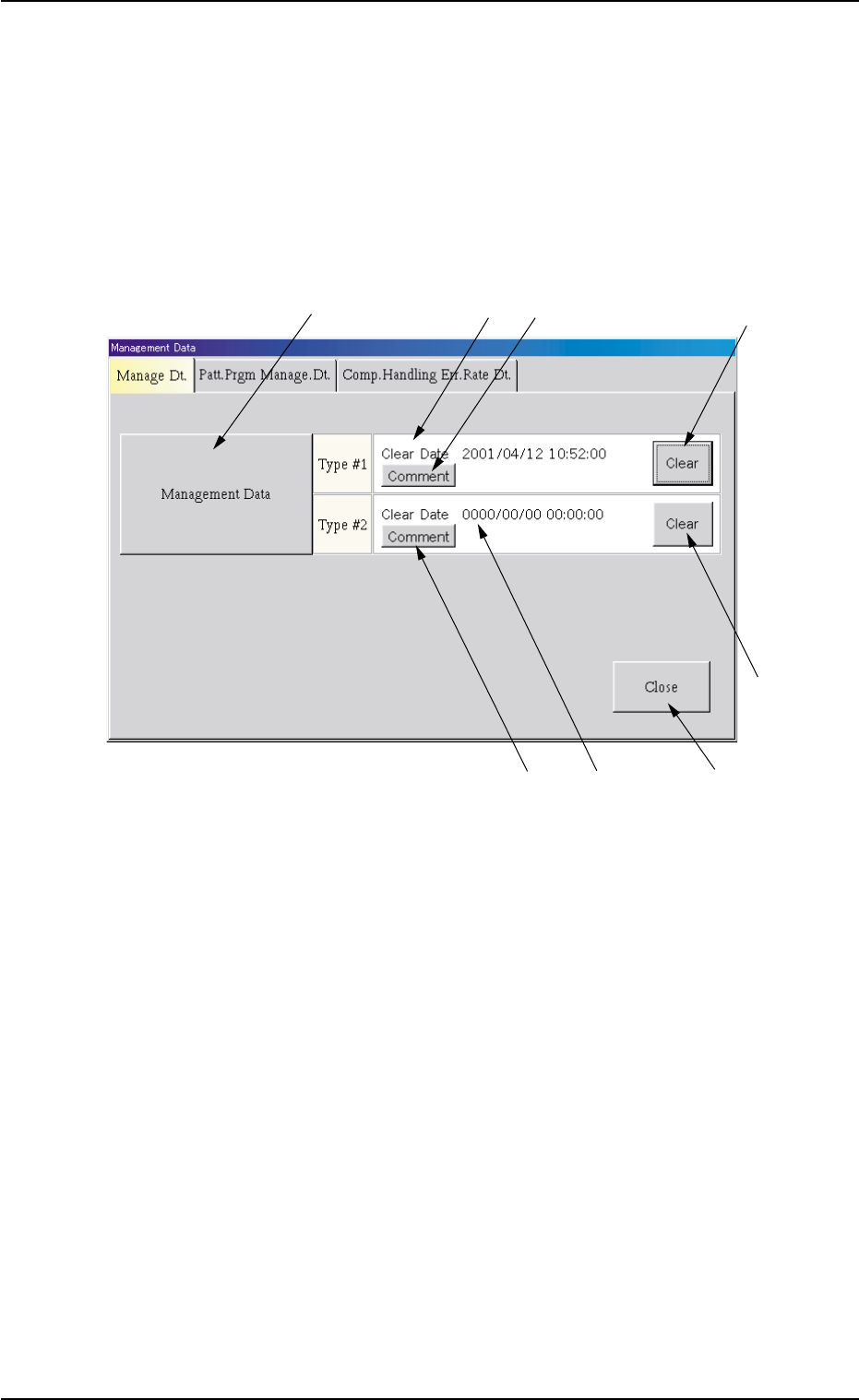
*5 [Comment] Button The "Comment" window opens. A comment can be entered for "T ype #2" *6 "File Information (T ype #2)" Pane This pane displays the clear date & time and the comment of …
2.1 "Manage Dt." Tab
The corresponding tab sheet enables the operator to view the summed
management data covering the whole machine performance.
• Sheet Layout
When the "Manage Dt." tab is pressed in the "Management Data" win-
dow, the following tab sheet appears.
Fig. 3D2 "Manage Dt." Tab Sheet
• Sheet Composition
*1 [Management Data] Button
When this button is pressed, the "Management Data" window opens.
Refer to "3. "Management Data" Window" for the detailed informa-
tion on the "Management Data" window.
*2 "File Information (Type #1)" Pane
This pane displays the clear date & time and the comment of "Man-
agement Data (Type #1)".
*3 [Comment] Button
The "Comment" window opens.
A comment can be entered for "Type #1"
*4 [Clear] Button
When this button is pressed, all data of "Management Data (Type
#1)" is cleared and the clear date & time is updated.
2.1 "Manage Dt." Tab
*4
*3
*2
*1
*5
*8
*6
*7
0305-001 4-4 AIL01EDTP

*5 [Comment] Button
The "Comment" window opens.
A comment can be entered for "Type #2"
*6 "File Information (Type #2)" Pane
This pane displays the clear date & time and the comment of "Man-
agement Data (Type #2)".
*7 [Clear] Button
When this button is pressed, all data of "Management Data (Type
#2)" is cleared and the clear date & time is updated.
*8 [Close] Button
When this button is pressed, the "Management Data" window closes.
2.1 "Manage Dt." Tab
0305-001 4-5 AIL01EDTP
2.2 "Patt. Prgm Manage. Dt." Tab
The corresponding tab sheet enables the operator to view the summed
pattern program management data related to each individual pattern
programs.
• Sheet Layout
When the "Patt. Prgm Manage. Dt." tab is pressed in the "Management
Data" window, the following tab sheet appears.
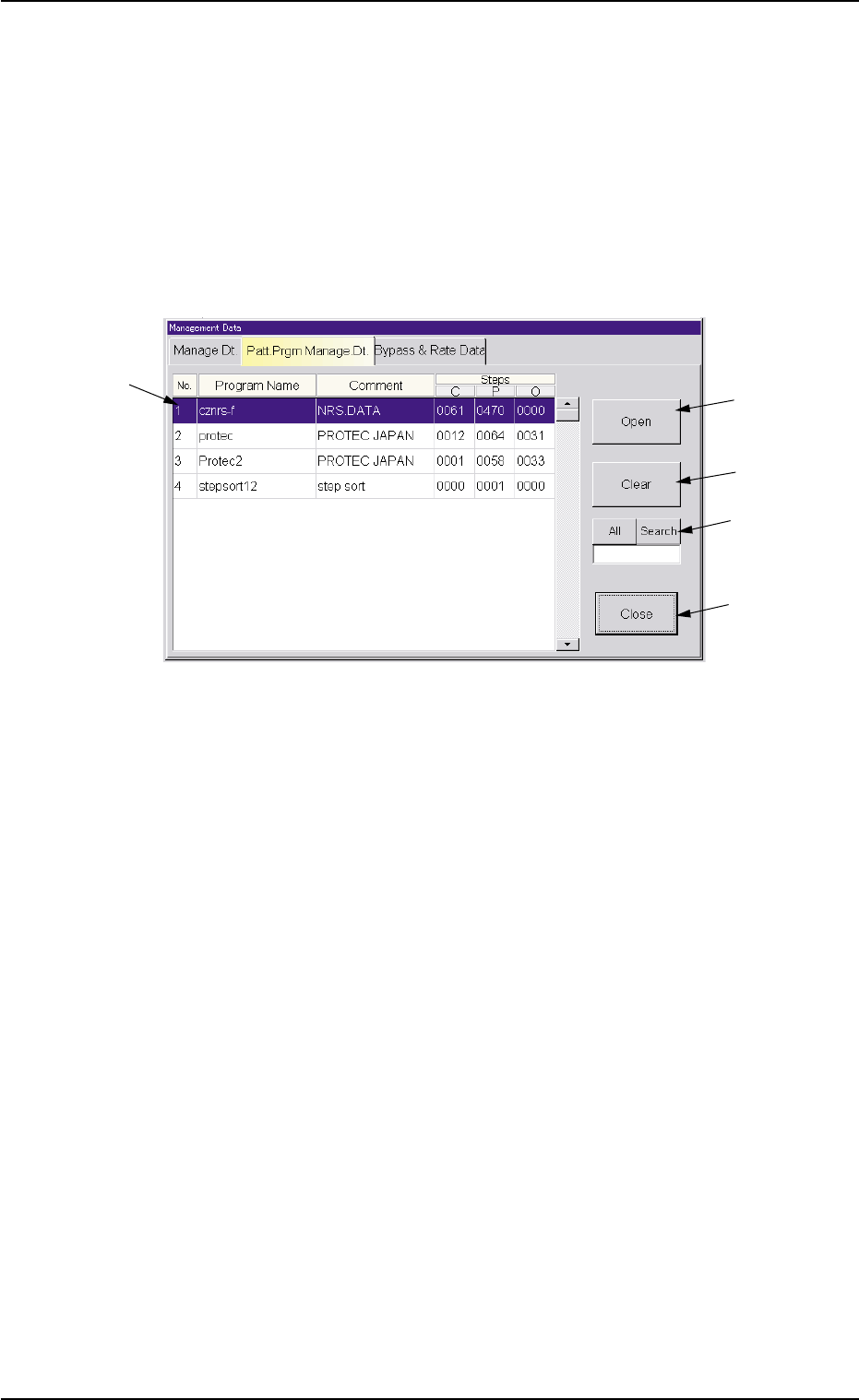
Fig. 3D3 "Patt. Prgm Manage. Dt." Tab Sheet
• Sheet Composition
*1 List of Model Names
Listed are the registered model names (pattern program names).
*2 [Open] Button
When this button is pressed after a pattern program (model) is se-
lected from the list of model names (*1), the "Pattern Program Man-
agement Data" window opens, enabling you to view the pattern pro-
gram management data.
Refer to "4. "Pattern Program Management Data" Window" for de-
tails.
*3 [Clear] Button
When this is pressed after a pattern program (model) to be deleted
is selected from the list of model names (*1), the management data
of the selected pattern program is deleted and the clear date is up-
dated.
2.2 "Patt. Prgm Manage. Dt." Tab
*3
*2
*5
*1
*4
0305-001 4-6 AIL01EDTP