3OM-1003-005.pdf - 第135页
3 . 4 Repetitive Patterns (Unit P .C.B. B.B.R. Enabled) (1) Information on Pattern Program Creation • P .C.B. Size, Packaged Posture and IDs of Components, and Fi- ducial Marks Follow the same procedure as described in &…

(2) Creation of Operation Data
• P.C.B. Data
Follow the same procedure as described in "3.1 Single Pattern".
• P.E.C. Recognition Data
Set "Disable" in the "P.E.C. recognition function" text box.
Do not set any parameter in the other text boxes.
• P.E.C. Recognition Mark Data
Do not create this data.
• Setup Data
Create this data when the automatic setup function should be used.
(3) Creation of Placement Feeder Location Data
Follow the same procedure as described in "3.1 Single Pattern".
(4) Creation of Placement Data (P-data) U01
• Unit Control
Follow the same procedure as described in "3.1 Single Pattern".
• Unit P.C.B. B.B.R.
Set "Disable" in this text box.
Do not set any parameter in the other text boxes.
• Placement Data (P-data)
Table 3B24
P-No. X [mm] Y [mm] Z
= =
= =
= theta [deg
]]
]]
] H [mm] Fdr. No. V C Comment
1 X
1
Y
1
+000.00 +0.000 101 00 -
2 X
2
Y
2
+090.00 +0.000 103 00 -
3 X
3
Y
3
+180.00 +0.000 105 00 -
4 +000.000 +000.000 +000.00 +0.000 000 00 P
Set "P" or "Q" as a control command in the last line (last step
No.).
(5) Creation of Placement Data (O-data) U01
Table 3B25
O-No. X [mm] Y [mm] Z = theta [deg] C Comment B-X [mm] B-Y [mm]
1 OX
1
OY
1
+000.00 - +000.000 +000.000
2 OX
2
OY
2
+000.00 - +000.000 +000.000
3 OX
3
OY
3
+000.00 - +000.000 +000.000
4 +000.000 +000.000 +000.00 E +000.000 +000.000
0305-001 2-65 AIL01EDTP
3.3 Repetitive Patterns
Note
3.4 Repetitive Patterns (Unit P.C.B. B.B.R. Enabled)
(1) Information on Pattern Program Creation
• P.C.B. Size, Packaged Posture and IDs of Components, and Fi-
ducial Marks
Follow the same procedure as described in "3.1 Single Pattern".
• Placement Coordinates & Angles and Coordinates of Recogni-
tion Marks
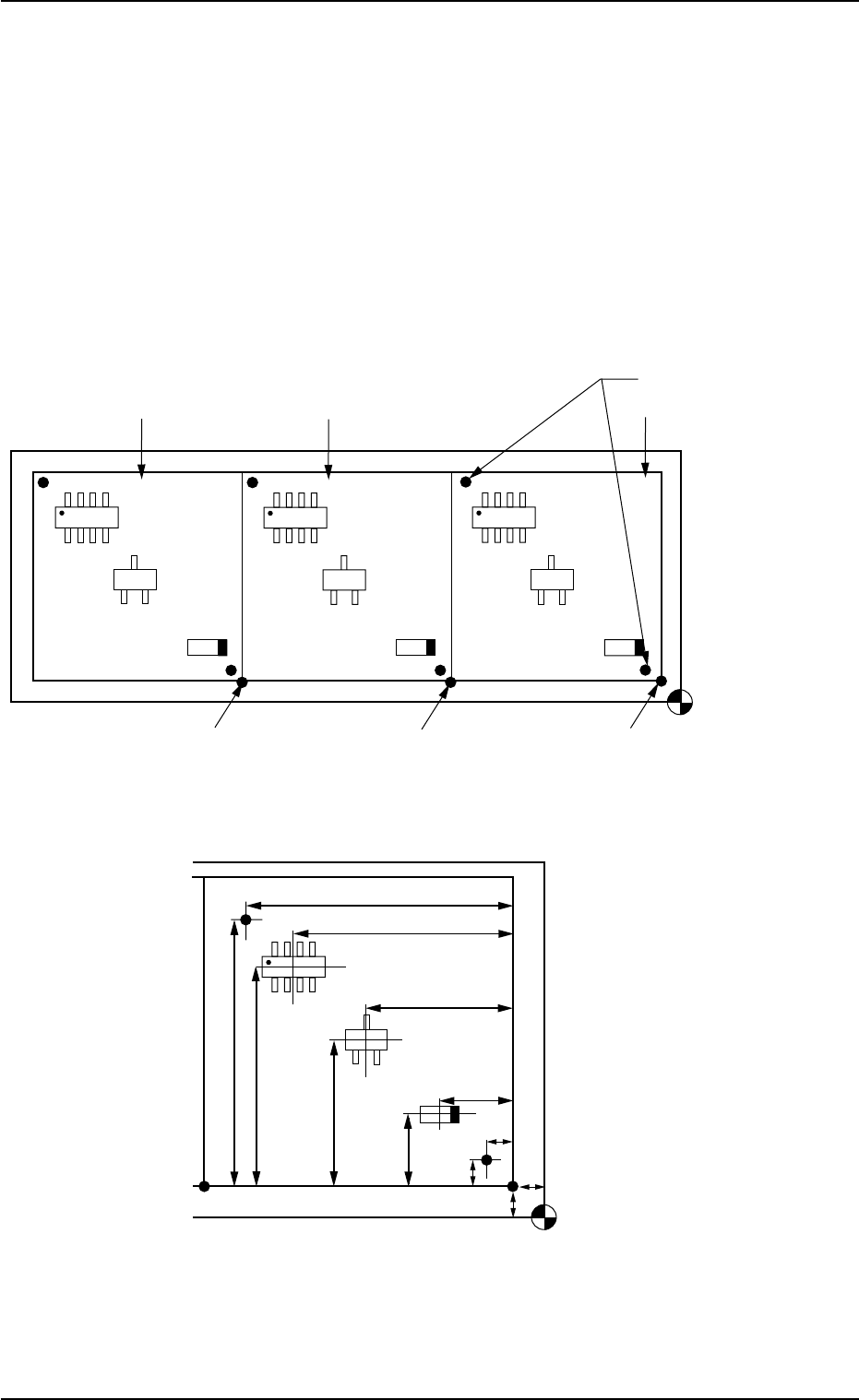
Fig. 3B128 General View
Fig. 3B129 Pattern 1 (Magnified View)
Placement Coordinat
e
Reference Point
(OX
1
, OY
1
)
(OX
2
, OY
2
)
Pattern Origin (OX
3
, OY
3
)
Pattern 1
Pattern 2
Pattern 3
Fiducial Marks
Placement Coordinate
Reference Point
X3
Y3
X2
Y2
X1
OX
1
Y1
OY1
FX1
FY1
FY2
FX2
0305-001 2-66 AIL01EDTP
3.4 Repetitive Patterns (Unit P.C.B. B.B.R. Enabled)
(2) Creation of Operation Data
• P.C.B. Data
Follow the same procedure as described in "3.1 Single Pattern".
• P.E.C. Recognition Data
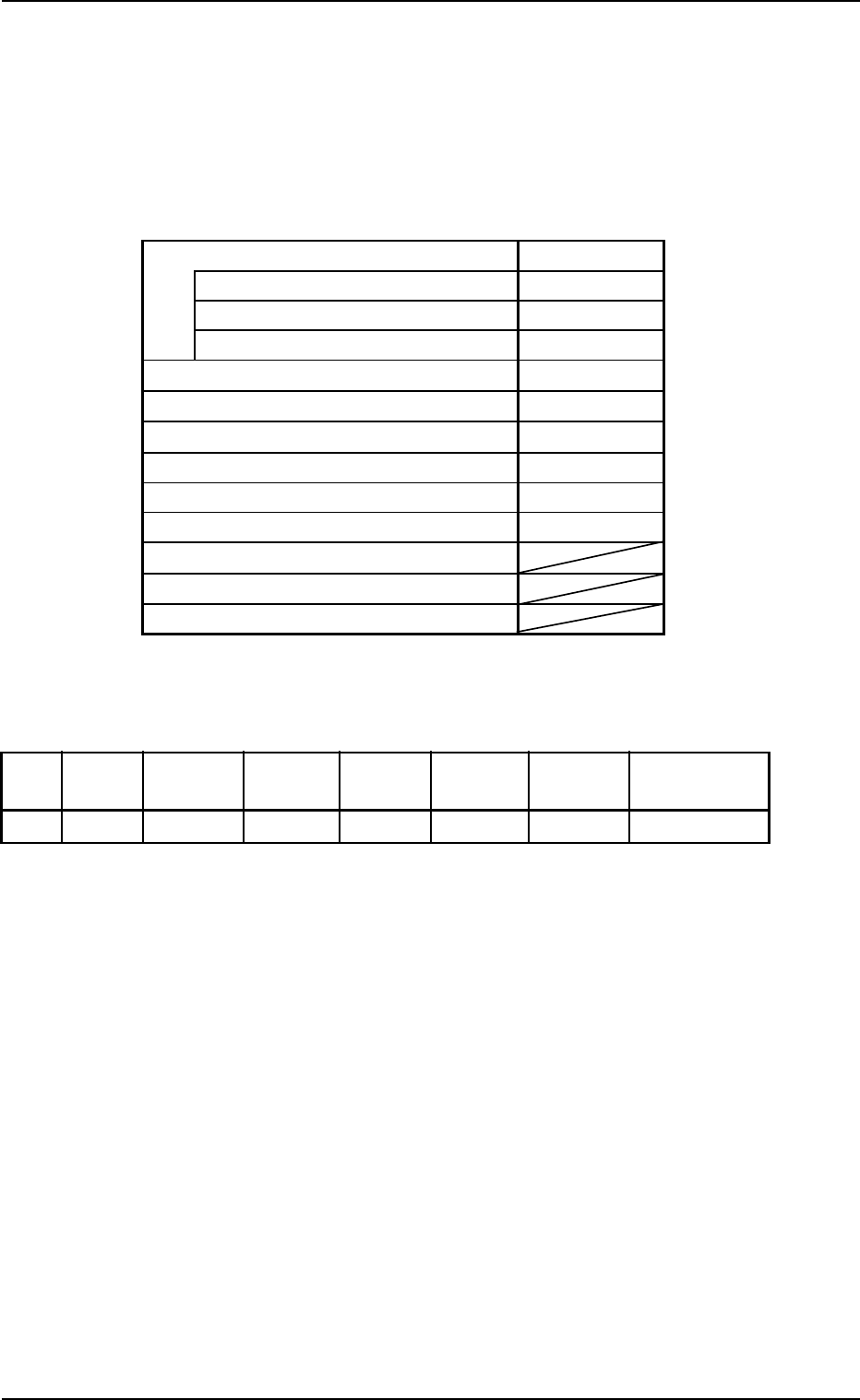
Table 3B26
P.E.C. recognition function Enable
P.E.C. recognition mode global Disable
P.E.C. recognition mode image Enable
P.E.C. recognition mode local Disable
Fiducial mark #1 X location [mm] 0.000 [mm]
Fiducial mark #1 Y location [mm] 0.000 [mm]
Fiducial mark #1 Mark code 1
Fiducial mark #2 X location [mm] 0.000 [mm]
Fiducial mark #2 Y location [mm] 0.000 [mm]
Fiducial mark #2 Mark code 1
Fiducial mark #3 X location [mm]
Fiducial mark #3 Y location [mm]
Fiducial mark #3 Mark code
• P.E.C. Recognition Mark Data
Table 3B27
Mark #
Mark Mark Size Mark Size Window
Mark Image Mark Level Recog Algo
Type D1 [mm] D2 [mm] Size [mm]
1 Round 1.00 0.00 05.0 Bright High Pattern
• Setup Data
Create this data when the automatic setup function should be used.
(3) Creation of Placement Feeder Location Data
Follow the same procedure as described in "3.1 Single Pattern".
0305-001 2-67
AIL01EDTP
3.4 Repetitive Patterns (Unit P.C.B. B.B.R. Enabled)