MV-9_Chapter 5. Teaching.pdf - 第110页
MV -9 Use r Manual 5-1 1 0 ⑤ B asi cally , so l der am ount i nspection will be conducted by using image luminance i nform a tion . However , i n case of conduct i ng solder am ount i nspect i on using color information …
错误!使用“开始”选项卡将 제목 2 应用于要在此处显示的文字。错误!使用“开始”选项卡将 제목 2 应用
于要在此处显示的文字。 .
5-109
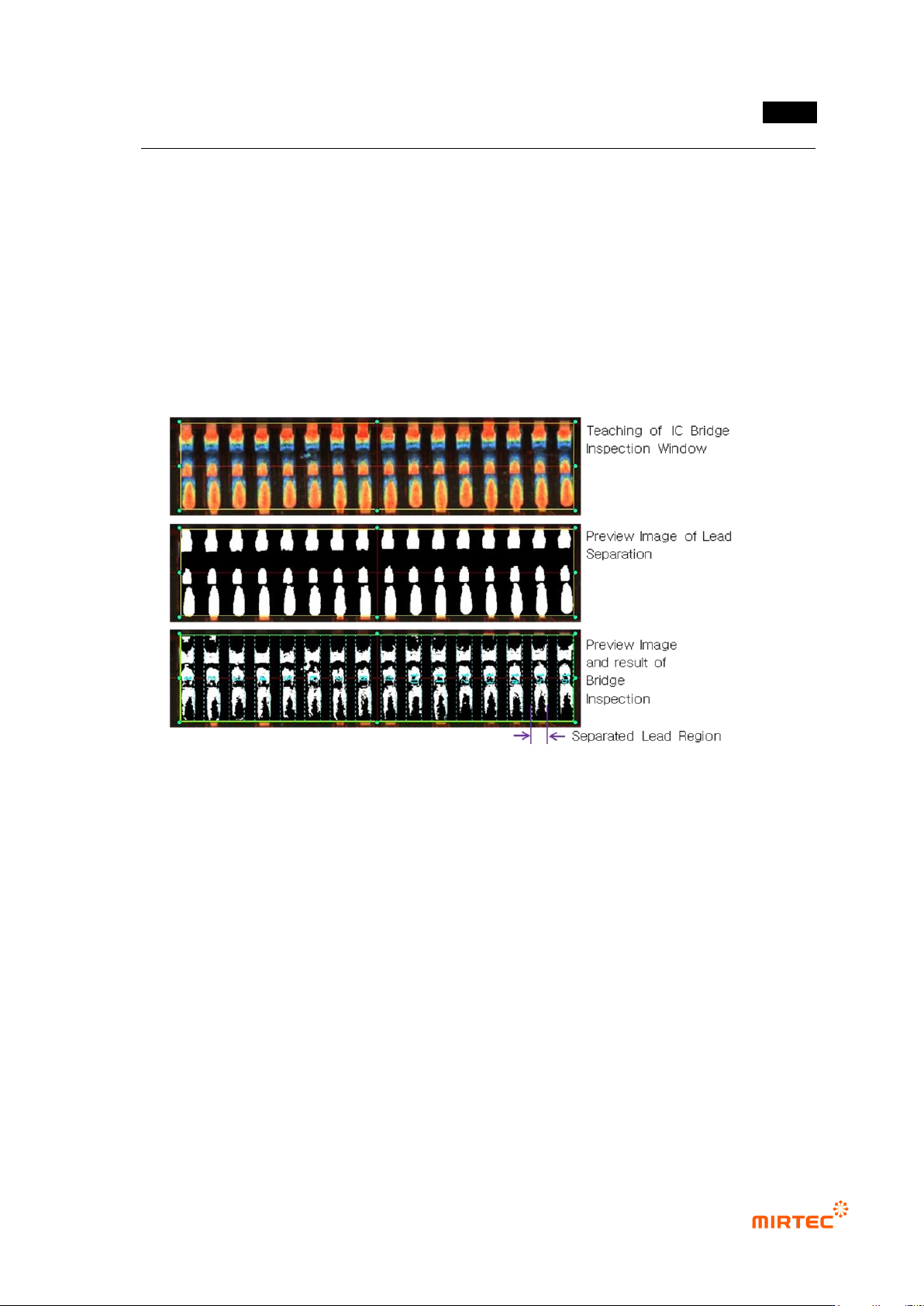
3) IC Bridge inspection teaching method
- Conduct inspection of short between lead and lead for IC Bridge inspection.
① Click <IC/Bridge inspection window> button among operating buttons.
② Draw inspection window in IC lead area to be inspected.
③ Select lead separation tap. Select light type and image type for good lead separation
checking preview. In case of noise around lead, use noise removal function. Check for good
lead separation through trial inspection.
④ Select Bridge inspection tap, and select proper light type and image type to detect foreign
material between lead checking preview.
[Figure 5-117 IC Bridge teaching]
4) Solder amount inspection (general inspection) teaching method
- For solder amount inspection (general inspection), extract using binarization method that
used luminance information of inspection image or designation of color area for inspection
using color map adjustment, and conduct inspection by applying binarization method.
① Create inspection window using IC Bridge inspection teaching method.
② In case of conducting solder amount inspection, check at solder amount inspection over lead
separation tap.
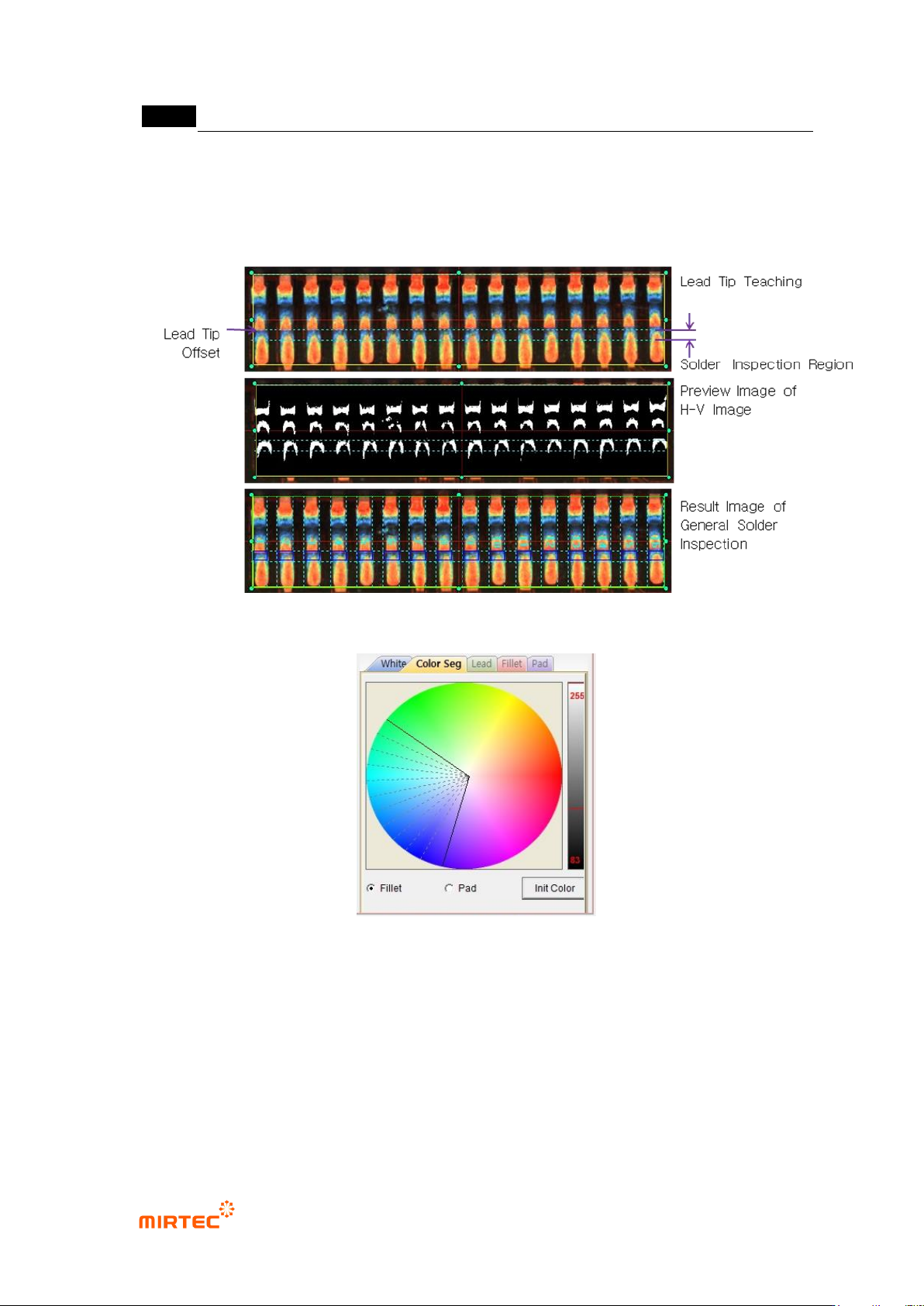
③ Set lead tap position and solder inspection area on lead tip tap. Lead tip position can be
manually or automatically set.
④ Select solder amount inspection tap, select white tap of central part and enter normal criteria
to judge good/defect. In case of conducting lifted inspection, check lifted inspection, and
enter good/defect judgment criteria.
MV-9 User Manual
5-110
⑤ Basically, solder amount inspection will be conducted by using image luminance information.
However, in case of conducting solder amount inspection using color information of fillet that
used color map, check color binarization, select color tap, and adjust color map of fillet.
[Figure 5-118 IC Bridge – solder amount inspection (general inspection) teaching (lead tip manual
setting)]
[Figure 5-119 IC Bridge – solder amount inspection (general inspection) color map]
5) Solder amount inspection (advanced inspection) teaching method
- For higher defect detection rate than general inspection, solder amount inspection
(advanced inspection) divides inspection area into lead, fillet and pad to conduct more
precise inspection through inspection setting.
① To use solder amount inspection (advanced inspection), check at use color inspection on
lead tip tap, and check at use color inspection on solder amount inspection tap.
错误!使用“开始”选项卡将 제목 2 应用于要在此处显示的文字。错误!使用“开始”选项卡将 제목 2 应用
于要在此处显示的文字。 .
5-111
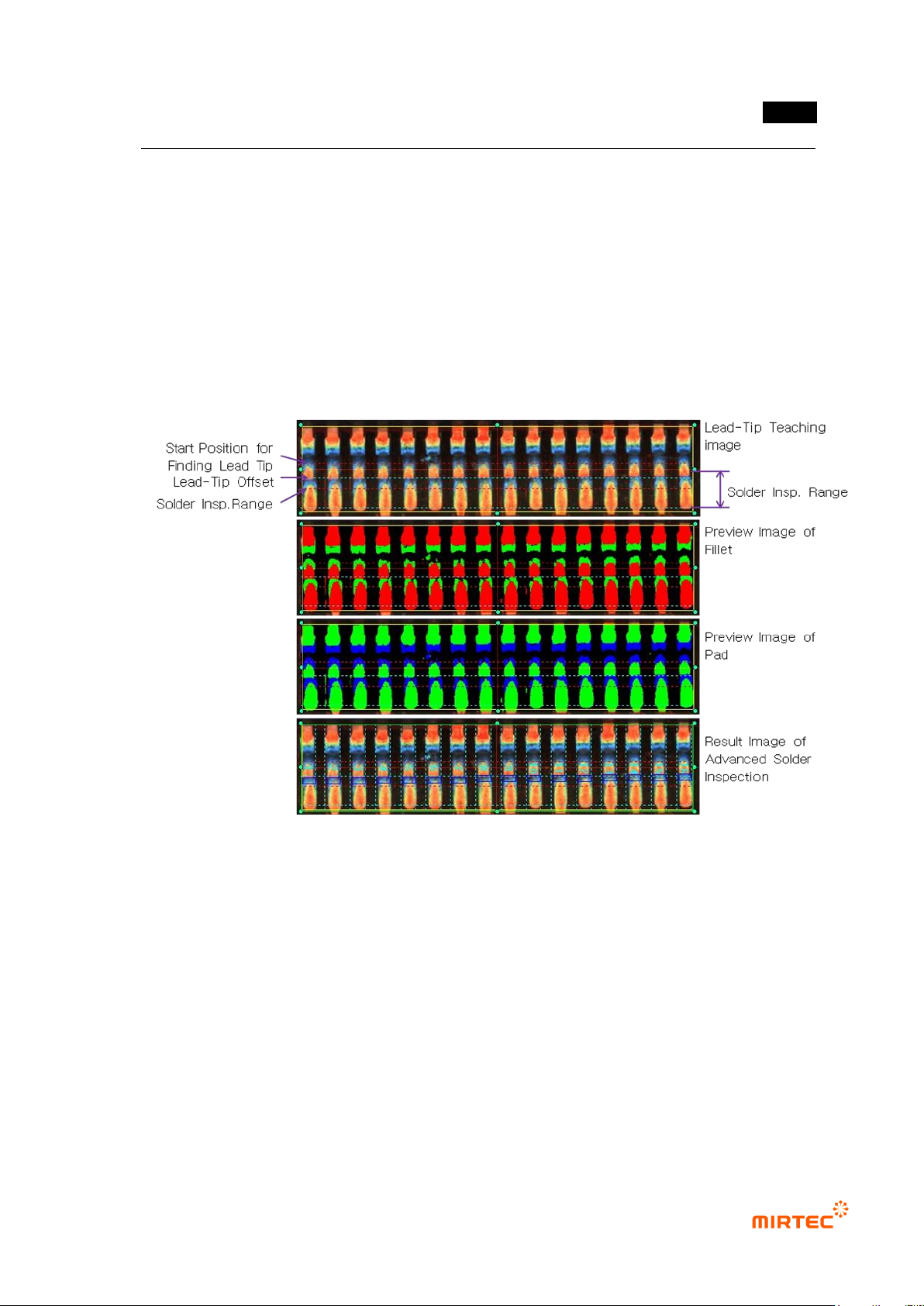
② Select „manual‟ on lead tap, and set lead tip offset to be same with solder amount inspection
(general inspection).
③ Select „auto‟ on lead tap, and set solder inspection area setting, search start position, search
range, min fillet size and lead tip range.
④ Check at „Use manual lead tip‟ if auto lead tip search fails
⑤ Select lead tap, and check at „Use lead inspection‟ and set inspection criteria.
⑥ Select fillet tap, and set binarization and normal criteria.
⑦ Select pad tap, and set binarization and normal criteria. Not to use pad inspection, check at
„Ignore pad area inspection‟.
[Figure 5-120 IC Bridge – solder amount inspection (advanced inspection) teaching (lead tip auto
setting)]
6) IC color teaching method
- In case of occurrence of lifted lead, IC color inspection detects lifted lead defect using the
characteristic of which color of lead shoulder or lead tip is different from normal. This
method detects defect through color inspection for intersection area between lead
separation area and color inspection window area in IC Bridge inspection window.
① Draw inspection window in IC Bridge inspection teaching method.
② Draw color inspection window in area for color inspection.
③ Select both of IC Bridge inspection window and color inspection window, and select „Group
component‟ in popup menu (click the right button of a mouse).