MV-9_Chapter 5. Teaching.pdf - 第96页
MV -9 Use r Manual 5- 96 If detected Outer Radius and In ner Rad i us is w ith in range input value range based on current value , judge as good. If i t is be lo w all of X distance, Y dist ance, D i st an ce value e…

错误!使用“开始”选项卡将 제목 2 应用于要在此处显示的文字。错误!使用“开始”选项卡将 제목 2 应用
于要在此处显示的文字。 .
5-95
- Search range
Search range means the length of segmentation region to detect circle.
Set search range to include boundary line of outer circle to be detected. Basically,
set it to 20 ~ 25.
- Detection type: select type to detect boundary line in each segmentation region
Inner circle
- Light type and image type
Basically, select horizontal + vertical light and R or L type. In case of white light,
select vertical light and L type.
- Binarization method and binarization value
Select auto or manual binarization method, and adjust binarization value for good
separation of inner circle during manual selection.
- Radius: adjust radius to be close to inner circle to be detected.
- Search range
Adjust search range to include inner circle to be detected. value of search range
differs from interval from outer circle, and set it not to include outer circle.
Preview
- Select display type when preview is selected in operation window.
Normal criteria
- Outer Radius
After trial inspection, radius of detected outer circle will be displayed in the current.
Enter normal range of radius of detected circle in the range. Basically, set it to 10 ~
15.
- Inner Radius
After trial inspection, radius detected inner circle will be displayed in the current.
Enter normal range of detected circle radius in the range. Basically, set it to 10 ~ 15.
- Center
X: Enter normal range for X direction distance between outer circle and inner circle
center
Y: Enter normal range for Y direction distance between outer circle and inner circle
center.
Distance: Enter normal range for straight distance between outer circle and inner
circle center (Euclidean distance, Euclidean Distance).
- Normal judgment criteria: If both of the following 2 conditions are satisfied, judge as good.
MV-9 User Manual
5-96
If detected Outer Radius and Inner Radius is within range input value range based
on current value, judge as good.
If it is below all of X distance, Y distance, Distance value entered in the center,
judge as good.
[Table 5-7 Binary inspection – eccentricity inspection detection type]
detection type
Description
1
Search boundary line from up to down, and detect Positive (Change from
black to white) boundary line.
2
Click inspection type No 1 one more time to convert detection type.
Search boundary line from down to up, and detect Negative (Change from
black to white) boundary line.
3
Search boundary line from down to up, and detect Positive (Change from
black to white) boundary line.
4
Click inspection type No 3 one more time to convert detection type.
Search boundary line from up to down, and detect Negative (Change from
black to white) boundary line.
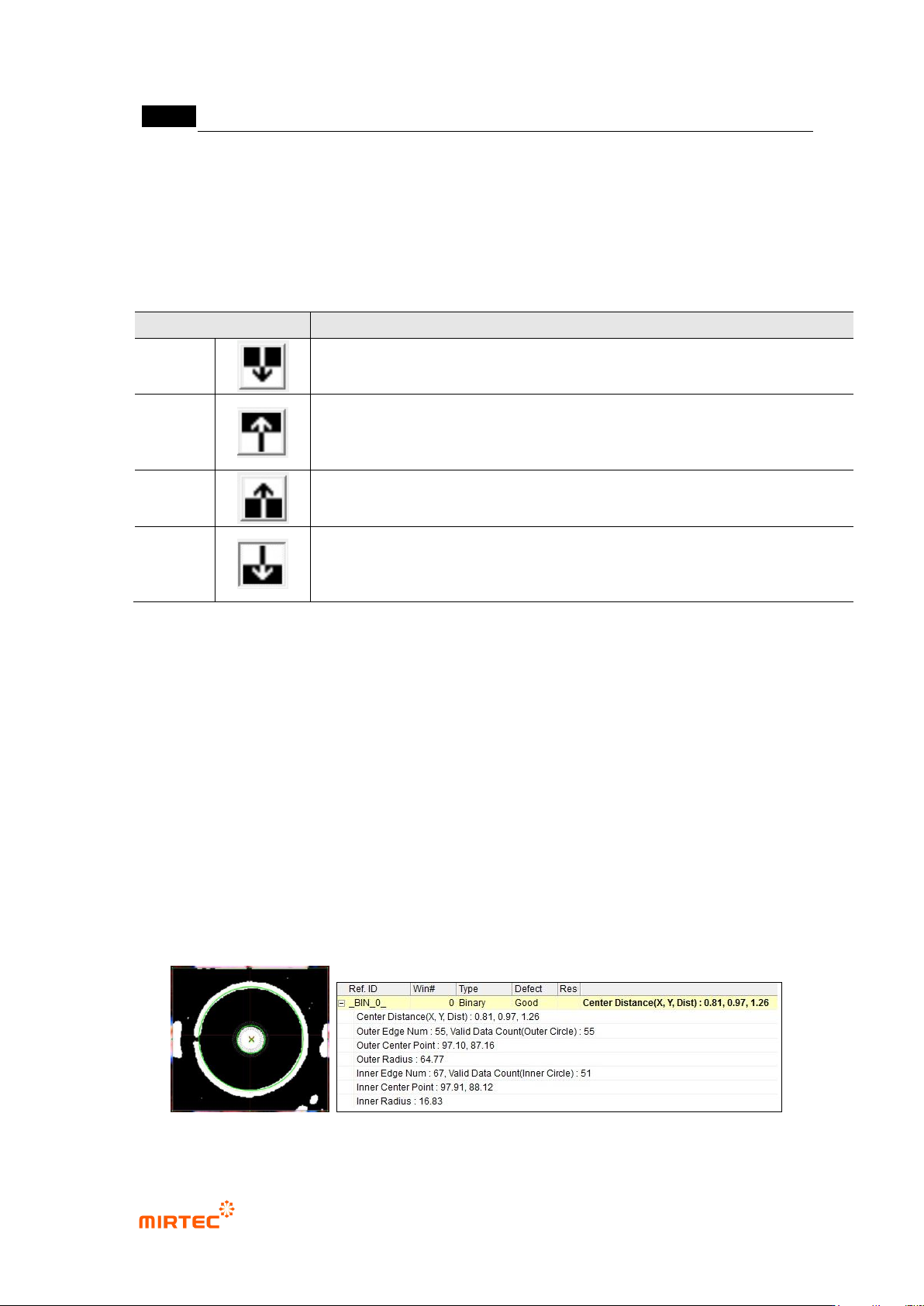
③ Inspection result in status screen
Center Distance (X, Y, Dist): calculated distance between center of inner circle and outer
circle.
Outer / Inner Edge Num: the number of boundary line position detected in segmented area
to detect circle.
Valid Data Count (Outer / Inner Circle): the number of boundary line position that is
actually used to search adjacent circle.
Outer / Inner Center Point: center position of near circle
Outer / Inner Radius: radius of near circle
[Figure 5-102 eccentricity inspection result]

错误!使用“开始”选项卡将 제목 2 应用于要在此处显示的文字。错误!使用“开始”选项卡将 제목 2 应用
于要在此处显示的文字。 .
5-97
9) Component center search
- This algorithm is to search and register center position of inspection target and to conduct
the following 2 inspections.
inspection for component Shift
Measurement of relative distance for reference point (virtual line offset)
- For measurement of relative distance, refer to BLU inspection. Here, we describe only
functions of shift inspection.
- Detection types are circle center search, rectangle center search and center of gravity
search.
C-Chip / R-Chip: used for System Calibration.
LED Circle / Color LED: used for BLU inspection.
① Teaching method
(a) Draw inspection window in inspection area.
(b) Select preview in operation window.
(c) Select whether to use SubPixel and Cognex.
(d) Set binarization value checking preview image.
(e) If image reverse is necessary, check at this.
(f) To detect edge by using color information, check at color map and click setting button,
and adjust color, saturation and luminance in color map.
(g) Select detection type.
(h) Set circle search range, Polarity (+), Circle Radius, Use hole inspection, Use CenterPoint,
virtual line offset according to detection type.
(i) Set „Don‟t care region‟.
(j) Conduct trial inspection, check whether central point is well found, and click reference
point registration button.
(k) Set tolerance range.