MV-9_Chapter 5. Teaching.pdf - 第87页
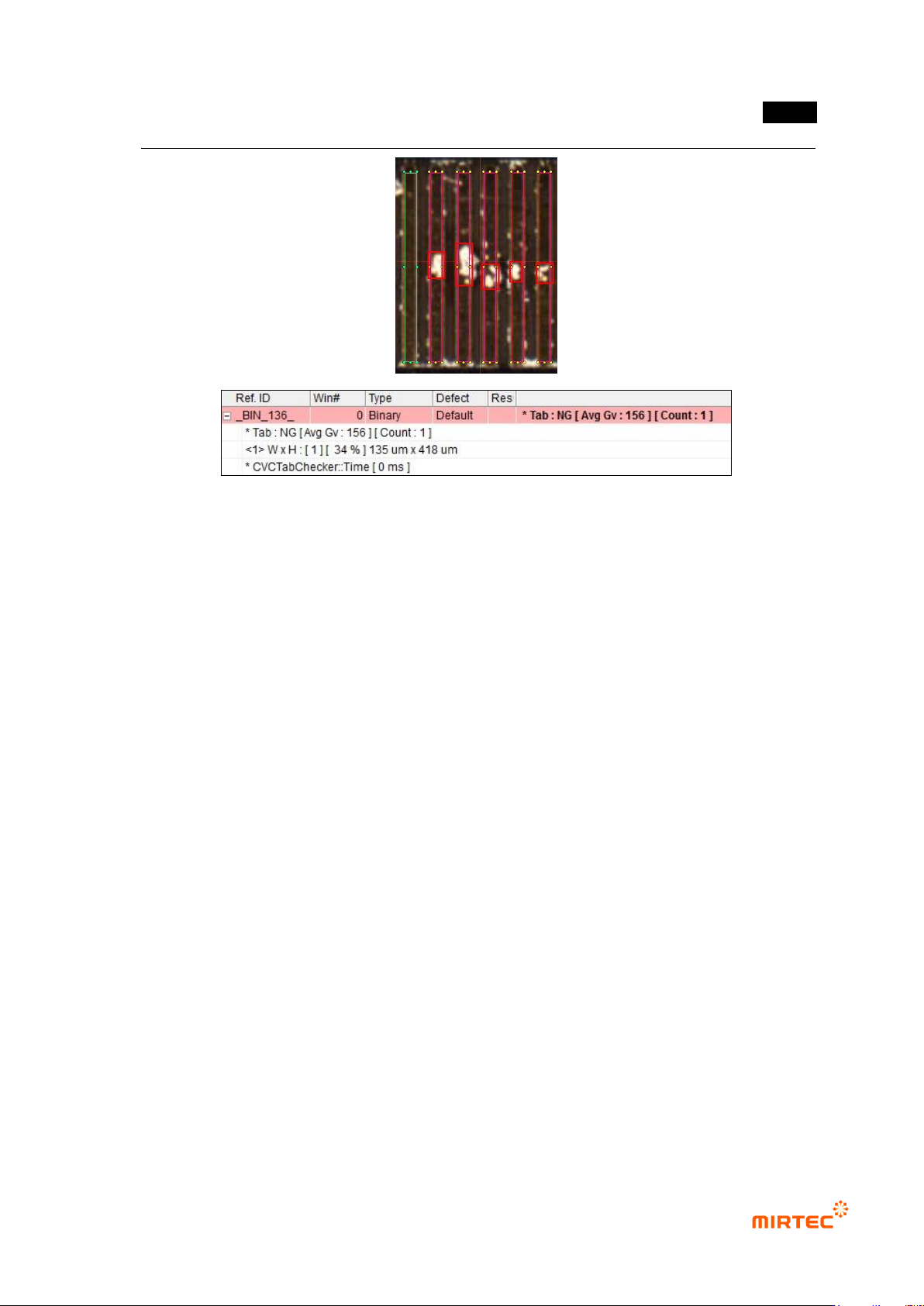
错误 ! 使用“开始” 选项卡将 제목 2 应用于要在此处显示的文字。 错误 ! 使用“开始”选项卡将 제목 2 应用 于要在此处显示的 文字。 . 5- 87 [Figure 5- 93 T ap insp ection result]
MV-9 User Manual
5-86
Therefore, adjust parameter to display each different characteristic of defect in 2
light images of manual and auto binarization that are different each other to detect
both of 2 defects.
- Binarization and average value
Intersection of black area in 2 images will be displayed for composite image.
Hence, common defect can be detected in 2 light images of manual and auto
binarization.
Noise removal
- Check at this option if noise removal is needed. Once it is checked, both of size filtering
and space filling will be conducted.
- Size filtering: remove part protruded from white area to expand black area. Basically, set it
below 2 (max 6).
- space filling: fill sunken part in white area, and black area is reduced. Basically, set it below
2 (max 6).
Detection condition
- Set criteria for good/defect judgment of detected black area
- Set 3 detection conditions to detect defects in different shape (For example, rectangle
shape, width-long defect shape, height-long defect shape). If all of width, height and ratio
are defect in defect target area, judge as defect.
Width, height: reference value for width and height judge as defect. If it is above
reference value, judge as defect.
Ratio (%): other reference value for ratio of white area excluding defect target area
(black area) for inspection window area. If it is below reference value, judge as
defect. (In other words, if black area in inspection window is large, white area will
be reduced, and calculated ratio value will be reduced.)
② Inspection result in status screen
- Tab: NG [Avg Gv: 156] [Count: 1]: means that inspection target tap is defect, and auto
binarization value is 156, the number of detection defect is 1.
- <1> WxH: [1] [34%] 135um x 418um: means that judge defect by detection condition 1,
and size of defect area is 135um x 418um and area ratio is 34%.
错误!使用“开始”选项卡将 제목 2 应用于要在此处显示的文字。错误!使用“开始”选项卡将 제목 2 应用
于要在此处显示的文字。 .
5-87
[Figure 5-93 Tap inspection result]
MV-9 User Manual
5-88
7) Multiple tap inspection
- This inspection algorithm is to detect foreign material and solder ball in tap area. Separate
area between tap area and tap from inspection area to inspect foreign material in each
area.
- Conduct teaching not to get off the tap area for inspection window.
a) Teaching method
(a) Draw inspection window in inspection area.
(b) Select preview in operation window, and select „for preview – tap separation‟ in
parameter.
(c) Select light type and image type for tap separation.
(d) Set binarization method and binarization value for tap separation checking preview
image
(e) Set noise removal for tap separation.
(f) Select „for preview – tap inspection‟ in parameter.
(g) Select light type and image type for tap inspection.
(h) Set binarization method and binarization value checking preview image
(i) Set noise removal for tap inspection.
(j) Set tap boundary noise removal.
(k) Enter normal criteria.