MV-9_Chapter 5. Teaching.pdf - 第86页
MV -9 Use r Manual 5- 86 Ther efore, adj ust parameter to display ea c h different character i st i c of defect in 2 light images of m anua l and auto binarization that are d ifferent each other to detect both of 2 def…
错误!使用“开始”选项卡将 제목 2 应用于要在此处显示的文字。错误!使用“开始”选项卡将 제목 2 应用
于要在此处显示的文字。 .
5-85
Automatically extract binarization value to display the value in current for trial
inspection.
will be automatically set for binarization type.
Manual binarization
- Set light type, image type and binarization to detect dark defect.
- Set binarization type and binarization value range to display defect in black in preview
image in the screen when manual binarization is selected in normal criteria – preview.
- In general, select horizontal + vertical light and R or L. select for manual binarization
type. If white light is used, select vertical light and L. However, select another light type
and image type according to defect characteristic.
Auto binarization
- Set light type, image type and binarization to detect bright defect.
- Set binarization type and binarization value range to display defect in black when auto
binarization is selected in preview image in the screen in normal criteria – preview.
- In general, select horizontal light, and L type will be automatically selected for image type.
However, select another light type and image type according to defect characteristic.
- will be automatically selected for binarization type. Binarization range will be set to
(current value – min) ~ (current value + max). If current value – min is below „0‟, it will be
set to „0‟. If current value + max are above 255, it will be set to 255.
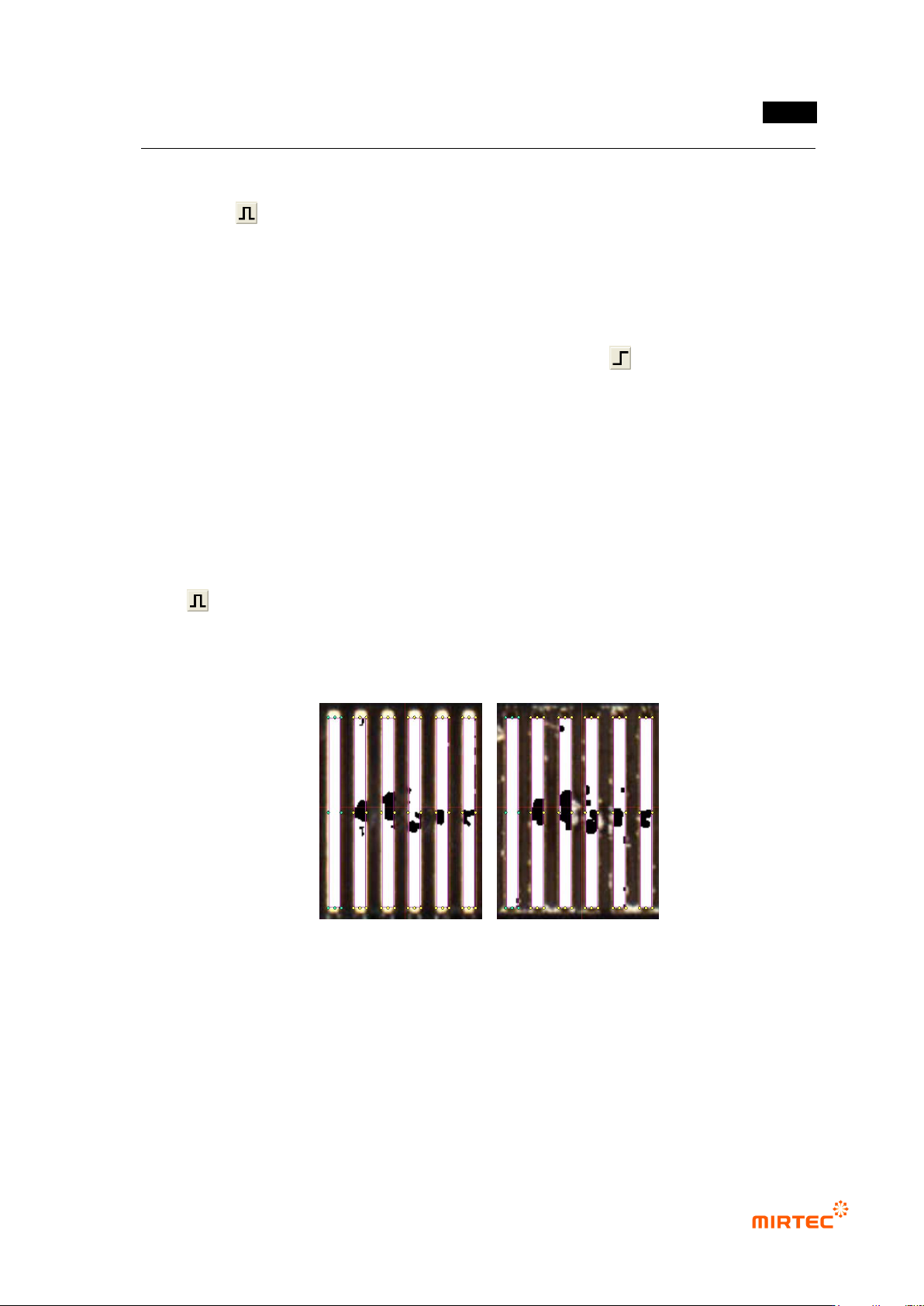
Manual binarization image Auto binarization image
[Figure 5-92 Tap inspection window preview image]
Binarization or average value or binarization and average value
- Use auto binarization image and manual binarization image to create composite image.
- Binarization or average value:
sum of sets in 2 images of black area will be displayed in composite image.
MV-9 User Manual
5-86
Therefore, adjust parameter to display each different characteristic of defect in 2
light images of manual and auto binarization that are different each other to detect
both of 2 defects.
- Binarization and average value
Intersection of black area in 2 images will be displayed for composite image.
Hence, common defect can be detected in 2 light images of manual and auto
binarization.
Noise removal
- Check at this option if noise removal is needed. Once it is checked, both of size filtering
and space filling will be conducted.
- Size filtering: remove part protruded from white area to expand black area. Basically, set it
below 2 (max 6).
- space filling: fill sunken part in white area, and black area is reduced. Basically, set it below
2 (max 6).
Detection condition
- Set criteria for good/defect judgment of detected black area
- Set 3 detection conditions to detect defects in different shape (For example, rectangle
shape, width-long defect shape, height-long defect shape). If all of width, height and ratio
are defect in defect target area, judge as defect.
Width, height: reference value for width and height judge as defect. If it is above
reference value, judge as defect.
Ratio (%): other reference value for ratio of white area excluding defect target area
(black area) for inspection window area. If it is below reference value, judge as
defect. (In other words, if black area in inspection window is large, white area will
be reduced, and calculated ratio value will be reduced.)
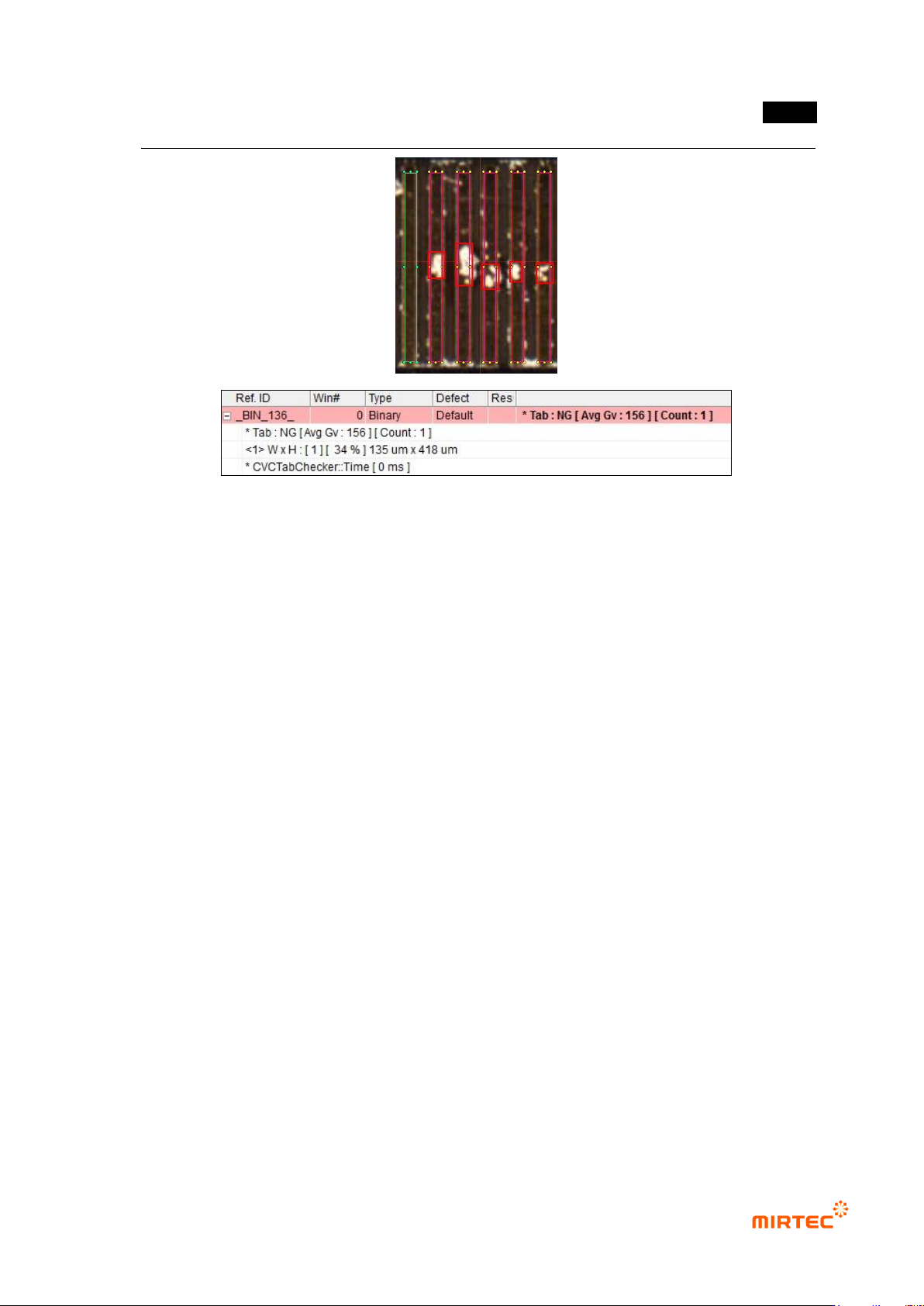
② Inspection result in status screen
- Tab: NG [Avg Gv: 156] [Count: 1]: means that inspection target tap is defect, and auto
binarization value is 156, the number of detection defect is 1.
- <1> WxH: [1] [34%] 135um x 418um: means that judge defect by detection condition 1,
and size of defect area is 135um x 418um and area ratio is 34%.
错误!使用“开始”选项卡将 제목 2 应用于要在此处显示的文字。错误!使用“开始”选项卡将 제목 2 应用
于要在此处显示的文字。 .
5-87
[Figure 5-93 Tap inspection result]