MV-9_Chapter 5. Teaching.pdf - 第180页
MV -9 Use r Manual 5- 180 - This is to extract ele c trod e only . Check a t the butto n to rem ove body edge com pone nt and to find electrode . At this po i nt, width o f edge to be removed is below certain ratio of el…
错误!使用“开始”选项卡将 제목 2 应用于要在此处显示的文字。错误!使用“开始”选项卡将 제목 2 应用
于要在此处显示的文字。 .
5-179
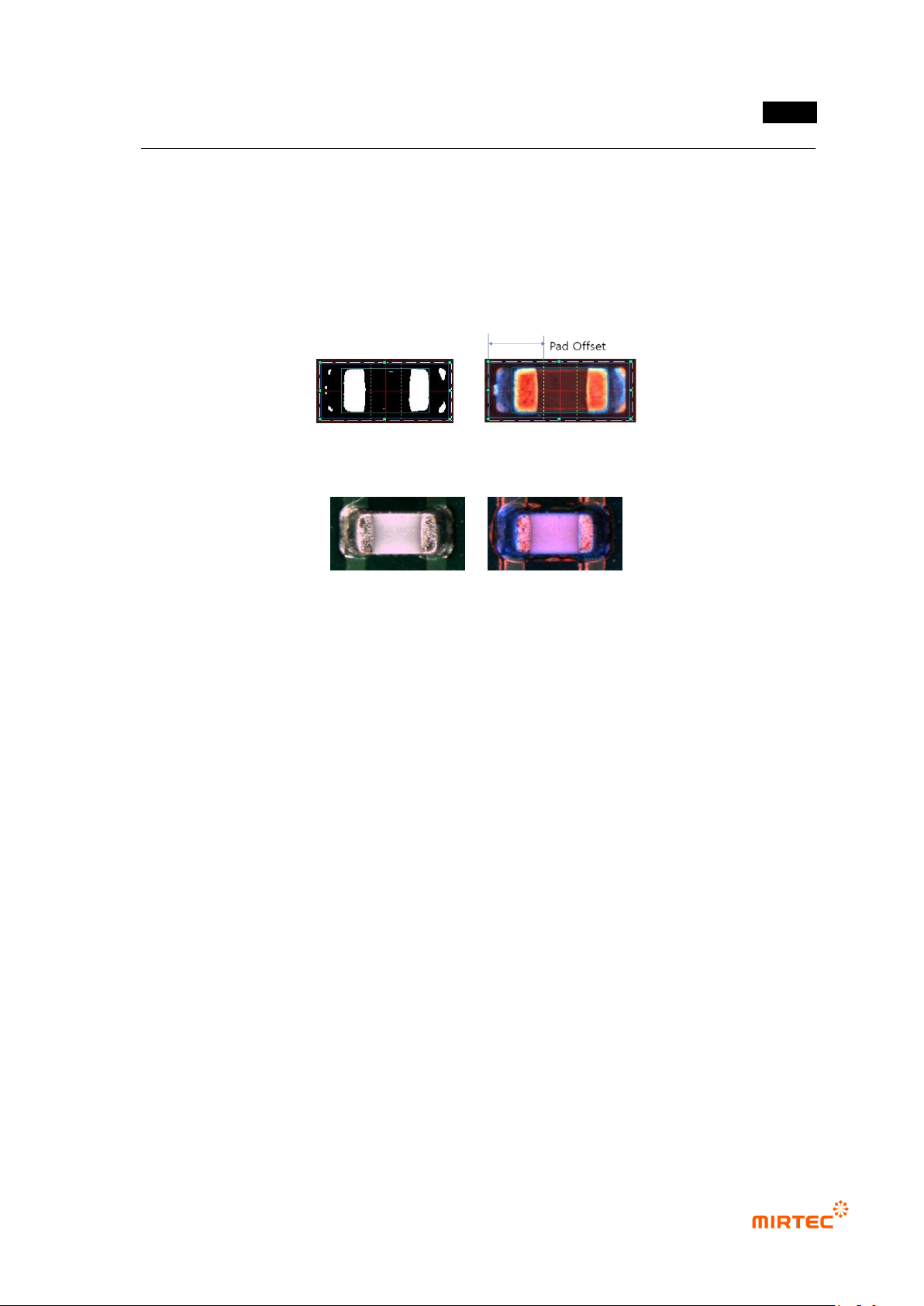
- If normal separation of electrode is not done because all part of chip became one due to
binarization or too high binarization value must be used for electrode separation, adjust
pad offset position close to chip electrode to limit electrode size.
- Sometimes, locate it close electrode to reduce false defect of non-mounting. However, if
window is warped, yellow dotted line will be set in electrode area. Hence, do not set it too
closely to electrode.
[Figure 5-219 pad offset definition]
(Horizontal image) (Color image)
[Figure 5-220 Example of chip of which electrode is not separated from chip body]
Binarization
- Click „optimize‟ button to conduct optimization after initial teaching, and check for good
separation of electrode in preview. If electrode and chip body is not separated, set proper
value for binarization boundary value for good separation of electrode and chip body part
checking preview.
- After adjusting binarization value, make sure to click optimization button to refresh chip
information (electrode size, electrode distance).
- Adjust parameter on chip body tap before optimization after teaching, and click
optimization button to ignore chip body parameter set by operator. Hence, make sure to
firstly conduct optimization before parameter adjustment after teaching.
Noise removal
① Area
- This is used to extract only electrode by removing white noise besides electrode. Enter
size of white noise to be removed in pixel unit.
② Electrode edit width
MV-9 User Manual
5-180
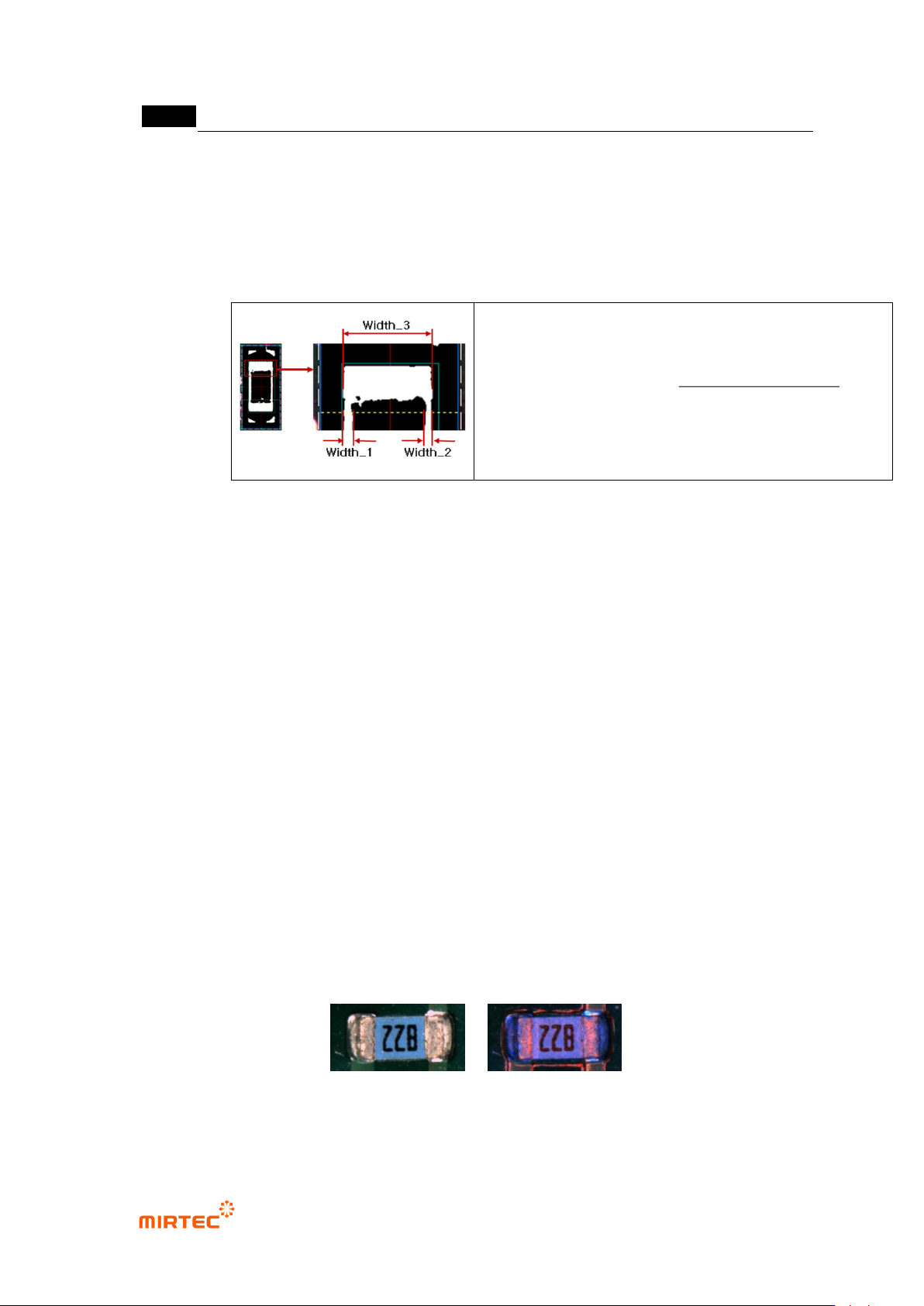
- This is to extract electrode only. Check at the button to remove body edge component and
to find electrode. At this point, width of edge to be removed is below certain ratio of
electrode width, remove it. The following is calculation formula of width ratio. As shown in
[Figure 5-164], Width_1 and Width_2 is the width of silk to be removed, Width_3 is the
width electrode.
100
Width_3
Width_2)(Width_1
(%)edit width electrode
[Figure 5-221 noise removal – definition of electrode edit width]
Chip Info
① Chip Type
- This will be automatically set in optimization stage, and judge and display chip model that
completed teaching using size of mounting window.
② Special chip
- If the body area of chip to be inspected is displayed in blue (In case of component of which
chip body is blue), check special chip, select color map-pad on [pad inspection] tap, and
then adjust color map to display chip body area in blue.
- In general, Manhattan and Tomb Stone of normal C chip is judged based on the fact that
body area is red. In case of normal R chip, judged based on the fact that body area is
black, and in case of chip color algorithm, judged based on blue ratio in chip body area.
Chip of which chip body is blue will be judged as defect under these judgment criteria.
Therefore, special chip setting is special condition to reduce false defect.
- In case of setting a special chip, if blue ratio in chip body area is lower than reference
value that is set inside (user change is impossible based on 1/3 of other area excluding
electrode on chip), judge as defect.
(Horizontal image) (Color image)
[Figure 5-222 Example of chip of which chip body area is blue]
错误!使用“开始”选项卡将 제목 2 应用于要在此处显示的文字。错误!使用“开始”选项卡将 제목 2 应用
于要在此处显示的文字。 .
5-181
No electrode auto extraction
① Electrode minor axis length: automatically display average value of minor axis length of
extracted 2 electrodes.
② Electrode major axis length: automatically display average value of major axis length of
extracted 2 electrodes.
- Extract 2 electrode areas after auto binarization in optimization process, and display each
average value of minor axis length and major axis length of 2 electrodes as electrode
minor axis/major axis length.
- body area of chip is displayed in similar luminance and color of electrode and auto
electrode extractions is not possible, check at „Not use electrode auto extraction‟ and
manually adjusts electrode major axis / minor axis length to set electrode area.
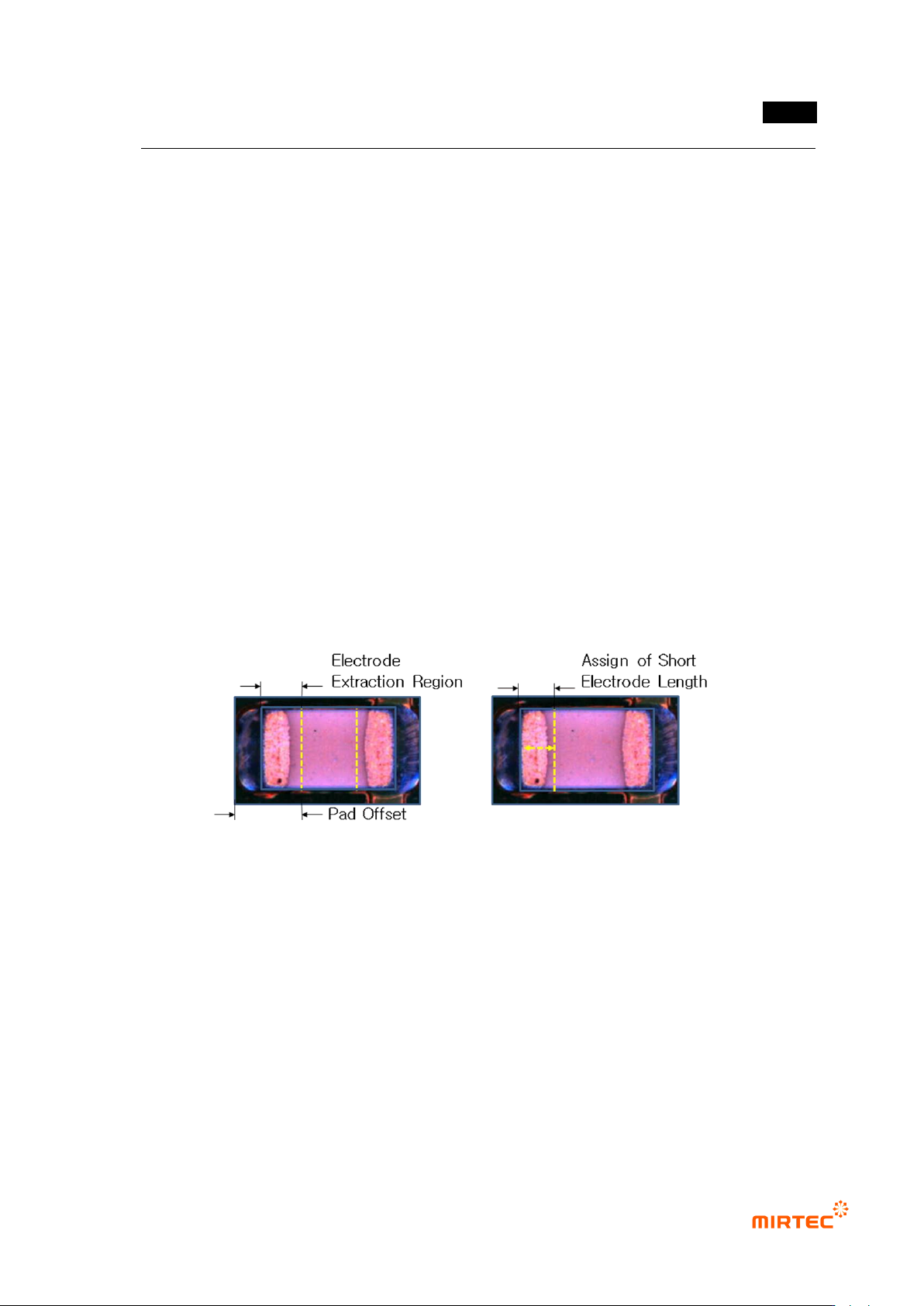
- There are 2 methods to manually limit electrode size. the first method is to limit electrode
extraction area using pad offset, and the second method is to check at „Not use electrode
auto extraction‟ and manually set major axis/minor axis length of electrode.
[Figure 5-223 Electrode mounting/minor axis setting method]
- For minor axis length, set area as much as electrode minor axis length set based on
mounting window end as electrode, and set electrode size using trial and error method that
checks the size of inspection area set by conducting trial inspection.
- Major axis/minor axis length of electrode will be based on calculation standard for
electrode color ratio -> short/long size on [pad inspection] tap. In case of C-chip, unusually,
much extraction of electrode occurs. This will make short or long size above 100% in
inspection review to cause false defect. In this case, largely change electrode major
axis/minor axis length value to reduce short/long size ratio. If short size of extracted