N7201A616E00_0317.pdf - 第275页
NPM-W 2 EJM7DE-MB-04O-0 0 4-1-1 -2 Component inspection

NPM-W2 EJM7DE-MB-04O-00
By installing the 2D inspection head to NPM-W2, various inspections on a production PCB can be performed.
●Component and solder inspections (→P.5.1.2) can be performed based on the production data.
Features
Operating procedure
4-1-1
Main features
Over-
view
4-1-1-1
●Checking for the presence/absence, displacement, flip-over, or polarity of components (chips, etc.) placed
in the processes upstream from NPM-W2 equipped with the inspection head prevents a defective PCB
from flowing into the downstream process.
●It is possible for inspection head-equipped NPM-W2 to check components (including shield cases and
BGA) for foreign bodies (→P.4-5-1) before placement so that a defective PCB cannot be flowed into a
subsequent process.
●When, for example, a defect is detected in the test for the presence of components, you can visually
locate the defect on the over judgment input screen, which allows you to make a change in the test result
or check the location of a defective component.
This saves components since no more components will have to be placed in downstream processes once
a defect is found.
●A defective PCB, removed from the inspection conveyor, will be reloaded via the reload conveyor after
rework, and be inspected/placed so that the quality of PCBs can be ensured on production line.
(Please prepare reload/ejection conveyers on your own).
●Since inspection results can be summarized by the nozzle or feeder, you can easily identify/deal with
error causes.
Constraints
●The inspection head designed for component inspection use shall be installed only to the front side of
NPM-W2.
●As for NPM-W2 that carries out inspection and placement operations, under the optimization of DGS, only
[Alternative placement] can be used for [Placement mode] but [Independent (for the front lane)] or
[Alternative (for the rear lane)] are not available for use.
1)Defective PCB: A PCB that the inspection head or an operator judges as defect.
2)Defective component: A component or its placement status that the inspection head or an operator judges
as defect.
NPM-W2 EJM7DE-MB-04O-00
4-1-1-2
Component
inspection
NPM-W2 EJM7DE-MB-04O-00
System configuration
Operating procedure
4-1-2
Over-
view
4-1-2-1
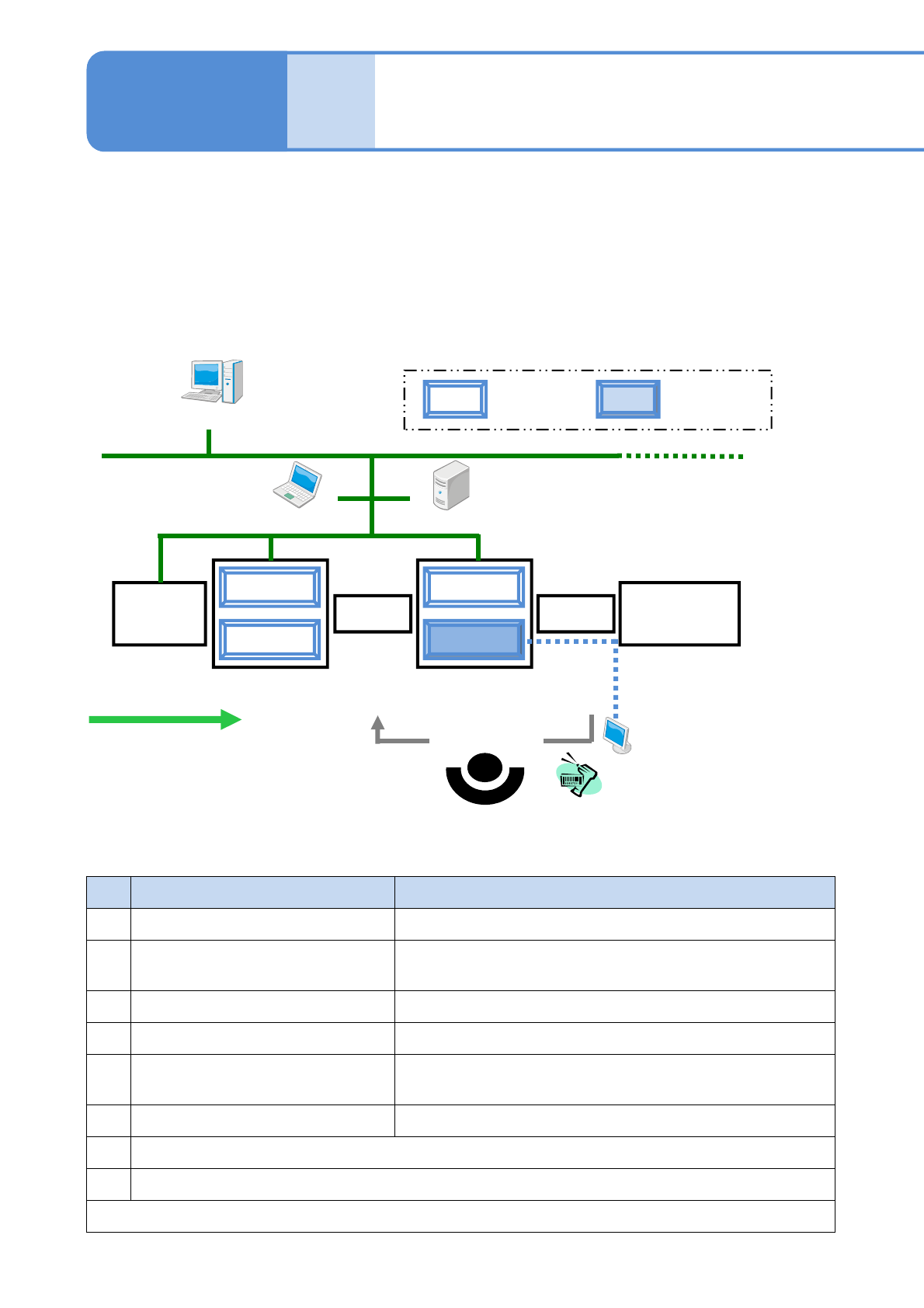
It describes the standard configuration of inspection head (component inspection)-installed NPM-W2 system
■Type 1
Place a reload conveyor in front of the machine equipped with the inspection head (component inspection), or
place an ejection conveyor just behind the machine equipped with the inspection head (component
inspection).
●Reload conveyor: Reloads reworked PCBs.
●Ejection conveyor: Performs tasks, such as locating a defect/reworking a PCB/registering the PCB for
reloading, in the case a component is rejected at inspection.
NPM-W2
Screen
printer
Reflow
NPM-W2
Reload conveyor
Ejection
conveyor
Barcode scanner
(Reloading of
PCB)
Option display
LWS LNB
(Flow of PCB)
DGS
Placement
head
Inspection head
(component
inspection)
No.
Name Explanation
1 DGS (Data Generation System) Newly creates or edits production data.
2 LNB (Line Network Box)
Saves production information obtained from NPM-W2.
(e.g., inspection result information)
3 LWS (Line Work Station) Edits and adjusts (tunes) inspection data during production.
4 Option display
*1)
Displays defective areas for ease of rework.
5 Barcode scanner
*2)
Reads a barcode on a defective PCB when the PCB is
reloaded via the reload conveyor after rework.
6 Reload/Ejection conveyor
*1)
Reloads reworked PCBs/removes defective PCBs.
*1) Devices to be prepared by you
*2) NPM-W2 standard optional devices (only wired type can be used)
For reloading a reworked PCB, devices 4, 5, and 6 above are required. (→P.4-5)
■Explanation of major peripheral devices (Phrases/words in this table will be used
in an abbreviated form in the rest of the manual)