N7201A616E00_0317.pdf - 第548页
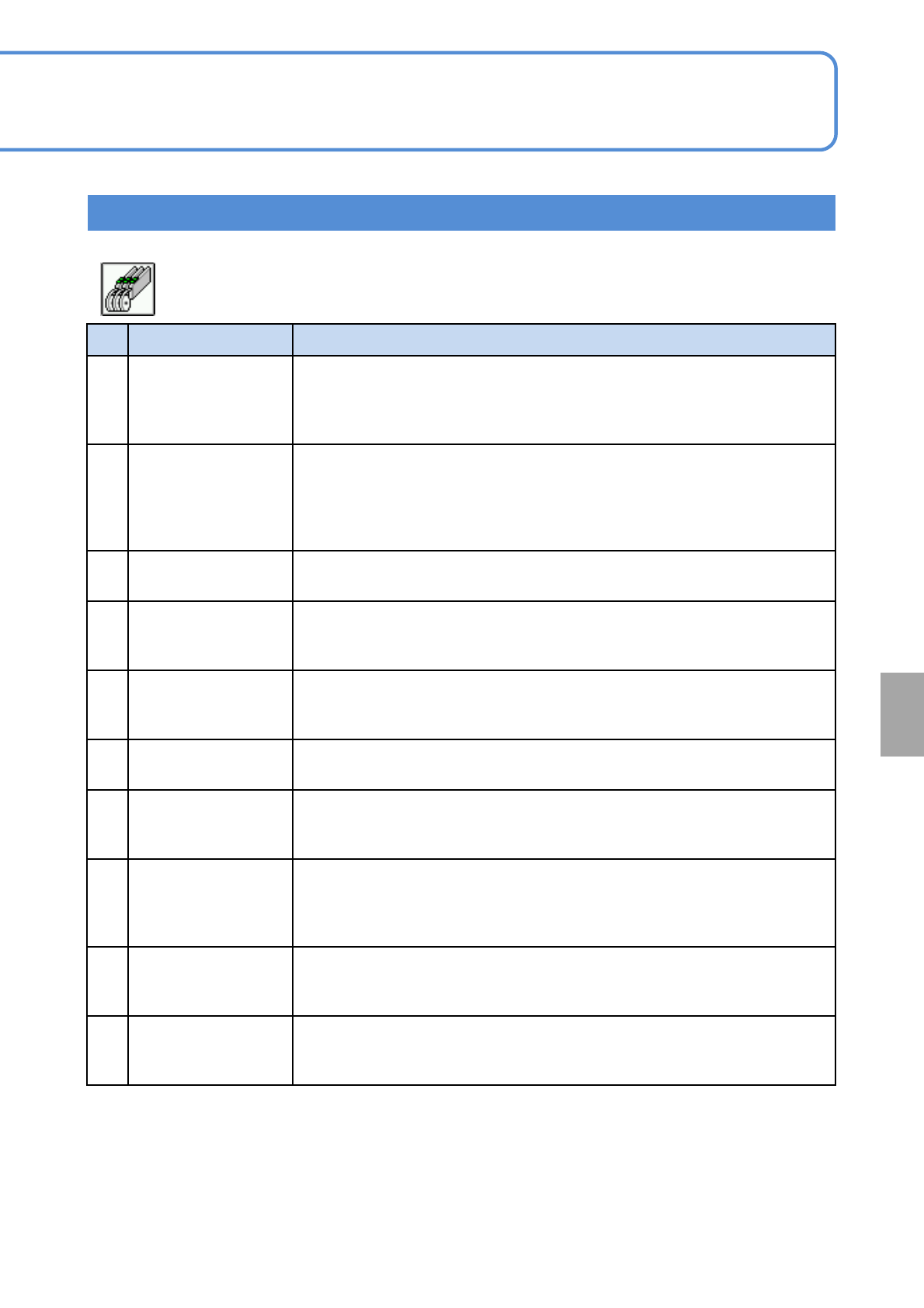
NPM-W 2 EJM7DE-MB-07 O-00 7-1-1 -9 No. Item name Function when [ON] is sel ected 21 Feeder mar k recognition Recognizes the mark at th e retainer of the fe eder tape, to perfor m pick up position teaching automatica lly.…
NPM-W2 EJM7DE-MB-07O-00
7-1-1-8
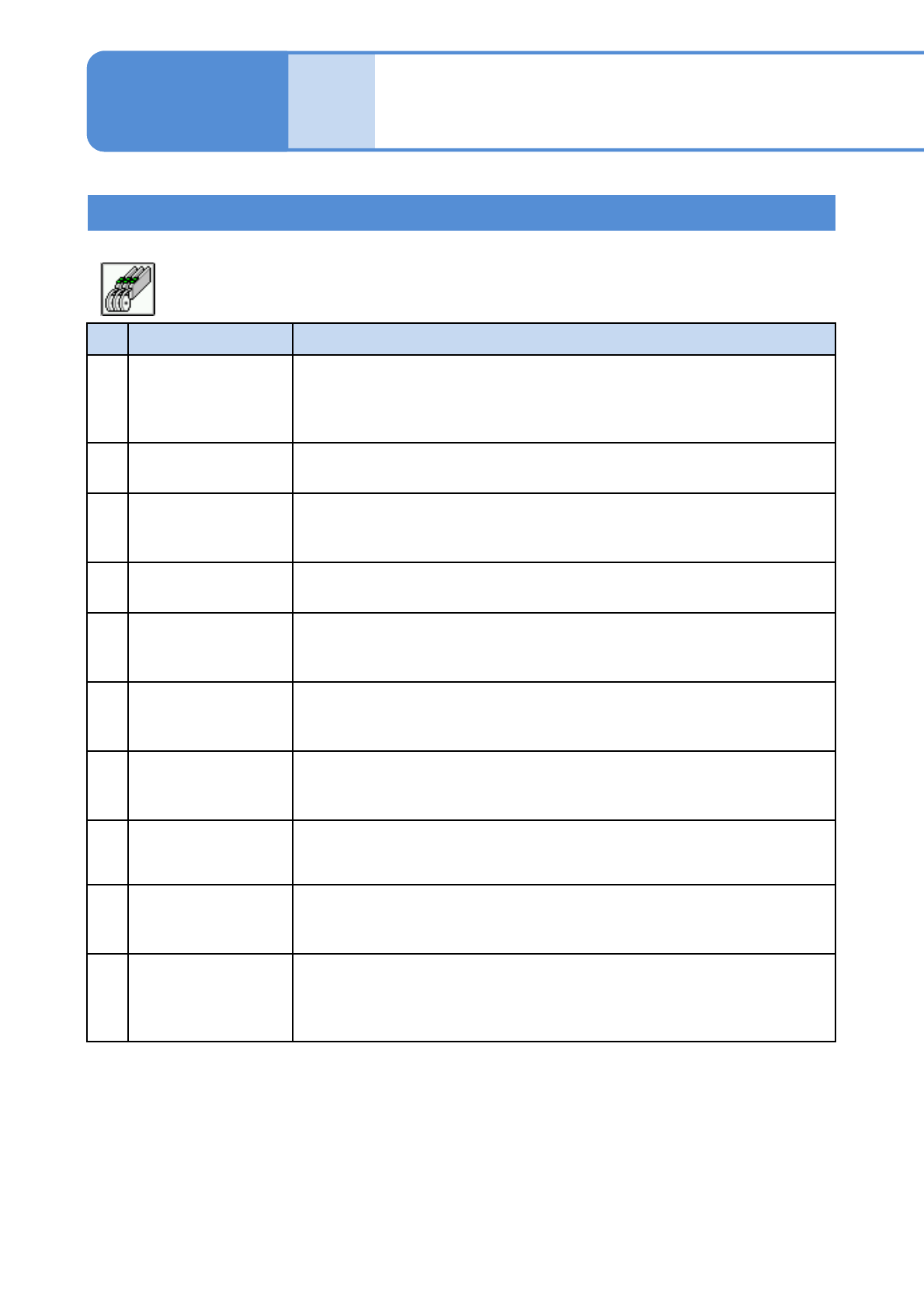
No. Item name Function when [ON] is selected
11
Fdr parts collation
(Time of feeder set )
If tape feeders have been removed/set during single stop, this option
executes parts collation for the feeders concerned after production is started.
If there is no problem, production continues. If any problem is found, a
message “Hasn’t executed parts verification” appears and the machine stops.
12
Feeder outside parts
collation
Enables tape feeder collation by the customer’s parts collation system.
When replenishing parts after a parts empty error, this option inquires of the
parts collation system whether collation has done. If collated, parts
replenishment will be completed to continue production. If not collated, parts
replenishment is considered to be unfinished and production will be stopped.
13
Substituted parts auto
change
Enables pickup of substitute parts using the registered data when the master
parts are used up.
14
All arranged
components supply
target
Allows loading of tape feeders that contain any parts registered in the
arrangement list.
15
Auto Cart Height
Measure
When several feeder carts are used for one machine, pickup rate lowers due
to variation in the height of cart. To prevent this problem, this option
measures the height of reference post automatically to make correction.
16 Stop at S-tape sense
Causes the machine a single stop if the splicing tape is detected, and
displays an error message “Splicing tape detection stop”.
17
Material empty check
of trans table
(Currently unused)
Detects material empty of the transfer tables (supply tables A to D) by the
sensor mounted on the transfer unit.
18
Trans material empty
check of syringe
(front)
(Currently unused)
Detects material empty of the syringe (supply tables A to D) by the sensor
mounted on the transfer unit.
19
Trans material empty
check of syringe(rear)
(Currently unused)
Detects material empty of the syringe (supply tables A to D) by the sensor
mounted on the transfer unit.
20
Syringe trans material
empty stop
(Currently unused)
Syringe trans material empty stop
Setting information 7
● Default :OFF
■ Feeder
System
administration
NPM-W2 EJM7DE-MB-07O-00
7-1-1-9
No. Item name Function when [ON] is selected
21
Feeder mark
recognition
Recognizes the mark at the retainer of the feeder tape, to perform pickup
position teaching automatically.
Pickup position teaching is not required for transparent embossed tape and
12 mm or wider feeder parts.
22
Disused Feeder LED
ON at Auto Prod Start
Turns ON the green LED of the tape feeders that are not used for production
at the start of operation.
23
Certify Feeder First
Pick Up Pos Teach
after Change over
Displays the screen that shows the feeder pickup position after production
changeover. Confirm the pickup position before the first pickup.
24
Confirm stock parts
verification again
Displays a window for confirming the target parts when parts with stock have
been collated.
25
8mm feeder(paper)
gap correct function
If a recognition error has occurred with a part that requires pocket recognition
at the start of recognition, the tape is fed by a half pitch automatically. If the
part is present, correction is made after the pocket is recognized again.
26
Pick up position teach
Parts shape display
Displays a frame showing the shape of part on the Pickup position teach
screen (Arrange - PartsPrepare - Feeder - Pickup pos) and Pickup position
check error screen.
27
Prevention of feeder
over-exposure
Changes the input range for the second origin offset according to the size of
the flat chip (to prevent values beyond the half of the part size from being set
as the second origin offset).
28
Thin Type Single
Feeder
Allows the thin type single feeders to be used.
29
Pickup position teach
before the production
start
Causes all machines to perform pickup position teaching before starting
production.
30
Display pickup
position teach
when occurred feeder
error
Moves the head to the pickup position of the tape feeder if the machine
comes to a single stop due to any of the following feeder errors.
Setting information 8
● Default :OFF
■ Feeder
Unit
setting
Option setting 5
Operating procedure
7-1-1
NPM-W2 EJM7DE-MB-07O-00
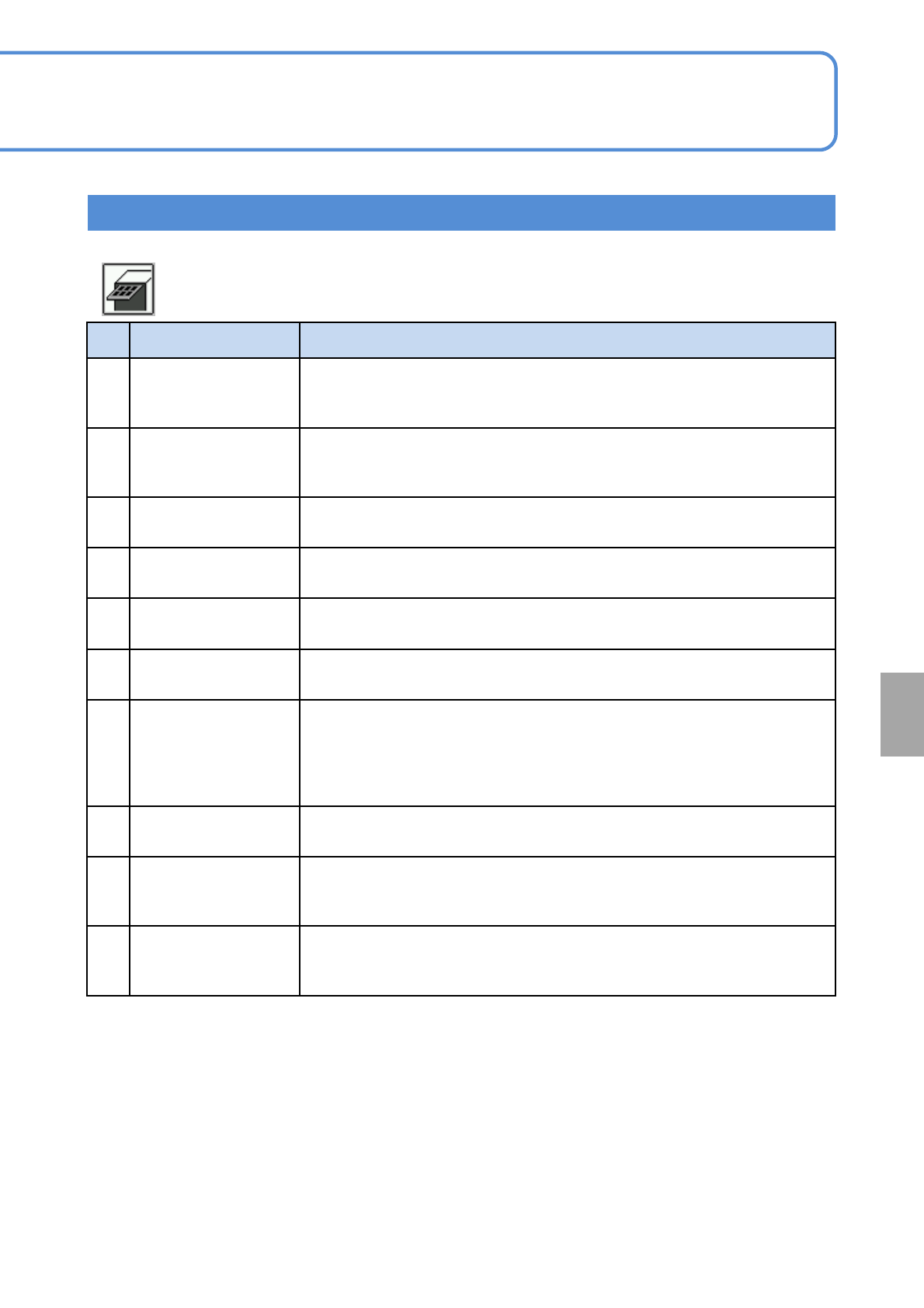
No. Item name Function when [ON] is selected
1
Tray Pts-collation
(option)
If trays containing any parts different from those in the production data
downloaded to the machine are loaded, the interlock function of the machine
is activated, disabling production from being continued automatically.
2 Tray auto sort
Rearranges the pallets judged to have been loaded in wrong positions
(detected by parts collation via RIFD) to their correct positions according to
the production data.
3
Send require sorted in
tray
Uses the loaded stock trays in order from top to bottom.
4
Part remainder
number warning
Displays a warning message when “Feeder remainder number warning
length” in “Action parameters” is reached.
5
Tray stock Auto.
change
When the top pallet position of the stock tray is emptied, a lower pallet
containing the same parts will be moved to the position during parts supply.
6 Use tray supply side
Allows tray parts to be replenished and NG pallet parts to be removed from
the tray supply side during production.
7
Tray outside parts
collation
(option)
Enables tray feeder collation by the customer’s parts collation system.
When replenishing parts after a parts empty error, this option inquires of the
parts collation system whether collation has done. If collated, parts
replenishment will be completed to continue production. If not collated, parts
replenishment is considered to be unfinished and production will be stopped.
8
Make tray counter
changeable
Enables the tray counter to be only after production changeover until the
start of the first production.
9
All arranged
components supply
target
Allows loading of trays that contain any parts registered in the arrangement
list.
10
During the production
the tray magazine
shutter is off
Keeps the magazine shutter closed during production.
7-1-1-10
Setting information 9
● Default :OFF
■ Tray
System
administration