N7201A616E00_0317.pdf - 第338页
NPM-W 2 EJM7DE-MB-05O-0 0 Operating procedure 5-4-2 1 1 A B C D PCB The number of NG PCBs / the number of PCB skip including the PCB pass. Ptn The number of NG patterns / the number of patterns actually inspected . Cycle…
NPM-W2 EJM7DE-MB-05O-00
5-4-1
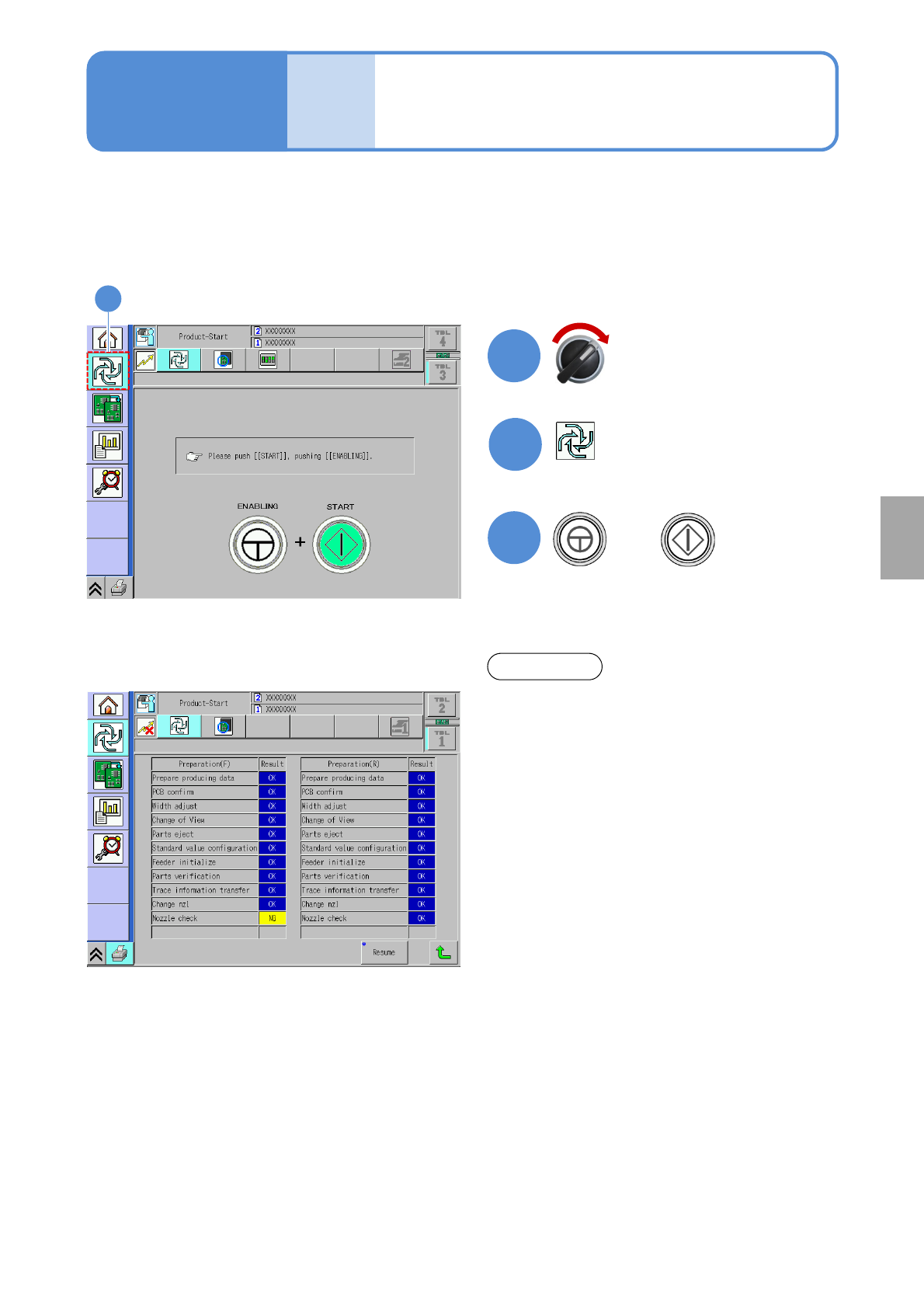
When the production data teach ends, the production starts.
2
2
Starting production
Operating procedure
5-4-1
●Ensure that the power supply of the peripheral devices such as barcode reader is turned ON when
starting the production.
Servo switch ON
1
3
+
Produc-
tion
When something abnormal occurs during self-
diagnosis, an error item is displayed. Please
handle the error accordingly.
NOTICE
Solder
inspection
NPM-W2 EJM7DE-MB-05O-00
Operating procedure
5-4-2
1
1
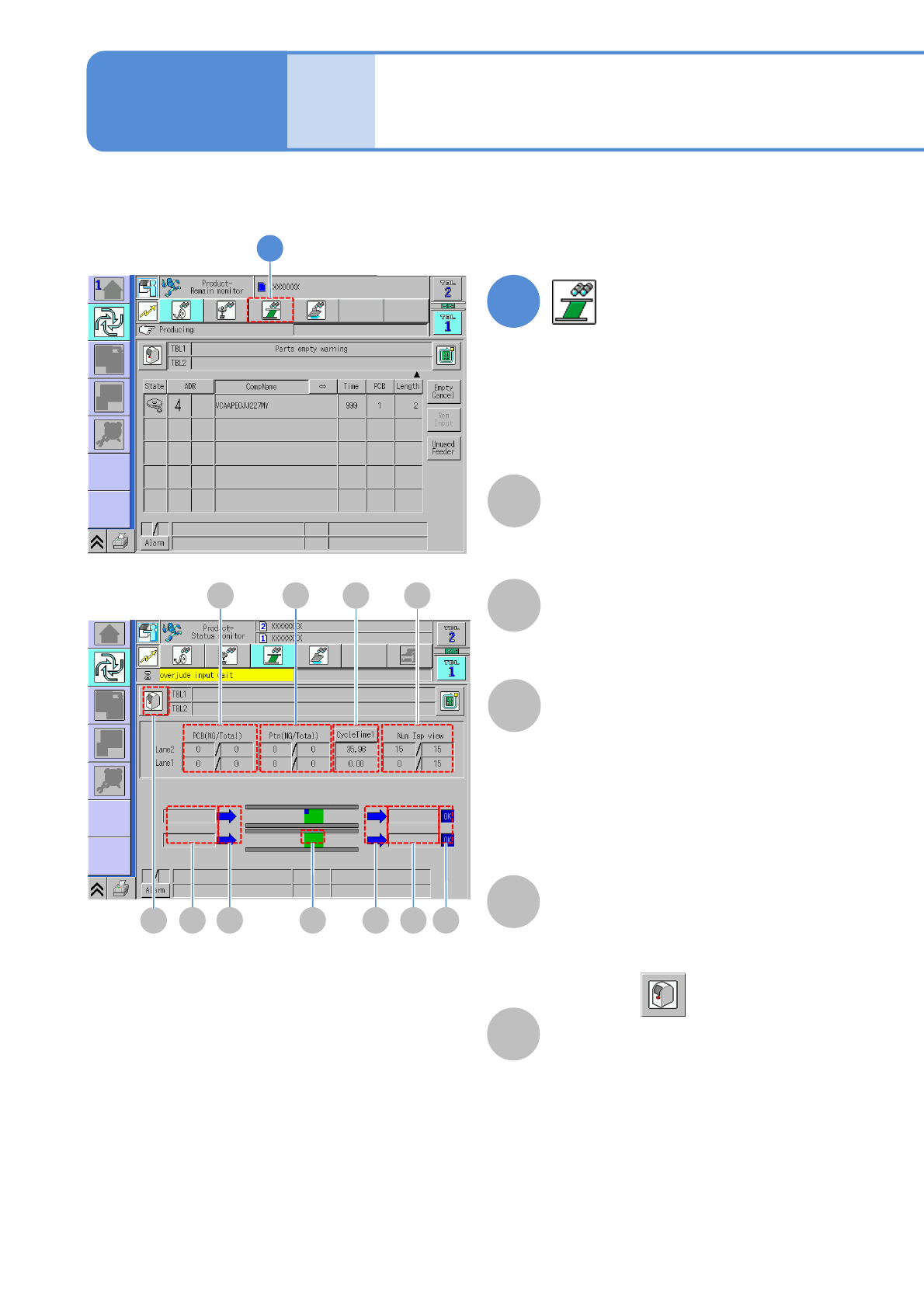
A B C D
PCB
The number of NG PCBs / the number of
PCB skip including the PCB pass.
Ptn
The number of NG patterns / the
number of patterns actually inspected.
Cycle time
Cycle time 1:
The time (sec) elapsing between the
completion of clamping prior to placement
and the moment before the release of
clamping after the end of placement.
Cycle time 2:
The time (sec) for transporting, PCB waiting
and PCB loading
Num Isp view
The number of views inspected until now
/ the total number of inspection views
Process wait
Load wait:
Waiting for PCBs to be loaded from the
machine in the upstream process.
Unload wait:
Waiting for the machine in the downstream
process to be come ready for loading PCBs
Produc-
tion
Status monitor
E F GHE EF
A
B
C
D
E
You can check the inspection result of production PCB.
5-4-2-1
■When is displayed

NPM-W2 EJM7DE-MB-05O-00
Flow direction arrow
(Displayed only during selecting the
machine)
Blue:
Not waiting for process.
Yellow:
Waiting for process or reloading.
Inspection result
G
H
F
5-4-2-2
Displayed when the machine is equipped
with the inspection head, or when an
ejection conveyor is placed just
downstream from the machine.
●In accordance with the inspection
result of the last PCB unloaded from
the machine, OK/NG is displayed.
●When a PCB comes to rest on the
ejection conveyor, the background
color turns yellow.
PCB marker
(Displayed only during selecting the
machine)
Displayed at the top right corner of the
screen when any defects are found on
PCB during inspection.
Yellow: when PCB inspection results
include any NG.
Light blue: when PCB inspection results
include any NG placement.
●When NG placement coincides with
NG, the marker is displayed in yellow
that is used in preference to light blue
Solder
inspection