N7201A616E00_0317.pdf - 第410页
NPM-W 2 EJM7DE-MB-06O-0 0 6-1-16 -1 A A No zzle selection da ta edit (dispensing head) pos1/pos2 You can check and modify the nozzle contro l paramet er information used by each head . F I B E Control paramete rs of the …
NPM-W2 EJM7DE-MB-06O-00
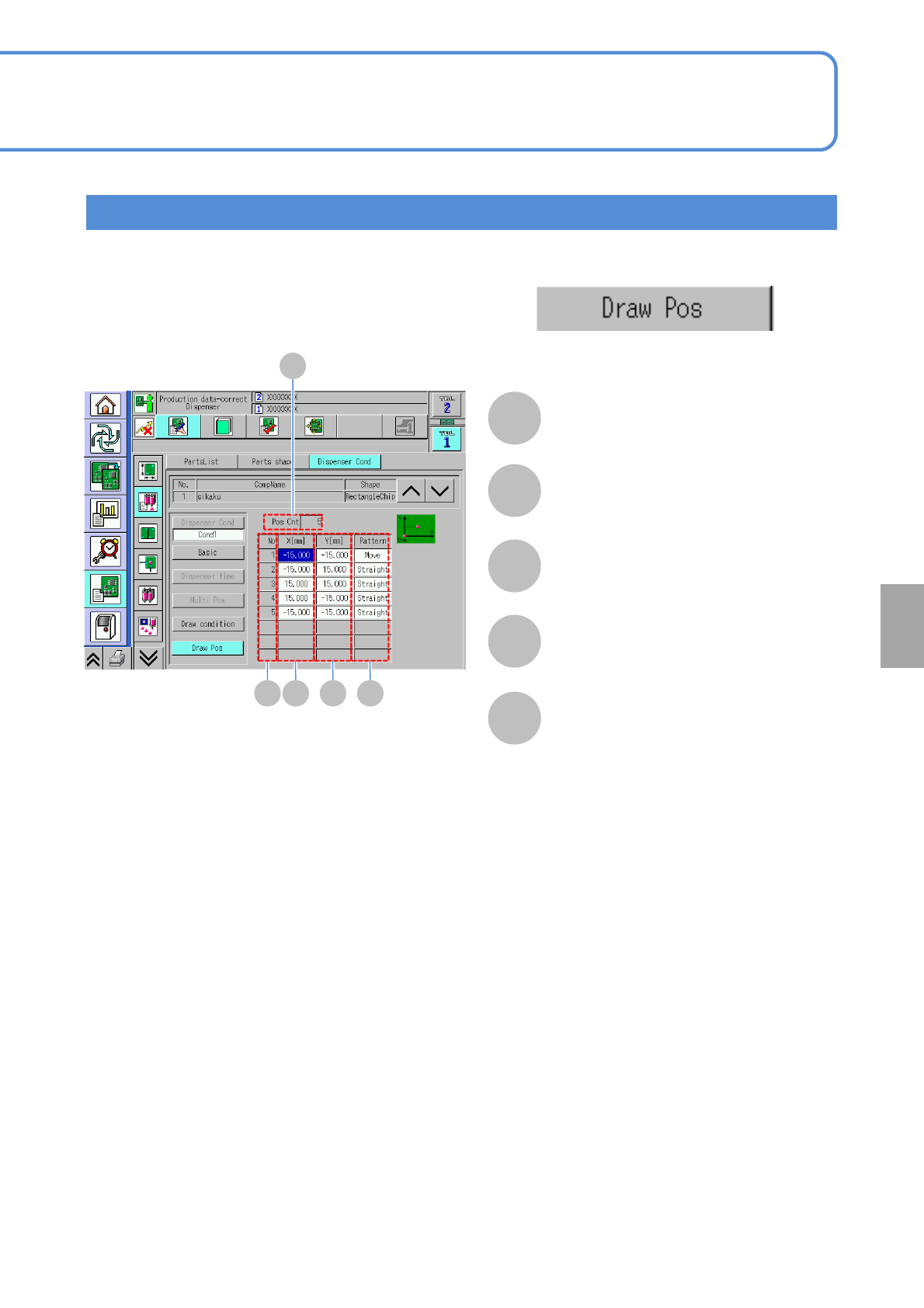
Setting the drawing coordinates
From [Dispensing condition] screen (→ P.6-1-15-1)
Only when the drawing data exists
A
B
A
Pos Cnt
The point of draw coordinate in the
applicable list is displayed.
B
No
The number in sequence is displayed.
C
X[mm]
X dispensing coordinate is displayed.
D
Y[mm]
Y dispensing coordinate is displayed.
E
Pattern
Action pattern of the applicable
coordinate data is displayed.
For ‘Move’:
XY unit only move without
dispensing or drawing.
For ‘Straight’:
Draw straight line from the previous
coordinate.
For ‘Dispense’:
Perform dot dispensing.
C D E
6-1-15-6
Setting
change
NPM-W2 EJM7DE-MB-06O-00
6-1-16-1
A
A
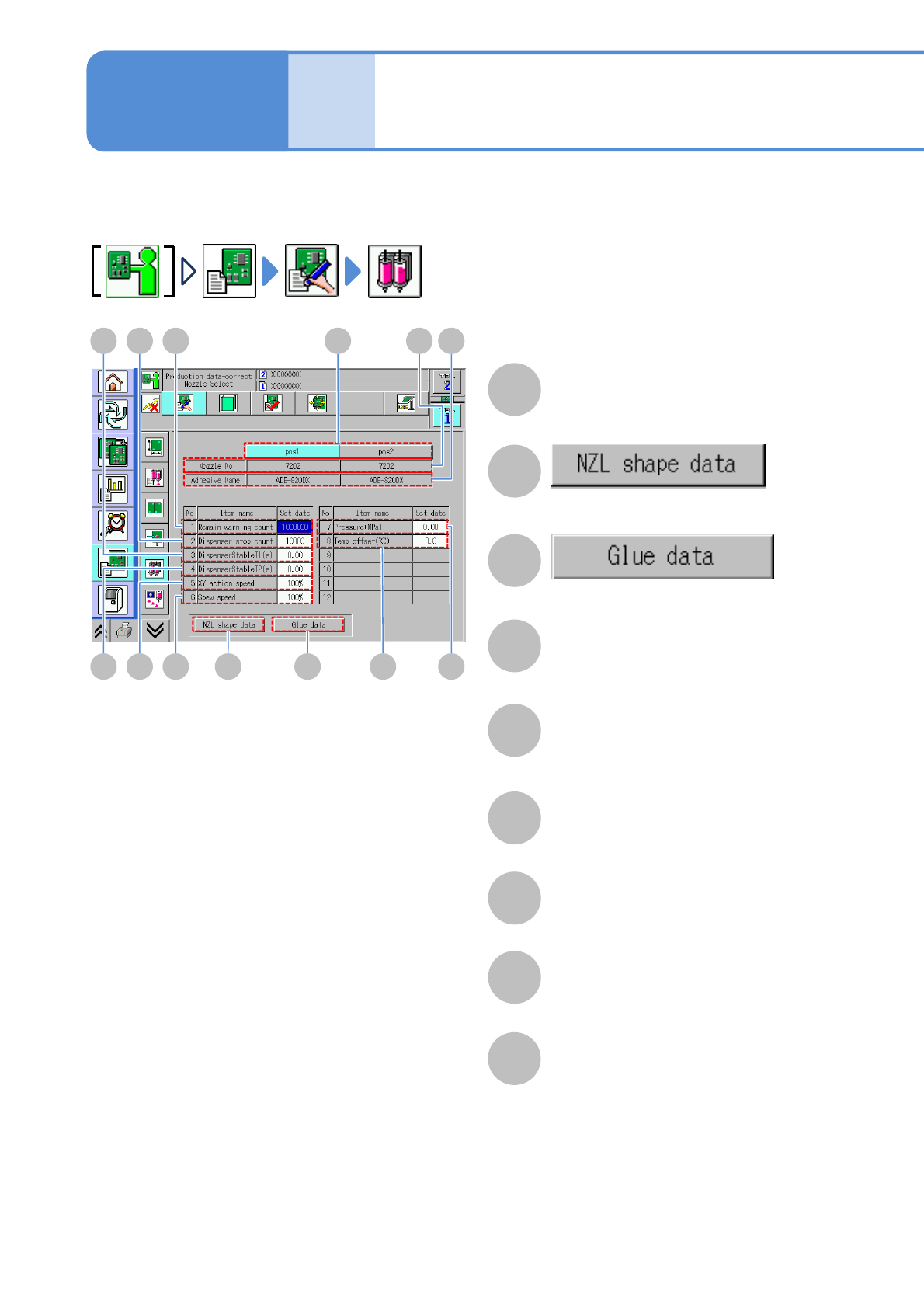
Nozzle selection data
edit (dispensing head)
pos1/pos2
You can check and modify the nozzle control parameter information used by each head.
F
I B
E
Control parameters of the selected
nozzle position are displayed
DGH
J K C LM
B
The library screen of the nozzle shape
data is displayed.
C
The library screen of the adhesive data
is displayed.
D
Nozzle number
The nozzle shape code number of the
nozzle shape data used by the head is
displayed.
E
Adhesive Name
The adhesive name of the adhesive
data used by the head is displayed.
F
Remain warning count
You can check and edit the remaining
count warning.
G
Dispenser stop count
You can check and edit the dispensing
stop count.
H
DispenserStableT1 (s)
You can check and edit the dispensing
stabilizing timer (before dispensing).
I
DispenserStableT2 (s)
You can check and edit the dispensing
stabilizing timer (after dispensing).
Data
editing
Operating procedure
6-1-16

NPM-W2 EJM7DE-MB-06O-00
6-1-16-2
J
XY action speed
You can check and edit the XY speed in
production.
K
Spew speed
You can check and edit the dispensing
speed (rotation speed of the screw
shaft) in dispensing operation.
L
Pressure(MPa)
You can check and edit the air pressure
supplied to the syringe.
M
Temp offset (℃)
You can check and edit the material
temperature on a control temperature
unit. Offset value added to the
temperature set in the adhesive library
is set to the temperature control unit.
Setting
change